
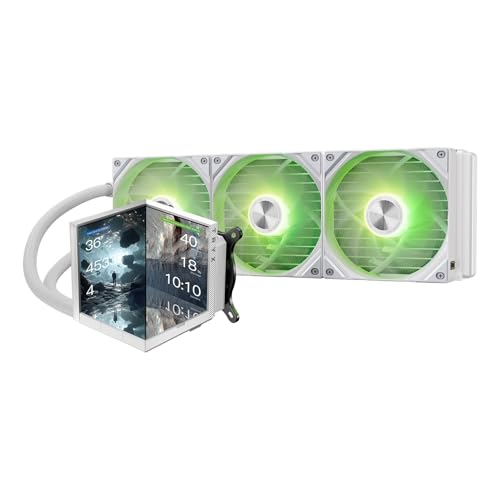
TRYX Stage 360 is not a normal 360mm liquid cooler.
It is built for buyers who want cooling hardware that also acts like a display piece, and that combination makes the TRYX Stage AIO Cooler review a little different from the usual spec-only comparison.
If you are asking whether the TRYX Stage 360 AIO Cooler is worth it, the short answer is yes for the right build: it suits showcase-focused PC owners who want a premium-looking white cooler, a high-effort visual centerpiece, and enough cooling headroom for demanding Intel or AMD systems.
TRYX Stage 360 Review Summary
TRYX Stage 360 makes sense for a buyer who values the visual side of a PC as much as the thermal side.
The listing is clear that this is a 360mm all-in-one cooler with a dual-screen front, multiple display modes, and Asetek-based cooling hardware, so the product is aimed at enthusiast builds rather than simple silent-workstation upgrades.
If your goal is a clean, memorable, and highly customizable top-end white AIO, this is an easy cooler to understand.
Best fit: showcase builds, themed rigs, figure-friendly setups, and users who want the cooler to contribute to the whole aesthetic instead of disappearing into the case.
Less ideal for: budget-conscious buyers, people who do not care about display hardware, and anyone who wants the least complicated install and software stack possible.
Review Scorecard
| Category | Score | Why it earns that score |
|---|---|---|
| Visual impact | 10/10 | Dual 4-inch screens and multiple display modes make it one of the most presentation-driven AIOs in the category. |
| Cooling concept | 8/10 | The Asetek 7th Gen V2 pump and raised micro-convex cold plate suggest serious thermal hardware behind the display features. |
| Build appeal | 9/10 | The white finish, panoramic-style presentation, and split-screen options are clearly aimed at premium showcase builds. |
| Compatibility | 9/10 | The included mounting support covers Intel LGA 1851/1700 and AMD AM5/AM4, which helps reduce platform risk. |
| Cable management | 8/10 | Pogo-pin fan connection and a single attachable cable should make the radiator side cleaner than many RGB-heavy AIOs. |
| Everyday practicality | 7/10 | The feature set is strong, but the display/software angle adds complexity that some buyers will not want. |
| Value for the right buyer | 8/10 | It looks like a product where the non-thermal features justify the premium only if you actually want those features. |
Key Features and Specifications of TRYX Stage 360
TRYX Stage 360 is a 360mm white AIO cooler built around display novelty and enthusiast-grade cooling hardware.
The headline features are the dual 4.0-inch IPS screens, 720×720 resolution, 254 PPI pixel density, and three display modes: Mirror Mode, Split-Screen Mode, and Extended Mode.
The listing also says the cooler supports showing stats, photos, GIFs, HD video, and even live gameplay capture.
The display layer is paired with KANALI software, which adds native GIPHY access.
That matters because it reduces the amount of manual media management required if you want animated content on the cooler.
For a user who likes changing themes, that is a real convenience feature rather than a gimmick.
Under the screens, the cooling platform is based on an Asetek 7th Gen V2 pump and a raised micro-convex cold plate.
The listing claims support for up to 280W TDP, which is the kind of number you expect from a high-end 360mm class cooler.
As always, the real-world result will depend on case airflow, CPU choice, fan curve tuning, and noise tolerance, but the hardware positioning is clearly not entry-level.
The included fans are three 120mm pre-installed ROTA SL ARGB units.
TRYX says they use pogo-pin connections with a single attachable cable, which should simplify both installation and cable management.
For white builds, that matters as much as raw fan performance because messy cabling ruins the look faster than almost anything else.
Compatibility is broad.
The box includes all-metal mounting hardware and support for Intel LGA 1851, 1700, 1200, 1151, 1150, and 1155, plus AMD AM5 and AM4.
That coverage makes the cooler easier to recommend to people who upgrade across generations and do not want to buy a new bracket every cycle.
The listing also highlights long-term support and coverage: 24/7 real-person live support through KANALI, a 6-year AIO cooler coverage claim, and 3 years for the screen.
That does not replace normal buyer caution, but it is helpful context for a product that leans so hard into integrated electronics.
Pros and Cons of TRYX Stage 360
Pros
- The dual-screen design is genuinely distinctive and gives the cooler a clear purpose in showcase builds.
- Three display modes make it flexible enough for different themes instead of locking you into one visual style.
- GIPHY integration through KANALI makes animated customization easier than manual file juggling.
- Broad Intel and AMD socket support reduces compatibility anxiety.
- Pogo-pin fan connections and a single cable should make the radiator assembly cleaner.
- The white finish is a strong match for themed or figure-centered PC builds.
Cons
- The software and display ecosystem will matter more than it does on a normal AIO, so this is not a low-maintenance choice.
- Buyers who only care about thermals may pay for features they never use.
- The visual hardware makes the product more niche than a standard 360mm cooler.
- A display-heavy cooler can be harder to justify in a build where the radiator is mostly hidden.
Who Should Buy TRYX Stage 360?
TRYX Stage 360 is for people building a PC that is meant to be seen.
If your case has a clear window, your theme is carefully planned, or you want the cooler itself to be part of the design language, this product is a strong match.
It is also a practical option for users who want one purchase to cover both cooling and visual presentation, instead of buying a plain AIO and then adding separate screen accessories later.
It also fits buyers who like customizing their setup often.
The combination of stats, photos, GIFs, video, and display modes means the cooler can be tuned to different moods without changing hardware.
That gives it a lot more personality than a standard RGB radiator block.
You should probably skip it if your build is hidden under a desk, if you prefer the least distracting software footprint, or if your main goal is the lowest-cost way to cool a high-end CPU.
It is not a utilitarian value cooler.
It is a premium showcase component that happens to be a serious 360mm AIO as well.
Cooling and Display Experience of TRYX Stage 360
Dual-Screen Presentation
The 4.0-inch IPS dual-screen setup is the defining feature here.
TRYX is clearly aiming for a visual centerpiece, not just a small status panel, and the 720×720 resolution with 254 PPI is there to keep content sharp enough for close viewing.
In a showcase build, that matters because low-resolution display hardware can look cheap even when the rest of the system is expensive.
KANALI and Content Flexibility
KANALI gives the cooler more day-to-day flexibility than a static screen would.
Native GIPHY support lowers the friction of finding animated content, while mirror, split-screen, and extended modes let you decide whether the cooler should act as one display or two.
That range is important because a decorative product is only useful if it remains easy to update.
Thermal Platform and Mounting
The Asetek 7th Gen V2 pump and micro-convex cold plate are the parts that keep the product grounded.
They suggest the display is not just sitting on top of a weak thermal foundation.
Combined with the all-metal mounting hardware and broad socket support, the cooler looks designed to be installed like a premium mainstream enthusiast AIO rather than a fragile display accessory.
Cable Management and Build Cleanliness
The pogo-pin fan design is a smart choice in a product like this because the radiator itself should stay visually tidy.
A lot of RGB-heavy cooling gear looks good in marketing photos and messy in a real case once the cable bundle appears.
TRYX seems to have thought about that problem directly, which improves the appeal for modders and clean-build fans.
Alternatives to TRYX Stage 360
If you want a more conventional high-end 360mm AIO, the ARCTIC Liquid Freezer III is the first obvious alternative.
It is better suited to buyers who care more about function than visual theatrics.
If you want premium branding and a strong all-around reputation, the Corsair iCUE LINK H150i is a logical comparison point.
It is for builders who want polished ecosystem support and a cleaner cable story without the dual-screen emphasis.
If you prefer a more traditional enthusiast AIO with strong visual presence, the NZXT Kraken 360 line is worth looking at.
It targets the same showcase mindset, though with a different design language.
If your priority is maximum cooling without paying for display hardware, the DeepCool LT720 is another common benchmark.
It is a better fit for buyers who want performance-first value.
Is TRYX Stage 360 Worth It?
TRYX Stage 360 is worth it if you want a premium 360mm cooler that doubles as a visual feature, and your build can actually show it off.
The dual-screen design, flexible display modes, broad platform support, and tidy fan cabling all point toward a product built for careful enthusiast builds.
If you only need a dependable AIO and do not care about screens or customization, this is probably more cooler than you need.
But if the PC is part performance machine and part display piece, TRYX Stage 360 is an easy one to take seriously.
