
The most useful tech gifts fit into routines the recipient already has: a better-connected desk, easier backups, or a more comfortable way to work and play. These ideas range from small accessories to larger workstation upgrades.
Check the recipient’s devices and setup before choosing, especially for docks, displays, and network gear.
Practical Christmas Tech Gifts for PC Users
1. AV Access Dual-Monitor USB-C KVM Dock
A One-Button Shared Desk Upgrade
AV Access Dual-Monitor USB-C KVM Dock

- Connects two laptops to the same dual-monitor setup and shared peripherals.
- Combines a KVM switch with a 12-in-1 dock, including HDMI, USB, Ethernet, and SD card connections.
- Requires USB-C laptops with DP Alt Mode and DP MST; Mac models support mirrored displays only.
Best For: Someone switching between work and personal laptops at one desk
2. TP-Link Deco 7 Pro Wi-Fi 7 Mesh System
Whole-Home Connectivity Gift
TP-Link Deco 7 Pro Wi-Fi 7 Mesh System

- The three-pack is listed to cover up to 7,600 square feet and support over 200 devices.
- Tri-band Wi-Fi 7 system with one 10G WAN/LAN port and four 2.5G WAN/LAN ports.
- Requires a separate modem; mesh backhaul requires at least two Deco units.
Best For: A household with many connected devices or Wi-Fi weak spots
3. GOLDENMATE 1500VA Lithium UPS
A Power-Backup Desk Essential

- Provides 1500VA/1000W pure sine wave battery backup with eight outlets.
- LCD shows battery and power status; USB-C and USB-A ports provide a combined 10W output.
- Communication link to a Windows PC, Mac, or NAS can support safe shutdown when configured.
Best For: A desktop owner who wants backup power during interruptions
4. UGREEN DH2300 2-Bay NAS
A Home for Growing File Libraries

- Designed for personal storage and backups across phones, computers, and tablets.
- Supports up to 64TB of storage; drives are not included.
- Uses wired Ethernet, and the listing says it does not support Docker or virtual machines.
Best For: Someone who wants to gather personal files and device backups in one place
5. Acer 9-in-1 USB-C Dual-Monitor Dock
A Laptop-to-Desk Connection Hub
Acer 9-in-1 USB-C Dual-Monitor Dock

- Includes two HDMI ports, three USB-A ports, USB-C, and SD and microSD slots.
- Supports dual HDMI displays up to 4K at 60Hz and delivers up to 90W to a laptop with suitable power input.
- Laptop USB-C must support DisplayPort Alt Mode; Mac dual-display output has mode limitations.
Best For: A laptop user connecting to monitors and desk peripherals
6. ProtoArc EM01 NL Rechargeable Trackball
7. WAVLINK BE6500 USB Wi-Fi 7 Adapter
A Wireless Option for Desktop PCs
WAVLINK BE6500 USB Wi-Fi 7 Adapter

- Adds Wi-Fi connectivity through a USB 3.0 port and includes two foldable antennas.
- Supports Windows 10/11 64-bit; driver installation is required.
- It is an adapter, not a Wi-Fi extender, and 6GHz use requires Windows 11 version 21H2 or later.
Best For: A desktop owner who needs to add wireless networking
8. FIFINE AmpliGame AM8 USB/XLR Microphone
A Voice Setup for Calls and Streams
FIFINE AmpliGame AM8 USB/XLR Microphone

- Connects by USB or XLR; an XLR cable and audio interface or mixer are separate requirements.
- USB mode includes tap-to-mute, headphone monitoring, gain control, and controllable RGB.
- The dynamic microphone has a cardioid pickup pattern and a desktop stand.
Best For: A streamer, podcaster, or frequent video-call participant
9. STREBITO 142-Piece Precision Screwdriver Set
A Kit for Small Electronics Fixes
STREBITO 142-Piece Precision Screwdriver Set
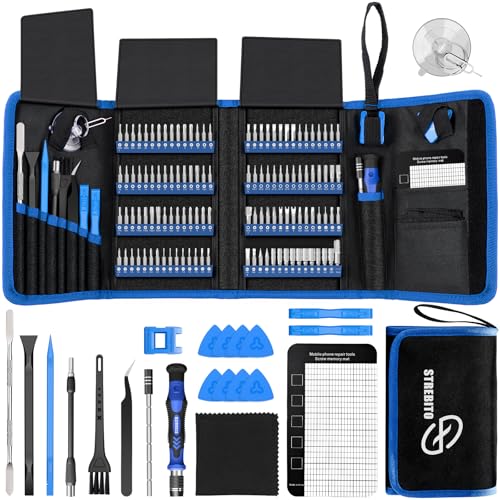
- Includes 120 bits and 22 accessories such as tweezers, a suction cup, and a magnetic mat.
- The listed uses include computers, laptops, SSDs, tablets, and game consoles.
- Bits and accessories are organized in a portable storage bag.
Best For: A PC builder or electronics hobbyist who does their own repairs
10. HUION Keydial Mini Bluetooth Shortcut Keypad
A Shortcut Station for Creative Work
HUION Keydial Mini Bluetooth Shortcut Keypad

- Offers 18 programmable keys and a dial with up to three assigned functions.
- Bluetooth 5.0 connects wirelessly; custom shortcuts are set through the Huion driver.
- Designed for tasks including drawing, photo and video editing, gaming, and media control.
Best For: A creative PC user who regularly uses keyboard shortcuts
11. BONAI Rechargeable AA/AAA Battery Kit
A Rechargeable Power Drawer
BONAI Rechargeable AA/AAA Battery Kit

- Includes eight AA and eight AAA rechargeable Ni-MH batteries.
- The charger can charge up to 16 AA or AAA cells, including mixed sizes.
- Listed uses include game controllers, flashlights, and smart-home gadgets.
Best For: Someone with wireless peripherals or battery-powered household devices
12. HUANUO FlowLift Pro Single Monitor Arm
A More Adjustable Monitor Position
HUANUO FlowLift Pro Single Monitor Arm

- Fits monitors from 13 to 32 inches weighing 4.4 to 15.4 pounds with VESA 75×75mm or 100×100mm.
- Supports tilt, swivel, and rotation, with a C-clamp or grommet base.
- Recommended for wood desks 0.59 to 3.54 inches thick.
Best For: A desk user who wants to reposition a compatible monitor
13. HARDELL 6-Inch Digital Caliper
A Measuring Tool for PC Projects
HARDELL 6-Inch Digital Caliper

- Measures up to 6 inches or 150mm and switches between metric and imperial units.
- Four modes cover inside, outside, depth, and step measurements.
- Includes a case, two batteries, mini screwdriver, and stainless steel ruler.
Best For: A PC builder, maker, or hobbyist measuring small parts
14. LeZone 12-Outlet Surge Protector Power Strip
A Convenient Desk Power Station
LeZone 12-Outlet Surge Protector Power Strip

- Has 12 AC outlets, two USB ports, and two USB-C ports.
- A 10-foot extension cord and flat plug help reach outlets behind furniture.
- The listing gives a 4800-joule surge protection rating.
Best For: Someone arranging power for a computer desk or dorm room
15. Large Extended Gaming Mouse Pad
A Roomier Desktop Surface
Large Extended Gaming Mouse Pad
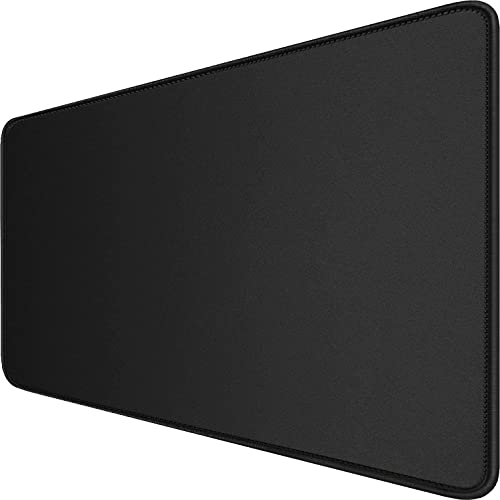
- Measures 31.5 by 15.7 inches to fit a mouse, keyboard, and other desk items.
- Has a non-slip rubber base, stitched edges, and a 3mm thickness.
- Waterproof-coated surface is described as easy to clean.
Best For: A PC user who wants more continuous space for keyboard and mouse
16. Dell 27-Inch 4K USB-C Monitor
A Sharp Screen for Work and Play

- 27-inch IPS display with 3840×2160 resolution and a refresh rate up to 120Hz.
- USB-C connection provides up to 65W power delivery; the listing includes a USB-C cable.
- Features include height, pivot, swivel, and tilt adjustment.
Best For: Someone who works, studies, or creates at a computer
17. SanDisk Extreme Portable 2TB SSD
A Portable Home for Large Files
SanDisk Extreme Portable 2TB SSD

- Offers 2TB of portable solid-state storage with USB connectivity.
- Listing cites read speeds up to 1050MB/s and write speeds up to 1000MB/s, depending on host and other factors.
- Includes password protection with 256-bit AES hardware encryption and an IP65 rating.
Best For: A student, photographer, or PC user with a growing file library
18. Bose QuietComfort Wireless Headphones
A Quieter Way to Focus
Bose QuietComfort Wireless Headphones

- Over-ear Bluetooth headphones offer Quiet and Aware listening modes.
- Up to 24 hours of battery life is listed; a 15-minute USB-C charge is stated to add up to 2.5 hours.
- Includes an audio cable with an inline microphone for wired listening.
Best For: A commuter, traveler, or computer user who likes focused listening
19. UGREEN Nexode 20,000mAh USB-C Power Bank
Portable Charging for Laptop Days
UGREEN Nexode 20,000mAh USB-C Power Bank

- 20,000mAh capacity and up to 130W total charging power are listed.
- The USB-C output port supports up to 100W, and the TFT display shows charging information.
- Includes a 5A USB-C to USB-C cable; the listing says the capacity meets airline standards.
Best For: A laptop user who often works or travels away from outlets
20. Edifier R1280DB Bluetooth Bookshelf Speakers
A Speaker Pair for a PC Desk
Edifier R1280DB Bluetooth Bookshelf Speakers
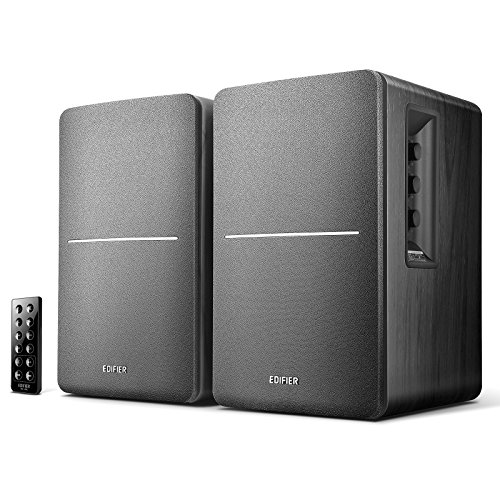
- Powered stereo bookshelf speakers connect by Bluetooth, optical, coaxial, or dual RCA inputs.
- Includes a remote; bass and treble controls are on the active speaker.
- The listing gives 42W RMS output and describes a 4-inch woofer with a 13mm tweeter.
Best For: A PC user who prefers desktop speakers to headphones
Choosing a Gift for a PC User
Start with the recipient’s everyday setup. A person who docks a laptop each morning may appreciate a USB-C hub or monitor, while someone who builds and repairs desktops may get more use from a precision screwdriver set or caliper. For a shared home office, a KVM dock can reduce the friction of moving between two laptops. For a desk that already works well, a mouse pad, rechargeable batteries, or speakers can make a useful addition without asking the recipient to rebuild their setup.
Think about whether the gift solves a recurring annoyance. A UPS is relevant if power interruptions are a concern; a mesh system is for broader home Wi-Fi coverage, while a USB Wi-Fi adapter adds wireless capability to a computer. Those solve different problems. Similarly, a portable SSD is suited to files that travel with its owner, while a NAS is a central home storage option that requires drives and wired networking. Matching the gift to the actual need is more helpful than buying the largest number on a spec sheet.
Budget and Scale
For a modest gift, focus on accessories that fit easily into an existing setup: a large desk mat, rechargeable battery kit, digital caliper, or shortcut keypad. These can still feel personal when they match the recipient’s habits, such as editing photos, maintaining electronics, or using wireless controllers. Mid-sized upgrades include a dock, microphone, trackball, or portable SSD. They work best when you know the recipient’s computer and preferred workflow.
Larger purchases such as a monitor, UPS, NAS, mesh Wi-Fi system, or headphones deserve more checking. Consider the cost of anything needed to use the gift: the NAS requires storage drives, and a KVM or dock may need compatible cables and ports. Avoid choosing solely by headline capacity or speed; compatibility and practical usefulness matter more.
Compatibility and Personalization
Before buying, check the recipient’s computer model, operating system, available ports, and other equipment. USB-C alone does not guarantee video output or charging support. The Acer dock requires USB-C DisplayPort Alt Mode, while the KVM dock specifies DP Alt Mode and MST for extended dual displays and says Mac models mirror displays. Confirm the monitor’s supported resolution and connection type as well.
For a monitor arm, compare the screen’s size, weight, and VESA mounting pattern with the stated limits, then check the desk’s material and thickness. For a Wi-Fi adapter, confirm operating-system support and whether the PC has a free USB 3.0 port. For network gear, remember that the mesh system requires a separate modem, and a NAS connects by Ethernet. A short note asking for a laptop model or monitor details can preserve the surprise while avoiding a mismatch.
Personalize by routine rather than appearance. A creator may use programmable shortcuts every day; a frequent traveler may value headphones or portable charging; a hands-on builder may prefer tools for their next project. If you are unsure about a major component, choose an accessory that complements gear you already know the person uses.
Timing and Last-Minute Decisions
For a planned purchase, leave time to verify model details and any required accessories. Larger gifts may require setup, updates, or integration with a home network, so consider whether the recipient will enjoy configuring equipment. A practical gift can include a simple note about why you chose it or the setup it supports.
When time is short, favor items with straightforward uses and fewer compatibility dependencies, such as a desk mat, battery kit, headphones, or portable SSD, after checking the recipient’s device connections. Do not rely on a product listing’s delivery estimate without confirming it at checkout. If a technical match is uncertain, a clearly worded card describing the intended gift can give you time to confirm the exact model together. The best practical Christmas tech gift ideas are the ones the recipient can put to work in their own setup, on their own schedule.
