
PCCOOLER DC360 is a 360mm LCD AIO for buyers who want cooling hardware to do more than disappear inside the case.
This PCCOOLER DC360 review focuses on where the design helps, where it asks for more from the build, and whether it is worth it for a gaming or creator PC.
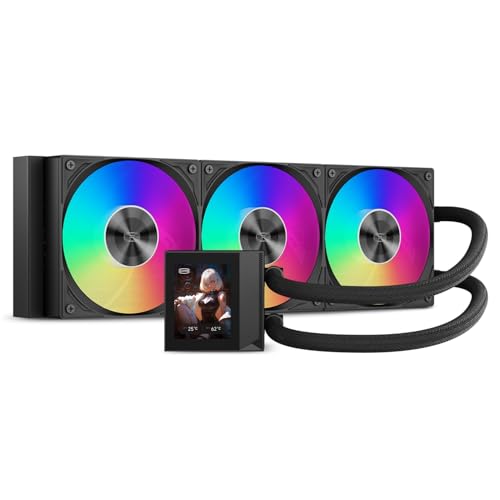
DC360 Review Summary
The PCCOOLER DC360 makes sense for builders who want a visually distinctive liquid cooler with practical modern compatibility.
Its selling points are straightforward: a customizable 2.4-inch IPS LCD, three ARGB PWM fans, a 2600 RPM pump, and support for current Intel and AMD desktop sockets.
Buy it if you want a 360mm cooler that combines display customization, broad platform support, and a cleaner-looking installation. It is especially appealing in showcase builds, windowed cases, and systems where the cooler is part of the visual theme rather than only a thermal component.
The main tradeoff is also clear.
This is not a minimal, invisible AIO.
The LCD, internal USB connection requirement, and 360mm radiator size all add planning steps.
If you want the simplest install or you are working with a compact chassis, this is not the easiest choice.
Review Scorecard
| Category | Score | Rationale |
|---|---|---|
| Feature set | 9/10 | The LCD, ARGB fans, and socket support create a strong feature mix for a display-focused AIO. |
| Compatibility | 8/10 | Covers AM5, AM4, LGA1851, LGA1700, and older Intel sockets, but requires a case with 360mm radiator support. |
| Installation practicality | 7/10 | Pre-installed fans and organized cabling help, yet the internal USB connection and large radiator still need planning. |
| Visual appeal | 9/10 | The customizable screen and ARGB lighting are the main reason to choose this model. |
| Cooling-oriented design | 8/10 | A 360mm radiator, 2600 RPM pump, and high-static-pressure fans are aimed at demanding CPUs. |
| Buyer value | 8/10 | Strong if you want features and presentation together, less compelling if you only need basic cooling. |
Key Features and Specifications of DC360
The PCCOOLER DC360 is built around a 360mm aluminum radiator paired with three 120mm fans and a 2600 RPM pump.
The listing positions it as a cooling solution for demanding gaming and creator CPUs, with PWM control used to balance cooling response and everyday acoustics.
The screen is the standout feature.
PCCOOLER describes the 2.4-inch IPS LCD as customizable through its software, with support for real-time system information and user content such as PNG, JPG, GIF, and MP4 files.
That makes the cooler more than a thermal accessory; it becomes part of the system’s presentation layer.
The fan and wiring setup also points toward a cleaner build.
The radiator fans come pre-installed, the cabling is organized, and the tubing length is listed at 400mm, which gives more flexibility for top or front radiator placement in compatible cases.
| Spec | Detail |
|---|---|
| Radiator size | 360mm |
| Radiator material | Aluminum |
| Pump speed | 2600 RPM |
| Fan count | 3 x 120mm |
| Fan speed range | 500 to 2500 RPM |
| Lighting | Addressable RGB, 5V 3-pin header |
| Screen | 2.4-inch IPS LCD |
| Screen content | System info, PNG, JPG, GIF, MP4 |
| Tubing | 400mm |
| Intel support | LGA1851, LGA1700, LGA1200, LGA115X |
| AMD support | AM5, AM4 |
| Case requirement | 394 x 120 x 27mm radiator plus 25mm fans, with internal USB for LCD |
Two practical details matter most before buying.
First, the case must actually fit a 360mm radiator with fan clearance.
Second, the LCD needs an available internal USB connection.
Those are the sorts of constraints that separate a smooth build from a frustrating one.
Pros and Cons of DC360
Pros
- The 2.4-inch IPS LCD adds real visual flexibility for custom builds.
- Broad socket support makes it relevant for current AMD and Intel desktops.
- Pre-installed fans and organized cabling should reduce setup friction.
- The 360mm radiator format is appropriate for higher-heat CPUs.
- ARGB integration is standard 5V motherboard sync, so it fits common lighting setups.
Cons
- A 360mm cooler is not suitable for every case.
- The LCD depends on software and an internal USB header, which adds complexity.
- The design is aimed at presentation as much as cooling, so minimalist builders may not need the extra features.
- The listing gives no reason to expect easy compatibility in smaller or tightly constrained enclosures.
Who Should Buy DC360?
The PCCOOLER DC360 is a strong fit for builders who want a showpiece AIO with useful hardware features rather than decoration alone.
If you are assembling a gaming PC with a windowed panel, a creator workstation that will sit on a desk, or a custom build where the cooler is part of the theme, the LCD and ARGB combination makes sense.
It is also a good match for anyone planning around modern mainstream platforms.
Support for AM5 and LGA1700/LGA1851 means it fits many current desktop builds without forcing a platform compromise.
You should skip it if your case is compact, your front panel layout is crowded, or your priority is the simplest possible installation.
The 360mm size, USB requirement, and screen software stack add more planning than a plain tower cooler or a smaller AIO.
How the DC360 Fits a Modern Build
LCD First, Not Last
The LCD is the defining design choice, so the DC360 should be evaluated as a display cooler first and a thermal product second.
If you want the ability to show system stats or custom media, the IPS panel gives the cooler a real reason to exist beyond basic heat transfer.
Cooling Hardware That Matches the Format
The hardware choice is consistent with the size class: a 360mm radiator, three high-static-pressure 120mm fans, and a pump rated at 2600 RPM.
That combination is aimed at moving heat away from modern CPUs, especially in cases that can support a full front or top 360mm mount.
Build Planning Matters
The DC360 rewards careful case selection.
The required radiator dimensions and internal USB connection are not minor details, and they should be checked before purchase.
Builders who verify clearances early are more likely to enjoy the cooler than troubleshoot it.
Best Use Cases
This cooler makes the most sense in a glass-sided gaming build, a creator PC that benefits from system monitoring on the pump display, or any themed build where coordinated lighting and screen content matter.
It is less compelling in a closed, utilitarian system where no one will see the screen.
Alternatives to DC360
If you want a similar display-focused AIO, the most obvious alternatives are other 360mm liquid coolers with screen features.
Look at the NZXT Kraken 360, the Lian Li Galahad II LCD, or the Corsair iCUE LINK H150i LCD if you want to compare ecosystem, software, and aesthetics.
If your priority is cooling hardware rather than a display, a plain 360mm AIO from brands such as ARCTIC Liquid Freezer III 360 or DeepCool LS720 may be a more practical choice.
Those options can make more sense when the screen is not a buying priority.
Is DC360 Worth It?
The PCCOOLER DC360 is worth it if you want a 360mm AIO that is as much about the build experience and visual presentation as it is about cooling.
For showcase gaming rigs and creator PCs, it offers a persuasive mix of LCD customization, ARGB, and modern socket support.
It is not the best pick for small cases, low-effort builds, or buyers who want the cleanest possible hardware stack.
But if your case fits it and you will use the screen, the DC360 looks like a sensible buy rather than a gimmick.
