
The Itramax Continuity Camera Mount is a simple idea with a specific job: turn a supported iPhone into a cleaner webcam for a desk monitor.
If you want a foldable magnetic mount for meetings, streaming, or remote work, this Itramax continuity camera mount review covers where it makes sense and where it does not.
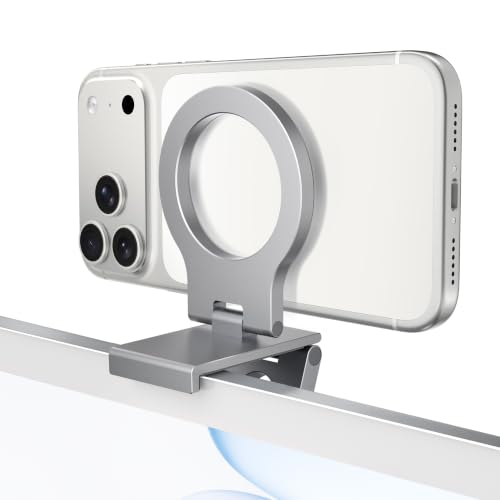
Itramax Continuity Camera Mount Review Summary
The Itramax Continuity Camera Mount is best for buyers who already plan to use an iPhone as their desk webcam and want a compact, monitor-top solution rather than a separate arm or clamp.
It is especially appealing if you use a desktop monitor with a flat enough top edge, value MagSafe-style convenience, and want something that folds away when you are done.
What stands out most is the product’s narrow but useful focus.
The listing is not trying to be a universal phone stand.
It is built for desktop monitors, iMac-style setups, Apple TV or Studio Display desks, and continuity camera use where the rear camera points at you while the screen faces away.
That makes it a good fit for people who care more about cleaner video positioning than about extra adjustability.
It is not the best choice for every machine.
The listing itself warns that thin laptops are a poor match and that thick, curved, or uneven monitor edges may interfere with fit.
Buyers who want a fully articulated arm, a 360-degree swivel, or a multi-device desktop rig should look elsewhere.
But for the right monitor setup, this is a tidy, low-friction accessory that solves a real problem.
Review Scorecard
| Category | Score | Why it matters |
|---|---|---|
| Webcam placement | 8/10 | Positions the phone above the display for a cleaner eye-line and rear-camera use. |
| Monitor compatibility | 7/10 | Works best on desktop monitors with suitable top edges, but the fit is not universal. |
| Portability | 9/10 | The foldable body and compact design make it easy to store or travel with. |
| Magnetic convenience | 8/10 | Supports bare MagSafe iPhones and includes metal rings for non-MagSafe cases and models. |
| Build practicality | 7/10 | Aluminum alloy and silicone pads are sensible choices, though the design is intentionally basic. |
| Setup flexibility | 6/10 | Useful for a focused use case, but it does not offer broad articulation or swivel features. |
Key Features and Specifications of Itramax Continuity Camera Mount
The headline feature is the monitor-top design for continuity camera use.
Instead of holding the phone beside the screen or below eye level, the mount lifts it above the display so the rear camera can face the user during FaceTime, Zoom, Teams, streaming, or recording.
The body uses aluminum alloy with soft silicone contact pads.
That combination matters because the mount is meant to sit against monitor edges without feeling overly harsh on the display surface.
The foldable form factor also makes the product easier to pack, store, or move between workspaces.
The magnetic side is built around MagSafe compatibility.
The listing says it works with bare MagSafe iPhones and MagSafe-compatible cases, and it includes two adhesive metal rings for iPhone 16e, iPhone 11/XR/XS series, and other non-MagSafe devices or cases.
That makes the product more flexible than a magnet-only accessory.
The package is practical rather than luxurious.
You get the mount, two adhesive metal rings, two cleaning wipes, two positioning guides, and a user manual.
There is also a built-in 1/4-inch threaded hole, which gives the mount some tripod or stand compatibility for desktop use.
Important fit notes are part of the product story.
The listing says thick, curved, or uneven monitor top edges may affect compatibility, and heavier phones may cause some MacBook screens to tilt backward, which is why an external monitor is the preferred setup.
Pros and Cons of Itramax Continuity Camera Mount
Pros
- Purpose-built for iPhone-as-webcam workflows instead of general-purpose phone holding.
- Foldable design makes it easy to store or travel with.
- Aluminum alloy and silicone contact pads suggest a practical, desk-friendly build.
- Includes adhesive metal rings, so non-MagSafe phones and cases are not automatically excluded.
- Works with common remote-work and creator use cases like FaceTime, Zoom, Teams, and streaming.
Cons
- Not ideal for thin laptops, especially if screen tilt is a concern.
- Fit depends on the shape and thickness of the monitor top edge.
- Lacks a 360-degree swivel, so it is not a highly adjustable mount.
- Best value depends on whether you actually intend to use continuity camera regularly.
Who Should Buy Itramax Continuity Camera Mount?
This is a smart buy for people who already know they want to use an iPhone as a webcam on a desk monitor.
If you do video calls all day, stream from a fixed workstation, or want a cleaner camera angle without adding clutter, the Itramax Continuity Camera Mount solves that job neatly.
It is also a sensible option for users who want a simple accessory instead of a larger rig.
The fold-flat design and included metal rings make it easier to live with than more complicated mounting systems, especially if you move between workspaces or want something that disappears into a drawer.
Buyers with MagSafe iPhones will have the easiest time, but the included metal rings broaden compatibility for older phones and non-MagSafe cases.
That makes the product more accessible than its first impression suggests.
Skip it if your laptop or monitor top edge is unusual, if you need frequent angle changes, or if you want a mount that doubles as a full-purpose desk arm.
The product is optimized for one specific use case, and that specificity is exactly why it is useful.
Using the Itramax Continuity Camera Mount on a Desk
Monitor-Top Placement
The strongest use case is a desktop monitor with a top edge that is flat enough for stable contact.
In that setup, the mount can sit above the screen and keep the phone close to eye level, which is the whole point of a continuity camera accessory.
Magnetic Setup
The magnetic hold is meant to be straightforward for MagSafe-compatible iPhones and cases.
For phones that need help, the included adhesive metal rings add a path to compatibility, though the listing correctly warns that very thick or textured cases can reduce grip or adhesion.
Foldable Daily Carry
The foldable body makes more sense than it first appears.
A webcam accessory that lives near a monitor most of the time still benefits from being easy to tuck away, especially if you alternate between office, home, and travel workstations.
Desk Limitations
This is not a universal clamp, and it should be evaluated like a monitor accessory rather than a desk gadget.
The listing’s warnings about curved edges and MacBook tilt are important because they define the boundary between a smooth setup and a frustrating one.
Alternatives to Itramax Continuity Camera Mount
If you want a similar monitor-top webcam idea but prefer a different brand, look at Elgato Facecam accessories for creator-focused setups that may better suit existing streaming gear.
If you want a more general MagSafe phone mount ecosystem, Belkin MagSafe mounts are worth comparing because Belkin often offers polished accessories for Apple-centric desks.
If your priority is simple magnetic phone positioning rather than continuity-camera specificity, Lamicall magnetic phone stands can be a practical alternative for people who want a different desk shape or viewing angle.
If you need broader desktop flexibility, Ulanzi phone mounts are another category to check because that brand is often associated with creator accessories and tripod-friendly hardware.
The right alternative depends on whether you want a monitor-top webcam mount, a more flexible desk stand, or a creator accessory with wider camera-rig compatibility.
Is Itramax Continuity Camera Mount Worth It?
Yes, if your goal is narrow and practical: mount a compatible iPhone above a desktop monitor and use the rear camera as a cleaner webcam.
In that use case, the Itramax Continuity Camera Mount is thoughtfully targeted, portable, and easy to understand.
No, if you want a mount that solves every desk or laptop situation.
This is not the most adjustable option, and the fit guidance means some setups will be better than others.
But for a monitor-based continuity camera setup, it looks like a sensible buy rather than an overbuilt one.
If you already know you want an iPhone webcam mount for a desktop workflow, this is worth considering.
If you are still experimenting with camera placement or need more flexibility, compare alternatives first.
