
Finding the right present for an editor can be surprisingly easy when you focus on tools that save time, reduce clutter, and improve comfort. The best gifts support the workflow, not just the desk.
These gift ideas for video editors cover editing essentials, studio upgrades, and thoughtful accessories for every budget.
18 Gift Ideas for Video Editors to Consider in 2026
Precision Mouse Upgrade
Logitech MX Master 3S Wireless Mouse
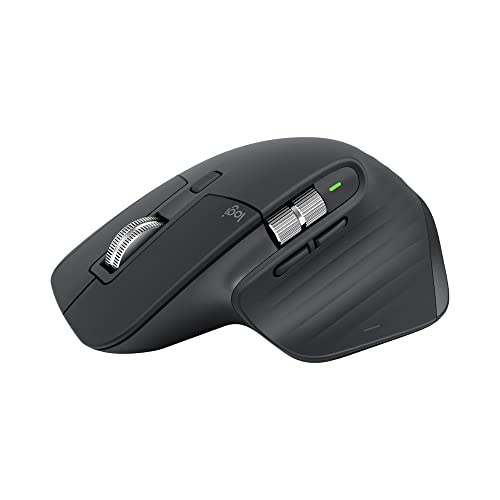
- MagSpeed scrolling helps video editors move through timelines faster
- Programmable buttons add handy shortcuts for editing workflows
- Quiet clicks make long editing sessions less distracting
Best For: Video editors who want faster timeline navigation and customizable controls.
Shortcut Command Hub

- 15 macro keys make repetitive editing actions quicker to trigger
- Visual feedback helps keep shortcuts easy to recognize at a glance
- Works with Mac and PC for flexible editing setups
Best For: Editors who rely on shortcuts, macros, and repetitive workflows.
Laptop Editing Dock
CalDigit TS4 Thunderbolt 4 Dock

- 18 ports add the connectivity laptop-based editors often need
- 98W charging helps keep a compatible laptop powered while working
- Supports high-resolution display setups for more flexible editing
Best For: Laptop-based editors needing more ports and faster connectivity.
Speedy Footage Transfer
Samsung T7 Shield Portable SSD 1TB

- 1TB portable SSD for moving large footage files between devices
- Rugged IP65 water-resistant design for more durable everyday use
- Strong 4.7 rating with a very large review count for broad appeal
Best For: Editors who move large footage files between devices.
4K Project Storage
SanDisk Extreme Portable SSD 2TB

- 2TB portable SSD for 4K projects and external media libraries
- Up to 1050MB/s with USB-C and IP65 water and dust resistance
- Backed by 91.4K reviews and a solid 4.6 rating
Best For: Editors handling 4K projects and external media libraries.
Archive Capacity
Seagate Expansion Desktop Hard Drive 8TB

- 8TB desktop hard drive for affordable bulk storage
- Easy plug-and-play backup for footage archives and large libraries
- Strong title match for editors who need practical extra capacity
Best For: Editors who need affordable bulk storage for archives and footage.
Desk Lighting Upgrade

- Ultrawide, bright, dimmable lighting for long editing sessions
- Dual smart mode, auto-dimming, and adjustable arm for desk use
- Giftable matte blue finish with strong review volume and rating
Best For: Editors working long hours at a desk or in dim rooms.
IPad Desk Companion

- Great for editors using an iPad as a second screen or reference device
- Foldable aluminum design fits neatly into a video editing desk setup
- Charges and holds the tablet in one place while you work
Best For: Editors who use an iPad as a second screen or reference device
Comfort-First Mouse
Humanscale Pro Click Ergonomic Mouse

- Ergonomic shape suits long editing sessions at the desk
- Wireless multi-host connectivity supports a flexible workflow
- Made for editors who want a comfortable productivity mouse
Best For: Editors who want comfort for long editing sessions
Shortcut-Friendly Keyboard
Keychron K8 Pro Mechanical Keyboard

- QMK/VIA programmability is great for editor shortcuts and macros
- Hot-swappable TKL layout keeps the desk compact and practical
- Works across Mac, Windows, and Linux for broad editing setups
Best For: Editors who appreciate a satisfying typing experience and shortcuts
Tactile Editing Console
Loupedeck Live Editing Console
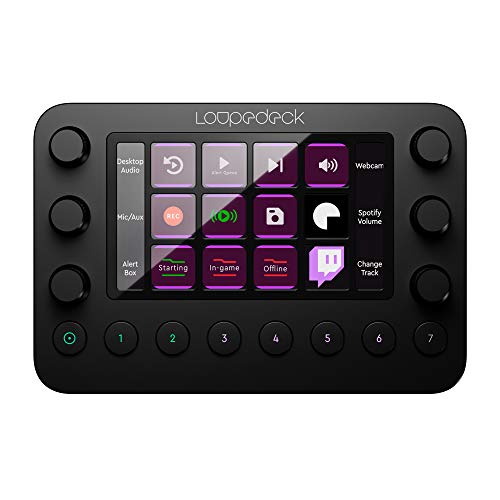
- Customizable buttons and dials give hands-on control in editing apps
- Built for photo and video editing as well as live streaming
- A strong pick for creators who want tactile workflow controls
Best For: Editors who want tactile controls for creative software
Voiceover Upgrade

- Plug-and-play USB mic for voiceovers, podcasts, and YouTube work
- Clear, reliable choice for video editors who also record audio
- Well-known creator mic with strong review volume and broad appeal
Best For: Video editors who also record voiceovers, podcasts, or YouTube content.
Compact On-Camera Audio
RØDE VideoMicro II On-Camera Microphone

- Ultra-compact shotgun mic for cameras or mobile devices
- A smart pick for editors working in hybrid shooting setups
- Useful for creators who edit their own footage and want cleaner audio
Best For: Editors working in hybrid shooting and light production setups.
Lighting for Better Edits
Bi-Color 660 LED Video Light Kit

- Two bi-color 660 LED lights with stands and barndoors
- Great for editors who film content or need better review lighting
- High-appeal lighting kit for studio-style video work and comparisons
Best For: Editors who also film content or need better lighting for review work.
Ergonomic Laptop Lift
Portable Adjustable Laptop Stand

- Helps improve posture for editors working from a laptop
- Foldable, portable design fits easily into a desk setup or travel bag
- Ventilated build supports cooler laptop use during long edit sessions
Best For: Editors who work from a laptop and want better ergonomics
All-In-One Port Hub
8-in-1 USB-C Hub with HDMI and Card Reader

- Adds HDMI, SD/microSD, Ethernet, and extra USB ports in one compact hub
- Useful for editors moving footage from cards and connecting external displays
- Broad laptop compatibility makes it a practical desk or travel accessory
Best For: Laptop editors who need extra ports for cards, drives, and displays
Clean Desk Monitor Arm
Single Ultrawide Monitor Arm Desk Mount

- Helps create a cleaner, more flexible editing workstation
- Fully adjustable arm supports a more comfortable screen position
- Compatible with a wide range of screen sizes, including ultrawides
Best For: Editors building a cleaner, more flexible workstation
How to Choose the Right Gift for a Video Editor
The best Gift Ideas for Video Editors usually fall into a few helpful categories: editing controls, storage, desk setup, audio, lighting, and ergonomic upgrades. Start by thinking about how they work. Someone editing long-form YouTube videos may appreciate faster shortcuts and more comfortable peripherals, while a streamer or content creator may get more value from audio gear or studio lighting.
It also helps to look at what they already use. If their desk is already well-equipped, choose an accessory that complements their setup rather than replacing it. A compact control surface, monitor arm, or laptop stand can make a noticeable difference without requiring a major gear overhaul.
Match the Gift to Their Editing Style
For fast-paced editors, shortcut-heavy tools and macro controllers can speed up repetitive tasks. For color and timeline work, a responsive mouse or mechanical keyboard can improve precision and comfort. If they split time between editing and streaming, multi-purpose accessories tend to deliver the most value.
Budget Considerations for Gift Ideas for Video Editors
There are strong options at nearly every price point. Lower-budget gifts often include desk accessories, cables, lighting, or ergonomic add-ons, while midrange gifts can cover quality mice, keyboards, and mics. Higher-budget gifts typically focus on storage, docks, monitor mounts, and advanced control surfaces.
If you want the gift to feel substantial without overspending, choose something that solves a daily annoyance. A better desk lamp, a portable SSD, or a reliable USB-C hub can feel more meaningful than a trendy item that rarely gets used.
Small Budgets Can Still Feel Premium
Even modest gifts can be impressive when they improve workflow. Look for products that offer obvious convenience, such as one-cable connectivity, better cable management, or easier access to shortcuts. These kinds of gifts are especially useful because they support every session, not just special projects.
Personalization Tips That Make the Gift Feel Thoughtful
Personalization matters for creators. If you know their preferred software, operating system, or work habits, you can choose something that fits naturally into their routine. For example, editors who spend all day on a laptop may appreciate a stand and dock, while desktop users might benefit more from an upgraded keyboard or monitor arm.
You can also personalize by choosing gifts that reduce friction in their specific setup. Gift Ideas for Video Editors become especially thoughtful when they reflect whether the recipient works in a home studio, a shared office, or while traveling.
Think About Their Space
Compact desks call for foldable accessories, slim hubs, and wireless tools. Larger setups can handle desktop drives, monitor arms, and lighting kits. Matching the gift to the environment makes it feel intentional and practical.
Last-Minute Buying Advice
If you are shopping close to the deadline, prioritize gifts with broad compatibility and easy setup. Accessories that work with most laptops, desktops, and creative workflows are the safest choice. Storage devices, mice, keyboard upgrades, and desk accessories are usually easy to gift because they do not require deep technical knowledge.
When in doubt, choose an item that solves a universal editing problem: too many cables, not enough desk space, slow workflow, or uncomfortable long sessions. Those are the gifts that editors tend to appreciate long after the wrapping paper is gone.
For a polished final pick, pair a practical tool with a small personal touch, such as a note about their latest project or a recommendation for a coffee gift card. That makes the present feel both useful and memorable.
