
Gaming Keyboard Wired review is about a simple promise: quiet typing, colorful lighting, and an easier hand position for long sessions.
If you want a budget-minded wired keyboard that leans on comfort and convenience instead of flashy customization, this one is easy to understand.
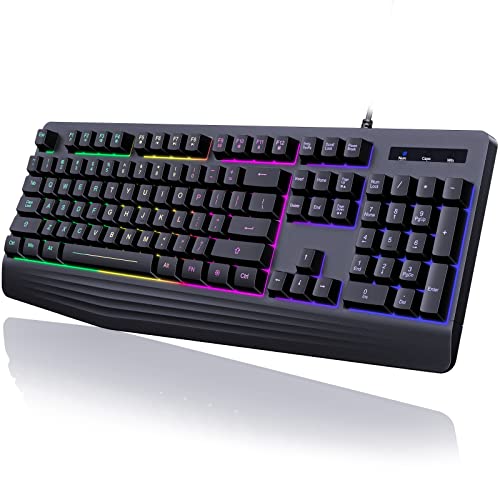
Gaming Keyboard Wired Review Summary
This Gaming keyboard wired model makes sense for buyers who want a full-size desktop keyboard with a wrist rest, rainbow backlighting, and a quieter membrane feel rather than a mechanical board.
It is especially suited to casual gamers, office users, and anyone who wants basic gaming features without having to learn software, macros, or complicated lighting profiles.
The strongest case for it is straightforward: it combines a 104-key layout, dedicated media keys, anti-ghosting support, and plug-and-play USB operation in a single package.
The tradeoff is equally clear: this is not a customization-heavy keyboard, and the listing says the lighting is rainbow-only with no solid-color option or true backlight personalization.
Review Scorecard
| Category | Score | Rationale |
|---|---|---|
| Typing comfort | 8/10 | The integrated wrist rest and stepped keycap design are aimed at long sessions. |
| Gaming usefulness | 7/10 | 19 anti-ghosting keys and FN shortcuts help with common play patterns. |
| Noise level | 8/10 | The membrane switch design is described as quiet and non-clicky. |
| Lighting flexibility | 5/10 | Rainbow backlight with steady and breathing modes, but no solid-color customization. |
| Everyday convenience | 8/10 | 12 multimedia keys and simple USB wired setup make it easy to use. |
| Durability promise | 6/10 | ABS construction and laser-engraved lettering are practical, but the listing is still value-oriented. |
| Cross-platform fit | 7/10 | It supports Windows broadly and is listed as compatible with Mac, with a Mac caveat on multimedia keys. |
Verdict: this is a sensible buy if you want a quiet, full-size wired keyboard with gaming-friendly basics and you do not care about premium switch feel or lighting control.
Key Features and Specifications of Gaming Keyboard Wired
The listing positions this as a 104-key wired keyboard with a rainbow LED backlight, a built-in wrist rest, and membrane-style quiet typing.
It is intended for PC use first, while also listing compatibility with Mac and Xbox use cases.
Here are the main evidence-based details:
- 104-key full-size layout
- Rainbow backlight with steady and breathing modes
- Brightness and breathing speed adjustment
- Lighting can be turned off
- No solid-color lighting and no lighting customization beyond the listed modes
- Quiet membrane typing feel
- Integrated ergonomic wrist rest
- Stepped keycap design for easier finger reach
- 12 dedicated multimedia keys
- 19 anti-ghosting keys
- FN+W swaps WASD and arrow keys
- FN+Win locks the Windows key
- Laser-engraved key lettering
- ABS construction
- USB wired plug-and-play connection
- Broad Windows compatibility plus Mac compatibility, with multimedia key limitations on Mac
The feature set is practical rather than ambitious.
It covers the basics most buyers actually use: readable lighting, easy media control, comfortable hand placement, and no software setup.
Pros and Cons of Gaming Keyboard Wired
Pros
- Quiet typing feel makes it more suitable for shared rooms, late-night use, or office environments than a loud mechanical board.
- Integrated wrist rest should help reduce fatigue during long typing or gaming sessions.
- Full-size 104-key layout is better for people who still need a number pad and standard desktop spacing.
- 12 multimedia keys make volume and media control easier without opening menus.
- 19 anti-ghosting keys are a useful gaming feature at this price and category level.
- Plug-and-play wired setup keeps the experience simple.
Cons
- Lighting is limited to rainbow effects with no true color customization.
- Membrane feel will not satisfy buyers who want a crisp mechanical switch response.
- Mac users lose some function because the listing notes multimedia keys are not available on Mac.
- No software layer means no advanced macro ecosystem or tuning.
The pros and cons are balanced in a predictable way: it offers comfort and convenience first, while giving up enthusiast-level control.
Who Should Buy Gaming Keyboard Wired?
Buy this if you want a straightforward keyboard that can handle work, browsing, and casual gaming without extra setup.
It fits users who want a quiet keyboard with a wrist rest and appreciate practical extras like media keys and anti-ghosting.
It also makes sense if you are replacing a basic office keyboard and want something that feels more gaming-oriented without jumping to mechanical pricing or noise.
The rainbow lighting adds a bit of atmosphere, but the real value is in the layout and comfort-focused design.
Skip it if you want switch variety, deep RGB control, software-based macro editing, or a premium mechanical feel.
It is also a weaker fit if you rely on Mac multimedia key behavior and expect every feature to work exactly the same across platforms.
How the Gaming Keyboard Wired Fits Daily Use
Quiet Desk Companion
The membrane key design is the main reason this keyboard stands out for mixed-use desks.
If your environment needs lower noise, the listing’s emphasis on quiet typing is more useful than flashy specs.
Wrist Rest and Layout
The integrated wrist rest and stepped keycaps are aimed at reducing strain and making the board easier to use for long stretches.
That matters more here than exotic switch feel because the product is clearly built for comfort-first use.
Lighting Without Complexity
The backlight is useful for visibility and mood, but the appeal is simple: rainbow effects, steady or breathing modes, adjustable brightness, and the option to switch lighting off.
If you want one look and no management overhead, that is enough.
Gaming Shortcuts That Matter
The 19 anti-ghosting keys, FN+W toggle, and Win-key lock cover the common frustrations of basic gaming keyboards.
They are not headline-grabbing features, but they are exactly the kind of functions that reduce annoyance during real use.
Alternatives to Gaming Keyboard Wired
If you want a more established gaming keyboard line, look at the Logitech G search, the Corsair keyboard search, or the Redragon keyboard search.
If you want a similarly simple everyday option with a different balance of comfort and features, the Razer keyboard search is another common comparison point.
These alternatives are worth checking if you want better switch feel, broader software support, or a more refined build.
They are also the safer path if you already know you want a more established ecosystem than a value-oriented wired membrane board can provide.
Is Gaming Keyboard Wired Worth It?
Yes, if your goal is a quiet, full-size wired keyboard with a wrist rest and basic gaming features.
It is worth considering for buyers who value comfort, simplicity, and straightforward functionality more than premium customization.
No, if you want mechanical switches, deep RGB control, or a more advanced gaming software stack.
In that case, it is better to spend more on a board that is built around those priorities from the start.
