
The FFJ Master02 wireless gaming mouse review comes down to a simple question: do you want a feature-heavy mouse that can move between devices without giving up gaming-oriented controls?
Based on the listing evidence, the answer is yes for the right buyer.
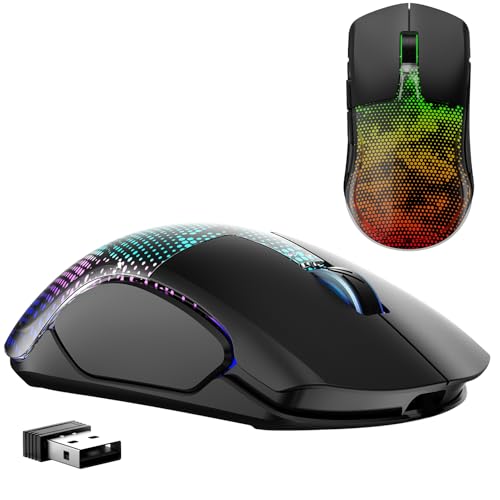
Master02 Review Summary
The FFJ Master02 is best for players and power users who want one mouse for PC, Mac, and mobile-style setups, plus enough tuning options to make the hardware feel tailored.
Its tri-mode connection, programmable buttons, adjustable DPI, and RGB lighting make it more flexible than a basic wireless mouse, while the 1000mAh battery and wired fallback reduce the usual headaches of recharge-only peripherals.
If you care about convenience, customization, and a comfortable shape for longer sessions, this is a sensible buy.
If you want a minimal mouse with no driver dependence or no lighting at all, the extra feature set may be more than you need.
Review Scorecard
| Category | Score | Why it scores this way |
|---|---|---|
| Connectivity flexibility | 9/10 | Supports Bluetooth 5.3, 2.4GHz wireless, and USB-C wired use. |
| Customization | 9/10 | Six programmable buttons, macro editing, and driver-based DPI and polling adjustments. |
| Battery convenience | 8/10 | 1000mAh battery, fast recharge claim, sleep modes, and wired play while charging. |
| Gaming focus | 8/10 | 12000 DPI ceiling, adjustable polling rate, 400 IPS, and low-latency positioning. |
| Comfort and ergonomics | 7/10 | Ergonomic shape and skin-friendly materials are promising, but fit is still individual. |
| Everyday versatility | 9/10 | One mouse can move between laptops, desktops, tablets, and different operating systems. |
| Style and presentation | 8/10 | Large RGB area and textured shell give it a distinctive gaming look. |
Key Features and Specifications of Master02
The core appeal of the FFJ Master02 is that it tries to cover three jobs at once: a gaming mouse, a desk mouse, and a travel-friendly multi-device mouse.
It includes:
- 6 programmable buttons with macro editing through the driver
- DPI adjustment from 50 to 12000 through software
- 7 default DPI levels: 800, 1200, 2400, 3600, 4800, 6000, and 12000
- 4 polling rate options: 125Hz, 250Hz, 500Hz, and 1000Hz
- 2.4GHz wireless, Bluetooth 5.3, and USB-C wired connection modes
- A 1000mAh rechargeable battery
- Sleep behavior that shifts to light sleep after 1 minute and deep sleep after 10 minutes of inactivity
- A claimed 1.5-hour full charge time
- Compatibility with Windows, Mac OS, iPadOS, Android, and other systems
The listing also emphasizes a built-in sensor rated at up to 400 IPS and 35G acceleration, which signals a clear gaming priority.
For buyers comparing peripheral specs, those numbers matter because they suggest this is not just an office mouse with RGB added later.
Design-wise, the mouse uses an ergonomic shell with a python-skin texture and a larger RGB backlight area across the top.
The shell is meant to feel comfortable over long sessions, while the lighting gives it a more aggressive desktop presence than a standard productivity mouse.
Pros and Cons of Master02
Pros
- Strong connection versatility. Bluetooth, 2.4GHz, and wired USB-C give you real setup flexibility.
- Good customization range. Six buttons, macros, DPI tuning, and polling-rate control are useful for gaming and shortcuts.
- Cross-device usefulness. The broad platform support makes it easier to share one mouse across multiple devices.
- Battery planning is thoughtful. Sleep modes and wired charging reduce downtime concerns.
- Clear gaming identity. The higher-sensitivity specs and RGB design make the intent obvious.
Cons
- Software is part of the experience. Some of the best tuning features depend on the driver, which adds setup friction.
- Feature density may be overkill for simple users. If you only need cursor movement and two buttons, this is more mouse than necessary.
- Shape fit is subjective. The ergonomic claim is helpful, but hand size and grip style still matter.
- RGB is optional only in theory. The lighting may be a selling point for some buyers and a distraction for others.
Overall, the tradeoff is clear: the Master02 offers capability first, simplicity second.
Who Should Buy Master02?
Buy the FFJ Master02 if you want a single wireless mouse that can handle gaming, work, and device hopping without forcing you to compromise on connection options.
It is especially attractive if you use both a desktop and a laptop, switch between Windows and Mac, or like to fine-tune DPI and button behavior.
It also fits buyers who want a more customizable mouse than the average budget model.
The programmable buttons and macro support make it useful for strategy games, MMO-style shortcuts, productivity shortcuts, and general power-user tasks.
Skip it if you prefer:
- a plain, low-maintenance mouse with no software layer
- a lighter office-first design with no RGB emphasis
- a compact travel mouse that prioritizes portability over grip comfort
This is a better match for people who want features they will actually use, not just a cheap shell with a gaming label.
Multi-Device Gaming and Daily Use
Tri-Mode Connection
The tri-mode setup is the biggest practical advantage.
Bluetooth 5.3 is the easiest path for lightweight everyday use, 2.4GHz wireless is the natural pick for gaming responsiveness, and USB-C wired mode protects you when the battery runs low.
That combination makes the Master02 more adaptable than mice locked to one connection style.
Button and DPI Tuning
The six programmable buttons and macro editing give the mouse a clear advantage for buyers who rely on shortcuts.
The DPI range from 50 to 12000, plus seven defaults and four polling rates, means you can shape the mouse for slower precision work or faster in-game tracking.
The value here is not just raw sensitivity; it is that the mouse can be tuned instead of accepted as-is.
Battery and Charging Behavior
The 1000mAh battery and claimed 40 to 75 hours of runtime, depending on RGB use, make the mouse look practical for people who dislike frequent charging.
The sleep modes are important too, because they help preserve charge without demanding constant user attention.
Wired use while charging removes the usual penalty when the battery finally runs down.
Comfort and Desk Presence
The ergonomic body and skin-friendly materials point toward long-session comfort, while the larger RGB area and textured shell make it feel like a gaming product rather than a generic office accessory.
That is a legitimate strength if you want your mouse to look as intentional as the rest of your setup.
It is less compelling if you prefer a neutral desk environment.
Alternatives to Master02
If you want a different balance of features, these are the most credible alternatives to compare:
Pick Logitech or Razer if you want a more established gaming-mouse ecosystem.
Pick Corsair if you want a familiar mainstream gaming brand in a simpler wireless format.
Pick Redragon if you mainly want budget competition and are comparing feature lists more than brand prestige.
Is Master02 Worth It?
Yes, the FFJ Master02 is worth it for buyers who will use its flexibility.
The tri-mode connectivity, macro support, adjustable DPI, and long-battery design make it a strong value proposition for multi-device gaming and everyday desktop use.
If you only need a plain mouse, it is probably more feature-rich than necessary.
If you want a configurable wireless gaming mouse that can move between machines and still feel like a serious input device, the Master02 is a reasonable pick.
