
A tidier tech setup can make work, gaming, and device maintenance easier throughout the year. These practical Christmas gifts suit PC users, remote workers, and hands-on builders.
Christmas Tech Organization Gifts for PC Users
1. UGREEN DXP2800 2-Bay NAS Enclosure
For a Growing Home File Library
UGREEN DXP2800 2-Bay NAS Enclosure

- Centralizes family photos, videos, computer backups, and personal files across devices.
- Supports up to 80TB across two HDD bays and two M.2 NVMe slots; drives are sold separately.
- Runs compatible media server and NAS apps, including Docker and virtual machines.
Best For: Advanced home users, creators, or families managing files and backups
2. 1TB Portable USB 3.2 External SSD
For Files on the Move
1TB Portable USB 3.2 External SSD

- Provides 1TB of portable storage for large files, photos, video, and gaming assets.
- The aluminum drive is described as water- and drop-proof, with SMART monitoring.
- Connects to compatible computers, cameras, consoles, and mobile devices; interface affects speed.
Best For: Photographers, students, and PC users who move large files
3. Acer 13-in-1 USB-C Docking Station
For a More Connected Laptop Desk
Acer 13-in-1 USB-C Docking Station

- Combines HDMI, DisplayPort, USB, Ethernet, audio, and SD/TF card connections.
- Includes a 110W adapter and provides up to 100W laptop charging through its USB-C PD host port.
- Triple-display support depends on the Windows laptop and GPU; macOS supports mirroring only.
Best For: Laptop users connecting several peripherals and displays
4. Acer Gadget 7-in-1 Wireless Charging Station
For a Clearer Nightstand
Acer Gadget 7-in-1 Wireless Charging Station

- Charges compatible phones, earbuds, and Apple Watch wirelessly, with USB-A and USB-C ports for wired devices.
- Can charge up to six devices at once when using the supported 30W adapter.
- Includes a Bluetooth-synced clock display and adjustable warm or cool lighting.
Best For: People who charge several personal devices at a desk or bedside
5. Power Strip with Cable Management Box
For Hiding Power Strip Clutter
Power Strip with Cable Management Box

- Pairs a 10-outlet power strip with a covered box and reusable cable ties.
- The box measures 11.4 × 5.5 × 5.5 inches and can be mounted on a wall or desk side.
- Includes a flat plug, 6-foot cord, USB charging ports, and individual outlet and USB switches.
Best For: Anyone organizing a home office, desk, or entertainment setup
6. NIIMBOT B2 Bluetooth Label Maker
For Clearly Marked Cables and Storage
NIIMBOT B2 Bluetooth Label Maker

- Prints labels for cables, files, kitchen storage, and other home or office organization.
- Connects by Bluetooth to iOS, Android, and Windows PCs, or by USB to a computer with a driver.
- The app offers multiple fonts, icons, and batch printing; one roll of tape is included.
Best For: Tech enthusiasts and home-office users labeling shared equipment
7. Univivi 36-Inch Under-Desk Cable Tray
For Clearing Cords from the Floor
Univivi 36-Inch Under-Desk Cable Tray

- Provides a 36-inch fabric tray to hold power strips, adapters, and cables under a desk.
- Installs with clamps or screws and includes ties to secure items in the tray.
- Check desk-edge clearance: the listing calls for at least 5.3 inches when drawers or a back rod are present.
Best For: Remote workers with adapters and power strips beneath their desks
8. Yodoit 15.6-Inch Portable FHD Monitor
For a Second Screen Away from Home
Yodoit 15.6-Inch Portable FHD Monitor

- Offers a 1920 × 1080 IPS display with a matte finish and built-in speakers.
- Connects by USB-C or by mini HDMI with USB power, depending on the source device.
- Includes a smart cover and is described for use with compatible PCs, Macs, consoles, and phones.
Best For: Travelers, students, and laptop users working in multiple locations
9. STREBITO 142-Piece Precision Screwdriver Set
For the Hands-On PC Builder
STREBITO 142-Piece Precision Screwdriver Set
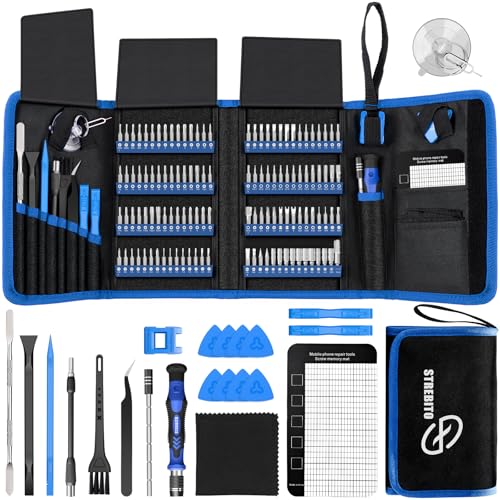
- Includes 120 driver bits and 22 repair accessories, including tweezers and a magnetic mat.
- The set is intended for electronics such as computers, laptops, tablets, and game consoles.
- Bits are organized in marked holders inside a portable storage bag.
Best For: PC builders and gadget owners who handle their own repairs
10. 313-Piece Desk Cable Management Kit
For a Complete Cable Tidy-Up
313-Piece Desk Cable Management Kit

- Includes adhesive clips, reusable cable wraps, sleeves, zip ties, and mounting bases.
- Designed to bundle and route power, charging, and audio/video cables around desks and devices.
- The kit has 313 pieces for workspace, TV, or home office organization.
Best For: PC builders and desk enthusiasts organizing multiple cable runs
11. ErGear Adjustable Single Monitor Arm
For a Clearer, More Flexible Desk
ErGear Adjustable Single Monitor Arm

- Fits compatible 13–34-inch monitors up to 19.8 pounds with 75 × 75 or 100 × 100 mm VESA patterns.
- Offers height, tilt, swivel, and rotation adjustments, plus cable clips.
- Mounts by C-clamp or grommet; check monitor and desk measurements before buying.
Best For: Computer users who want to reposition a monitor and free desk space
12. SABRENT 4-Port USB 3.0 Hub
For Easy Access to USB Ports

- Adds four USB 3.0 ports to compatible computers and devices.
- Individual switches and LED indicators help manage connected peripherals.
- Its 2-foot cable helps reach less accessible ports; the hub is not for charging.
Best For: PC users who regularly connect USB accessories and storage
13. KooMall 36 × 24-Inch ESD Work Mat Kit
For a Dedicated Electronics Workbench
KooMall 36 × 24-Inch ESD Work Mat Kit

- Provides a 36 × 24-inch rubber mat for electronics assembly, soldering, and repair work.
- Includes a grounding plug, grounding cord, and antistatic wrist strap.
- The mat has a textured surface and can be cleaned with water, according to the listing.
Best For: PC builders assembling or servicing components at home
14. CyberPower CP1500PFCLCD UPS
For Added Power Protection

- Provides battery backup and surge protection for computers, workstations, and network equipment.
- Has 12 outlets: six battery-backup and surge-protected, plus six surge-protected outlets.
- The LCD displays battery and power conditions; the unit also has USB-A and USB-C charging ports.
Best For: PC users and remote workers protecting a home setup from brief interruptions
Choosing a Gift for Their Setup
Start with the part of the recipient’s routine that creates the most friction. A desk covered in loose cords may benefit from the cable tray, cable kit, or power strip box. If their laptop becomes a hub for peripherals each day, a docking station or USB hub could make connections easier to manage. For a PC builder, repair tools and a work mat support hands-on projects; for someone who moves between rooms or locations, portable storage or a second screen may fit better.
Consider how much space the gift needs and whether it solves a recurring problem. A monitor arm can reclaim desk surface, but only if the desk edge and monitor are compatible. A NAS can bring scattered files together, while requiring the recipient to select storage drives and configure a network device. Practical Christmas tech organization gifts work best when they make the recipient’s own habits easier, rather than adding a new task they do not want.
Set a Budget Around the Whole Setup
Think about the complete cost of use, not only the main item. The NAS enclosure is diskless, so the buyer needs to account for compatible hard drives or SSDs. A label maker includes one roll of tape, while further labeling projects may call for additional supplies. A dock may replace several smaller adapters, and cable ties or clips can be inexpensive ways to tidy an existing workspace.
For a modest gift, choose a compact accessory that solves one clear annoyance, such as a USB hub or cable clips. A larger desk upgrade might involve a docking station, monitor arm, or portable monitor. For backup or power protection, consider the equipment it will serve and the recipient’s actual needs before choosing a more substantial device. Keep any budget flexible enough for cables, storage, or installation items that the recipient may need separately.
Check Compatibility and Personalize the Choice
Compatibility matters most for devices that connect to or mount on existing equipment. Before choosing a dock, check the laptop’s USB-C capabilities, operating system, and display support. Its triple-display features depend on compatible Windows hardware, while macOS is limited to mirrored displays. With a monitor arm, compare the screen’s size, weight, and VESA pattern with the mount’s supported range, and confirm that the desk can take a clamp or grommet base.
For chargers, verify that the recipient’s phone, watch, and earbuds match the stated compatibility. The Acer station is designed around Apple devices for wireless phone and watch charging and is not compatible with Samsung Watch. The under-desk tray also needs adequate room along the desk edge, especially where drawers or a support rail are present. Personalization can be simple: choose a labeling project that suits their desk, a storage device for their photo library, or a repair kit that matches the devices they actually maintain.
Plan Timing and Last-Minute Decisions
When choosing close to Christmas, favor a gift whose fit is easy to confirm from the recipient’s devices and workspace. A cable management kit, label maker, or screwdriver set may require fewer measurements than a monitor arm or multi-display dock. For larger equipment, check model details and setup requirements before ordering, and leave time to confirm that any separate drives, adapters, or mounting hardware are accounted for.
A useful last-minute decision starts with one question: what do they repeatedly plug in, store, repair, or move? The answer narrows the field to a category that can help right away. A gift does not need holiday styling to feel thoughtful; a well-chosen organizer, charging station, or backup accessory can make their everyday tech setup feel more manageable long after the decorations are put away.
