
For a PC user, a thoughtful gift can make a familiar setup more comfortable, organized, or useful. These ideas range from everyday accessories to compact upgrades, with compatibility details to check before choosing.
18 Christmas Tech Gift Ideas for PC Users
1. OneOdio Wired Over-Ear Headphones
For Focused Listening
OneOdio Wired Over-Ear Headphones

- Wired over-ear design with 50 mm drivers and padded ear cushions.
- Includes 3.5 mm and 6.35 mm jacks for compatible audio devices.
- Swiveling ear cups support single-ear monitoring.
Best For: PC gamers, music listeners, and people who want private listening
2. Yodoit 15.6-Inch Portable Monitor
For a Bigger Mobile Workspace
Yodoit 15.6-Inch Portable Monitor

- 15.6-inch 1920 × 1080 IPS screen with a matte finish.
- Connects through USB-C or mini HDMI, depending on device support.
- Built-in speakers and a smart cover suit travel and desk use.
Best For: Laptop users who work away from a fixed desk
3. RIWUCT Foldable Aluminum Laptop Stand
For a More Flexible Desk
RIWUCT Foldable Aluminum Laptop Stand
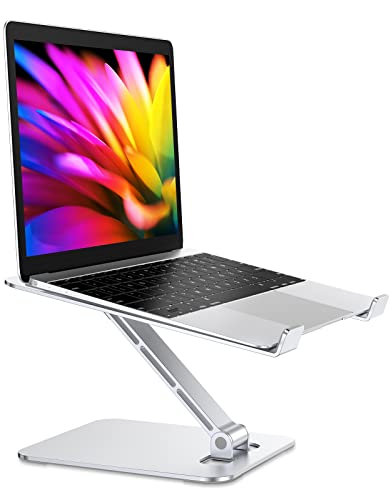
- Adjustable stand folds for storage or carrying.
- Raises compatible laptops up to 7.48 inches.
- Open design leaves space for airflow beneath the laptop.
Best For: Laptop users with a home, school, or office setup
4. ProtoArc EM11 NL Vertical Wireless Mouse
For a Different Mouse Grip
ProtoArc EM11 NL Vertical Wireless Mouse

- Vertical shape is designed to keep the wrist in a more natural position.
- Connects by Bluetooth or the included USB-A receiver to up to three devices.
- Rechargeable design includes a USB-C charging cable.
Best For: Right-handed PC users with small to medium hands
5. Redragon K617 Compact Mechanical Keyboard
For a Customizable Gaming Desk
Redragon K617 Compact Mechanical Keyboard

- Compact 61-key layout leaves more room on the desk.
- Hot-swap sockets accept compatible 3-pin or 5-pin switches.
- RGB lighting offers preset modes and adjustable brightness.
Best For: PC builders, typists, and people who enjoy customizing their setup
6. SABRENT 5-in-1 USB-C Hub
7. ATUVOS Apple Find My Tracker Tags, 4-Pack
For Keeping Track of Essentials
ATUVOS Apple Find My Tracker Tags, 4-Pack

- Four Bluetooth tags work with Apple Find My on iOS devices.
- Tags can ring nearby items through their built-in speaker.
- Each tag has a replaceable battery.
Best For: Apple users who often misplace keys, bags, or luggage
8. BrosTrend AX900 USB Wi-Fi Adapter
For Adding Wireless to a PC
BrosTrend AX900 USB Wi-Fi Adapter

- USB adapter supports dual-band Wi-Fi 6 connections.
- Includes a 6 dBi antenna and supports 2.4 GHz and 5 GHz bands.
- Driver support is listed for Windows 7, 10, and 11; Mac and Linux are unsupported.
Best For: Windows desktop users whose computer needs wireless networking
9. Large Stitched-Edge Gaming Desk Mat
For a Roomier Mouse Surface
Large Stitched-Edge Gaming Desk Mat

- 31.5 × 15.7-inch surface can fit a keyboard and mouse.
- Non-slip rubber base and stitched edges help keep the mat in place.
- Water-resistant coating is designed for easier cleanup.
Best For: PC gamers and anyone refreshing a desktop setup
10. TP-Link Deco X15 Wi-Fi 6 Mesh System, 2-Pack
For Better Home Wi-Fi Coverage
TP-Link Deco X15 Wi-Fi 6 Mesh System, 2-Pack

- Two-node Wi-Fi 6 mesh system is listed for coverage up to 3,900 square feet.
- Each unit has two Gigabit Ethernet ports for wired connections.
- Setup and network management use the Deco app.
Best For: Households with a larger home or weak wireless coverage in some rooms
11. Kitchbai USB Document Camera
For Showing Work on Camera

- Foldable visualizer captures documents and objects over USB.
- Three brightness settings and adjustable image orientation are included.
- Compatibility is listed for Windows, macOS, and Chrome OS.
Best For: Teachers, students, and people who demonstrate crafts or small objects on video
12. 14-Inch Dual-Screen Laptop Extender
13. ASUS TUF Gaming 27-Inch QHD Monitor
For an Immersive Gaming Setup
ASUS TUF Gaming 27-Inch QHD Monitor

- 27-inch QHD display has a 2560 × 1440 resolution.
- Fast IPS panel and 180 Hz refresh rate are listed for gaming.
- Includes HDMI and DisplayPort connectivity.
Best For: PC gamers, creative hobbyists, and people who work at a desk
14. VAVOFO Adjustable USB-C Desk Lamp
15. SIKAI CASE Six-Key Macro Keypad
16. NexiGo N60 1080p USB Webcam
For Clearer Video Calls

- USB webcam captures video at up to 1920 × 1080 and 30 fps.
- Built-in microphone is designed to reduce ambient noise.
- Privacy cover blocks the lens when the camera is not in use.
Best For: Remote workers, students, and video-call regulars
17. Anker 100W USB-C Cable, 2-Pack
For Everyday Charging
Anker 100W USB-C Cable, 2-Pack
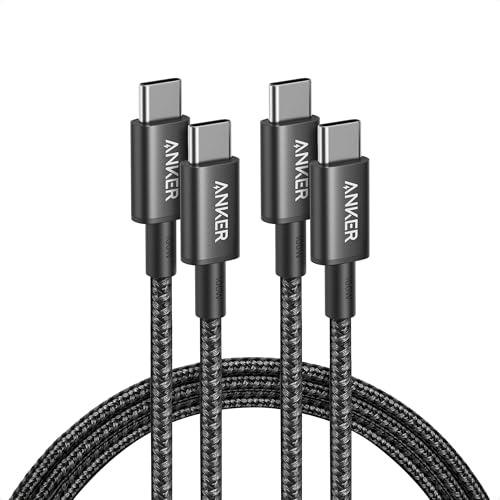
- Two 6-foot USB-C to USB-C cables are included.
- Supports up to 100W charging with a compatible charger.
- Nylon exterior; cable does not support video output.
Best For: People who charge USB-C devices at home, work, or on the go
18. USB-C Rechargeable Precision Screwdriver Kit
For Small PC Repairs
USB-C Rechargeable Precision Screwdriver Kit

- Kit includes 71 precision bits in a sliding storage case.
- Rechargeable screwdriver runs at 200 rpm and includes a three-LED light.
- Designed for small electronics and precision repair tasks.
Best For: PC builders and electronics hobbyists
Choosing a Gift for a PC User
Start with the recipient’s daily routine. Someone who joins video meetings may appreciate a webcam or a desk lamp, while a frequent traveler could make better use of a portable monitor or laptop stand. For a gaming setup, consider accessories that affect the desk itself, such as the compact keyboard or extended mouse mat. A small tool kit is a practical choice for someone who builds PCs or likes repairing electronics.
Pay attention to what they already own. A peripheral that fits an existing habit is more likely to be used than a niche upgrade that requires a new workflow. For example, a macro keypad makes the most sense for someone who repeats shortcuts in games, design programs, or office tasks. Headphones suit listening and monitoring, while a mesh Wi-Fi system addresses a household network issue rather than a single desk need.
Keep the Budget Grounded
The keyword “Christmas tech gifts under 25 dollars” sets a useful spending boundary, but the supplied product list includes items that may cost more than that threshold. Product prices change, and no exact prices are provided here, so check current listings before treating any option as within budget. If the limit is firm, compare the live price and any shipping or tax charges before deciding. The gift guide can help narrow the type of item, but it cannot confirm today’s checkout total.
Small gifts can still feel personal when they connect to how the person uses a computer. A cable for a bag, a tidy desk mat, or an adjustable stand can be a thoughtful everyday upgrade. Consider whether the gift solves a real annoyance—too few ports, little desk space, dim task lighting, or a hard-to-reach shortcut—rather than choosing based only on a product’s feature list.
Check Compatibility Before Buying
For computer accessories, confirm the recipient’s device and operating system. The USB-C hub requires the host computer to support video over USB-C for its HDMI display output, and it supports only one external display. The laptop screen extender also needs a full-featured USB-C or HDMI connection; with HDMI, a separate USB power connection is required. These details matter because USB-C connectors do not guarantee identical video or charging capabilities.
Check software and platform limits too. The Wi-Fi adapter lists Windows support and says Mac and Linux are unsupported. The Apple Find My tracker tags are for iOS, not Android. The macro keypad must be configured in Windows, although saved macros can then work on other listed systems. For the vertical mouse, the product notes recommend checking hand size and mention a learning curve. Confirming these points first can prevent a well-meant gift from becoming an awkward fit.
Personalization can be simple: choose a color or format that suits the recipient’s desk, or pick a practical item that complements a device they already use. For anything involving ports, check the actual laptop or desktop model rather than relying on the product title alone. If you are unsure, a broadly useful item such as a cable, desk accessory, or tool kit may be easier to match than a specialized display or networking device.
Timing and Last-Minute Decisions
For a Christmas purchase, verify the current price, stock status, and arrival estimate on the retailer’s page before ordering; those details can change and are not established by this guide. If the holiday is close, favor a product whose compatibility you can confirm immediately and whose delivery estimate meets your needs. A gift that arrives after the celebration may still be useful, but timing should be part of the choice.
When deciding at the last minute, keep the recipient’s setup in mind and avoid guessing about ports or operating systems. A short check of their computer model or a discreet question to someone in the household can clarify whether a hub, monitor, or adapter will work. Then choose the item that best fits their everyday routine and budget, and include a note explaining the practical upgrade you had in mind.
