
Shopping for PC tech gifts under $200? These picks focus on useful upgrades for work, play, storage, audio, and home connectivity. Check the recipient’s devices and setup before choosing.
14 Christmas Tech Gifts for PC Users
1. Anker Nano 13-in-1 Laptop Docking Station
A More Connected Desk
Anker Nano 13-in-1 Laptop Docking Station

- Combines a 13-in-1 dock with a detachable 6-in-1 USB-C hub for desk or travel use.
- Connects displays through two HDMI ports and one DisplayPort; display support varies by operating system.
- Offers up to 100W Power Delivery, Ethernet, USB ports, and SD/TF card slots.
Best For: Laptop users who connect monitors and desk accessories.
2. 8BitDo Ultimate 2 Wireless Controller
For PC Gaming From the Couch
8BitDo Ultimate 2 Wireless Controller

- Supports wireless 2.4G and wired connections, with a stated 1000Hz polling rate for both.
- Includes TMR joysticks, switchable trigger modes, motion control, and two back paddles.
- Comes with a multifunction charging dock and USB-C adapter.
Best For: PC gamers who enjoy controller-friendly games or couch gaming.
3. Verbatim Pocket 1TB External SSD
Portable Space for Files and Games
Verbatim Pocket 1TB External SSD

- Provides 1TB of solid-state storage in a compact external drive.
- Lists read and write speeds of up to 1000MB/s and connects over USB-C.
- Includes a keyring, cable holder, USB cable, and Windows-only Nero Backup Software.
Best For: Photographers, gamers, and people who move large files between computers.
4. Logitech C920x HD Pro Webcam
A Clearer Camera for Calls

- Records and supports video calling at Full HD 1080p and 30 frames per second.
- Has autofocus, automatic lighting adjustment, and dual microphones.
- Includes a three-month XSplit VCam license; the listing says it has no privacy shutter.
Best For: Remote workers, students, and creators who need a webcam.
5. Sony WH-CH720N Wireless Headphones
6. APC BX1500M UPS Battery Backup
Backup Power for a PC Setup
APC BX1500M UPS Battery Backup

- Provides 1500VA/900W capacity, with five battery-backup outlets and five surge-only outlets.
- Automatic voltage regulation addresses low voltage and surges without using battery power.
- An LCD displays battery charge, estimated runtime, load capacity, and input voltage.
Best For: PC owners who want time to save work during power interruptions.
7. HyperX Cloud III Wired Gaming Headset
Comfort for Long Gaming Sessions
HyperX Cloud III Wired Gaming Headset

- Angled 53mm drivers are tuned for gaming audio.
- Includes a detachable noise-cancelling microphone with a mic-mute indicator.
- Connects through USB-C, USB-A, or 3.5mm; the package includes a USB-C adapter.
Best For: PC gamers who want an over-ear headset for play and voice chat.
8. Elgato Wave:3 MK.2 USB Microphone
A Streaming and Recording Upgrade
Elgato Wave:3 MK.2 USB Microphone

- USB-C condenser microphone works with PC or Mac for streaming and recording.
- Includes Auto Gain and Clipguard 2.0 features to help manage input levels.
- Onboard effects, a multifunction dial, tap-to-mute, and a headphone jack provide direct control.
Best For: Streamers, podcasters, and people who frequently join calls from a PC.
9. Logitech MX Master 3S Wireless Mouse
A Desk Companion for Daily Work
Logitech MX Master 3S Wireless Mouse
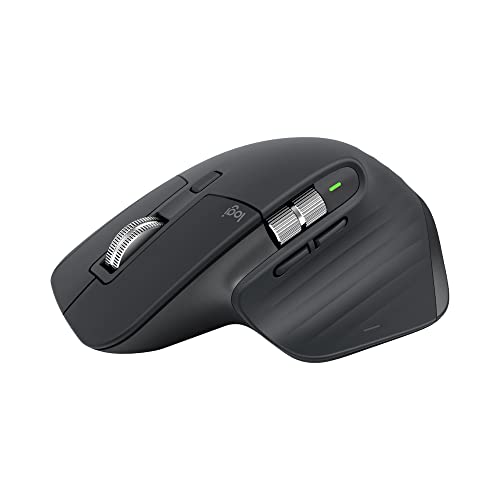
- Wireless mouse has a contoured shape and a stated 18-month average battery life.
- Its listed features include optical tracking and sensitivity up to 8000 DPI.
- Includes a Logitech Bolt receiver.
Best For: PC enthusiasts, programmers, and anyone who spends long hours at a desk.
10. Razer Kiyo Pro Webcam
More Camera Control for Streaming

- Captures uncompressed Full HD 1080p video at up to 60 frames per second.
- Offers three field-of-view options and an adaptive light sensor.
- Works with OBS, XSplit, Twitch, Zoom, Teams, and other listed platforms.
Best For: Streamers and video-call users who want control over framing and camera quality.
11. Crucial X10 Pro 1TB Portable SSD
Fast Storage for Creative Projects
Crucial X10 Pro 1TB Portable SSD
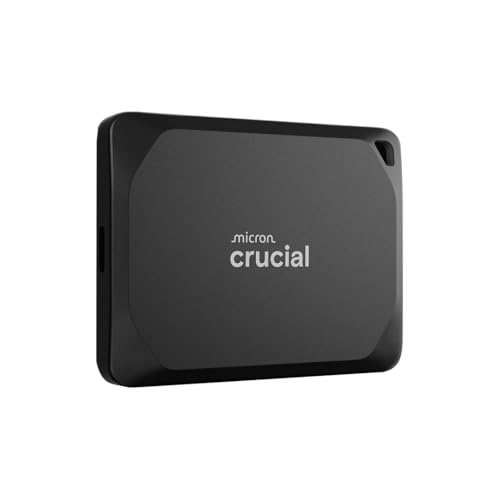
- Provides 1TB of portable storage with listed speeds up to 2100MB/s read and 2000MB/s write.
- USB-C and USB-A connectivity supports a range of listed computers, tablets, and consoles.
- The listing describes IP55 water and dust resistance and drop resistance up to 7.5 feet.
Best For: Students, photographers, and PC users looking for portable backup storage.
12. Logitech Z407 Bluetooth Computer Speakers
Desktop Sound With a Subwoofer
Logitech Z407 Bluetooth Computer Speakers
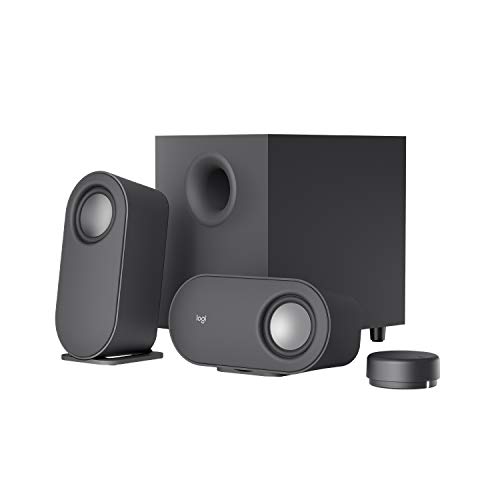
- The 2.1 speaker system includes two satellites and a subwoofer.
- Connects through Bluetooth, micro USB, or 3.5mm input, with support for up to three devices.
- A wireless control dial adjusts volume and bass and can play or pause audio.
Best For: PC owners who want everyday audio without wearing a headset.
13. TP-Link Deco XE75 Pro Wi-Fi 6E Mesh System
Stronger Home Network Coverage
TP-Link Deco XE75 Pro Wi-Fi 6E Mesh System

- The two-pack is listed to cover up to 5,500 square feet and support Wi-Fi 6E.
- Includes one 2.5Gbps WAN/LAN port and two 1Gbps LAN ports per unit, according to the listing.
- Requires a separate modem for most internet service providers; setup and management use the Deco app.
Best For: Households with Wi-Fi dead zones, busy networks, or many connected devices.
14. ASUS ProArt PA278QV 27-Inch Monitor
A Larger Canvas for Creative Work
ASUS ProArt PA278QV 27-Inch Monitor

- 27-inch WQHD IPS display has a 2560 × 1440 resolution.
- Lists 100% sRGB and Rec. 709 coverage, plus a color pre-calibration report.
- Stand adjusts for height, tilt, pivot, and swivel; inputs include HDMI and DisplayPort.
Best For: Designers, content creators, and PC users who want more workspace.
How to Choose a Christmas Tech Gift for a PC User
Start with what the recipient does most often. A remote worker may get daily value from a webcam, mouse, docking station, or headphones. A PC gamer might prefer a controller, headset, backup power, or speakers. For someone who streams or records, a dedicated microphone or adjustable webcam can support their setup. A monitor or mesh Wi-Fi system can be a larger household upgrade, so consider who else will use it and whether the space can accommodate it.
Think about the current setup before choosing. A gift that solves a real annoyance—too few laptop ports, crowded storage, weak audio, or Wi-Fi dead zones—will feel personal even if it has no holiday styling. If you are unsure which problem matters most, ask about the recipient’s setup or choose an accessory that works alongside what they already own.
Keep the Budget in View
For Christmas tech gifts under $200, consider the full cost of making a device useful. A dock may need a compatible laptop and display cables; a microphone may benefit from a quiet recording spot; an SSD needs a USB connection the computer can use. The supplied list spans compact accessories and more substantial upgrades, but prices can change, so check the current listing against your spending limit before ordering.
A simple way to compare options is to weigh frequency of use against setup complexity. A mouse, controller, or headphones may be straightforward for someone already using compatible devices. A UPS, mesh system, or monitor can solve a bigger need, but the recipient may need to rearrange a desk, check electrical requirements, or configure the network. Match the gift to how much setup they are likely to welcome.
Compatibility and Personalization
For laptop docks, confirm the computer has a full-function USB-C or compatible Thunderbolt port. Also check display behavior: the Anker dock’s listing says macOS mirrors multiple external displays, while supported resolutions and screen counts vary by configuration. A thoughtful gift can include a note explaining the intended setup, such as connecting a laptop to a monitor and wired accessories.
For storage, consider the recipient’s devices and their available USB-C or USB-A connections. The Verbatim drive includes Windows-only backup software, while the Crucial drive lists a broader set of supported platforms. For headphones, speakers, webcams, and microphones, check whether the recipient prefers wired or wireless connections and which apps or devices they use. The Logitech MX Master 3S listing describes an ambidextrous design, but shape and comfort are personal; if possible, confirm their preference.
A monitor gift deserves a quick desk check. Confirm that the person has room for a 27-inch display and an available compatible video output. For a Wi-Fi mesh system, consider the home layout and modem: the Deco XE75 Pro requires a separate modem for most providers. These checks turn a plausible gift into one that fits the actual setup.
Timing and Last-Minute Decisions
Order early when a gift depends on compatibility, delivery, or a larger setup change. That gives the recipient time to ask questions or connect the equipment before a workday or gaming session. If you are choosing close to Christmas, focus on a use case you already understand and check the retailer’s current delivery information directly; timing and availability can vary.
For a last-minute gift, pair a practical device with a short personal note: mention the projects, calls, games, or travel it could support. Keep the packaging and receipt details available in case the recipient needs a different connection or setup. A well-matched PC accessory can feel personal because it supports someone’s everyday routine, long after the decorations come down.
