
Choosing Christmas tech gifts for teachers is easier when you start with how they spend their day: planning lessons, working at a desk, or connecting with students and family. The ideas below range from small everyday helpers to larger devices, with compatibility and setup worth checking before purchase.
12 Christmas Tech Gifts for Teachers
1. Anker Prime 14-in-1 Laptop Docking Station
A More Connected Desk
Anker Prime 14-in-1 Laptop Docking Station

- Offers 14-in-1 connectivity, including dual HDMI display outputs and multiple data ports.
- Provides up to 160W total output, with charging for up to four devices at once.
- Supports USB-C, USB4, and Thunderbolt laptops; check display and operating-system limits first.
Best For: Teachers who connect a compatible laptop to monitors and desk accessories.
2. SOLAKAKA KI99 Pro Quiet Wireless Mechanical Keyboard
Quieter Typing Upgrade
SOLAKAKA KI99 Pro Quiet Wireless Mechanical Keyboard

- Uses silent switches and a gasket structure with five noise-reducing layers.
- Connects by Bluetooth, 2.4 GHz wireless, or USB-C and supports Windows and macOS.
- Its 96% layout saves desk space, while the knob adjusts volume, media, and lighting.
Best For: Teachers who type often and want a compact keyboard with quieter switches.
3. AEEZO 10.1-Inch Wi-Fi Digital Picture Frame
A Frame for Shared Memories
AEEZO 10.1-Inch Wi-Fi Digital Picture Frame

- Displays photos on a 10.1-inch 1280 × 800 IPS touchscreen with adjustable brightness.
- Its 32GB built-in storage holds photos, and the frame can receive uploads through the AiMOR app.
- Auto-rotation adjusts image orientation; Wi-Fi is needed for app sharing.
Best For: Teachers who would enjoy a rotating display of family or classroom memories.
4. EMEET S600L 4K Webcam with Ring Light
Brighter Video Calls
EMEET S600L 4K Webcam with Ring Light

- Supports 4K at 30 fps and 1080p at 60 fps, with autofocus and a 73° field of view.
- Built-in lighting offers cool white, warm white, natural white, and ambient modes.
- Connects over USB and includes a sliding privacy cover; works with Windows and macOS.
Best For: Teachers who lead remote lessons, meetings, or recorded presentations.
5. INIU 20,000mAh 65W Laptop Power Bank
Portable Power for Long Days
INIU 20,000mAh 65W Laptop Power Bank

- Combines 20,000mAh capacity with 65W charging and three output ports.
- Can charge a laptop, phone, and another compatible device simultaneously.
- Includes a detachable 4.7-inch USB-C cable; confirm the recipient’s device and charging needs.
Best For: Teachers commuting or moving between rooms with compatible devices to recharge.
6. KYY 15.6-Inch FHD Portable Monitor
An Extra Screen to Go
KYY 15.6-Inch FHD Portable Monitor

- Provides a 15.6-inch 1920 × 1080 display with a 60Hz refresh rate.
- Connects to compatible devices using USB-C or mini HDMI; no driver is needed.
- Includes a foldable cover that doubles as a stand, plus cables and a screen protector.
Best For: Teachers who want extra screen space for planning or grading at different desks.
7. HAPPRUN Native 1080p Portable Projector
8. FIFINE AmpliGame AM8 USB/XLR Dynamic Microphone
A Clearer Voice on Recordings
FIFINE AmpliGame AM8 USB/XLR Dynamic Microphone

- Offers a USB connection with tap-to-mute and a separate XLR connection option.
- USB mode includes a headphone jack, monitoring volume control, gain knob, and RGB lighting.
- For XLR use, an audio interface or mixer and a separate XLR cable are required.
Best For: Teachers recording lessons or making audio for classroom materials.
9. ProtoArc EM11 NL Ergonomic Vertical Mouse
A Different Feel at the Desk
ProtoArc EM11 NL Ergonomic Vertical Mouse

- Its vertical shape is designed to keep the wrist in a more natural position.
- Pairs with up to three devices using Bluetooth or a USB-A receiver.
- Designed for right-handed users with hands under 7.5 inches; allow time to adapt to the shape.
Best For: Right-handed teachers with small to medium hands who want an ergonomic mouse option.
10. ATUVOS Bluetooth Tracker Tags, 4-Pack
Four Tags for Everyday Essentials
ATUVOS Bluetooth Tracker Tags, 4-Pack
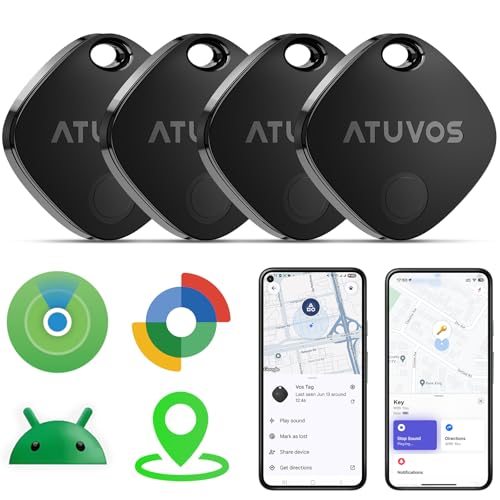
- Works with Apple Find My or Google Find Hub on supported devices; not compatible with Huawei.
- A built-in speaker can sound an alarm, and the tags support location sharing and alerts.
- Rated IP67 for water resistance; check the recipient’s phone OS and preferred tracking app.
Best For: Teachers who often need help locating keys, bags, or other belongings.
11. Lenovo Idea Tab 11-Inch with Pen and Folio Case
A Tablet for Notes and Planning
Lenovo Idea Tab 11-Inch with Pen and Folio Case

- Includes an 11-inch 2.5K IPS touchscreen, Lenovo Tab Pen, and folio case.
- Offers 8GB memory and 256GB storage, with Android 15 listed as its operating system.
- Four included learning apps support note-taking, sketching, writing, and calculation.
Best For: Teachers who want a tablet for reading, annotating, and organizing lesson materials.
12. Amazon Echo Dot Smart Speaker
Hands-Free Timers and Audio

- Plays music, audiobooks, and podcasts through supported services or Bluetooth.
- Alexa can set hands-free timers, give weather updates, and answer questions.
- Works with compatible smart-home devices and includes a microphone-off button.
Best For: Teachers who can use a voice assistant for timers or audio at home or work.
How to Choose a Christmas Tech Gift for a Teacher
Start with the teacher’s routine rather than the most impressive-looking device. A person who spends hours preparing materials may appreciate a keyboard, mouse, or second screen. Someone who teaches online may get more use from a webcam or microphone. A tracker tag or power bank is aimed at daily logistics, while a digital frame or smart speaker can be more personal for home.
Consider where the gift will be used. A school may restrict smart speakers, Bluetooth devices, or personal electronics, and classroom Wi-Fi policies can affect connected products. A projector can be useful for a teacher who controls the room’s setup, but less practical if the school already provides equipment. For a desk gift, check the available space, ports, and whether the recipient works from a laptop or desktop.
Set a Budget That Fits the Use
Small accessories can still solve recurring annoyances. The tracker tags offer four pieces for keys or bags, while a mouse or keyboard can improve a familiar work area. A power bank is more useful when the recipient regularly works away from outlets; a portable monitor or docking station suits a desk setup where an additional screen or fewer cable swaps would matter.
For larger purchases, make sure the recipient would use the specific feature set. The Lenovo tablet includes a pen and folio case for writing and reading. The projector is designed for a large image and HDMI connections. The webcam combines a camera and light, while the microphone offers both USB and XLR connection choices. Pick based on a known need rather than the number of features.
Check Compatibility and Personalization
Before buying, match the product to the recipient’s devices. The docking station requires a compatible USB-C, USB4, or Thunderbolt connection and has stated operating-system and display limitations. The portable monitor needs a compatible USB-C video connection or mini HDMI. The mouse pairs through Bluetooth or USB-A, and its right-handed shape is designed for smaller to medium hands. The tracker tags depend on either Apple Find My or Google Find Hub, so verify the phone platform and supported OS.
Personalization can be practical. If choosing a keyboard, consider whether a compact layout and quiet switches suit the workspace. For a digital photo frame, arrange for family or friends to share images if that fits the recipient’s preferences. For a microphone or webcam, think about whether the teacher uses video calls, recorded lessons, or both. A gift that matches an existing routine is more likely to be enjoyed.
Timing and Last-Minute Decisions
For a late-season choice, favor gifts with a clear use and straightforward connection to existing devices. Still check the retailer’s current product details and delivery information directly; these can change. Avoid assuming a cable, adapter, streaming stick, or audio interface is included unless the listing says so. The projector’s streaming stick is separate, and XLR use with the microphone requires a separate cable and audio interface or mixer.
If there is time, ask a family member or colleague about the teacher’s setup and school policies. If not, choose a device whose compatibility is easy to confirm and include a gift receipt where available. Christmas tech gifts for teachers work best when they make planning, communication, or time away from work a little easier.
