
Choose a client gift that fits how they work, connect, or unwind. These tech picks range from useful desk accessories to devices for home and travel, with compatibility details to consider before buying.
13 Christmas Tech Gifts for Clients
1. Deco 7 Pro Tri-Band Wi-Fi 7 Mesh System
For a More Connected Home
Deco 7 Pro Tri-Band Wi-Fi 7 Mesh System

- Three-unit mesh system lists coverage up to 7,600 sq. ft.
- Wi-Fi 7 with a 10G WAN/LAN port and four 2.5G WAN/LAN ports.
- Requires a separate modem; the system works with other Deco products.
Best For: Clients upgrading a busy home office or connected household.
2. Anker Prime 14-in-1 Laptop Dock
For a Streamlined Laptop Desk
Anker Prime 14-in-1 Laptop Dock

- Combines 14-in-1 connectivity, including dual HDMI ports.
- Offers up to 160W total output and data speeds up to 10Gbps.
- Supports USB-C, USB4, and Thunderbolt; check display and operating system limitations.
Best For: Clients who connect a laptop to peripherals and multiple displays.
3. intpw Powered 9-Port USB Hub
For the Port-Short Laptop

- Includes USB-C and USB-A data ports plus two USB-C PD charging ports.
- Provides data transfer up to 10Gbps on USB 3.2 ports.
- Powered hub does not provide video output; PD charging ports do not transfer data.
Best For: Clients who need more USB connections at a laptop or desktop.
4. HAPPRUN Native 1080p Bluetooth Projector
5. Acer A640 4K Webcam
For Clearer Video Calls

- Supports 4K at 30 fps and 2K or 1080p at 60 fps.
- AI noise cancellation microphone and a physical privacy shutter.
- USB plug-and-play; it has no built-in speakers.
Best For: Clients who join video meetings or present remotely.
6. AOC 15.6-inch Portable FHD Monitor
For Work Beyond the Main Desk
AOC 15.6-inch Portable FHD Monitor

- Adds a 1920×1080 IPS screen with a 170° viewing angle.
- Has dual USB-C ports and Mini HDMI connectivity.
- Includes a smart cover for protection and travel.
Best For: Clients who travel for work or want a flexible second screen.
7. Anker Nano Clamp Power Strip
For a Tidier Desk

- Has six AC outlets, two USB-C ports, and two USB-A ports.
- One USB-C port provides up to 70W output.
- Desk clamp fits edges 0.6–1.8 inches thick; check desk shape and edge.
Best For: Clients with several devices clustered at a desk.
8. AULA F99 Pro Silent Wireless Keyboard
For Quiet, Customizable Typing
AULA F99 Pro Silent Wireless Keyboard

- Connects by Bluetooth, 2.4GHz wireless, or USB, and can pair with up to five devices.
- Hot-swappable switches and keycaps allow customization without soldering.
- Includes pre-lubed quiet switches, RGB lighting, and a control knob.
Best For: Clients who enjoy customizing a computer setup for work or gaming.
9. SanDisk Extreme Portable 2TB SSD
For Files on the Move
SanDisk Extreme Portable 2TB SSD

- Provides 2TB of portable solid-state storage.
- Lists read speeds up to 1,050MB/s and write speeds up to 1,000MB/s.
- Includes password protection with 256-bit AES hardware encryption.
Best For: Clients who manage large work files, photos, or media.
10. Amazon Echo Show 5 Smart Display
For Hands-Free Home Help
Amazon Echo Show 5 Smart Display
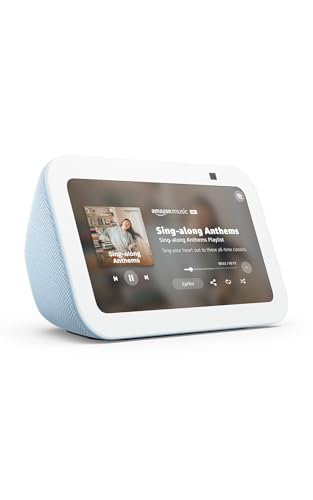
- Its 5.5-inch display shows news and weather and supports video calls.
- Can control compatible smart devices and display photos.
- Includes a camera shutter and a button to turn off the microphone and camera.
Best For: Clients who appreciate reminders, video calls, or smart-home control.
11. Logitech Blue Yeti USB Microphone
For a Better Recording Setup
Logitech Blue Yeti USB Microphone

- Offers four pickup patterns for voices, instruments, and podcasts.
- Has onboard headphone volume, mute, gain, and pattern controls.
- Connects by USB to Mac or PC and includes a desktop stand.
Best For: Clients who record presentations, host calls, or create audio content.
12. Skylight 10-inch Wi-Fi Digital Photo Frame
For a Personal Photo Display
Skylight 10-inch Wi-Fi Digital Photo Frame

- Shows photos on a 10-inch 1280×800 touchscreen.
- Gift Mode lets you preload and personalize the frame before unboxing.
- Offline mode displays existing photos; Wi-Fi is needed to receive or upload new ones.
Best For: Clients who enjoy family or travel photos at home or work.
13. Life360 Tile Bluetooth Tracker 4-Pack
For Everyday Essentials
Life360 Tile Bluetooth Tracker 4-Pack

- Four Bluetooth trackers can attach to keys, bags, water bottles, and more.
- Use the app to ring a misplaced Tile or make a phone ring from the Tile.
- Compatible with iOS and Android; Tiles can be added to Life360.
Best For: Clients who travel often or misplace everyday essentials.
Choosing a gift for a client
A useful client gift reflects the recipient’s routine without requiring you to know every detail of their personal life. Start with the context you do know: whether they work from a home office, travel regularly, spend time on video calls, or enjoy recording and streaming. A portable monitor, webcam, docking station, or powered hub can support a work setup. A projector, smart display, digital photo frame, or tracker may suit a home or travel routine better.
Consider how much setup a recipient is likely to welcome. A USB microphone or portable monitor can be a straightforward addition to existing equipment, while a mesh Wi-Fi system has a larger role in the household network. If you are uncertain about a client’s preferences, choose something with a clear use and check its main requirements before ordering. A gift should feel helpful, not like another project.
Budget and perceived usefulness
These gifts cover different levels of investment, so set a budget before choosing. A smaller desk accessory can still feel thoughtful when it solves a visible annoyance, such as too few laptop ports or a crowded charging area. A high-capacity storage drive or a larger networking upgrade may make sense when you know the client’s needs and have an appropriate business gifting budget.
For a more personal impression, focus on relevance rather than size. A digital frame can be especially meaningful if you can preload suitable photos with permission; a portable SSD may suit someone who routinely handles large media files. When you do not know the recipient well, practical accessories are often easier to give than items that depend on taste, room layout, or a particular workflow.
Check compatibility and personalization
Compatibility is the most useful detail to verify before buying Christmas tech gifts for clients. For a dock or hub, check the laptop’s ports and operating system. The Anker dock supports USB-C, USB4, and Thunderbolt, but its notes list limitations for macOS displays and Linux. The intpw hub does not output video, and its USB-C PD charging ports do not transfer data. Those distinctions can matter more than the number of ports.
For a portable monitor or webcam, confirm that the recipient’s computer can connect through the listed USB-C, HDMI, or USB options. A projector needs an appropriate HDMI source for streaming; its TV stick is sold separately, and phones may require a compatible adapter. A mesh system requires a separate modem, and the clamp power strip needs a compatible desk edge. These are easy checks if you know the person’s setup, but they are good reasons to choose a simpler gift when you do not.
Personalization can be modest. A digital photo frame supports Gift Mode and can be prepared with photos, while the keyboard offers switch and keycap customization for someone who likes to tailor their setup. For client relationships, keep personalization appropriate and consider whether setup requires access to private accounts, devices, or photos.
Timing and last-minute decisions
Allow time to check compatibility and prepare any personal touches. If the gift depends on home networking, a desk measurement, or a particular computer port, verify that information before the holiday rush. If you plan to preload a photo frame, leave time to choose images and set it up. Avoid promising delivery dates: shipping schedules and availability can change.
For a last-minute choice, favor a gift with a use that is easy to understand and minimal prerequisites you cannot confirm. A tracker multipack, USB microphone, or portable SSD may be easier to match to a recipient than a networking system or desk clamp. Check the product listing for current stock and delivery estimates, and have a simple card explain why you chose it. The strongest Christmas tech gifts for clients are useful, considered, and suited to what you actually know about the person.
