
Apartment-friendly tech can make a small home more comfortable, useful, and fun without requiring a full room makeover. These Christmas gift ideas span entertainment, work, and everyday routines.
16 Tech Gifts for Apartment Dwellers
1. ULTIMEA 7.1ch Dolby Atmos Sound Bar
A More Immersive TV Night
ULTIMEA 7.1ch Dolby Atmos Sound Bar

- Pairs a soundbar with a wireless subwoofer and two wireless surround speakers.
- Supports Dolby Atmos through HDMI eARC; also offers Optical, USB, and Bluetooth 6.0 connections.
- The subwoofer and surround speakers connect wirelessly but still need power outlets.
Best For: Apartment movie and gaming fans with space and outlets for a surround setup.
2. JMGO N1S 4K Triple Laser Projector
A Flexible Big-Screen Upgrade
JMGO N1S 4K Triple Laser Projector

- Offers 4K UHD resolution, HDR10, Google TV, and licensed Netflix access.
- Its gimbal adjusts vertically, with auto focus and keystone correction for setup.
- The listed 200-inch screen size depends on projection conditions and available wall space.
Best For: Someone who wants a movable viewing setup and has a suitable projection surface.
3. Jackery Explorer 1000 v2 Power Station
Portable Power for Flexible Living
Jackery Explorer 1000 v2 Power Station

- Provides 1,070Wh capacity, 1,500W AC output, and three AC ports.
- Includes USB-C, USB-A, and a DC car port for charging compatible devices.
- The listed 23.8-pound unit is portable; solar panels are not included.
Best For: A renter who wants backup power for devices or a portable option for outings.
4. INNOCN 40C1R 40-Inch Ultrawide Monitor
A Roomy Desk Display
INNOCN 40C1R 40-Inch Ultrawide Monitor

- The 40-inch screen has a 3440 × 1440 resolution and 21:9 aspect ratio.
- Connects through DisplayPort, USB-C, or two HDMI ports.
- Its stand supports tilt, swivel, and height adjustment; check desk space before gifting.
Best For: A remote worker, editor, or gamer with a desk that can fit a wide display.
5. Anker Prime 14-in-1 Docking Station
A Tidier Laptop Workstation
Anker Prime 14-in-1 Docking Station

- Combines 14 connections, including USB-C and dual HDMI display outputs.
- Offers up to 160W total output and data transfer speeds up to 10Gbps.
- Check laptop support: it requires USB-C, USB4, or Thunderbolt with DP Alt Mode and Power Delivery; it does not support Linux.
Best For: Someone building a multi-device desk setup around a compatible laptop.
6. Aurzen BOOM Air Portable Projector
Movie Nights That Move
Aurzen BOOM Air Portable Projector

- Runs Google TV with access to supported streaming apps and has visible 10W speakers.
- Uses native 1080p resolution with HDR10; 4K input requires an HDMI-connected device.
- USB-C power requires a 65W-or-higher power bank and a 5A E-Marker USB-C cable.
Best For: A renter who wants a portable projector and can arrange the required power source.
7. TP-Link Deco 7 Wi-Fi 7 Mesh System
Coverage for Awkward Layouts
TP-Link Deco 7 Wi-Fi 7 Mesh System

- Creates a mesh network with a single network name and app-based setup.
- Supports Wi-Fi 7 and has 2.5G Ethernet ports.
- A separate modem is required for most providers; mesh backhaul requires at least two Deco units.
Best For: Someone addressing Wi-Fi coverage gaps across rooms, with a compatible modem and plan.
8. LEVOIT Core 400S-P Smart Air Purifier
A Practical Living-Room Upgrade
LEVOIT Core 400S-P Smart Air Purifier

- Designed for rooms up to 1,733 square feet, according to the listing.
- Its three-stage filter is listed for pollen, dust, and animal dander; smoke CADR is 231 CFM.
- An air-quality sensor updates the PM2.5 display, and the purifier supports smart controls.
Best For: A household seeking an air purifier for a frequently used room or open floor plan.
9. CASABREWS CM5418 Compact Espresso Machine
A Small-Kitchen Coffee Ritual
CASABREWS CM5418 Compact Espresso Machine

- Makes single or double espresso shots and includes a steam wand for milk frothing.
- The removable water tank holds 34 ounces.
- Includes one-cup and two-cup filters, a portafilter, and a tamper with spoon.
Best For: A coffee lover with counter space for a compact espresso setup.
10. AEEZO 10.1-Inch Digital Picture Frame
A Shelf of Shared Memories
AEEZO 10.1-Inch Digital Picture Frame
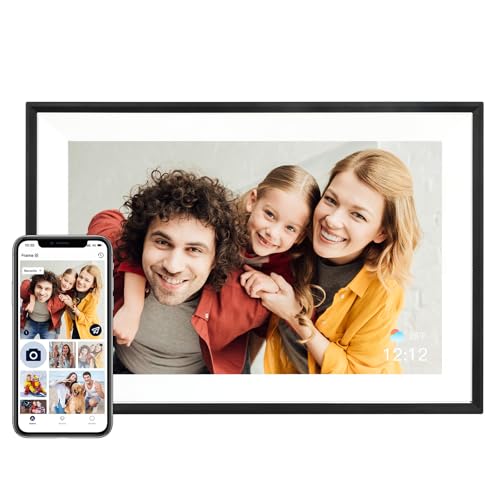
- Displays photos on a 10.1-inch, 1280 × 800 IPS touchscreen.
- Has 32GB of built-in storage and supports photo sharing through the AiMOR app.
- Auto-rotation adjusts orientation; photos from an SD card must be imported to the frame.
Best For: Family or friends who want to share changing photos in a common room.
11. LetPot 12-Pod Smart Indoor Garden
Fresh Herbs Without a Balcony
LetPot 12-Pod Smart Indoor Garden

- Provides 12 planting cups, a 5.5-liter water tank, and a 24W growing light.
- The adjustable light pole extends up to 30 inches, and the app controls lighting schedules.
- Includes sponges, baskets, covers, and A&B nutrients.
Best For: An apartment gardener interested in growing plants indoors.
12. JLab JBuds Lux ANC Over-Ear Headphones
A Quieter Personal Listening Space
JLab JBuds Lux ANC Over-Ear Headphones

- Hybrid active noise cancellation is listed as reducing noise by up to 35 dB.
- Bluetooth Multipoint connects to two devices, and a USB-C cable supports wired listening.
- Includes Be Aware Mode, app-based EQ controls, and wireless audio sharing with compatible JLab headphones.
Best For: Someone who wants personal listening for work, travel, or shared living spaces.
13. HUANUO FlowLift Single Monitor Arm
More Room on the Desk
HUANUO FlowLift Single Monitor Arm

- Fits monitors from 13 to 32 inches and 4.4 to 19.8 pounds with VESA 75 × 75mm or 100 × 100mm patterns.
- Offers tilt, swivel, and rotation adjustments, plus a choice of clamp or grommet mounting.
- Check the desk thickness and underside clearance before choosing a mounting location.
Best For: A home-office worker with a compatible monitor and suitable desk.
14. Kisnt KN85 Wireless Mechanical Keyboard
A Compact Typing Upgrade
Kisnt KN85 Wireless Mechanical Keyboard

- Its 75% layout keeps arrow keys and function keys while omitting the number pad.
- Connects through USB-C, 2.4GHz wireless, or Bluetooth and supports switching between Windows and Mac.
- Hot-swappable switches and adjustable RGB backlighting let the owner customize the setup.
Best For: A typist or gamer looking to save desk space and personalize their keyboard.
15. 1.0L Electric Kettle with Seven Temperature Settings
A Better Tea-Break Routine
1.0L Electric Kettle with Seven Temperature Settings

- Offers seven temperature settings and a keep-warm function for up to four hours.
- The 1.0-liter kettle uses 1200W and is designed for 120V outlets.
- Features automatic shut-off and a stainless steel interior.
Best For: A tea or pour-over coffee drinker with limited kitchen counter space.
16. RGB+IC Corner Floor Lamp
Color and Light for a Corner

- Offers adjustable RGB+IC lighting controlled by app, remote, or built-in controls.
- Its foldable base and slim profile are designed for corner placement.
- Connects to the app through Bluetooth; it does not support Alexa or Wi-Fi.
Best For: Someone who wants adjustable ambient lighting in a living room or gaming corner.
Choosing Tech Gifts for Apartment Dwellers
The best tech gifts for apartment dwellers fit the recipient’s routines and the space they actually have. Start by noticing what they do at home: stream films, work at a laptop, brew coffee, grow herbs, or share photos with family. A useful upgrade can make one of those routines easier without requiring a new room layout.
Think through placement before choosing a large item. A 40-inch ultrawide monitor needs a sufficiently deep, wide desk, while a soundbar system needs room for its speakers and access to power outlets. A projector offers more flexibility, but it still needs a suitable wall or screen, and some models work best in dim conditions. Compact options such as headphones, a keyboard, a kettle, or a digital photo frame can suit smaller surfaces, though they still need a place to live.
Noise and shared walls matter in apartment life. Over-ear headphones offer a private way to listen, while a projector or sound system is better suited to a recipient who can manage volume with neighbors in mind. For work, a docking station, monitor arm, or compact keyboard can make a small desk more functional. Check whether the recipient’s desk can accommodate a clamp, grommet, or monitor base before gifting a mount.
Set a Budget Around the Whole Setup
A gift’s practical cost may include more than the main device. A projector may need a power bank or cable to work in a portable arrangement; a docking station needs a compatible laptop and displays to make its connections useful. A mesh network may require multiple units for backhaul and a modem for internet service. Consider these supporting needs as part of the gift, and avoid assuming that accessories are included unless the product details say so.
For smaller budgets, focus on a single everyday improvement: a keyboard that frees desk space, a kettle with temperature presets, or a photo frame that brings family pictures into view. Mid-sized upgrades might support a specific hobby or routine, such as espresso preparation or indoor herb growing. Larger gifts can anchor a work or entertainment setup, so it helps to confirm that the recipient wants and has room for that kind of change.
Check Compatibility and Personalize the Choice
Before buying computer gear, confirm the recipient’s laptop ports, operating system, monitor connections, and desk dimensions. The Anker dock’s listed requirements include USB-C, USB4, or Thunderbolt with DP Alt Mode and Power Delivery, and the product notes say it does not support Linux. The monitor lists USB-C, HDMI, and DisplayPort inputs; match those against the devices they will use. For a monitor arm, verify screen weight, VESA pattern, and desk mounting clearance.
For home networking, consider the current modem, internet service, and whether a single router or multiple mesh units suit the apartment layout. Thick walls and device placement affect coverage, so a mesh system is most relevant when the recipient has a known dead zone. For appliances and lighting, check voltage, outlet access, and placement. The kettle is specified for 120V outlets, while the corner lamp uses Bluetooth app control and does not support Alexa or Wi-Fi.
Personalization can make practical tech feel more thoughtful. Preload a digital frame with shared photos if you can arrange it, or pair an indoor garden with seeds chosen for the recipient’s cooking habits. A keyboard or lamp can be selected to suit their desk or room style. Keep the recipient’s preferences in mind: useful features only matter when they match how someone likes to work, relax, or decorate.
Timing and Last-Minute Decisions
For a planned gift, ask subtle questions early about desk space, laptop model, Wi-Fi issues, or favorite coffee and tea routines. That can prevent compatibility surprises while still keeping the present a secret. For a last-minute decision, choose something whose use is clear and whose setup depends on fewer unknowns, such as headphones, a photo frame, or a kettle, after confirming any essential device or outlet requirements.
Leave time to check the box contents and setup instructions when the gift arrives. Some products require app setup, importing photos, positioning a projector, or adjusting a monitor mount. For Christmas gifting, a simple note explaining why you chose the item can make a practical device feel personal: it shows you noticed a routine they enjoy or a small apartment challenge you hoped to ease.
