
An accountant’s workday can involve spreadsheets, video calls, printed records, and hours at a desk. These Christmas tech gifts focus on useful upgrades for work and home, with options ranging from small desk additions to larger equipment.
16 Christmas Tech Gifts for Accountants
1. GOLDENMATE 1000VA/800W Lithium UPS
For a More Resilient Home Office
GOLDENMATE 1000VA/800W Lithium UPS

- Eight outlets provide surge protection and battery backup.
- An LCD panel displays battery and power conditions.
- The product supports standard 110V household power; check outlet voltage before use.
Best For: An accountant protecting a computer and router from brief power interruptions.
2. 512GB Encrypted Touchscreen External SSD
For Portable File Storage
512GB Encrypted Touchscreen External SSD

- 512GB capacity and a touchscreen showing transfer speed, temperature, and storage capacity.
- Hardware encryption and password protection help safeguard stored files.
- USB-C compatibility includes Windows PCs, Macs, iPhones, iPads, and Android devices.
Best For: An accountant seeking portable storage for personal files or permitted work materials.
3. TRALT Ergonomic Mesh Office Chair
For Long Desk Sessions
TRALT Ergonomic Mesh Office Chair

- Adjustable lumbar support lets the user change its depth.
- A breathable mesh back and molded foam seat are designed for desk use.
- Seat height adjusts from 17.7 to 21.7 inches.
Best For: An accountant who works at a home office desk most days.
4. Cardirun Foldable Walking Pad with Incline
For Gentle Movement at Home
Cardirun Foldable Walking Pad with Incline

- Walking mode runs from 0.6 to 3.8 mph; running mode reaches 6.2 mph.
- A 10% manual incline and LED display track workout settings and metrics.
- The folding design is 5 inches high for storage.
Best For: An accountant who enjoys walking while reviewing routine tasks.
5. Acer 13-in-1 USB-C Laptop Dock
For a Connected Laptop Workspace
Acer 13-in-1 USB-C Laptop Dock

- Includes two HDMI ports, one DisplayPort, Ethernet, USB ports, and SD/TF readers.
- The USB-C host port can deliver up to 100W to a compatible laptop.
- Triple-display support depends on laptop, GPU, and operating-system compatibility.
Best For: An accountant connecting a compatible laptop to monitors and desk accessories.
6. HUANUO Adjustable Single Monitor Arm
For a More Flexible Screen Position
HUANUO Adjustable Single Monitor Arm

- Fits monitors from 13 to 32 inches and weighing 4.4 to 19.8 pounds.
- Supports 75x75mm and 100x100mm VESA patterns.
- Offers tilt, swivel, and rotation, with clamp and grommet mounting options.
Best For: An accountant whose monitor and desk meet the mount’s fit requirements.
7. Tonfarb 136GB Digital Voice Recorder
For Capturing Meeting Notes
Tonfarb 136GB Digital Voice Recorder

- One-click recording and voice-activated recording are included.
- The package combines 8GB built-in storage with a 128GB TF card.
- Recordings can transfer to a computer over USB-C.
Best For: An accountant recording meetings when participants and workplace rules allow.
8. ZealSound USB Podcast Microphone
For Clearer Remote Calls
ZealSound USB Podcast Microphone

- USB plug-and-play connection supports Windows PCs, Macs, laptops, and select mobile devices.
- A built-in headphone jack enables real-time monitoring.
- Dedicated controls adjust microphone volume, monitoring volume, and echo.
Best For: An accountant who frequently joins remote client or team meetings.
9. KVIDIO Hybrid Active Noise-Canceling Headphones
For Quiet Focus Time
KVIDIO Hybrid Active Noise-Canceling Headphones

- Active noise cancellation and transparency mode are included.
- Battery life is listed as up to 40 hours with noise cancellation or 70 hours in standard mode.
- The package includes a 3.5mm audio cable and USB-C charging cable.
Best For: An accountant seeking focus during busy work periods or virtual meetings.
10. Adjustable LED Desk Lamp with USB Port
For Tunable Desk Lighting
Adjustable LED Desk Lamp with USB Port

- Six color temperatures and six brightness levels adjust the light for desk tasks.
- Touch controls and a one-hour timer are built in.
- A dual-folding design supports flexible positioning and compact storage.
Best For: An accountant reading printed statements or working after daylight hours.
11. Aothia PU Leather Desk Pad, Gray
For a Tidy Work Surface
Aothia PU Leather Desk Pad, Gray

- The 23.6 by 13.7 inch pad fits a laptop, mouse, and keyboard.
- Its water-resistant PU leather surface can be wiped clean.
- A suede-style underside is designed to resist slipping.
Best For: An accountant who uses a laptop alongside paperwork at a desk.
12. Logitech Wave Keys and Lift Ergonomic Combo
For Keyboard and Mouse Comfort
Logitech Wave Keys and Lift Ergonomic Combo
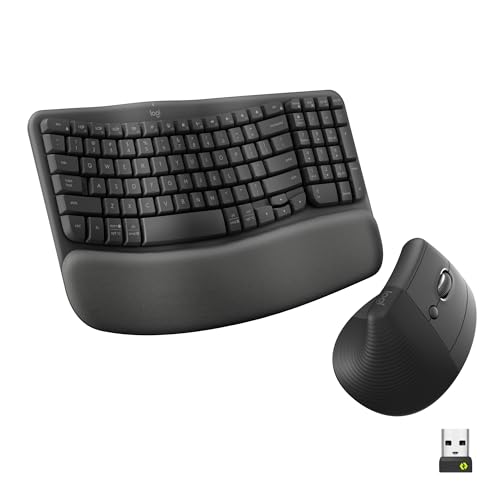
- The keyboard has a wavy design and cushioned memory foam palm rest.
- The Lift mouse has a vertical shape and thumb rest for small to medium hands.
- The combo connects via Bluetooth Low Energy or a Logi Bolt USB receiver.
Best For: An accountant who spends long sessions typing and navigating spreadsheets.
13. Brother Monochrome Laser Printer with Scanner
For Paperwork at Home
Brother Monochrome Laser Printer with Scanner

- Prints monochrome documents and includes scanning and copying functions.
- A 50-page auto document feeder supports document handling.
- Automatic duplex printing and single-pass two-sided scanning are included.
Best For: An accountant who regularly handles invoices and household records at home.
14. LG 34-Inch Curved UltraWide Monitor
For Side-by-Side Windows
LG 34-Inch Curved UltraWide Monitor

- The 3440 x 1440 display offers a 21:9 workspace for multiple open windows.
- Reader Mode reduces blue light, and the stand adjusts for height and tilt.
- USB-C, two HDMI ports, and DisplayPort provide connection options.
Best For: An accountant comparing spreadsheets, reports, and reference documents.
15. Keychron K8 Wireless Mechanical Keyboard
For Quiet, Tactile Typing
Keychron K8 Wireless Mechanical Keyboard

- The tenkeyless layout has 87 keys and white LED backlighting.
- Silent K Pro Red switches are described as soft and quiet.
- Bluetooth connects up to three devices; USB-C wired mode is also available.
Best For: An accountant who prefers a mechanical typing feel in a shared workspace.
16. SentrySafe Fireproof and Waterproof Document Box
For Household Record Storage
SentrySafe Fireproof and Waterproof Document Box

- The interior fits hanging file folders for important papers.
- A key lock and two keys are included.
- The product is listed as UL Classified for up to 30 minutes of high-temperature exposure and ETL Verified for water exposure.
Best For: An accountant organizing personal or household records at home.
Choosing a Tech Gift for an Accountant
Start with the recipient’s actual work setup. Someone who spends most of the day at a desk may appreciate an ergonomic chair, keyboard and mouse, or adjustable monitor arm. For a laptop-based workflow, a docking station can bring monitors, network, storage, and peripherals together, provided the laptop supports the dock’s video and USB-C features. If the accountant handles many documents, a printer with duplex scanning or a file safe may be more useful than another screen accessory.
Think about the workday’s friction points. A desk lamp can help with paper review in a dim room; headphones may support concentration or clearer calls. An external SSD offers portable storage, while the UPS is intended to provide battery backup to connected equipment. A walking pad makes sense only for someone who wants to move while working and has enough room to use it safely.
Match the Gift to Your Budget
For a modest gift, consider the desk pad, lamp, or voice recorder. These can complement an existing setup without requiring a major rearrangement. Headphones, a keyboard and mouse combo, or a monitor arm are more substantial upgrades while still focusing on one part of the workday.
Larger gifts such as the chair, docking station, ultrawide monitor, printer, UPS, or walking pad deserve a little more planning. Consider whether the recipient already owns a similar device and whether a larger purchase would fit the home office. If the gift is from a group, a coordinated contribution toward one meaningful workstation improvement can be more useful than several duplicate accessories. Avoid assuming a particular model or price fits a budget; check current details before buying.
Check Compatibility and Personalize Thoughtfully
For computer accessories, confirm the recipient’s equipment first. The Acer dock relies on native USB-C, graphics, and system support; its triple-display feature has additional Windows and DSC requirements, and macOS multiple displays mirror rather than extend. The LG monitor’s USB-C charging and the SSD’s connection speeds likewise depend on compatible devices and ports. For the monitor arm, check screen weight, size, VESA pattern, and the desk’s suitability for clamp or grommet mounting.
Personalization can be practical rather than decorative. Pair a desk upgrade with a note about how it suits the recipient’s routine, or choose a neutral finish that works with their existing office. For a safe or storage device, consider whether the recipient wants a place for household papers and how they organize them. For a recorder, make clear that workplace policies and participant consent may govern recording. Work files may also be subject to employer rules, so portable storage should be used only as permitted.
Christmas Timing and Last-Minute Decisions
For a larger workspace gift, decide early enough to check measurements, ports, and desk space. A monitor, chair, printer, or treadmill can be awkward to exchange if it does not fit the recipient’s room or setup. A discreet question to a family member or colleague may resolve practical questions without revealing the exact gift.
When time is short, choose an item that fits equipment and habits you already know. A desk mat or lamp is easier to match than a dock that depends on laptop capabilities. Confirm current product details and purchase terms with the seller, since listings and fulfillment can change. If compatibility remains uncertain, a card explaining the intended upgrade lets the recipient help select the right fit after Christmas. For accountants facing year-end deadlines, a thoughtful gift that saves time, improves comfort, or helps organize records can be especially welcome.
