
A useful gift for a UX designer can make daily work more comfortable, help capture ideas, or support a creative project. The best fit depends on how they work, what equipment they already use, and whether they spend more time at a desk or on the move.
20 Christmas Gifts for UX Designers
1. Anker Prime 14-in-1 Laptop Docking Station
The Connected Desk Upgrade
Anker Prime 14-in-1 Laptop Docking Station

- Brings together laptop accessories and displays through a 14-in-1 hub.
- Offers dual HDMI display connections; supported output depends on the laptop.
- Supports USB-C, USB4, and Thunderbolt connections, with Windows and ChromeOS compatibility.
Best For: UX designers who connect several devices to a laptop at a home or office desk.
2. XPPen Artist 13.3 Pro V2 Pen Display
The Hands-On Sketching Gift
XPPen Artist 13.3 Pro V2 Pen Display

- 13.3-inch fully laminated FHD screen supports drawing and visual annotation.
- Includes a dial, eight customizable shortcut keys, and a battery-free stylus.
- Connects to a computer and supports Windows, macOS, ChromeOS, and Linux.
Best For: Designers who sketch interface ideas or create visual assets by hand.
3. Maxtek Double-Sided Mobile Whiteboard
The Workshop Brainstormer
Maxtek Double-Sided Mobile Whiteboard

- Double-sided writing surface rotates and rolls on locking wheels.
- Compact footprint suits a home office or small meeting space.
- Includes an eraser, three markers, and six magnets.
Best For: UX designers who map user journeys or lead in-person brainstorming sessions.
4. Nulaxy Adjustable Rotating Laptop Stand
The Flexible Laptop Riser
Nulaxy Adjustable Rotating Laptop Stand

- Raises a laptop screen up to 18 inches and adjusts for viewing angle.
- Rotating base makes it easier to share a screen during collaboration.
- Fits laptops and tablets up to 17 inches; an external keyboard and mouse are suggested for typing.
Best For: A laptop user who wants a more adjustable setup for calls and focused work.
5. Tonfarb Digital Voice Recorder
The Conversation Capture Tool
Tonfarb Digital Voice Recorder

- One-click recording can capture interviews, meetings, or workshop discussions.
- Includes 8GB of built-in storage and a 128GB TF card.
- Transfers recordings to a computer over USB-C; recording with others should be done with their consent.
Best For: UX researchers who want to review interview notes or group discussions later.
6. HUION Keydial Mini Programmable Keypad
The Shortcut Workflow Helper
HUION Keydial Mini Programmable Keypad

- Offers 18 customizable keys and a dial with up to three functions.
- Connects over Bluetooth and supports Windows and macOS.
- Useful with compatible creative software for editing and design shortcuts.
Best For: Designers who repeat keyboard shortcuts in image, video, or illustration software.
7. 100W USB-C Power Bank with Retractable Cable
8. ProtoArc EM11 NL Vertical Wireless Mouse
The Alternative Mouse Pick
ProtoArc EM11 NL Vertical Wireless Mouse

- Vertical shape is designed for a more natural wrist and forearm position.
- Pairs with up to three devices using Bluetooth or the included USB-A receiver.
- Designed for hands under 7.5 inches long; allow time to adjust to the shape.
Best For: Right-handed designers with small to medium hands interested in a vertical mouse.
9. ErGear Adjustable Single Monitor Arm
The Clearer Desk Setup
ErGear Adjustable Single Monitor Arm

- Fits most 13–34-inch monitors up to 19.8 pounds with a 75x75mm or 100x100mm VESA pattern.
- Adjusts height, tilt, swivel, and rotation for different viewing positions.
- Includes cable clips and desk clamp or grommet mounting options; check desk and monitor fit.
Best For: A desk-based designer whose monitor is compatible with its size, weight, and VESA limits.
10. HARDELL 6-Inch Digital Caliper
The Real-World Measuring Aid
HARDELL 6-Inch Digital Caliper

- Measures interior, exterior, depth, and step dimensions in inches or millimeters.
- Large LCD and zero function support quick comparative measurements.
- Includes a case, two batteries, mini screwdriver, and stainless steel ruler.
Best For: Designers who document physical objects, product dimensions, or workshop prototypes.
11. Calibrite Display Pro HL Colorimeter
12. SanDisk 2TB Extreme Portable SSD
The Project File Companion
SanDisk 2TB Extreme Portable SSD

- Provides 2TB of portable storage for project files and reference materials.
- USB 3.2 Gen 2 connection and stated read speeds up to 1050MB/s.
- Includes password protection with 256-bit AES hardware encryption.
Best For: A designer who wants portable local storage for large work files.
13. Logitech Blue Yeti USB Microphone
The Clearer Call Microphone
Logitech Blue Yeti USB Microphone

- Offers cardioid, omni, bidirectional, and stereo pickup patterns.
- Onboard controls include headphone volume, mute, pattern selection, and mic gain.
- Connects by USB to Mac or PC and includes an adjustable desktop stand.
Best For: Designers who lead remote critiques, presentations, or recorded discussions.
14. BenQ PD2706U 27-Inch 4K Monitor
The Spacious Design Canvas
BenQ PD2706U 27-Inch 4K Monitor

- 27-inch 4K UHD IPS screen covers 99% sRGB and 95% P3, according to the supplied details.
- 90W USB-C supports image, video, data, and charging through one connection.
- KVM switch can display two PC systems with one keyboard and mouse.
Best For: A designer who wants a larger, high-resolution screen for interface and visual work.
15. Keychron Q13 Max Alice Mechanical Keyboard
The Ergonomic Typing Upgrade
Keychron Q13 Max Alice Mechanical Keyboard
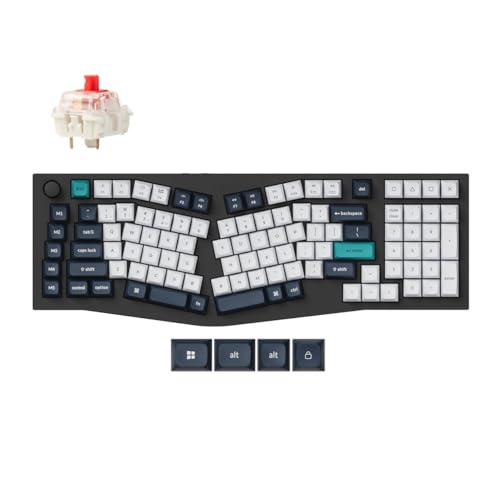
- Uses a 96% Alice layout with a full-metal body and mechanical switches.
- Connects over 2.4 GHz wireless, Bluetooth 5.2, or USB-C.
- Bluetooth can connect to three devices for multitasking.
Best For: A designer who values a distinctive keyboard layout for long typing sessions.
16. SWISSGEAR 1900 ScanSmart Laptop Backpack
The Organized Commuter Bag
SWISSGEAR 1900 ScanSmart Laptop Backpack

- Fits most 17-inch laptops and has a padded tablet pocket.
- Includes an organizer compartment, file holder, and multiple quick-access pockets.
- 31-liter capacity and a trolley strap suit commuting and travel.
Best For: A UX designer who carries a laptop, tablet, and work essentials between locations.
17. Pantone Capsule Signature Edition Color Guide
18. cocopar 15.6-Inch Portable 4K Monitor
The Travel-Friendly Second Screen
cocopar 15.6-Inch Portable 4K Monitor

- 15.6-inch 4K UHD screen with matte finish and built-in kickstand.
- Has two USB-C ports and an HDMI port; USB-C plug-and-play requires DP Alt Mode or Thunderbolt support.
- Includes a sleeve case, HDMI cable, USB-C cable, and power adapter.
Best For: A designer who wants a second screen for travel or work away from their main desk.
19. Insta360 Link 2 4K Webcam
The Presenter-Friendly Webcam

- 4K webcam includes HDR, autofocus, and an AI noise-canceling microphone.
- AI tracking pans and tilts to follow movement; DeskView and Whiteboard modes are included.
- Works with major video meeting platforms; not compatible with ARM-based Windows systems.
Best For: Designers who present, teach, or run remote workshops on video calls.
20. 18W Clamp Desk Lamp with Adjustable Light
The Flexible Task Light
18W Clamp Desk Lamp with Adjustable Light

- Clamp-on gooseneck design lets the lamp head point toward a work area.
- Offers three color modes and 16 brightness levels per mode.
- Touch and remote controls include a lighting mode memory function.
Best For: A designer who sketches, reads, or reviews printed materials at a desk.
How to Choose a Christmas Gift for a UX Designer
Start with how the person spends a typical workday. A researcher who interviews users may get more use from the voice recorder, microphone, or portable storage than from a drawing tablet. Someone who spends hours refining screens may appreciate a larger monitor, colorimeter, keypad, or pen display. For a designer who moves between home, office, and client meetings, a backpack, power bank, or portable monitor can make the workday easier to manage.
Pay attention to what they already own. If their desk has a single laptop and few accessories, a docking station or laptop stand could be a practical upgrade. If they already have a comfortable, well-organized setup, a color guide or digital caliper may support more specialized work. A gift does not need to be a design tool: lighting, a keyboard, or a bag can improve the everyday environment where design happens.
Match the Gift to Your Budget
For a relatively modest gift, consider the caliper, voice recorder, keypad, color guide, or desk lamp. These each support a defined task or habit without requiring a full workstation change. A vertical mouse or laptop stand is another personal option, especially when you know the recipient’s hand size or laptop dimensions.
A larger gift can address a broader need. Monitors, the docking station, colorimeter, and pen display can become central parts of a setup. Before choosing one, consider whether the recipient has mentioned a screen upgrade, color-matching work, or a desire to draw directly on a display. A thoughtful shared gift may be a better fit for these larger purchases when you are uncertain about personal preferences.
Check Compatibility and Personalization
Computer accessories are only useful when they work with the recipient’s equipment. Check operating system, ports, and display support. The docking station has stated limits for macOS display mirroring and does not support Linux; the portable monitor needs a USB-C port with DP Alt Mode or Thunderbolt for plug-and-play. The keypad and pen display have their own operating system and software support, so review the specific requirements against the recipient’s computer and preferred apps.
For monitor-related gifts, confirm the existing setup. The monitor arm requires a compatible VESA pattern and has screen size and weight limits. A colorimeter supports specified display types and includes Mac and Windows software. A power bank’s actual charging rate is limited by both the port used and the device’s input capability. If you cannot check the exact device, choose a less compatibility-sensitive desk or travel accessory, or ask someone close to the recipient discreetly.
Personal comfort matters too. A mechanical keyboard layout, vertical mouse shape, or particular pen workflow can be a matter of taste. The vertical mouse is designed for smaller to medium hands and may take time to get used to. Ergonomic or adjustable features do not guarantee a comfortable fit for everyone, so treat these as considered options rather than universal upgrades.
Plan Timing and Last-Minute Decisions
Order early when setup involves compatibility checks, a particular computer connection, or a specific workspace measurement. That gives time to confirm details and wrap the gift without making Christmas depend on a rushed purchase. For a last-minute choice, favor something with a clear use and simple fit: a color reference guide, portable storage, desk lamp, microphone, or voice recorder may be easier to match than a monitor or monitor arm.
If the gift is meant to support interviews or workshops, include a short note suggesting a use, such as keeping recordings organized for later review. For gear with adjustable settings, a brief card explaining the feature that made you think of them can make a practical present feel personal. The goal is to recognize the recipient’s actual habits and give them something they can use in their own way.
