
Photo editing gifts can support the whole process: importing camera files, refining images, checking color, and sharing finished work. The right fit depends on the recipient’s computer, display, storage habits, and whether they prefer digital or printed results.
13 Christmas Gift Ideas for Photo Editors
1. HUION Kamvas Pro 16 Plus 4K Pen Display
A Pen Display for Hands-On Retouching
HUION Kamvas Pro 16 Plus 4K Pen Display
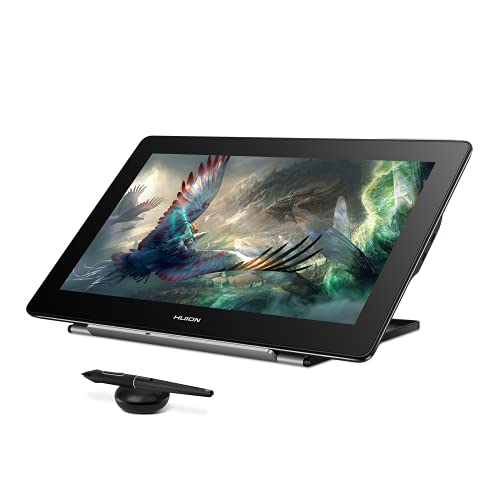
- The 15.6-inch 4K screen pairs with a battery-free pen for direct editing and drawing.
- The pen supports 8192 pressure levels and tilt recognition for pressure-sensitive strokes.
- Connects to compatible Windows, Mac, Linux, or Android devices; it is not standalone.
Best For: Editors who want pen input for retouching, masking, or detailed adjustments.
2. UGREEN DXP2800 2-Bay Diskless NAS
A Central Home for Photo Archives
UGREEN DXP2800 2-Bay Diskless NAS

- Centralizes photos, videos, backups, and other files across compatible devices.
- Supports up to 80TB across two HDD bays and two M.2 NVMe slots.
- Diskless design means storage drives must be purchased separately.
Best For: Editors building a shared photo archive or multi-device backup setup.
3. SABRENT 4-Bay USB-C Drive Enclosure
Expandable Storage for a Growing Archive
SABRENT 4-Bay USB-C Drive Enclosure

- Holds up to four 3.5-inch SATA HDDs or SSDs; drives are not included.
- Connects directly over USB-C and works with Windows, macOS, and Linux.
- Each drive mounts individually in JBOD style; this is not a RAID device.
Best For: Editors who want to connect several separate project or archive drives.
4. LitONES Adjustable Desk Lamp
A Flexible Light for the Editing Desk

- Offers stepless brightness adjustment from 1% to 100%.
- Five color-temperature settings range from 2700K to 6500K.
- The adjustable arm reaches over multi-screen workstations and standing desks.
Best For: Editors who want adjustable desk lighting for long work sessions.
5. HUANUO TitanLift Heavy-Duty Monitor Arm
A More Adjustable Display Position
HUANUO TitanLift Heavy-Duty Monitor Arm

- Supports compatible screens from 17 to 49 inches weighing 6.6 to 44 pounds.
- Provides tilt, swivel, rotation, and extension adjustments for screen positioning.
- Requires a wooden desk 0.8 to 3.5 inches thick with no obstructing underside beams.
Best For: Editors with a compatible large monitor and suitable wooden desk.
6. Acer 7-in-1 USB-C Hub
A Laptop Port Upgrade for Photo Work

- Adds SD and microSD card slots, USB ports, HDMI, and USB-C connections.
- Supports HDMI output up to 4K at 30Hz on devices with USB-C video output.
- The PD port supports up to 100W charging when paired with a compatible laptop and charger.
Best For: Laptop editors who need card slots and extra connections at a desk.
7. SABRENT UHS-II SD and microSD Card Reader
A Quick Route from Camera Card to Computer
SABRENT UHS-II SD and microSD Card Reader

- Reads both standard SD and microSD cards, including supported UHS-II formats.
- Has two slots for transferring files from compatible cards.
- Uses an integrated USB-C cable and needs no separate power supply.
Best For: Editors who regularly import photos from SD or microSD cards.
8. Calibrite Display Pro HL Colorimeter
9. Wacom Intuos Pro Medium Drawing Tablet
A Pressure-Sensitive Retouching Surface
Wacom Intuos Pro Medium Drawing Tablet

- The Pro Pen 3 supports 8192 pressure levels and tilt control.
- Ten customizable ExpressKeys and two dials put shortcuts within reach.
- Connects over USB or Bluetooth to compatible Mac and Windows computers.
Best For: Editors who prefer a pen tablet for selections and retouching.
10. TourBox Elite Plus Editing Controller
A Shortcut Controller for Editing Sessions
TourBox Elite Plus Editing Controller

- Provides programmable buttons and knob controls for creative workflows.
- Offers software integration with Photoshop, Lightroom, Capture One, and other listed apps.
- Compatible with iPadOS, macOS, and Windows; includes two AA batteries.
Best For: Editors who want frequently used controls close at hand.
11. Canon imagePROGRAF PRO-310 Photo Printer
A Home Printer for Finished Images
Canon imagePROGRAF PRO-310 Photo Printer

- Prints color photos using a nine-color pigment ink system with Chroma Optimizer.
- Supports paper sizes up to 13 by 19 inches and custom lengths up to 129 inches.
- Includes a 3-inch color LCD for checking printer status and settings.
Best For: Photo editors who want to print their work at home.
12. Color Management & Quality Output
A Practical Guide to Color from Screen to Print
Color Management & Quality Output
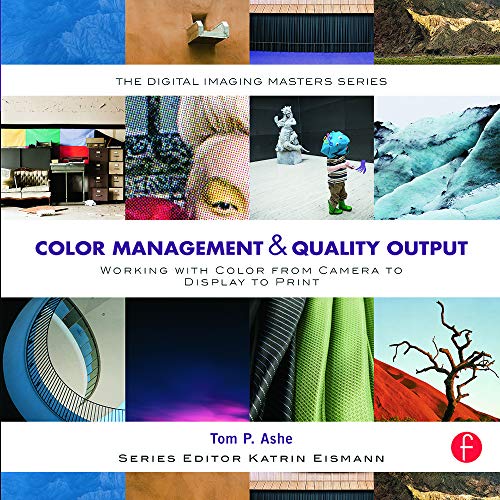
- Covers color management from camera input through display and print output.
- Includes guidance on Photoshop and Lightroom print menus and color settings.
- The 456-page reference also discusses profiles, sharpening, and print media.
Best For: Editors who want to strengthen their color-managed print workflow.
13. BenQ PD2706U 27-Inch 4K Monitor
A Detailed Screen for Color-Focused Editing
BenQ PD2706U 27-Inch 4K Monitor

- Combines a 27-inch IPS panel with 4K UHD resolution.
- Covers 99% sRGB/Rec.709 and 95% P3, with listed Delta E ≤ 3 accuracy.
- Includes 90W USB-C, a KVM switch, and an ergonomic design.
Best For: Editors who want a larger, detailed display for photo work.
Choosing a Christmas Gift for a Photo Editor
Start with the part of the workflow the recipient talks about most. Someone who spends hours making selections and retouching may appreciate a pen tablet or pen display. A tablet sits beside the existing monitor and uses a separate surface for pen input; a pen display lets the recipient work directly on its screen. The Kamvas requires a compatible connected device, while the Wacom Intuos Pro works as a separate tablet. Check desk space and software compatibility before choosing between them.
For a color-focused editor, consider the monitor and calibration options. The BenQ is a 27-inch 4K display with listed color coverage and USB-C connectivity. The Calibrite colorimeter supports profiling compatible displays and offers validation tools. These gifts make the most sense when the recipient has an editing setup where color consistency matters. A book on color management is a more compact way to support learning about the path from camera files to screen and print.
Match the Gift to Their Workflow
Importing and storing files are practical areas where small upgrades can save steps. The SABRENT card reader handles SD and microSD cards, while the Acer hub combines card slots with other laptop connections. Before buying either, check what ports and card formats the recipient already uses. A hub’s HDMI output depends on the computer supporting USB-C video, and the listed output is up to 4K at 30Hz.
For larger archives, distinguish between a network storage device and a directly attached enclosure. The UGREEN NAS centralizes files across compatible devices, but it is diskless, so drives must be selected separately. The four-bay SABRENT enclosure connects directly to a computer and mounts drives individually; it is not a RAID device. Check the recipient’s current backup routine, drive collection, and comfort setting up storage before choosing. Storage gifts can involve follow-on purchases, so include that in the decision.
A TourBox controller suits someone who likes to customize controls and use shortcuts. The desk lamp or monitor arm addresses the physical workspace instead. With the arm, verify the monitor’s size, weight, and VESA pattern, along with the desk material, thickness, and underside clearance. These details matter more than appearance when a gift has to fit an existing workstation.
Set a Budget That Includes the Setup
A thoughtful photo editing gift does not need to be the biggest item on the desk. A card reader or reference book can be useful without changing the computer setup. A hub, controller, or lamp can add convenience, while a monitor, printer, calibration device, or storage system is a more substantial equipment choice. For gear that needs drives, cables, paper, or ink, consider whether the recipient already has compatible supplies before judging the total cost.
Avoid choosing by headline features alone. A display may need a particular connection; a NAS needs separate drives; a printer needs compatible media and ink over time. When you are unsure about the computer model or existing equipment, a book or compact accessory can be easier to match than core hardware.
Check Compatibility and Personalize the Choice
Look at the recipient’s computer operating system, available USB-C or USB ports, monitor connections, and editing software. The product details list compatibility for each item, but the recipient’s exact device still matters. For the monitor arm, confirm VESA mounting and the desk requirements. For a pen display or tablet, consider whether the recipient prefers drawing directly on a screen or using a separate surface. For card readers, check the camera’s memory card type.
Personalization can come from matching the gift to a known habit: printing portraits, organizing years of RAW files, editing on a laptop, or refining color across displays. If you do not know the specifics, a gift receipt or a note offering to choose the right cable or storage drive together can keep the gift useful while preserving the surprise.
Timing and Last-Minute Decisions
For a planned purchase, verify the recipient’s setup and any required add-ons before ordering. For a last-minute choice, use what you already know: a person who imports camera cards may welcome a reader, while someone who prints work may value a color-management reference. Avoid promising arrival dates; check current seller delivery information directly. If compatibility remains uncertain, favor a lower-dependency accessory or book, and let the recipient select more involved hardware after Christmas.
