
IT students spend time coding, studying, troubleshooting, and building projects. A useful Christmas gift can make those hours more comfortable or give them tools for the work they already enjoy.
Practical Gifts for Study and Tech Projects
1. BOSGAME P5 Pro Mini PC
2. TRALT Ergonomic Mesh Office Chair
A More Comfortable Study Seat
TRALT Ergonomic Mesh Office Chair

- Adjustable lumbar support and an adjustable-height seat support a tailored desk setup.
- Breathable mesh backrest and a high-resilience molded foam seat.
- The product notes specify a 19.7-inch-wide seat and 17.7–21.7-inch seat-height range.
Best For: A student who spends long study sessions at a desk.
3. Acer 13-in-1 USB-C Docking Station
A Laptop Desk-Setup Upgrade
Acer 13-in-1 USB-C Docking Station

- Provides two HDMI ports, one DisplayPort, USB ports, Gigabit Ethernet, and SD/TF readers.
- Includes a 110W adapter and supports up to 100W charging for a connected host laptop.
- Triple-display support depends on the laptop, GPU, and system; macOS supports mirroring across multiple displays.
Best For: A laptop user who wants to connect displays, wired networking, and peripherals.
4. INIU 20,000mAh 65W Laptop Power Bank
Portable Power for Campus Days
INIU 20,000mAh 65W Laptop Power Bank

- Offers 20,000mAh capacity and 65W charging through a three-port design.
- Has two USB-C ports and one USB-A port for charging compatible devices.
- The product notes list laptops, phones, tablets, and handheld gaming devices among compatible devices.
Best For: A student who needs to recharge compatible devices away from an outlet.
5. STREBITO 142-Piece Precision Screwdriver Set
A Starter Kit for Small Repairs
STREBITO 142-Piece Precision Screwdriver Set
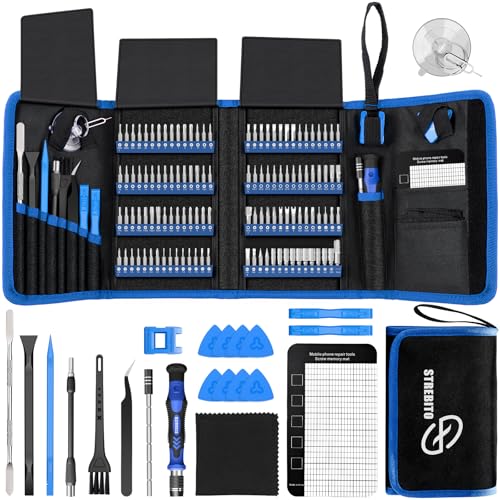
- Includes 120 screwdriver bits and 22 accessories, including a magnetic mat and ESD tweezers.
- Designed for repair work on computers, laptops, tablets, phones, and game consoles.
- Comes in a portable storage bag with labeled bit holders.
Best For: A hands-on student who opens and maintains computers or small electronics.
6. LOXP Adjustable 360° Laptop Stand
A Flexible Laptop Riser
LOXP Adjustable 360° Laptop Stand

- Adjusts in height and angle, and its base rotates 360 degrees.
- Folds for transport and has non-slip silicone to help keep a laptop in place.
- Designed for laptops from 10 to 16 inches.
Best For: A laptop user who wants a more adjustable desk arrangement.
7. iCasso Large Green Weeds Desk Mat
A Roomier Desk Surface
iCasso Large Green Weeds Desk Mat

- The product notes list a 35.4 by 15.7-inch extended desk-cover size.
- Its Lycra surface is intended for mouse movement, with stitched edges and a rubber base.
- Can be cleaned with a wet cloth or machine washed and hung to dry, according to the notes.
Best For: A student who wants a comfortable surface for a keyboard, mouse, and study materials.
8. NOYAFA NF466 Network Cable Tester
A Tool for Network Practice
NOYAFA NF466 Network Cable Tester
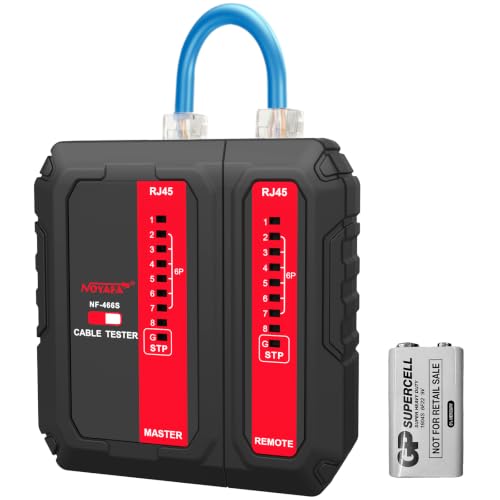
- Checks RJ45, RJ11, and RJ12 connections and CAT5, CAT6, and CAT7 UTP cables.
- Automatic tests check for continuity, open circuits, shorts, and miswiring.
- Portable handheld tester runs on a 9V battery, which is not listed among included components.
Best For: A student troubleshooting cables during home networking or lab projects.
9. Netac ZX20 2TB Portable NVMe SSD
Portable Space for Projects
Netac ZX20 2TB Portable NVMe SSD

- Provides 2TB of external solid-state storage in a compact portable design.
- The product notes list read speeds up to 2000MB/s and write speeds up to 1700MB/s.
- Includes USB-C-to-C and USB-C-to-A cables.
Best For: A student who needs portable storage for projects, backups, or media files.
10. MSI PRO MP273Q E14 27-Inch QHD Monitor
A Bigger View for Coursework
MSI PRO MP273Q E14 27-Inch QHD Monitor

- 27-inch IPS display with 2560 × 1440 QHD resolution and a 144Hz refresh rate.
- Connects through HDMI or DisplayPort and has a tilt-adjustable stand.
- Supports VESA 100 × 100mm mounting and includes built-in speakers.
Best For: A student who wants more screen space for coding, documentation, and research.
11. Bose QuietComfort Wireless Headphones
A Quieter Study Companion
Bose QuietComfort Wireless Headphones

- Over-ear Bluetooth headphones with active noise cancellation and Quiet and Aware modes.
- Offer up to 24 hours of battery life, with USB-C charging and an included audio cable.
- Adjustable EQ lets the listener change bass, mid-range, and treble through the Bose app.
Best For: A student who wants to reduce distractions in shared housing or a library.
12. CyberPower CP1500PFCLCD UPS
Backup for a Desktop Setup

- 1500VA/1000W sine-wave UPS with battery backup and surge protection.
- Includes 12 outlets: six with battery backup and surge protection, and six surge-protected outlets.
- Color LCD shows battery and power conditions; the unit also has AVR and USB-A and USB-C charging ports.
Best For: A student with a desktop or network setup who wants brief backup power during outages.
How to Choose a Christmas Gift for an IT Student
Start with the student’s current setup and the kind of work they do. Someone who primarily uses a laptop for classes may get daily use from a stand, dock, monitor, or portable power bank. A student who enjoys building and troubleshooting may appreciate the screwdriver kit, cable tester, or a small PC for home lab practice. Ask about their projects or notice what they carry and use; a gift that fills a real gap is usually more useful than a device chosen only for its impressive specifications.
Think about where the gift will be used. Dorm rooms and shared apartments reward compact, portable items. A foldable laptop stand, external SSD, and power bank are easier to pack between home, class, and campus. A chair, monitor, or UPS makes more sense when the student has a stable desk. For a student who works in libraries or busy shared spaces, noise-canceling headphones may be especially welcome.
Match the Gift to Your Budget
Smaller desk and repair accessories can be thoughtful gifts without requiring a full setup upgrade. A desk mat offers a comfortable, organized surface, while a precision screwdriver set gives an aspiring repairer tools for small electronics projects. A cable tester is more specialized, so it suits a student who has mentioned networking labs or hands-on troubleshooting.
For a larger present, consider what would improve daily coursework: a monitor for more screen room, a chair for extended desk time, or a dock to connect a laptop to multiple peripherals. A mini PC or UPS may be most appropriate when the recipient already has a particular home lab or desktop setup in mind. If several relatives are contributing, combining funds toward one larger, clearly needed item can be more useful than giving several unrelated accessories.
Check Compatibility and Personalization
Compatibility matters especially for docks, monitors, power banks, and laptop stands. Before choosing the Acer dock, check whether the student’s laptop supports video over USB-C and whether its graphics hardware supports the display configuration they want. Its multi-display behavior differs between Windows and macOS. With a monitor, check that the computer has a matching HDMI or DisplayPort connection and can drive the intended resolution and refresh rate. Confirm that the laptop fits the stand’s 10-to-16-inch range.
Power accessories deserve a quick check too. Verify that the student’s laptop can accept USB-C charging at the power bank’s supported rate, and match the CyberPower UPS capacity to the equipment they plan to connect. A UPS provides a limited amount of battery backup; its runtime depends on the connected load. For storage, confirm the student’s computer can connect to the included USB-C or USB-A cable and that 2TB suits their files. If you are unsure, a gift receipt or a conversation about their exact model can help.
Personal touches can make practical technology feel thoughtful. Pair a desk mat with a note about a favorite color or workspace style, or include a short card explaining why you chose tools that support their interest in computers. For a student who likes to tinker, a small message encouraging a future project can make a repair kit or cable tester feel tailored to them.
Timing and Last-Minute Decisions
For a planned purchase, check compatibility and the recipient’s desk or travel needs before the holiday rush. Large items such as a chair, monitor, or UPS may need more space at home, so make sure the student can accommodate them. If you are deciding close to Christmas, choose from what you already know about their setup. A portable accessory, desk mat, or repair kit can be easier to match than a major computer component.
When there is not enough time to verify a specific laptop or monitor connection, give a card describing the intended gift and let the student confirm the model or configuration. That keeps the present personal while giving them a say in the details. The best Christmas gift ideas for IT students are the ones that fit their studies, interests, and everyday setup.
