
Flight simulation gifts can make a setup more comfortable, immersive, or easier to manage. The right choice depends on the recipient’s aircraft preferences, current controls, available desk space, and PC connections.
Christmas Gifts for Flight Simulator Fans
1. Fosi Audio K7 Desktop DAC and Headphone Amp
A Desktop Audio Upgrade
Fosi Audio K7 Desktop DAC and Headphone Amp

- Connects through USB-C, optical, coaxial, or Bluetooth.
- Offers 4.4mm, 3.5mm, and RCA outputs for compatible audio gear.
- Has two control knobs, shortcut buttons, and a status display.
Best For: PC pilots with wired headphones who want a dedicated desktop audio hub.
2. SABRENT 10-Port Powered USB 3.0 Hub
More Ports for a Busy Cockpit
SABRENT 10-Port Powered USB 3.0 Hub

- Expands one USB 3.0 port into 10 ports.
- Individual switches and blue LEDs control and indicate each port.
- Includes a 60W power adapter and USB 3.0 cable.
Best For: Flight sim fans connecting several USB controls and accessories.
3. HUANUO TitanLift Heavy-Duty Monitor Arm
A More Adjustable View
HUANUO TitanLift Heavy-Duty Monitor Arm

- Supports compatible screens from 17 to 49 inches and 6.6 to 44 pounds.
- Provides tilt, swivel, rotation, and extension adjustments.
- Requires a wooden desk 0.8 to 3.5 inches thick with suitable underside clearance.
Best For: Sim pilots with a compatible large monitor and suitable desk.
4. Univivi 36-Inch Under-Desk Cable Tray
Tidy Up the Flight Desk
Univivi 36-Inch Under-Desk Cable Tray

- Measures 36 by 5.5 by 5.5 inches for under-desk cable storage.
- Installs with clamps or screws and includes built-in ties.
- Needs at least 5.3 inches of clear edge space if the desk has drawers or a back rod.
Best For: Players managing cords from multiple controls and displays.
5. Everlasting Comfort Memory Foam Seat Cushion
Comfort for Long Sessions
Everlasting Comfort Memory Foam Seat Cushion

- Uses memory foam with an ergonomic U-shaped cutout.
- Has a breathable, machine-washable cover and non-slip bottom.
- Can be used on office chairs, car seats, and other suitable seats.
Best For: Pilots who spend long stretches seated at a computer.
6. Wheel Stand Pro Flight Stand for Saitek Pro Flight Yoke
A Flexible Yoke Stand
Wheel Stand Pro Flight Stand for Saitek Pro Flight Yoke

- Designed for the Saitek Pro Flight yoke system.
- Offers stepless adjustment and quick-release clamps.
- The listing says it is not compatible with Honeycomb.
Best For: Saitek yoke users who want an adjustable seated setup.
7. Goplus 13-Inch Illuminated World Globe
A World Map for the Desk
Goplus 13-Inch Illuminated World Globe

- The 13-inch globe rotates through 720 degrees.
- Built-in LED lighting is operated with a switch on the USB cable.
- Has a desktop stand with a chrome-plated base.
Best For: Aviation fans interested in geography and world routes.
8. Thrustmaster TPR Rudder Pedals
Foot Controls for Coordinated Flight
Thrustmaster TPR Rudder Pedals

- PC-compatible pedals use a suspended pendular mechanism.
- H.E.A.R.T magnetic sensors provide frictionless operation.
- Spring resistance can be adjusted for a customized pedal feel.
Best For: Sim pilots adding foot-controlled yaw and turn coordination.
9. Samsung Odyssey G9 49-Inch Curved Monitor
A Panoramic Cockpit Display
Samsung Odyssey G9 49-Inch Curved Monitor

- The curved screen measures 49 inches with a 32:9 aspect ratio.
- Supports 5120 by 1440 resolution and a 144Hz refresh rate.
- Picture-in-Picture and split-screen features support multi-view use.
Best For: Pilots who want a broad view on a single ultrawide monitor.
10. Marada Adjustable Flight and Racing Simulator Cockpit
A Dedicated Sim Seat and Frame
Marada Adjustable Flight and Racing Simulator Cockpit

- The frame switches between flight simulation and sim racing configurations.
- Includes five interchangeable mounting panels for controls or a keyboard tray.
- Electronics, pedals, joystick, wheel, and HOTAS are not included.
Best For: Dedicated sim enthusiasts with room for a cockpit frame.
11. SanDisk Extreme 2TB Portable SSD
Portable Storage for Sim Files
SanDisk Extreme 2TB Portable SSD

- Provides 2TB of portable solid-state storage over USB.
- Advertised read speeds reach up to 1050MB/s, depending on the host device and other factors.
- The listing notes IP65 water and dust resistance and 3-meter drop protection.
Best For: Flight sim users storing large files, add-ons, or recordings.
12. Poster Master Six-Piece Framed Aviation Print Set
Aircraft Art for the Sim Room
Poster Master Six-Piece Framed Aviation Print Set

- The set contains six framed aviation-themed prints.
- The 11-by-14-inch prints feature vintage aircraft and patent-style artwork.
- Frames are included for wall display.
Best For: Enthusiasts decorating an office, gaming room, or cockpit corner.
13. AltMot Flight Simulator Instrument Panel Six Pack
Cockpit Instruments at the Desk
AltMot Flight Simulator Instrument Panel Six Pack

- Includes a built-in monitor and software for Windows PC use.
- The listing names X-Plane 11 and 12, and Microsoft Flight Simulator 2020 and 2024.
- Requires an HDMI output and USB connection; can mount on compatible yokes or a VESA desktop mount.
Best For: Windows sim pilots who want physical cockpit instruments.
14. HyperX Cloud III Wired Gaming Headset
Clear Audio for Squadron Comms
HyperX Cloud III Wired Gaming Headset
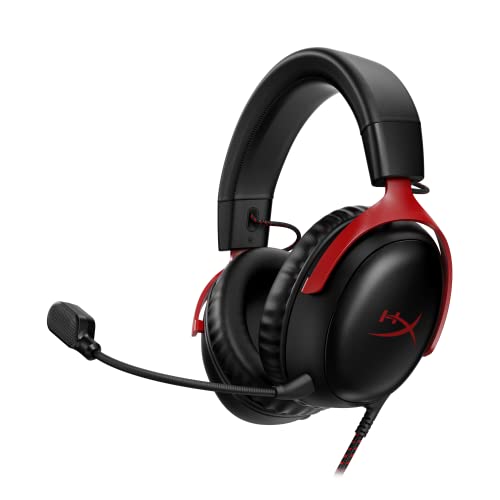
- Includes angled 53mm drivers and a detachable microphone.
- Connects through USB-C, USB-A, or a 3.5mm jack using included accessories.
- Has memory foam, an aluminum frame, and an LED microphone mute indicator.
Best For: Online squadron members who want wired audio and voice chat.
15. Thrustmaster HOTAS Warthog Flight Stick and Throttle
A Hands-On Combat Flight System
Thrustmaster HOTAS Warthog Flight Stick and Throttle

- The PC system is described as a 1:1 A-10C control replica with an all-metal build.
- Its throttle provides independent control of two engines.
- Includes 55 programmable action buttons and an 8-way point-of-view hat.
Best For: Combat and space sim fans who prefer dedicated stick and throttle controls.
16. Turtle Beach VelocityOne Flight Control System
A Complete Yoke-Based Control Set
Turtle Beach VelocityOne Flight Control System
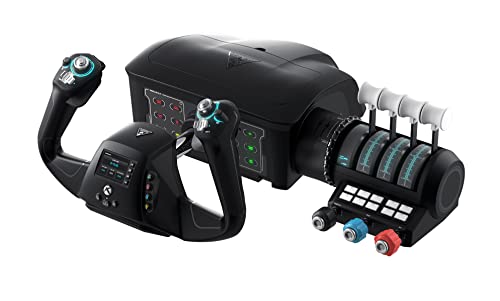
- Combines a yoke, throttle quadrant, trim wheel, and integrated rudder and brake controls.
- Designed for Xbox and Windows titles, including Microsoft Flight Simulator 2020 and 2024.
- Includes a clamping system for a variety of home setups.
Best For: General aviation fans seeking an all-in-one yoke control system.
17. Hikig Two-Set Desk Mounts for Flight Controls
Clamp-On Control Positioning
Hikig Two-Set Desk Mounts for Flight Controls

- The two mounts are listed as compatible with many joystick and throttle systems.
- Height and front-to-back position can be adjusted.
- Clamps attach the mounts to a desk for a secured control position.
Best For: Pilots with compatible controls who want to mount them at a desk.
18. TrackIR 5 Head Tracking with TrackClip PRO
Look Around with Head Movement
TrackIR 5 Head Tracking with TrackClip PRO

- Translates head movements into camera control in supported PC games and simulators.
- Tracks yaw, pitch, roll, and movement along X, Y, and Z axes.
- Includes TrackClip PRO, which attaches to a hat or visor.
Best For: PC sim pilots who want to look around the cockpit hands-free.
19. Pimax Crystal Super PC VR Headset
An Immersive VR Cockpit View
Pimax Crystal Super PC VR Headset

- The listing specifies 3840-by-3840 resolution per eye and a 140-degree field of view.
- Uses DisplayPort and USB connections with a Windows PC.
- Features inside-out tracking, adjustable IPD, and eye tracking.
Best For: Flight sim fans with a compatible PC who want to fly in VR.
Choosing a Christmas Gift for a Flight Simulator Fan
Start with how the recipient flies. A casual player using a keyboard and mouse may get more from a headset, a USB hub, or a seat cushion than from advanced controls. Someone already flying with a yoke may appreciate an instrument panel, rudder pedals, or a monitor upgrade. Combat and space sim fans may favor a stick and throttle, while pilots who enjoy general aviation often look for yoke-centered controls.
If you can, check what they already own before choosing a control accessory. Flight sim gear is often purchased piece by piece, and duplicates can be less useful than a support item that fits the setup. A gift receipt or a discreet question to a household member can help confirm the control brand and model without spoiling the surprise.
Match the Gift to the Budget
Smaller upgrades can still feel personal. Aviation prints or a desktop globe add character to a sim room without requiring the recipient to change their computer. A seat cushion or powered USB hub can solve everyday setup annoyances. Cable management is also a practical choice when several devices compete for desk space, though the tray’s measurements and mounting clearance should be checked first.
Mid-range gifts can change how a setup works. A desk mount or monitor arm can position existing equipment more conveniently, while a portable SSD adds space for files and recordings. A headset supports game audio and online voice chat. These gifts depend on details such as open USB ports, desk shape, monitor weight, or audio connections, so verify those basics where possible.
Larger purchases such as a cockpit frame, ultrawide monitor, VR headset, HOTAS, or yoke system deserve extra care. They take more space, connect to specific hardware, and can define the recipient’s entire setup. Consider them when you know the person’s preferences and room layout. A large or specialized gift is most welcome when it works with the computer and controls they already use.
Check Compatibility and Personalization
Read the product’s listed compatibility before buying. Some items are explicitly for Windows PCs, some mention Xbox as well, and some support named simulators or control families. The Saitek flight stand, for example, is listed for Saitek Pro Flight and says it is not compatible with Honeycomb. The instrument panel requires both HDMI and USB, while the monitor arm requires a compatible VESA pattern, screen size and weight, and a suitable wooden desk.
Personalization can mean matching the recipient’s style of flying rather than adding a name or festive design. Choose instrumentation for someone who enjoys cockpit procedures, head tracking for someone who likes scanning outside the aircraft, and a broad display for someone who prefers a traditional monitor view. A VR headset suits a different preference and requires a compatible PC. Focus on the features they will actually use.
Plan Timing and Last-Minute Decisions
For Christmas shopping, allow time to confirm fit and connections, especially for larger hardware. Check current product details and delivery estimates directly before ordering; listings and stock can change. For gifts that need desk measurements or device-model checks, ask early. A monitor arm, cockpit frame, or controls can be difficult to assess after the package arrives if the room or equipment is unsuitable.
When time is short, choose something with fewer dependencies: aviation artwork, a globe, or a cushion may be easier to select than a specialized control system. A powered USB hub or headset can also be straightforward if you know the recipient has compatible ports. Keep a gift receipt and preserve packaging until compatibility is confirmed. That gives the recipient room to make the setup their own while still receiving a useful Christmas gift.
