
A thoughtful gift for a database administrator can make a home lab easier to manage, improve a busy desk, or support hands-on troubleshooting. The best fit depends on how they work and what their setup can accommodate.
17 Christmas Gifts for Database Administrators
1. UGREEN DXP4800 Pro 4-Bay NAS
For the Home Lab Builder

- Supports Docker and virtual machines for development and testing setups.
- Offers four drive bays and two M.2 SSD slots for storage configurations.
- Includes RAID options and user permission controls for managing files.
Best For: A database administrator building shared storage or a home lab.
2. AV Access Dual-Monitor KVM Dock
For the Two-Laptop Desk
AV Access Dual-Monitor KVM Dock

- Lets two compatible laptops share two monitors, a keyboard, and peripherals.
- Combines KVM switching with 12-in-1 docking connectivity.
- Check USB-C display compatibility; Mac models support mirrored displays only.
Best For: Someone who switches between two laptops at one desk.
3. Deco 7 Pro Wi-Fi 7 Mesh System
For Whole-Home Lab Coverage
Deco 7 Pro Wi-Fi 7 Mesh System

- Three-pack system is listed to cover up to 7,600 square feet.
- Includes four 2.5G WAN/LAN ports and one 10G WAN/LAN port.
- Requires a separate modem; coverage and speeds vary with conditions.
Best For: A home lab owner seeking broader mesh network coverage.
4. TRALT Ergonomic Mesh Office Chair
For Long Desk Sessions
TRALT Ergonomic Mesh Office Chair

- Adjustable lumbar support and a breathable mesh backrest are listed.
- Seat height adjusts from 17.7 to 21.7 inches.
- The listing gives a 330-pound capacity and 19.7-inch seat width.
Best For: A desk worker who would value adjustable seating support.
5. Univivi 36-Inch Under-Desk Cable Tray
For a Tidier Workstation
Univivi 36-Inch Under-Desk Cable Tray

- 36-inch fabric tray organizes adapters, sockets, and cables beneath a desk.
- Installs with clamps or screws, according to the listing.
- Check desk dimensions and allow at least 5.3 inches of edge clearance.
Best For: Someone with a desk crowded by chargers and cables.
6. AstroAI 6000-Count Digital Multimeter
For Electronics Troubleshooting
AstroAI 6000-Count Digital Multimeter

- Measures AC/DC voltage and current, resistance, continuity, and capacitance.
- Includes a backlit display, data hold, auto-ranging, and a kickstand.
- The package includes a battery, test leads, socket, and manual.
Best For: A hobbyist who works on electronics projects and basic checks.
7. LYMAX Monitor Light Bar with Remote
For Focused Desk Lighting
LYMAX Monitor Light Bar with Remote

- Adjustable color temperature spans 2900K to 6000K, per the listing.
- The weighted bracket fits screens 0.2 to 1.8 inches thick.
- USB-C powered, with touch controls and a wireless remote.
Best For: A database administrator who wants task lighting without a desk lamp base.
8. STREBITO 142-Piece Precision Screwdriver Set
For Small Hardware Repairs
STREBITO 142-Piece Precision Screwdriver Set
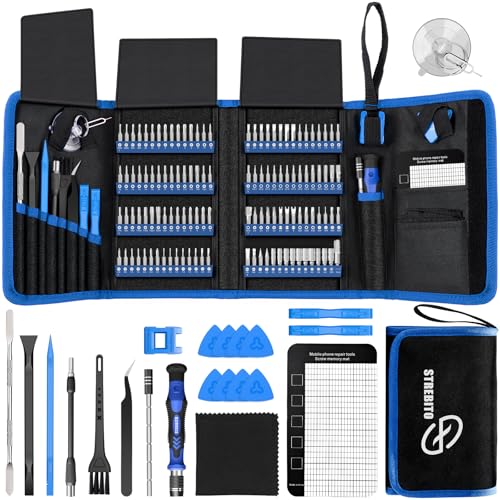
- Includes 120 driver bits and 22 repair accessories.
- A magnetic mat helps keep small screws and parts organized.
- The kit is supplied in a portable storage bag.
Best For: Someone who maintains computers, drives, or other small electronics.
9. HUION Keydial Mini Programmable Keypad
For Shortcut-Heavy Workflows
HUION Keydial Mini Programmable Keypad

- Offers 18 programmable keys and a dial with up to three functions.
- Connects over Bluetooth 5.0 and supports Windows and Mac OS.
- Custom shortcuts require setup in the Huion driver.
Best For: A user who wants dedicated keys for frequent commands or controls.
10. HUANUO FlowLift Pro Monitor Arm
For a Flexible Display Setup
HUANUO FlowLift Pro Monitor Arm

- Supports screens 13–32 inches weighing 4.4–15.4 pounds with VESA 75 or 100 mm.
- Offers tilt, swivel, and rotation adjustments.
- The listing recommends wood desks 0.59–3.54 inches thick; check fit first.
Best For: Someone with a compatible monitor who wants adjustable positioning.
11. ZealSound K66 USB Microphone
For Clearer Technical Calls

- Connects by USB and includes USB-C and Lightning adapters.
- Has a mute button, gain and volume controls, and a headphone monitoring jack.
- The listing describes a noise-reduction mode for keyboard and fan noise.
Best For: A remote worker who takes frequent calls, recordings, or streams.
12. BOSGAME P3 Lite Mini PC
For a Dedicated Test Machine

- The listed configuration includes 32GB DDR5 RAM and a 1TB NVMe SSD.
- Dual 2.5G Ethernet ports suit networked lab setups.
- Supports Windows 11 Pro and is listed as compatible with Ubuntu.
Best For: A database administrator who wants a compact machine for experiments.
13. Dell 32-Inch 4K Monitor S3225QS
For More Dashboard Space
Dell 32-Inch 4K Monitor S3225QS

- Provides a 32-inch 4K display with HDMI and DisplayPort connectivity.
- The listing specifies a 120Hz refresh rate and height adjustment.
- Check available desk space and computer display output before buying.
Best For: Someone who compares dashboards, query results, or logs on one screen.
14. Dell Pro Thunderbolt 4 Smart Dock SD25TB4
For a One-Cable Desk Setup
Dell Pro Thunderbolt 4 Smart Dock SD25TB4

- Supports up to four 4K displays through its listed video connections.
- Provides up to 130W charging for Dell devices and 96W for others.
- Check that the recipient's laptop supports the required USB-C or Thunderbolt connections.
Best For: A laptop user connecting multiple displays and desk peripherals.
15. SanDisk 2TB Extreme Portable SSD
For Portable Project Storage
SanDisk 2TB Extreme Portable SSD

- Provides 2TB of portable storage with USB-C connectivity.
- The listing gives speeds up to 1050MB/s read and 1000MB/s write.
- Includes password protection with 256-bit AES hardware encryption.
Best For: Someone who carries approved project files between compatible devices.
16. NETGEAR 8-Port 2.5G Managed Switch
For a Faster Wired Lab
NETGEAR 8-Port 2.5G Managed Switch

- Provides eight 2.5Gbps Ethernet ports with auto-negotiation.
- Easy Smart management includes VLAN configuration, QoS, and port monitoring.
- The listing says it is made for use in the U.S. and Canada.
Best For: A home lab owner connecting compatible multi-gig devices.
17. KINESIS Freestyle Edge RGB Plus Keyboard
For a Split-Key Layout
KINESIS Freestyle Edge RGB Plus Keyboard

- Uses a split mechanical keyboard layout with programmable keys.
- The listing includes detachable palm support and a lift kit.
- Check operating system and layout compatibility before gifting.
Best For: A database administrator who prefers an ergonomic split keyboard.
Choosing a Gift for a Database Administrator
Database administrators work across many kinds of setups. One person may spend most of the day writing queries and monitoring dashboards; another may maintain servers, test backups, or support a small business network. Start with what the recipient actually does. A mini PC, NAS, or managed switch suits a home lab enthusiast, while a monitor arm, chair, light bar, or split keyboard focuses on everyday comfort and workspace layout.
Think about whether the gift solves a recurring inconvenience. A KVM dock can reduce cable changes for someone who uses two laptops. A portable SSD can make project files easier to carry, while a cable tray can tidy a desk with adapters and network leads. Practical gifts work best when they fit the recipient’s routine rather than adding a new system they have to maintain.
Match the Gift to Your Budget
Small desk accessories and repair tools can be useful without requiring a major workstation purchase. A monitor light bar, screwdriver kit, multimeter, or cable tray may fit a modest budget and has a clear role. For a larger gift, consider a monitor, chair, docking station, or network component, especially when you know the recipient wants that kind of upgrade.
Shared gifts can make a higher-cost home lab item more attainable. Before pooling money for storage or networking hardware, confirm that the recipient has room for it and intends to expand their setup. A large-capacity device is only useful if it fits their storage plan, network, and available space.
Check Compatibility and Personalize the Choice
Compatibility is especially important for computer gifts. For a monitor, check the desk dimensions, the computer’s available video connections, and whether the recipient wants one larger screen. For a dock or KVM, confirm the laptop ports and display support; the supplied KVM listing notes that Mac models support mirrored displays only. For a monitor arm, match screen size, weight, VESA pattern, and desk construction to the listed requirements.
Networking gifts need a similar check. A multi-gig switch is most useful when the machines or storage devices can use its port speeds. The NETGEAR switch listing specifies U.S. and Canadian use. The Wi-Fi mesh system requires a separate modem. For a NAS or mini PC, consider how it will join the current network and what role it will serve before choosing a gift.
Personalization can be as simple as choosing around the person’s habits. Someone who likes tinkering may appreciate repair tools or a small lab machine; a person who spends all day on calls may prefer a microphone. If you are unsure about exact preferences, a desk accessory with clear dimensions or a portable storage device may be easier to match than a major system.
Plan Timing and Last-Minute Decisions
For Christmas, leave time to confirm compatibility and discuss larger purchases discreetly. When that is not possible, choose a product whose fit is straightforward, such as a precision tool kit or a desk light, and check any sizing or connection details before ordering. Avoid guessing about monitor mounts, laptop docks, or network equipment: a small mismatch can make a carefully chosen gift difficult to use.
If the decision comes down to timing, favor something that is useful immediately and easy to place in the recipient’s existing workspace. A multimeter or screwdriver kit can complement equipment they already own. A chair, monitor, NAS, or network upgrade deserves more planning because it affects space, connections, and setup. A concise note explaining why you chose it can make a practical technology gift feel personal.
