
Coding students spend long hours learning, building projects, and collaborating. A useful Christmas gift can make their study setup more comfortable or give them a new way to practice and create.
Gift Ideas for Coding Students
1. TRALT Ergonomic Office Chair
A More Supportive Study Seat

- Adjustable lumbar support helps tailor the back support.
- Breathable mesh back suits long desk sessions.
- Adjustable seat height and rolling casters support a flexible workspace.
Best For: A student who studies or codes for long periods at a desk.
2. INIU 20,000mAh 65W Laptop Power Bank
Portable Power for Campus Days
INIU 20,000mAh 65W Laptop Power Bank

- 20,000mAh capacity and 65W charging output.
- Three ports: two USB-C and one USB-A.
- Can charge a compatible laptop, phone, and earbuds at once.
Best For: A student who works between classes or away from an outlet.
3. FIFINE AmpliGame AM8 USB/XLR Microphone
A Clearer Voice for Calls and Projects
FIFINE AmpliGame AM8 USB/XLR Microphone

- Connects by USB or XLR; XLR cable is not included.
- USB mode includes tap-to-mute and headphone monitoring.
- Cardioid dynamic design is intended to reduce off-axis sound.
Best For: A student who records, streams, or joins frequent online meetings.
4. Yodoit 15.6-Inch Portable Monitor
A Second Screen for Study Sessions
Yodoit 15.6-Inch Portable Monitor

- 15.6-inch IPS display with 1920×1080 resolution.
- Connects by USB-C or Mini HDMI, depending on the device.
- Includes a smart cover and built-in speakers.
Best For: A student who wants room for code and documentation while traveling.
5. AFIING 55 x 24-Inch Desk Mat
A Roomier, Neater Desk Surface

- Large 55 x 24-inch surface fits a keyboard, mouse, and laptop.
- Waterproof PU leather top wipes clean with a damp cloth.
- Suede backing helps keep the mat in place.
Best For: A student refreshing a home study or gaming desk.
6. RIWUCT Adjustable Aluminum Laptop Stand
A Foldable Lift for the Laptop
RIWUCT Adjustable Aluminum Laptop Stand
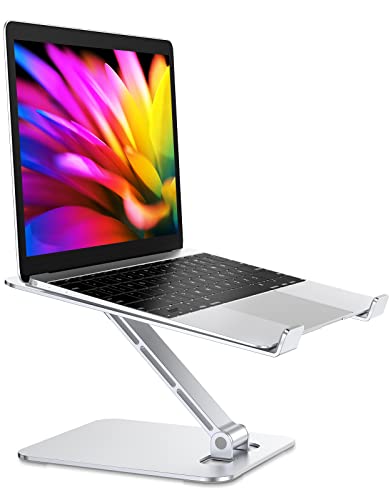
- Raises a laptop screen up to 7.48 inches.
- Folds for storage and carrying.
- Designed for laptops from 10 to 16 inches.
Best For: A student who wants to raise a laptop at a study desk.
7. Nulea M501 Wireless Trackball Mouse
A Different Way to Navigate
Nulea M501 Wireless Trackball Mouse

- Thumb-operated trackball moves the cursor without moving the mouse body.
- Connects to up to three devices via Bluetooth or USB dongle.
- Rechargeable design has six buttons and four DPI levels.
Best For: A student interested in an alternative mouse for a compact workspace.
8. WALGLASS Double-Sided Magnetic Whiteboard
A Wall Space for Working Through Ideas
WALGLASS Double-Sided Magnetic Whiteboard

- Double-sided magnetic dry-erase surface measures 24 x 18 inches.
- Includes markers, magnets, an eraser, and a tray.
- Movable hooks allow horizontal or vertical hanging.
Best For: A student who likes mapping algorithms and tasks visually.
9. Pzloz Adjustable LED Desk Lamp
Flexible Light for Late Study
Pzloz Adjustable LED Desk Lamp

- Offers five color temperatures and five brightness levels.
- Adjustable arms and lamp head direct light around the workspace.
- Includes a wireless remote control.
Best For: A student who studies, reads, or draws at a desk.
10. SanDisk 1TB Portable SSD
Pocketable Space for Projects
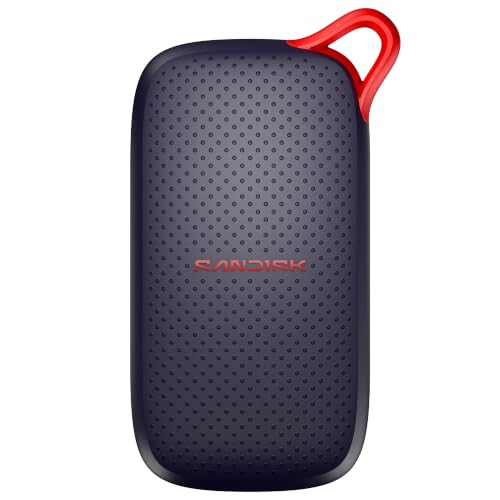
- Provides 1TB of portable storage.
- USB-C connection and read speeds up to 1000 MB/s.
- Compact drive includes a USB cable.
Best For: A student managing large project files or keeping a separate backup.
11. Bose QuietComfort Wireless Headphones
A Quieter Place to Focus
Bose QuietComfort Wireless Headphones

- Over-ear headphones offer active noise cancellation and Quiet or Aware modes.
- Bluetooth multipoint lets them switch between connected devices.
- Up to 24 hours of battery life per charge, according to the supplied product details.
Best For: A student working in shared spaces or listening while studying.
12. Weller 70W Digital Soldering Station
A Bench Tool for Electronics Projects
Weller 70W Digital Soldering Station
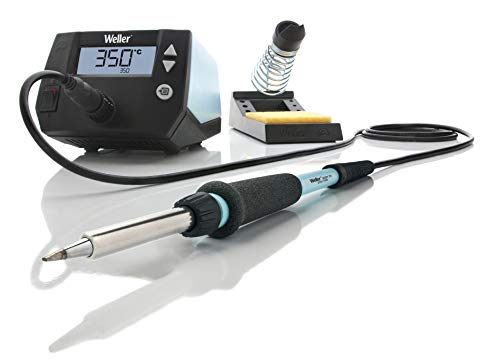
- 70W soldering iron with a heat-resistant silicone cable.
- Digital temperature control with stated ±4°F stability.
- Includes a safety rest, sponge, and screwdriver tip.
Best For: A student who builds or repairs electronics as a hobby.
13. AULA F75 Pro Hot-Swappable Keyboard
A Customizable Typing Upgrade
AULA F75 Pro Hot-Swappable Keyboard

- Compact 75% layout retains arrow keys.
- Hot-swappable base supports 3-pin or 5-pin switches.
- Connects by Bluetooth, 2.4GHz wireless, or USB-C.
Best For: A student who types often and enjoys customizing a keyboard.
14. CanaKit Raspberry Pi 5 Starter Kit PRO
A Small Computer for Hands-On Learning
CanaKit Raspberry Pi 5 Starter Kit PRO
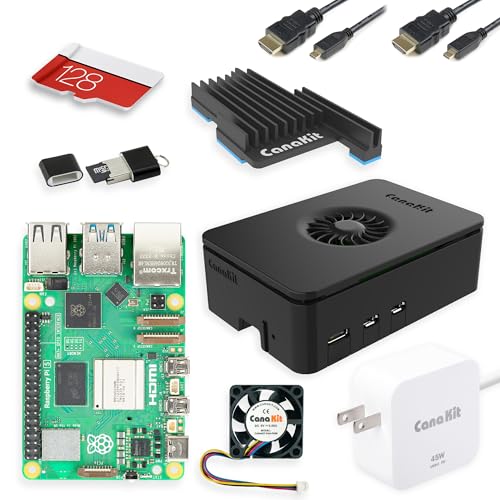
- Includes a Raspberry Pi 5 board with 8GB RAM.
- Comes with a 128GB microSD card preloaded with Raspberry Pi OS.
- Kit includes a case, fan, power supply, and two display cables.
Best For: A student exploring Linux, networking, or small programming projects.
15. MSI 27-Inch QHD IPS Monitor
More Screen Space for Code

- 27-inch IPS display with 2560 x 1440 resolution.
- 75Hz refresh rate and Adaptive-Sync support.
- Includes HDMI and DisplayPort connections and supports VESA mounting.
Best For: A student building a larger desktop workspace for code and research.
16. NexiGo N60 1080p USB Webcam
A Simple Setup for Video Calls

- Captures video at up to 1920 x 1080 resolution and 30fps.
- USB connection works with compatible devices without extra drivers, per the supplied details.
- Built-in microphone and privacy cover are included.
Best For: A student attending remote classes, interviews, or group meetings.
17. Wacom Intuos Small Pen Tablet
A Pen Tool for Diagrams and Notes
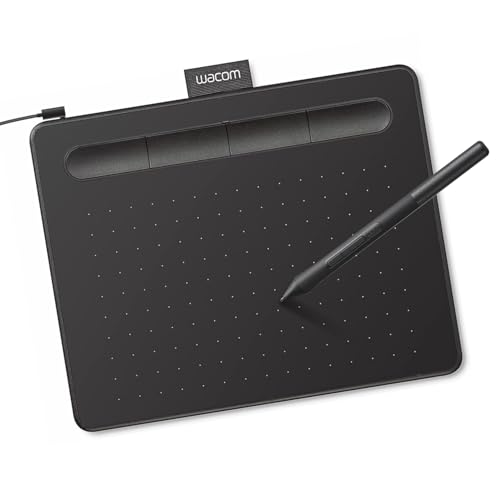
- Battery-free pen and four ExpressKeys for shortcuts.
- Works with Mac, Windows, and Chromebook, according to the supplied details.
- Can be used to draw, edit, and mark up documents.
Best For: A student who sketches diagrams, annotates notes, or explores digital art.
How to Choose a Gift for a Coding Student
Start with how the student actually spends time at a computer. Someone who studies at a fixed desk may appreciate a chair, lamp, desk mat, or larger monitor. A student moving between classes may get more use from the portable monitor, laptop stand, or power bank. For a gift that encourages hands-on experimentation, the Raspberry Pi kit or soldering station supports a different kind of learning than another everyday desk accessory.
Consider what would remove a recurring annoyance. A second screen can reduce the need to switch constantly between an editor and reference material. Extra storage can help when project files, course materials, or media take up space. A webcam, microphone, or headphones can make remote collaboration more comfortable. Practical gifts often feel personal when they fit a habit the recipient has mentioned, such as working in a shared room or sketching out solutions before coding.
Set a Budget Around Their Setup
For a modest budget, focus on a single useful accessory that complements what they already own. The desk mat, laptop stand, whiteboard, or webcam can improve a specific part of a study routine without requiring a major desk overhaul. If they frequently work away from home, the power bank may address a practical need; if they like to personalize their setup, the keyboard offers switch customization and several connection options.
For a larger gift, first consider whether the student has room for it and can use it with their current equipment. A monitor or chair may have a bigger effect on a permanent study space, while headphones can serve in libraries, shared housing, and during travel. A soldering station is best matched to someone who already builds or repairs electronics, since the gift is most useful when it connects to an existing interest. You can also pair a larger item with a handwritten note explaining why you chose it, without needing to add unrelated accessories.
Check Compatibility and Personalization
Computer accessories depend on the recipient’s devices and workspace. Before choosing a monitor, check which video outputs their laptop supports. The portable monitor lists USB-C and Mini HDMI options, while the MSI display lists HDMI and DisplayPort. USB-C ports do not all provide video output, so check the laptop’s specifications or ask discreetly if you are unsure. For a laptop stand, verify the laptop size falls within its stated 10-to-16-inch range and that the desk can accommodate the raised screen.
For a power bank, check that the device accepts charging through a compatible USB-C connection and that its power needs suit the listed output. The keyboard offers Bluetooth, 2.4GHz wireless, and USB-C; the trackball lists Bluetooth and USB dongle connections. If gifting the Wacom tablet, confirm that the recipient’s computer fits the listed operating system compatibility. A chair, lamp, or mat also needs a quick space check: measure the desk or room before selecting a large footprint, especially for the 55 x 24-inch desk mat.
Personalization can be simple. Match a desk accessory to the student’s available space and existing setup, or choose a project tool based on what they already enjoy learning. A compact accessory can be the better fit for someone in a dorm or shared apartment; a monitor or chair makes more sense when there is a dedicated study area.
Plan Timing and Last-Minute Decisions
For Christmas, leave time to confirm compatibility and whether the recipient already owns a similar item. Electronics and larger workspace gifts may need more thought than a whiteboard or desk mat. If you are shopping close to the holiday, choose something whose fit is straightforward based on information you already know, such as their laptop size or device ports. Avoid relying on delivery estimates unless you have checked current retailer details.
A thoughtful last-minute choice can still be useful: focus on a clear need, include a note about the study or project you had in mind, and keep the packaging easy to exchange if sizing or compatibility turns out to be wrong. The strongest Christmas gift ideas for coding students are the ones that support their real routines, whether that means a more comfortable desk, better collaboration, or a new project to explore.
