
A useful gift for a 3D artist can support the way they work: navigating models, sketching ideas, organizing files, or making long desk sessions more comfortable. The right fit depends on their software, computer, workspace, and current equipment.
17 Gift Ideas for 3D Artists
1. UGREEN 4-Bay NAS DH4300 Plus
A Home for Growing Project Libraries

- 4-bay NAS enclosure for private home storage and media.
- Supports photo and video backup from phones and remote file access.
- Storage disks are not included; it supports Docker but not virtual machines.
Best For: Artists who want centralized storage for project archives and media.
2. Primy Adjustable Drafting Chair
Comfort for the Raised Desk
Primy Adjustable Drafting Chair

- Adjustable-height chair with a foot ring and flip-up armrests.
- Curved backrest includes adjustable lumbar support.
- Mesh back, padded seat, and rolling casters suit office use.
Best For: Artists working at a standing desk or raised studio table.
3. XPPen Artist 13.3 Pro V2 Pen Display
Direct-Screen Sketching Upgrade
XPPen Artist 13.3 Pro V2 Pen Display

- 13.3-inch fully laminated FHD display with up to 60-degree pen tilt.
- Red dial and eight customizable shortcut keys support workflow adjustments.
- Requires a computer; listed software support includes Blender 3D.
Best For: 3D artists who sketch concepts or paint textures at a computer.
4. LitONES Dual-Sided LED Desk Lamp
Flexible Studio Lighting
LitONES Dual-Sided LED Desk Lamp

- Offers 50 lighting modes, five color temperatures, and ten brightness levels.
- Adjustable arm extends up to 33.3 inches and rotates for positioning.
- Includes a tabletop rotary knob remote and touch controls.
Best For: Artists who want adjustable light for desk work and physical references.
5. HUANUO TitanLift Monitor Arm
A More Flexible Monitor Position

- Fits compatible 17–49-inch monitors weighing 6.6–44 pounds.
- Arm extends up to 22.5 inches and adjusts in height, tilt, swivel, and rotation.
- Requires a compatible VESA pattern and a wooden desk within the stated thickness range.
Best For: Artists with a compatible monitor and desk seeking flexible positioning.
6. HUION Keydial Mini Programmable Keypad
Shortcuts Within Easy Reach
HUION Keydial Mini Programmable Keypad

- Provides 18 programmable keys and a dial with up to three functions.
- Bluetooth 5.0 connection and one-handed design support a tidy workspace.
- Shortcut setup uses the Huion driver and depends on software support.
Best For: Artists who want quick access to frequently used creative shortcuts.
7. AFIING 55 × 24-Inch Desk Mat
A Roomier Desk Surface

- Large PU leather surface fits a keyboard, mouse, laptop, and accessories.
- Suede backing helps the mat stay in place on the desk.
- Waterproof surface wipes clean with a damp cloth.
Best For: Artists looking to protect and organize a broad desk area.
8. SABRENT USB-C NVMe Enclosure
Portable Storage from a Spare Drive

- Tool-free enclosure supports M.2 NVMe SSDs in 2230, 2242, 2260, and 2280 sizes.
- Connects over USB-C for up to 10Gbps; no external power or drivers are needed.
- Not compatible with M.2 SATA drives.
Best For: Artists with a compatible NVMe SSD to use for portable project storage.
9. XPPen Magic Drawing Pad 12.2-Inch
A Mobile Canvas for Ideas
XPPen Magic Drawing Pad 12.2-Inch

- Standalone Android 14 drawing tablet works without a computer.
- 12.2-inch, 2160 × 1440 display and pressure-sensitive stylus support drawing.
- Includes 8GB memory, 256GB storage, and microSD expansion up to 1TB.
Best For: Artists who want a portable surface for drawing and 3D-related creative work.
10. Redragon K550 Mechanical Keyboard
Macro Keys for Repeated Tasks
Redragon K550 Mechanical Keyboard

- Includes 12 programmable onboard macro keys alongside the main keyboard.
- Dedicated media controls and a USB pass-through port are built in.
- Wired keyboard has an aluminum top plate and includes a wrist rest.
Best For: Artists who prefer a full-size keyboard with programmable task shortcuts.
11. Wacom MovinkPad 11 Drawing Tablet
Sketching Away from the Desk
Wacom MovinkPad 11 Drawing Tablet

- Standalone 11.45-inch Android 14 tablet with 8GB memory and 128GB storage.
- Includes a battery-free Pro Pen 3 with 8,192 pressure levels.
- Matte etched glass and a portable design support on-the-go drawing.
Best For: Artists who want a portable tablet for sketching and notes.
12. 3Dconnexion SpaceMouse Wireless Bluetooth
A Dedicated 3D Navigation Tool
3Dconnexion SpaceMouse Wireless Bluetooth

- Designed for 3D navigation with wireless and USB-C connectivity.
- Includes two programmable side buttons.
- Rechargeable battery is listed as lasting up to one month between charges.
Best For: Artists who want a dedicated controller for navigating models and scenes.
13. XPPen Artist Pro 19 Gen2 4K Pen Display
Large 4K Creative Display
XPPen Artist Pro 19 Gen2 4K Pen Display

- 18.4-inch 4K UHD display supports direct pen input and dual styluses.
- Includes a shortcut remote with a dial and ten customizable keys.
- Connects to supported devices over USB-C or HDMI; VESA adapter is included.
Best For: Artists seeking a large screen for detailed sculpting, drawing, or painting.
14. Razer Core X V2 eGPU Enclosure
Graphics Expansion for Compatible Laptops
Razer Core X V2 eGPU Enclosure
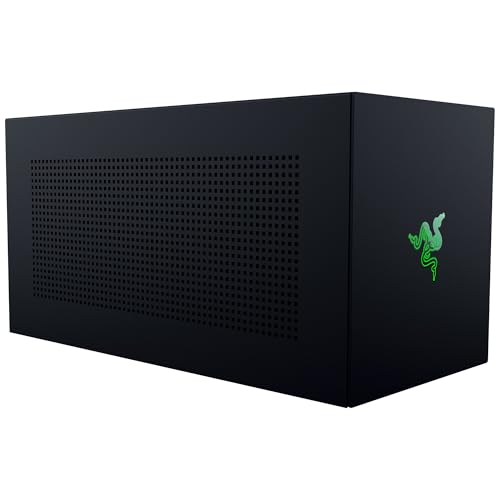
- Supports compatible desktop NVIDIA or AMD graphics cards up to four slots wide.
- Uses Thunderbolt 5 and supports compatible Thunderbolt 4 and USB 4 devices.
- Graphics card and power supply are not included; M1-or-later Mac devices do not support eGPUs.
Best For: Artists with a compatible laptop seeking desktop GPU expansion options.
15. BenQ PD2706U 27-Inch 4K Monitor
More Space for Fine Detail
BenQ PD2706U 27-Inch 4K Monitor

- 27-inch 4K UHD IPS display covers 99% sRGB and 95% P3, according to the supplied listing.
- Includes 90W USB-C, a KVM switch, and a USB hub.
- Ergonomic adjustments, anti-glare, and flicker-free features are listed.
Best For: Artists who want a larger 4K screen for project detail and color work.
16. 3Dconnexion SpaceMouse Wireless Kit 2
Wireless Scene Navigation
3Dconnexion SpaceMouse Wireless Kit 2

- Uses a six-degrees-of-freedom sensor for 3D navigation.
- Wireless connectivity includes Bluetooth and USB options.
- Listed compatibility includes Windows and macOS.
Best For: 3D artists who want a dedicated wireless controller for model navigation.
17. Crucial X9 2TB Portable SSD
Extra Space for Projects on the Move

- Provides 2TB of portable solid-state storage.
- Connects by USB-C and is listed for Windows, Mac, Android, and other devices.
- Listing states up to 1050MB/s and IP55 water and dust resistance.
Best For: Artists who need portable room for project files, assets, and backups.
Choosing a Christmas Gift for a 3D Artist
Start with how the person works. A modeler who spends most of the day orbiting and framing scenes may appreciate a dedicated 3D navigation controller. A sculptor or texture artist may get more use from a pen display or standalone drawing tablet. Someone whose projects are already spread across several drives may benefit more from storage or a NAS enclosure than another input device.
Think about the stage of their setup, too. Desk accessories such as a lamp, chair, mat, or monitor arm can improve a workspace they already use. Larger upgrades like a 4K pen display, monitor, or external GPU enclosure make sense when you know the recipient has room for them and wants that kind of equipment. A practical Christmas present can be an everyday tool rather than something with holiday styling.
Match the Gift to Your Budget
For a smaller workspace refresh, consider the desk mat, lamp, or programmable keypad. These gifts add surface area, adjustable lighting, or quick-access controls without replacing the artist’s main computer. A portable SSD is another practical category when the recipient regularly moves large projects between devices, though they may already have a preferred storage setup.
A drawing tablet, monitor, chair, or monitor arm is a more substantial choice. Before choosing, think about what the artist actually lacks: a screen for drawing, a larger canvas, more comfortable seating, or better monitor positioning. The NAS and eGPU enclosure are specialized gifts. They can be useful additions to the right setup, but their value depends on storage habits, computer compatibility, and willingness to configure hardware.
Check Compatibility and Personalize the Choice
For any device that connects to a computer, check the recipient’s operating system, available ports, and software. The XPPen Artist 13.3 Pro V2 requires a computer, while the Magic Drawing Pad and Wacom MovinkPad are standalone Android tablets. The supplied listings name Blender 3D support for the Artist 13.3 Pro V2; confirm support for other devices against the artist’s intended software and setup.
A monitor arm requires more than a matching screen size: check monitor weight, VESA mounting pattern, desk material, and desk thickness. The Razer Core X V2 requires a compatible Thunderbolt 4, Thunderbolt 5, or USB 4 device, plus a separate graphics card and power supply. It does not support Mac devices with M1 or later chipsets. The SABRENT enclosure is for NVMe SSDs and does not work with M.2 SATA drives. For a NAS, remember that storage disks are not included.
Personalization can mean choosing around the person’s habits, not adding custom decoration. If possible, notice whether they draw directly on screen, work with a separate tablet, use a laptop, or prefer a fixed desktop. A gift that fits their current routine is easier to appreciate and use.
Timing and Last-Minute Decisions
For a gift that needs to fit existing equipment, verify the model and connection requirements before ordering. If you cannot confirm compatibility, lower-risk choices are workspace additions that suit a range of setups, such as a desk mat or adjustable lamp. A compatible portable SSD can also be a straightforward pick when extra storage is useful, but check whether the recipient has a matching port and a preferred file-backup workflow.
For a last-minute decision, prioritize what you can confidently match to the recipient’s workspace and needs. Avoid assuming that a more advanced device will automatically be the better present: the right tablet, monitor, controller, or storage option depends on how they create. A well-chosen practical tool can support their next project long after Christmas.
