
The best Christmas gaming stocking stuffer ideas can be small desk upgrades or thoughtful additions to a larger PC setup. This list includes practical peripherals and accessories alongside a few substantial gifts.
15 Christmas Gift Ideas for PC Gamers
1. SABRENT 10-Port Powered USB Hub
A Handy Port Expander
SABRENT 10-Port Powered USB Hub

- Adds 10 USB 3.0 ports from one port, with data transfer rates up to 5Gbps.
- Individual power switches and blue LED indicators make each port easy to control.
- Includes a 60W power adapter and USB 3.0 cable; works with Windows, Mac OS, and Linux.
Best For: PC gamers with several USB peripherals
2. COMHOMA Big and Tall Gaming Chair
A Roomier Seat Upgrade
COMHOMA Big and Tall Gaming Chair

- Features a spacious seat, wider backrest, thick padding, and faux leather upholstery.
- Height-adjustable armrests and an integrated footrest support different sitting preferences.
- Reclines up to 145 degrees and has a stated 400-pound maximum weight recommendation.
Best For: Gamers with a dedicated desk who want a wider chair
3. ErGear 48-Inch Electric Standing Desk
A Sit-Stand Setup Refresh
ErGear 48-Inch Electric Standing Desk

- Electric height adjustment spans 28.35 to 46.46 inches, according to the notes.
- Stores up to four preferred height settings for quick adjustments.
- The black desk has a steel frame and a 48-by-24-inch size.
Best For: PC gamers refreshing a home gaming desk
4. Bluedee Bluetooth Desktop Speakers
A Compact Audio Gift
Bluedee Bluetooth Desktop Speakers

- Connects over Bluetooth 5.4, USB, or USB-C, and is described as plug and play.
- A single control knob handles volume, playback, lighting, and connection modes.
- Offers eight selectable lighting effects plus an off option.
Best For: Gamers who like speakers for music, videos, and play
5. LYMAX Dimmable Monitor Light Bar
A Desk Lighting Upgrade
LYMAX Dimmable Monitor Light Bar

- Provides adjustable color temperature from 2900K to 6000K and dimming.
- Includes a wireless remote and touch controls for its lighting modes.
- The gravity-damper bracket is listed for screens 0.2 to 1.8 inches thick.
Best For: Gamers who use a desk in the evening
6. EasySMX X05Pro Wireless Controller
A Controller for PC Play
EasySMX X05Pro Wireless Controller

- Supports PC connection by 2.4GHz wireless, Bluetooth, or USB-C.
- Includes Hall Effect sticks, dual-stage triggers, and programmable back buttons.
- The smart charging dock has magnetic alignment and receiver storage.
Best For: PC gamers who enjoy racing, platformers, or action games
7. STREBITO 142-Piece Precision Screwdriver Kit
A Toolkit for PC Tinkerers
STREBITO 142-Piece Precision Screwdriver Kit
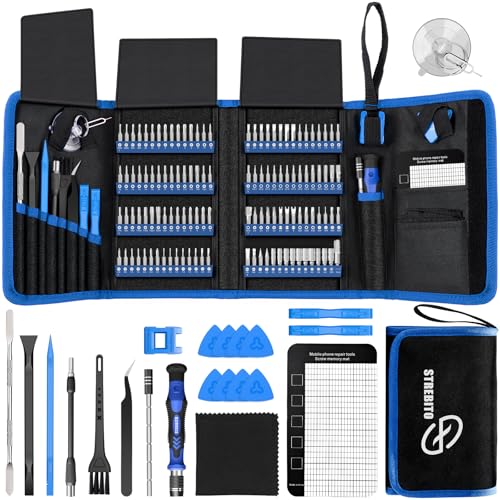
- Includes 120 driver bits and 22 accessories, including tweezers and a magnetic mat.
- The kit is listed for computer, laptop, SSD, and game console repairs.
- Bits and tools come in an organized, portable Oxford fabric bag.
Best For: Gamers who build, repair, or maintain electronics
8. Redragon K617 60% Mechanical Keyboard
A Compact Keyboard Pick
Redragon K617 60% Mechanical Keyboard

- Its 61-key layout leaves more desk space for mouse movement.
- The hot-swap socket accepts compatible 3-pin or 5-pin switches without soldering.
- Offers up to 20 preset RGB lighting modes and programmable macros.
Best For: Gamers who want a smaller keyboard footprint
9. 313-Piece Cable Management Kit
A Tidier Desk Gift
313-Piece Cable Management Kit

- Includes cable clips, reusable straps, sleeves, zip ties, and mounting bases.
- The kit is designed to organize power, charging, audio, and video cables.
- Adhesive-backed clips are intended for clean desk or wall surfaces.
Best For: PC gamers who want to tidy visible desk cables
10. EPOMAKER Click Lite Wireless Gaming Mouse
A Lightweight Mouse Upgrade
EPOMAKER Click Lite Wireless Gaming Mouse

- Connects through 2.4GHz wireless, Bluetooth, or USB-C cable.
- Offers five programmable buttons and adjustable sensitivity up to 12,000 DPI.
- The listed weight is 59 grams; the mouse is right-handed.
Best For: Right-handed gamers who play shooters or fast-paced games
11. NEWDERY Dual Controller Charging Station
A Charging Dock for PlayStation Controllers
NEWDERY Dual Controller Charging Station

- The listing specifies compatibility with PS5 DualSense and DualSense Edge controllers.
- Includes a USB cable and charging indicators that change when charging is complete.
- The dock has four anti-slip mats and is intended to hold controllers in place.
Best For: PC gamers who also use compatible PlayStation controllers
12. Acer Adjustable GPU Support Bracket
A Small PC Build Accessory
Acer Adjustable GPU Support Bracket

- A height-adjustable support stand intended for desktop graphics cards.
- Uses a magnetic base and silicone pads at the top and bottom.
- The listing describes tool-free adjustment in 0.5mm increments.
Best For: Desktop PC gamers with a large graphics card
13. 31.5-Inch Extended Gaming Mouse Pad
A Broad Mouse Surface
31.5-Inch Extended Gaming Mouse Pad

- The 31.5-by-15.7-inch pad can fit a keyboard and mouse together.
- Its rubber base is described as non-slip, with stitched nylon edges.
- The coated surface is listed as water resistant and easy to clean.
Best For: Gamers who want more room for broad mouse movements
14. TEDNETGO Extended Gaming Mouse Pad
A Simple Desk Mat Gift
TEDNETGO Extended Gaming Mouse Pad

- The 31.5-by-15.7-inch surface accommodates a keyboard and mouse.
- A rubberized base helps keep the pad in place on a desk.
- The listing describes a smooth Lycra surface and a water-resistant coating.
Best For: PC gamers due for a practical desk refresh
15. AOC 27-Inch QHD Gaming Monitor
A Major Display Upgrade
AOC 27-Inch QHD Gaming Monitor

- Displays 2560-by-1440 resolution on a 27-inch IPS panel.
- Lists a 240Hz refresh rate through DisplayPort and Adaptive-Sync support.
- Inputs include one DisplayPort 1.4 and two HDMI 2.0 ports.
Best For: PC gamers planning a substantial visual upgrade
Choosing a Gift for a PC Gamer
Start with the recipient’s actual setup and habits. A gamer who already has a favorite mouse, keyboard, or headset may appreciate useful desk accessories more than a replacement peripheral. The USB hub, cable kit, light bar, mouse pads, and precision screwdriver set can complement an existing PC without asking the recipient to change how they play. They also suit a stocking or smaller gift exchange better than a desk, chair, or monitor.
For a more personal choice, consider what currently interrupts their routine. A lack of USB ports points toward the powered hub. Tangled wires suggest the cable management kit. Someone who frequently opens or upgrades computers may put the screwdriver set to work, while a large graphics card makes a support bracket relevant. These gifts show attention to the setup without requiring you to guess a preferred game or play style.
Match the Gift to the Setup
Compatibility is worth checking before choosing any computer accessory. Confirm the recipient’s computer has the right connection for the hub, keyboard, speakers, mouse, or display. The keyboard is wired by USB-C; the speakers offer USB, USB-C, and Bluetooth; and the mouse offers 2.4GHz wireless, Bluetooth, and USB-C. A monitor upgrade also calls for a quick look at available DisplayPort or HDMI connections and the computer’s ability to drive the desired resolution and refresh rate.
Controller listings need particular care. The EasySMX controller lists PC support, alongside Switch and mobile devices, while the NEWDERY dock is specifically listed for PS5 DualSense and DualSense Edge controllers. Check what controller the recipient owns before selecting the dock. The chair and desk also need room: compare the chair’s dimensions and the desk’s 48-by-24-inch surface with the space available at home.
Personalization can be practical. For a desk with limited space, the compact keyboard may be more useful than a full-size layout. A speaker gift works well for someone who sometimes takes off their headset; a large mouse pad can suit a player who prefers broad mouse movements. If you do not know their preferences, cable organization or lighting is less dependent on game genre or individual controls.
Set a Budget That Fits the Occasion
A stocking stuffer does not have to be a tiny novelty. Smaller accessories such as cable clips, a monitor light bar, a mouse pad, or a GPU support bracket can feel thoughtful because they solve a clear setup problem. The hub, screwdriver kit, mouse, keyboard, controller, and speakers offer a more noticeable peripheral upgrade. The chair, standing desk, and monitor are substantial gifts that call for space, planning, and a bigger budget.
Choose based on what the recipient will use, not on the size of the box. If several people are contributing, a larger shared gift may make sense. For a solo gift, a useful accessory can be a better fit than a major item that does not suit the recipient’s room or preferences. The product notes provide features and dimensions, but do not establish current prices, so check the listing when setting a budget.
Plan Around Personal Preferences and Timing
For gaming gifts that affect comfort or feel, preferences matter. Mouse shape and handedness, keyboard size and layout, chair dimensions, and controller style are personal choices. When unsure, check the recipient’s current gear or ask someone familiar with the setup. For the desk, monitor, or chair, verify available space and connections before ordering.
Make timing part of the decision. A small accessory is easier to wrap and usually requires less setup coordination, while a desk or chair may need assembly and a clear area. A monitor upgrade needs time to connect and configure with the PC. For last-minute decisions, choose from items whose fit you can confirm quickly, and check the seller’s current shipping details directly. Avoid relying on a delivery date until it is confirmed for the recipient’s location.
