
A more organized desk can make everyday computer work feel smoother, whether the goal is clearing cable clutter, adding storage, or making a workstation more comfortable. These Christmas desk organization gifts range from small helpers to larger workspace upgrades.
Christmas Desk Organization Gifts
1. ELABEST X100 Ergonomic Mesh Office Chair
A Comfort Upgrade for Long Desk Sessions
ELABEST X100 Ergonomic Mesh Office Chair

- Adjustable lumbar support, headrest, and 5D flip-up arms let the recipient tune the chair to their setup.
- A footrest and reclining mechanism support breaks between work or gaming sessions.
- Flip-up arms help the chair tuck beneath a desk when not in use.
Best For: Someone who spends long stretches at a computer
2. intpw Powered 9-Port USB-C Hub
A Neater Home for Connected Devices
intpw Powered 9-Port USB-C Hub

- Adds USB-C and USB-A ports for connecting computer peripherals.
- Two USB-C PD ports provide up to 45W charging for compatible devices; they do not transfer data.
- Includes a power adapter and USB-C cable; it does not support video output.
Best For: Someone with several USB peripherals and a compatible USB-C computer
3. HUANUO FlowLift Dual Monitor Stand
More Room Beneath Two Screens
HUANUO FlowLift Dual Monitor Stand

- Lifts two monitors off the desktop to free space for a keyboard, notebook, or dock.
- Arms offer tilt, swivel, rotation, and height adjustment, with cable guides along the arms.
- Check monitor size, weight, VESA pattern, and desk material and thickness before gifting.
Best For: A dual-monitor user with a compatible wooden desk
4. Acer Gadget 7-in-1 Wireless Charging Station
A Central Charging Spot for Apple Devices
Acer Gadget 7-in-1 Wireless Charging Station

- Combines wireless charging positions with USB-A and USB-C wired ports for a multi-device setup.
- Includes a clock display with Bluetooth time sync and adjustable warm or cool lighting.
- Check device compatibility and note that phone cases should be under 2 mm thick.
Best For: Someone who keeps compatible phones, earbuds, or a watch near their desk
5. VASAGLE Mobile Five-Drawer File Cabinet
Under-Desk Storage That Rolls
VASAGLE Mobile Five-Drawer File Cabinet

- Five drawers provide places to sort documents and stationery near a workstation.
- At 25.9 inches tall, it is designed to slide beneath most standard desks.
- Five casters allow repositioning, and two front casters lock in place.
Best For: A PC user who needs nearby storage for papers and supplies
6. STREBITO 142-Piece Precision Screwdriver Set
A Tidy Toolkit for PC Projects
STREBITO 142-Piece Precision Screwdriver Set
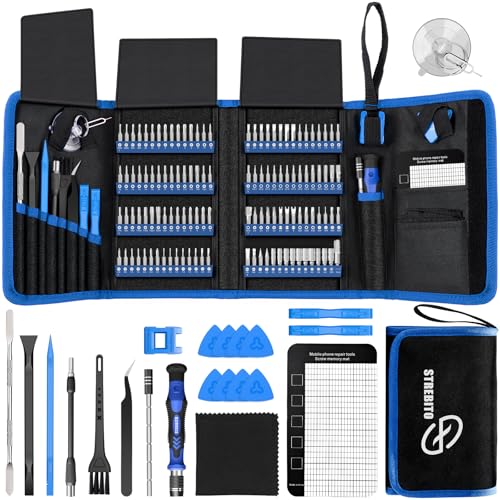
- The kit includes 120 bits and 22 accessories for electronics repair and DIY projects.
- A magnetic mat helps keep small screws and parts organized while working.
- Bits are stored in a marked holder, and tools come in a portable zippered bag.
Best For: A PC builder or tinkerer who maintains their own equipment
7. AFIING 55 × 24-Inch PU Leather Desk Mat
A Unified Surface for Keyboard and Mouse
AFIING 55 × 24-Inch PU Leather Desk Mat

- The extended mat provides space for a keyboard, mouse, laptop, and desk accessories.
- Its suede backing helps it stay in place during typing, gaming, or writing.
- The waterproof PU leather surface wipes clean with a damp cloth.
Best For: Someone who wants a broad, coordinated work surface
8. Delamu Two-Pack Metal Under-Desk Cable Trays
A Place to Route Cords Below the Desk
Delamu Two-Pack Metal Under-Desk Cable Trays

- Two U-shaped metal channels help gather cords and plugs beneath a desk.
- The set includes cable ties, cable holders, screws, and adhesive tape.
- Choose tape or screw mounting based on the desk surface and desired hold.
Best For: Someone managing several PC and charging cables
9. LED Desk Lamp with Wireless Phone Charging
Focused Light with a Charging Base
LED Desk Lamp with Wireless Phone Charging

- Three color modes and dimming from 5% to 100% adapt the light for different desk tasks.
- The 360-degree adjustable tube directs light where it is needed and folds for compact storage.
- A built-in 10W wireless charger supports compatible iPhone and Android phones.
Best For: Someone who works or studies at a desk in the evening
10. Wrap-It Reusable Cable Ties, 40 Pack
Small Ties for Everyday Cable Clutter
Wrap-It Reusable Cable Ties, 40 Pack

- The set contains 20 five-inch ties and 20 eight-inch ties for different cord sizes.
- Self-gripping ties stay attached to a cord when unwrapped and can be reused.
- Use them to bundle computer, monitor, charger, or gaming console cables.
Best For: Anyone who wants an easy way to bundle loose cords
11. Quiet Rechargeable USB Desktop Fan
Personal Airflow for the Workstation
Quiet Rechargeable USB Desktop Fan

- A digital display shows the selected speed, with 100 speed settings listed.
- The fan oscillates up to 120 degrees and can be used on a tabletop or wall-mounted.
- It has a built-in 3000 mAh battery and can also run from USB power.
Best For: Someone who likes adjustable airflow at their desk
12. Nelko P21 Bluetooth Label Maker
Labels for Bins, Cables, and Supplies
Nelko P21 Bluetooth Label Maker

- Connects to iOS or Android phones over Bluetooth and prints monochrome labels.
- The companion app offers templates, borders, and icons for organizing supplies.
- It does not work with computers; check phone compatibility and label tape format.
Best For: A home-office user who likes labeling storage and supplies
13. FLEXISPOT 40-Inch Electric Standing Desk Converter
A Flexible Height for the Main Work Surface
FLEXISPOT 40-Inch Electric Standing Desk Converter
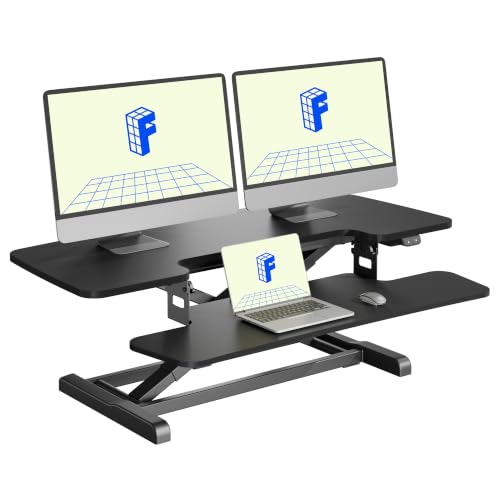
- One-touch electric adjustment raises the work surface from 4.9 to 19.7 inches.
- The two-tier layout has room for monitors above and a keyboard and mouse below.
- The top deck supports up to 44 pounds and the keyboard tray up to 11 pounds.
Best For: A desk worker who wants to alternate workstation height
Choosing a Desk Organization Gift for a PC User
Start with the clutter the recipient sees or handles every day. If cables spread across the desktop, reusable ties offer a small, easy-to-use fix, while under-desk trays can collect cords and plugs out of sight. A USB hub may reduce the need to reach for ports on the computer, but it adds connectivity rather than routing cables, so pair it with the actual problem in mind. For loose papers and stationery, a rolling drawer unit adds storage beside or beneath a desk.
Think about the space the gift will occupy. A large desk mat or standing desk converter needs substantial clear surface area. A monitor arm shifts screens off the desktop, but depends on the monitor and desk meeting its stated requirements. Smaller accessories such as ties, labels, and a repair kit can suit a compact setup and give the recipient more control over how their space is arranged.
Match the Gift to the Budget and Scale
A useful gift does not have to be a major furniture upgrade. Cable ties, a label maker, or a desk mat can address everyday organization without requiring the recipient to change their workstation. A hub, lamp, fan, or charging station adds a specific function to an existing desk. Chairs, monitor mounts, drawer cabinets, and standing desk converters are bigger choices that can change how the whole setup works.
For larger items, consider whether the recipient would welcome a substantial addition and has room for it. A rolling cabinet needs floor space; a converter needs desk depth and a surface that can support its load. If you are unsure, a smaller accessory is often easier to fit into an established setup. Consider what the recipient already owns, too: another charger or lamp is less useful if their desk already has one that meets their needs.
Check Compatibility and Personalization
Before choosing a mount, check the screen size, weight, VESA holes, and desk construction and thickness against the product requirements. For the standing converter, think about the top surface and total weight of monitors and accessories. The powered hub is intended for USB devices and does not provide video output; its charging ports do not transfer data. Check the recipient’s computer ports and connected devices before selecting it.
Charging accessories also need a compatibility check. The Acer station is designed around Apple devices for its phone, earbuds, and watch positions, and it does not support Samsung Watch. Its phone charging position has a case thickness limit. The lamp’s wireless charging is for compatible phones. The Nelko label maker connects to phones rather than computers, and its product notes flag a specific Android compatibility limitation. These details can make the difference between a thoughtful gift and an item that does not fit the recipient’s equipment.
Personalization can be practical rather than decorative. A label maker lets someone identify bins, notebooks, or supplies; cable ties can be assigned to specific cords; a mat can define a clear work zone. If the recipient builds or repairs PCs, the screwdriver kit and magnetic parts mat support a more orderly project area. Choose the function that fits how they use their desk, rather than assuming every PC enthusiast wants the same kind of upgrade.
Timing and Last-Minute Decisions
For a Christmas gift selected close to the holiday, favor items that require little setup if you cannot check the desk in advance. Ties, a mat, or a toolkit are relatively straightforward to use, while mounts, furniture, and converters call for measurements and installation. A charging station or hub is more convenient when you know the recipient’s devices and ports. Allow time to verify the fit for gifts that depend on a particular desk, screen, or phone.
When details are uncertain, use what you can observe: a drawer full of tangled cords points toward ties; crowded surfaces may call for vertical monitor placement; visible papers suggest nearby drawer storage. Match the gift to one concrete annoyance, and the recipient can put it to work as soon as it is set up.
