
The right AI workstation depends on what you run locally. A compact PC may handle coding, inference, and smaller experiments, while larger models or sustained training can demand far more GPU memory and room to expand.
These 10 picks span mini PCs, professional towers, and multi-GPU systems. Use the buying guide below to match their hardware to your workload—not just the biggest specification on the page.
Best 10 Workstation PCs for AI and Ml Picks for 2026
Compact Pro Graphics

- 24-core Core i9 and RTX 2000 Ada 16GB
- 32GB DDR5, upgradable to 96GB
- 3.5L chassis with four 4K outputs
Best For: Compact AI inference and professional creative work
Unified-Memory Pick

- Ryzen AI Max+ 395 with 16 CPU cores
- 128GB shared LPDDR5x memory
- Dual 10GbE and USB4 V2
Best For: Compact local inference with high shared-memory needs
NVIDIA AI Stack

- GB10 Grace Blackwell Superchip
- 128GB memory and 2TB SSD
- DGX OS with NVIDIA AI software
Best For: NVIDIA-based AI development and inference
High-Capacity Training Tower
Logicad Neuron Z AI Workstation

- RTX PRO 6000 Blackwell with 96GB VRAM
- 64-core EPYC and 256GB DDR5 RDIMM
- Two 2TB NVMe SSDs
Best For: Large AI workloads needing dedicated GPU memory
Compact Local AI Pick

- 128GB RAM with up to 96GB allocatable to GPU
- Ryzen AI Max+ 395 and 2TB SSD
- Dual 2.5GbE, Wi-Fi 7, and three-year warranty
Best For: Compact, private local AI inference
Maximum GPU Compute Pick
Threadripper PRO 9995WX Triple-GPU Tower

- 96-core CPU and three RTX PRO 6000 GPUs
- 768GB ECC RAM and 16TB Gen5 NVMe storage
- 240V/20A needed for maximum capabilities
Best For: Teams with demanding multi-GPU workloads
Expandable Networked Mini Pick
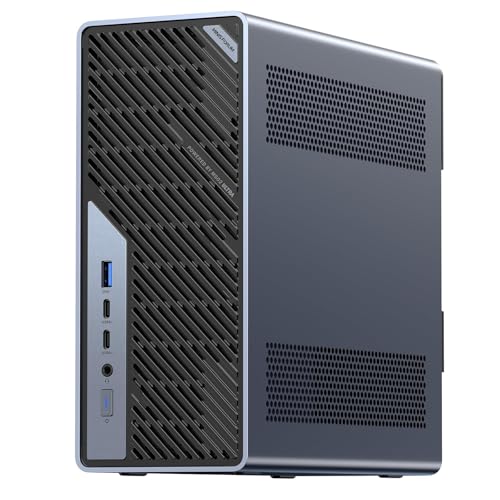
- Core Ultra 9 285HX with 32GB RAM and 1TB SSD
- PCIe 5.0 x16 slot for GPU expansion
- Dual 25GbE plus 10GbE and 2.5GbE
Best For: Compact, expandable networked AI development
High-Memory GPU Pick
Cloud Ninjas Threadripper 9960X Workstation

- 24-core Threadripper 9960X
- 128GB ECC RAM; 24GB RTX PRO GPU
- 1TB + 2TB NVMe; 10GbE
Best For: Local AI experiments and visualization needing ample memory
CPU-Focused Starter
Sentinel Threadripper PRO 7965WX Tower

- 24-core, 48-thread Threadripper PRO
- RTX 5060 Ti with 16GB memory
- 2TB Gen5 SSD plus 3TB HDD
Best For: CPU-heavy development with a planned RAM upgrade
Business Workstation Pick
Lenovo ThinkStation P3 Tower Gen 2

- 256GB DDR5 RAM installed
- RTX 4000 SFF Ada with 20GB memory
- 2TB Gen5 Opal SSD; dual 2.5GbE
Best For: Business AI workflows needing high installed RAM
Compact Pro Graphics – ACEMAGIC G3A AI Workstation
Among workstation pcs for ai and ml, the ACEMAGIC G3A is a compact choice for buyers who also need professional graphics software support. It pairs a 24-core Intel Core i9-13900F with an NVIDIA RTX 2000 Ada GPU and 16GB of dedicated graphics memory.
Best For: Space-conscious AI inference, 3D modeling, and creative workflows that benefit from professional GPU drivers.
Pros:
- RTX 2000 Ada graphics with 16GB GDDR6 and drivers certified for listed creative and engineering applications.
- 32GB DDR5 RAM is upgradable to 96GB; a second M.2 slot and a 2.5-inch SATA slot allow storage expansion.
- 3.5L chassis supports four 4K displays, dual LAN, and Wi-Fi 6E.
Cons:
- 32GB of installed RAM may call for an upgrade for larger projects.
- 16GB of dedicated GPU memory limits the size of models that fit entirely on the GPU.
The G3A makes sense when desk space, multi-display output, and certified graphics drivers matter as much as local AI capability. Check your model’s memory requirements before choosing it for larger workloads.
The MINISFORUM MS-S1 MAX stands out among workstation pcs for ai and ml because its Ryzen AI Max+ 395 combines a 16-core CPU, RDNA 3.5 graphics, and an NPU with 128GB of shared LPDDR5x memory. That large unified pool is particularly relevant to local model inference where memory capacity is a priority.
Best For: Local LLM and multimodal inference on a compact desktop, especially when a large shared memory pool matters.
Pros:
- 128GB of LPDDR5x-8000 unified memory is accessible to both CPU and GPU.
- Includes a 2TB SSD, dual M.2 slots, and a full-length PCIe x16 expansion slot.
- USB4 V2, dual 10GbE, and Wi-Fi 7 suit fast external storage and networked workflows.
Cons:
- Its integrated GPU uses shared memory rather than dedicated graphics VRAM.
- The listed 128GB LPDDR5x configuration should not be treated as a conventional RAM-upgrade path.
Choose this system for its unusually large unified memory and connectivity, not on the assumption that it behaves like a workstation with a discrete NVIDIA GPU. The supplied OS details do not identify a specific operating system, so confirm the software setup before buying.
For shoppers comparing workstation pcs for ai and ml, the HP ZGX G1n offers a compact NVIDIA-centered development setup. Its GB10 Grace Blackwell Superchip, 128GB of memory, 2TB SSD, and DGX OS target AI development, prototyping, and inference rather than a conventional Windows desktop workflow.
Best For: Developers who want a small system with NVIDIA’s integrated AI software stack for prototyping and inference.
Pros:
- GB10 Grace Blackwell Superchip is listed with up to 1,000 TOPS of FP4 AI performance.
- 128GB of memory and a 2TB SSD support substantial local projects.
- DGX OS includes an NVIDIA AI software stack; the specifications also list 10 Gigabit Ethernet and 200 Gigabit networking options.
Cons:
- ARM architecture and DGX OS may require checking compatibility with existing software.
- Graphics use shared memory rather than a separate pool of dedicated VRAM.
This is the most software-ecosystem-specific compact option here: attractive if DGX OS fits your workflow, less straightforward if you depend on Windows applications or an x86 environment. Verify the exact networking configuration you need.
The Logicad Neuron Z is the tower-scale choice among these workstation pcs for ai and ml. Its 64-core AMD EPYC 9535, RTX PRO 6000 Blackwell Workstation Edition with 96GB of dedicated graphics memory, and 256GB DDR5 RDIMM configuration target demanding model, dataset, and simulation work.
Best For: Professional AI training, large-model workflows, and compute-heavy work that needs substantial dedicated GPU memory.
Pros:
- RTX PRO 6000 Blackwell provides 96GB of dedicated GDDR7 graphics memory.
- 64-core, 128-thread EPYC processor and 256GB installed DDR5 RDIMM suit parallel workloads.
- Two 2TB NVMe SSDs provide separate high-speed storage capacity for projects and datasets.
- Mid-tower build is assembled in the USA and backed by a one-year parts-and-labor warranty.
Cons:
- Mid-tower footprint is less convenient than the mini PCs in this roundup.
- Only one GPU is specified; buyers planning multi-GPU work should verify expansion requirements.
If dedicated GPU memory is the deciding factor, this configuration offers far more than the smaller systems listed here. Its strengths are clear, but confirm your software, power, and future expansion needs before committing to a tower workstation.
Compact Local AI Pick – GEEKOM A9 Mega
Among workstation pcs for ai and ml, the GEEKOM A9 Mega suits buyers who want substantial on-device memory without a full-size tower. Its Ryzen AI Max+ 395 pairs 16 CPU cores with a Radeon 8060S GPU, 128GB of LPDDR5X memory, and a 2TB SSD.
Best For: Developers running private local inference and creative workflows in a compact desktop.
Pros:
- Up to 96GB of its 128GB memory can be allocated to the GPU for memory-intensive models.
- Dual USB4, dual HDMI 2.1, dual 2.5GbE, and Wi-Fi 7 support varied workstation setups.
- Vapor-chamber cooling and a three-year limited warranty add practical value for sustained use.
Cons:
- Its shared-memory GPU is not the same as a dedicated multi-GPU training setup.
- Model size alone does not establish usable inference speed; check your target model and software stack.
The appeal is a large shared-memory pool in a small system, especially for offline experimentation. Treat the advertised 128B-model capability as a compatibility claim to verify against your specific model, quantization, and performance needs.
Maximum GPU Compute Pick – Threadripper PRO 9995WX Triple-GPU Tower
For teams comparing workstation pcs for ai and ml at the high end, this Empowered PC tower combines a 96-core Threadripper PRO 9995WX with three RTX PRO 6000 Blackwell GPUs. Its 768GB of ECC memory and four 4TB Gen5 NVMe drives target demanding local compute and data pipelines.
Best For: Organizations with multi-GPU AI, data science, rendering, or engineering workloads and appropriate power infrastructure.
Pros:
- Three 96GB GPUs provide 288GB of aggregate VRAM for workflows that can use multiple GPUs.
- 768GB of DDR5 ECC memory and 16TB of NVMe storage support large datasets.
- Ships with Windows 11 Pro, a three-year limited hardware warranty, and lifetime technical and diagnostic support.
Cons:
- Maximum capabilities require a 240V/20A supply; operation on 120V/15A reduces compute power.
- Aggregate GPU memory is not automatically one unified 288GB pool; software must support distributing work across GPUs.
- At a listed 75 pounds, this is not a space-saving workstation.
Choose this configuration when your applications can put its CPU, memory, and three GPUs to work. Confirm electrical requirements and multi-GPU software support before ordering.
Expandable Networked Mini Pick – MINISFORUM MS-02 Ultra
The MINISFORUM MS-02 Ultra is a flexible option among workstation pcs for ai and ml when fast networking and future expansion matter more than a bundled high-end GPU. This configuration includes a Core Ultra 9 285HX, 32GB of RAM, a 1TB SSD, and a PCIe 5.0 x16 slot for a compatible desktop GPU.
Best For: Technical users building a compact, network-connected development workstation they can expand over time.
Pros:
- PCIe 5.0 x16 expansion offers a path to dedicated GPU acceleration.
- Four memory slots support up to 256GB, and four M.2 slots support up to 24TB of storage.
- Dual 25GbE, 10GbE, 2.5GbE, Wi-Fi 7, and 80Gbps USB4 v2 offer extensive connectivity.
Cons:
- The listed 32GB RAM and 1TB SSD may need upgrades for larger projects.
- Advanced GPU training requires adding a compatible GPU; check fit and the 350W power supply before buying.
This is best viewed as an adaptable platform rather than a ready-made multi-GPU AI tower. Plan your memory, storage, and GPU configuration around the workloads you intend to run.
High-Memory GPU Pick – Cloud Ninjas Threadripper 9960X Workstation
Among workstation pcs for ai and ml, this Cloud Ninjas configuration stands out for its 24-core Ryzen Threadripper 9960X, 128GB of ECC registered DDR5, and RTX PRO 4000 Blackwell SFF with 24GB of graphics memory. It is also marketed for SOLIDWORKS Visualize, making it a practical option when AI work shares a desk with visualization projects.
Best For: Buyers who want substantial system memory and 24GB of GPU memory for local AI experiments and professional visualization.
Pros:
- 128GB ECC registered RAM provides room for memory-heavy multitasking.
- 24GB RTX PRO graphics card offers more GPU memory than the other configurations here.
- Separate 1TB and 2TB PCIe Gen4 NVMe drives, plus 10GbE, 2.5GbE, and Wi-Fi 7.
Cons:
- The listed warranty is one year.
- At a listed 80 pounds, it is a heavy system to move.
The combination of CPU cores, ECC memory, and GPU capacity is compelling, but check the exact configuration and software requirements before purchasing for a specific ML workflow.
CPU-Focused Starter – Sentinel Threadripper PRO 7965WX Tower
For shoppers comparing workstation pcs for ai and ml, the Sentinel pairs a 24-core Threadripper PRO 7965WX with an RTX 5060 Ti 16GB. Its 2TB Gen5 NVMe SSD and 3TB hard drive give you fast primary storage alongside space for files and datasets.
Best For: CPU-heavy development and mixed creative work where a 16GB GPU is sufficient and a RAM upgrade may be planned.
Pros:
- 24 cores and 48 threads suit heavily threaded work.
- 2TB PCIe Gen5 SSD is complemented by a 3TB 7200rpm hard drive.
- Includes Windows 11 Pro, a three-year limited hardware warranty, and lifetime technical and diagnostic support.
Cons:
- 32GB of installed RAM is modest for demanding ML workloads.
- The 16GB GPU memory limits projects that require larger models or batches on the GPU.
This is a sensible starting point if processor capacity matters most. Budget for more RAM if your datasets or concurrent applications will exceed the installed 32GB.
Business Workstation Pick – Lenovo ThinkStation P3 Tower Gen 2
The Lenovo ThinkStation P3 Tower Gen 2 brings a business-oriented option to workstation pcs for ai and ml. This configuration lists a Core Ultra 9 285 vPro, an RTX 4000 SFF Ada GPU with 20GB of memory, and 256GB of DDR5 RAM—useful specifications when local inference runs alongside other professional applications.
Best For: Business users who prioritize high installed RAM, professional graphics, and workstation security features.
Pros:
- 256GB DDR5 RAM is installed, alongside a 20GB professional GPU.
- 2TB PCIe Gen5 Opal SSD and Windows 11 Pro are included.
- Dual 2.5Gbps Ethernet, chassis intrusion detection, and a one-year Lenovo on-site warranty support business deployment.
Cons:
- RAM is listed at its 256GB maximum, leaving no stated memory-capacity headroom.
- The listed manufacturer warranty lasts one year.
This is the strongest fit of the three for buyers who want abundant preinstalled system memory in a business tower. Confirm that its 20GB GPU memory meets the needs of your particular models.
How We Picked These Workstation PCs for AI and Ml
We compared the listed CPU, GPU, memory, storage, and expansion options against common uses: local inference, model development, data preparation, rendering, and training. We also considered form factor, since a mini PC and a multi-GPU tower solve different problems. Listed specifications are a starting point, not a benchmark: confirm the exact configuration, upgrade options, operating-system support, and power requirements before buying.
Quick Comparison: Which Type Fits Your Work?
For a small desk or shared office, the MINISFORUM MS-S1 MAX and GEEKOM A9 Mega pair compact designs with 128GB of listed memory. The ACEMAGIC G3A offers a dedicated NVIDIA RTX 2000 Ada GPU with 16GB of VRAM in a mini-PC format. If you need a platform for future GPU expansion, look closely at the MINISFORUM MS-02 Ultra’s listed PCIe 5.0 x16 slot—but check what GPU and power supply its specific configuration supports.
For a conventional tower, the Lenovo ThinkStation P3 Tower Gen 2 combines an RTX 4000 Ada GPU with 256GB of listed system RAM. The Logicad Neuron Z and the 96-core Threadripper PRO 9995WX system target much larger GPU-memory and compute needs. The HP ZGX G1n’s ARM-based design warrants an especially careful software-compatibility check.
Key Buying Factors for Workstation PCs for AI and Ml
GPU Memory and Software Support
Start with the models and frameworks you actually use. GPU VRAM determines whether a model, its working data, and necessary overhead can fit on the accelerator; system RAM is not a direct substitute. Quantization can reduce memory needs, but may change speed or quality. If your tools require CUDA, choose a compatible NVIDIA GPU rather than assuming an integrated AMD GPU—or another accelerator—will run the same workflow.
CPU, RAM, and Storage
More CPU cores help with preprocessing, compilation, and parallel jobs, but will not compensate for insufficient GPU capacity in GPU-bound tasks. Large datasets and multiple applications benefit from ample system RAM. Favor fast NVMe storage for active projects, then check drive capacity, spare slots, and backup plans; a large SSD alone is not a backup.
Expansion, Power, and Practical Fit
Before purchasing a tower for upgrades, verify PCIe slot spacing and bandwidth, GPU clearance, power connectors, cooling, and the supported power supply. Mini PCs save space but can have tighter thermal and upgrade limits. Also check noise, networking, warranty terms, and whether the quoted configuration includes the GPU you expect.
Who Should Buy Which Workstation PCs for AI and Ml?
Choose a compact system for space-conscious development and modest local workloads, after checking framework compatibility and memory limits. Choose a single-GPU professional workstation when you need a dedicated accelerator for daily work without the footprint of a multi-GPU build. Consider the Logicad Neuron Z or Threadripper PRO 9995WX configuration when your measured workload calls for substantially more GPU memory or multiple accelerators. For most buyers, the best value comes from sizing the GPU and memory to a real model and dataset, then paying for expansion only if you expect to use it.
