
ECC memory can help protect long renders, simulations, and other work that cannot afford silent memory errors. But an ECC-capable motherboard alone does not guarantee active error correction: the CPU, memory type, and firmware must support it too.
These 10 boards span mainstream workstation builds, current Threadripper PRO and Xeon platforms, and older server hardware. Start with your CPU and workload, then check the exact memory configuration before you buy.
Best 10 Workstation Motherboards with Ecc Support Picks for 2026
Best Intel Connectivity

- Intel W680 with ECC memory support
- Dual PCIe 5.0 slots and three M.2 slots
- Dual 2.5Gb Ethernet and SlimSAS
Best For: Intel workstations needing versatile expansion and networking
Best Seven-Slot Expansion

- Seven PCIe 5.0 x16 slots
- Eight-channel ECC registered DDR5 support
- Listed memory maximum of 2TB
Best For: Threadripper PRO builds with many expansion cards
Best Managed Threadripper Build

- Up to 2TB ECC R-DIMM DDR5
- Seven PCIe 5.0 x16 slots
- AST2600 BMC and dual 10Gb LAN
Best For: Managed, expansion-heavy Threadripper PRO workstations
Best Intel ECC Storage Build

- Up to 128GB DDR5 ECC UDIMM
- Eight SATA and three PCIe 4.0 M.2 connections
- Two PCIe 5.0 x16 slots with x8/x8 support
Best For: Intel ECC builds with multiple drives
Best for Threadripper Expansion

- Up to 1TB ECC DDR5 R-DIMM
- Three PCIe 5.0 x16 slots
- 10 Gb LAN, 2.5 Gb LAN, and WiFi 7
Best For: Expandable sTR5 Threadripper workstations
Best for Remote Management

- Eight DDR4 slots with RDIMM support
- Seven PCIe 4.0 expansion slots
- Integrated IPMI and dual 10GbE
Best For: Remotely managed LGA4189 Xeon workstations
Best for Intel PCIe 5.0 Builds

- Five PCIe 5.0 slots
- Eight DDR5 R-DIMM slots
- 10G and 2.5G Ethernet
Best For: Expansion-heavy LGA4677 Xeon W workstations
High-End Threadripper Pick

- Up to 1TB ECC R-DIMM DDR5
- Three PCIe 5.0 x16 slots
- 10 Gb LAN and two USB4 ports
Best For: High-core-count Threadripper workstations
Dual-Xeon Legacy Pick
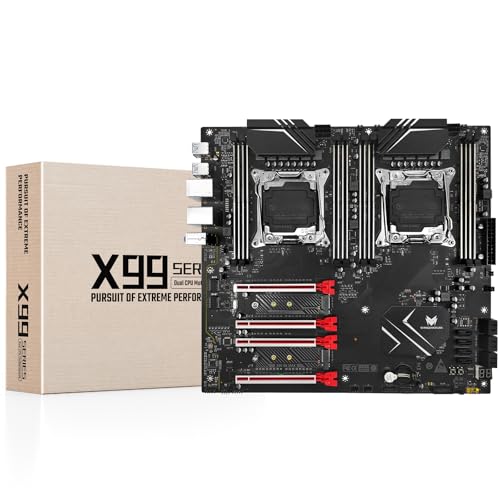
- Two LGA 2011-3 CPU sockets
- Up to 256GB DDR4 ECC
- Two NVMe M.2 and ten SATA ports
Best For: Reusing compatible Xeon E5 and DDR4 ECC parts
Intel Management Pick

- AST2600 BMC-based IPMI management
- Thunderbolt 4 and dual 2.5 GbE
- ECC support needs verification
Best For: Managed Core Ultra Series 2 workstations
Best Intel Connectivity – ASUS Pro WS W680-ACE
Among workstation motherboards with ECC support, the ASUS Pro WS W680-ACE is a practical Intel W680 choice when you need expansion and fast wired networking without moving to a Threadripper PRO platform. Its LGA 1700 socket supports listed 12th- and 13th-generation Intel processors.
Best For: Intel workstation builds needing ECC memory, dual 2.5Gb Ethernet, and several high-speed expansion options.
Pros:
- Two PCIe 5.0 SafeSlots and three PCIe 4.0 M.2 slots provide room for add-in cards and storage.
- Dual Intel 2.5Gb Ethernet, SlimSAS, and a front-panel USB 3.2 Gen 2×2 Type-C connection broaden connectivity.
- Includes a BMC header, Thunderbolt 4 header support, and ASUS Control Center Express management features.
Cons:
- Thunderbolt 4 is listed as header support, not a built-in rear Thunderbolt port.
- The specified maximum memory capacity is 128GB, below the 2TB limits listed for the WRX90 boards here.
Choose this board for an ECC-capable Intel workstation with balanced networking, storage, and expansion; confirm processor and memory compatibility for your planned configuration.
Best Seven-Slot Expansion – ASRock WRX90 WS EVO
The ASRock WRX90 WS EVO targets buyers comparing workstation motherboards with ECC support for Ryzen Threadripper PRO. Its standout combination is eight-channel DDR5 ECC registered memory support and seven PCIe 5.0 x16 slots.
Best For: Threadripper PRO builds that prioritize numerous PCIe expansion cards and high-capacity registered ECC memory.
Pros:
- Supports eight-channel ECC registered DDR5 and a stated maximum capacity of 2TB.
- Seven PCIe 5.0 x16 slots offer extensive add-in-card placement.
- 18+3+3 power-phase design with 110A SPS specified for VCore.
Cons:
- Requires a compatible Threadripper PRO platform rather than a mainstream desktop CPU.
- The supplied specifications conflict on DIMM count and socket naming; verify the exact board revision and CPU fit before purchase.
This is the expansion-first WRX90 option in the lineup, but the inconsistent listing details make a pre-purchase check of the manufacturer’s specifications especially important.
Best Managed Threadripper Build – ASUS Pro WS WRX90E-SAGE SE
For workstation motherboards with ECC support at the Threadripper PRO end of the range, the ASUS Pro WS WRX90E-SAGE SE pairs up to 2TB of ECC R-DIMM DDR5 with seven PCIe 5.0 x16 slots. It is designed for Ryzen Threadripper PRO 7000 WX-Series processors on socket sTR5.
Best For: High-end Threadripper PRO workstations requiring dense expansion and hardware-level remote management.
Pros:
- Seven PCIe 5.0 x16 slots, four M.2 slots, and SlimSAS NVMe support accommodate substantial expansion.
- Dedicated AST2600 BMC management LAN and ASUS Control Center Express support remote monitoring and management.
- Two 10Gb LAN ports, two rear USB4 40Gbps Type-C ports, and a 32-power-stage design round out the platform.
Cons:
- The EEB form factor requires a case that supports this larger board size.
- Its sTR5 socket and ECC R-DIMM requirements make it unsuitable for a standard desktop CPU-and-memory build.
Its networking and management features distinguish it from simpler expansion-focused boards; check case clearance and the qualified memory list before committing to a build.
Best Intel ECC Storage Build – Supermicro MBD-X13SAE-F-B
The Supermicro MBD-X13SAE-F-B is an Intel W680 contender among workstation motherboards with ECC support, pairing DDR5 unbuffered ECC compatibility with plentiful drive connections. It supports listed 12th- and 13th-generation Intel Core processors on LGA 1700.
Best For: Intel workstation builds that need ECC UDIMMs and connections for multiple SATA and M.2 drives.
Pros:
- Four DIMM slots support up to 128GB of DDR5 unbuffered ECC or non-ECC memory.
- Eight SATA ports and three PCIe 4.0 x4 M.2 slots provide varied storage connections.
- Two PCIe 5.0 x16 slots can operate at x16/none or x8/x8, alongside two PCIe 3.0 x4 slots.
Cons:
- The specified 128GB memory ceiling is lower than the 2TB maximum listed for the WRX90 options.
- ECC support is specified for unbuffered DIMMs, not registered ECC modules.
This board suits an Intel ECC workstation built around several drives and add-in cards; match your CPU and UDIMMs to its supported configurations.
Best for Threadripper Expansion – ASUS Pro WS TRX50-SAGE WIFI
Among workstation motherboards with ECC support, the ASUS Pro WS TRX50-SAGE WIFI is a strong fit for builders choosing an AMD Ryzen Threadripper PRO 7000 WX or Threadripper 7000 processor. It supports ECC DDR5 R-DIMMs and offers room for demanding expansion setups.
Best For: Threadripper workstations that need ECC memory, multiple PCIe 5.0 cards, and fast networking.
Pros:
- Supports up to 1TB of ECC DDR5 R-DIMM memory.
- Three PCIe 5.0 x16 slots, three M.2 slots, and SlimSAS NVMe support.
- 10 Gb and 2.5 Gb LAN, WiFi 7, and support for ASUS IPMI expansion cards.
Cons:
- Requires a compatible sTR5 Threadripper processor.
- IPMI expansion-card support is not the same as an integrated IPMI controller.
Choose this board when PCIe 5.0 expansion and modern connectivity matter as much as ECC capacity. If built-in out-of-band management is essential, account for its expansion-card approach.
Best for Remote Management – ASRock C621A WS
For buyers comparing workstation motherboards with ECC support on the 3rd Gen Intel Xeon Scalable platform, the ASRock C621A WS emphasizes server-style expansion and management. Its eight DDR4 DIMM slots support registered memory types, while a dedicated IPMI port enables out-of-band access.
Best For: Xeon workstation builds that prioritize remote management, network redundancy, and multiple expansion cards.
Pros:
- Eight-channel DDR4 memory architecture with RDIMM and LRDIMM support.
- Four PCIe 4.0 x16 and three PCIe 4.0 x8 slots.
- Dual 10GbE, dual Gigabit LAN, and integrated IPMI with iKVM.
Cons:
- Limited to LGA4189 3rd Gen Intel Xeon Scalable processors.
- Onboard M.2 connectivity is PCIe Gen3 rather than Gen4.
This is the practical pick when integrated remote administration is more important than the newest PCIe or M.2 generation. Confirm your planned memory capacity against the board’s specifications before ordering, as the supplied listing gives conflicting maximums.
Best for Intel PCIe 5.0 Builds – ASUS Pro WS W790-ACE
The ASUS Pro WS W790-ACE stands out among workstation motherboards with ECC support for Intel Xeon W-3400 and W-2400 builders seeking DDR5 R-DIMM support and plentiful PCIe 5.0 expansion. Its connectivity also suits a workstation with high-speed wired networking needs.
Best For: Xeon W workstations needing several PCIe 5.0 slots and fast wired networking.
Pros:
- Five PCIe 5.0 slots for expansion cards.
- Eight DDR5 R-DIMM slots and a listed maximum memory capacity of 2TB.
- 10G and 2.5G Ethernet, plus front and rear 20Gbps USB Type-C.
Cons:
- Requires a compatible LGA4677 Xeon W processor.
- The two onboard M.2 slots use PCIe 4.0, not PCIe 5.0.
Pick this board for its combination of Intel workstation memory support and PCIe 5.0 slots. Its supplied notes list a BMC header and management software, but do not establish integrated out-of-band IPMI.
High-End Threadripper Pick – ASUS Pro WS TRX50-SAGE WiFi A
Among workstation motherboards with ECC support, the ASUS Pro WS TRX50-SAGE WiFi A is built for demanding Threadripper systems. Its sTR5 socket supports the listed Threadripper PRO and Threadripper 7000/9000 processors, while four DDR5 slots support up to 1TB of ECC R-DIMM memory.
Best For: High-core-count workstations that need substantial ECC memory, expansion, and fast networking.
Pros:
- Supports up to 1TB ECC R-DIMM DDR5 memory.
- Offers three PCIe 5.0 x16 slots, four M.2 slots, and two USB4 ports.
- Includes 10 Gb and 2.5 Gb LAN, plus support for ASUS IPMI expansion cards.
Cons:
- Requires a compatible sTR5 Threadripper processor and ECC R-DIMM memory for the described build.
- Its 12.2-by-12.9-inch board requires careful case-fit checking.
This is the expansion-focused choice if your workload can use Threadripper’s platform capabilities; check processor, memory, and enclosure compatibility before ordering.
Dual-Xeon Legacy Pick – SHANGZHAOYUAN X99 D8 MAX
For buyers comparing workstation motherboards with ECC support around existing Xeon E5 v3/v4 parts, the SHANGZHAOYUAN X99 D8 MAX offers two LGA 2011-3 sockets and eight DDR4 slots. It supports up to 256GB of DDR4 or DDR4 ECC memory, subject to its stated CPU and memory restrictions.
Best For: Reusing compatible Xeon E5 processors and DDR4 ECC memory in a dual-CPU build.
Pros:
- Dual-CPU layout with up to 256GB DDR4 ECC support.
- Two NVMe M.2 slots, ten SATA 3.0 ports, and four PCIe x16 slots.
- Dual Gigabit LAN and VRM heatsinks.
Cons:
- Xeon E5 v4 builds require ECC server memory; the seller warns that server and desktop RAM cannot be mixed.
- No printed manual or CMOS battery is included.
- Uses the older LGA 2011-3 and DDR4 platform.
Its appeal is capacity and connectivity for compatible legacy components, not a current-generation platform. Verify your exact CPU, memory, power supply, and E-ATX case fit before building.
Intel Management Pick – ASUS Pro WS W880-ACE SE
The ASUS Pro WS W880-ACE SE is an LGA1851 workstation board for Intel Core Ultra Series 2 processors. If you are shopping for workstation motherboards with ECC support, note that the supplied specifications list DDR5 capacity but do not explicitly confirm ECC operation; verify the board’s memory documentation and your processor choice before buying it for ECC.
Best For: Intel Core Ultra Series 2 workstations prioritizing remote management and fast peripheral connectivity, pending ECC verification.
Pros:
- Dedicated LAN connection to an AST2600 BMC controller for IPMI remote management.
- Thunderbolt 4, dual 2.5 Gb Ethernet, and four M.2 slots.
- Includes BIOS FlashBack, Q-Code, and M.2 Q-Latch build features.
Cons:
- ECC support is not established by the supplied product notes.
- Limited to the listed LGA1851 Core Ultra Series 2 processor platform.
Its management features make it worth considering for an Intel workstation, but treat ECC compatibility as a required pre-purchase check rather than an assumed feature.
How We Picked These Workstation Motherboards with Ecc Support
We focused on boards that address different workstation needs rather than treating every ECC-capable listing as interchangeable. The shortlist covers Intel W680, W880, and W790; AMD TRX50 and WRX90; Xeon Scalable; and an older dual-socket X99 option. We considered the stated CPU platform, ECC memory class, expansion slots, networking, and board size. Listings vary in detail, so treat headline specifications as a starting point—not confirmation that every CPU and memory combination will run with error correction enabled.
Quick Comparison by Platform
- Mainstream Intel: The ASUS Pro WS W680-ACE pairs an LGA 1700 platform with DDR5 and ECC memory support. The newer Pro WS W880-ACE SE targets LGA 1851 Core Ultra Series 2 processors. Check CPU-specific ECC eligibility on either platform.
- AMD Threadripper: The two ASUS TRX50-SAGE variants target TR5 builds. The ASUS WRX90E-SAGE SE and ASRock WRX90 WS EVO target WRX90-class builds where Threadripper PRO platform capabilities and greater expansion are priorities.
- Intel Xeon: The ASUS W790-ACE targets LGA 4677, while the ASRock C621A WS supports 3rd Gen Xeon Scalable processors on LGA 4189. The Supermicro X13SAE-F is another option worth checking against its exact CPU and memory compatibility lists.
- Legacy dual-socket: The X99 dual-CPU board may suit a budget build using existing Xeon E5 v3/v4 parts, but its age warrants extra scrutiny of firmware, seller support, and component condition.
Key Buying Factors for Workstation Motherboards with Ecc Support
Verify the Entire ECC Path
Match the motherboard’s qualified CPU with the correct memory type—such as ECC UDIMM or ECC RDIMM. These types are not interchangeable. Check the manufacturer’s CPU and memory support lists, supported module capacities, and any BIOS requirements. After assembly, confirm that ECC operation is reported as active rather than assuming a successful boot proves it.
Plan Slots, Lanes, and Physical Fit
Count the GPUs, capture cards, high-speed storage cards, and network adapters you will actually install. A board’s full-length PCIe slots may share lanes or run at different electrical speeds. Check the slot-spacing and lane-sharing diagrams, then confirm that ATX, CEB, or EEB dimensions fit your case. Large GPUs can block neighboring slots.
Budget for the Whole Platform
CPU and ECC memory costs can outweigh the board price. Also compare onboard 2.5GbE or 10GbE, M.2 capacity, remote-management features where required, cooling needs, and power-supply connections. Older platforms can save money upfront while limiting upgrade options and long-term support.
Who Should Buy Which Workstation Motherboards with Ecc Support?
Choose a compatible W680 or W880 build if you need a conventional single-CPU workstation and modest expansion. Consider TRX50 for a Threadripper build when its verified CPU and memory configuration meets your ECC requirements. Step up to WRX90 or W790 when high core counts, more memory, or multiple demanding add-in cards justify the platform cost. Look at C621A or the X99 board mainly when you already own compatible legacy components. For any choice, confirm the precise board revision, CPU, memory kit, and firmware before ordering.
