
When projects outgrow a standard laptop, 64GB of RAM can help keep large models, datasets, and multiple professional apps running without constant memory pressure. But memory alone does not make a good workstation.
These 10 laptops span newer, portable configurations and older, larger systems with dedicated graphics. The right choice depends on your software, display needs, portability, and the exact configuration being sold.
Best 10 Workstation Laptops with 64gb RAM Picks for 2026
Best for GPU-Accelerated Design

- 64GB DDR5 RAM and 2TB SSD
- RTX 1000 Ada with 6GB VRAM
- 400-nit, 100% sRGB display
Best For: GPU-assisted design and content creation
Best for High-Resolution Multitasking

- 64GB DDR5 RAM and 1TB SSD
- 20-core Core i7-14700HX
- 3840×2400 touchscreen
Best For: Development and data work on a detailed display
Best Renewed GPU Option

- 64GB DDR5 RAM and 2TB SSD
- RTX A2000 with 4GB VRAM
- Renewed; 90-day limited warranty
Best For: Dedicated graphics with ample storage in a renewed laptop
Best for Business Productivity

- 64GB DDR5 RAM and 1TB SSD
- 20-core Core i7-14700HX
- 3840×2400 touch display
Best For: Code, data, and business multitasking
Xeon Pick

- Eight-core Xeon W-10885M
- 64GB RAM and 1TB SSD
- 17.3-inch FHD; Quadro RTX 3000
Best For: Large-screen Xeon workflows
Connected Pick

- Eight-core Core i9-10885H
- 64GB RAM and 1TB NVMe SSD
- Thunderbolt 3, Ethernet, SDXC
Best For: Port-heavy professional setups
Graphics Pick

- RTX A4000 with 8GB VRAM
- 64GB RAM and 1TB SSD
- 17.3-inch FHD display
Best For: Graphics-heavy large-screen work
Best for CAD Work
Lenovo ThinkPad P15 with RTX A2000
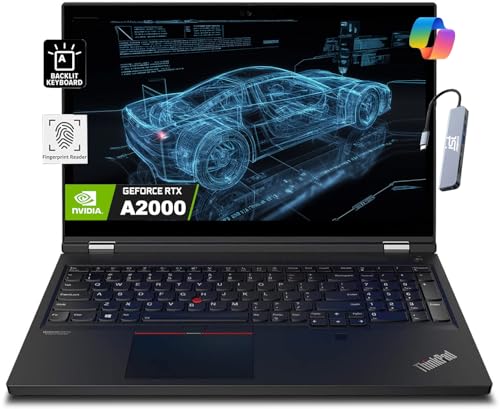
- RTX A2000 4GB dedicated graphics
- 64GB RAM and 2TB SSD
- FHD display rated at 300 nits
Best For: CAD and other professional graphics workflows
Best for Office Multitasking

- Eight-core Core i7-11800H
- 64GB RAM and 1TB SSD
- Integrated Intel graphics
Best For: Memory-heavy, CPU-focused professional tasks
Best for Large-Screen Multitasking

- 17.3-inch FHD display
- 16-core Core i9 and 64GB DDR5
- Integrated graphics listed; 8 pounds
Best For: Desk-based, CPU-intensive multitasking
Best for GPU-Accelerated Design – HP ZBook Studio G11
Among workstation laptops with 64gb ram, this ZBook pairs an Intel Core Ultra 7 165H and NVIDIA RTX 1000 Ada graphics with a 2TB SSD for demanding design and content-creation projects.
Best For: Engineers and creators who need dedicated graphics, substantial memory, and room for large project files.
Pros:
- RTX 1000 Ada with 6GB dedicated memory supports graphics-intensive work.
- 16-inch 1920×1200 anti-glare display offers 400-nit brightness and 100% sRGB coverage.
- Two Thunderbolt 4 ports, Wi-Fi 7, and Windows 11 Pro support a connected workspace.
Cons:
- The 1920×1200 screen has less detail than a 4K panel.
- The computer was resealed for memory and SSD upgrades; those parts carry a separate seller warranty.
The dedicated GPU makes this the stronger fit for visual workloads in this group, but check the split warranty terms before buying.
Best for High-Resolution Multitasking – Lenovo ThinkPad P16 4K Touch
For shoppers comparing workstation laptops with 64gb ram, this ThinkPad P16 emphasizes CPU-heavy work and screen space: it combines a Core i7-14700HX, 1TB SSD, and 16-inch 3840×2400 touchscreen.
Best For: Developers, analysts, and spreadsheet-heavy users who value a detailed touch display over dedicated graphics.
Pros:
- 20-core, 28-thread processor suits demanding multitasking.
- High-resolution 16:10 touchscreen provides room for documents and timelines.
- Dual Thunderbolt 4 ports, HDMI 2.1, and an SD Express reader offer flexible connections.
Cons:
- Listed integrated Intel graphics are a poor match for buyers who require a dedicated workstation GPU.
- The 1TB SSD offers less local storage than the 2TB options here.
Choose this configuration for processing power and display detail, not for GPU-dependent rendering; verify graphics requirements for your software first.
Best Renewed GPU Option – Dell Precision 7670
This renewed Dell Precision 7670 is one of the workstation laptops with 64gb ram that also includes dedicated graphics, pairing an RTX A2000 with a Core i9-12950HX and 2TB SSD.
Best For: Buyers comfortable with a renewed laptop who need substantial storage and a dedicated GPU.
Pros:
- RTX A2000 includes 4GB of dedicated graphics memory.
- 64GB of 4800MHz DDR5 memory and a 2TB NVMe SSD support large working sets.
- 16-inch 1920×1200 display and Windows 11 Pro suit everyday professional use.
Cons:
- Renewed condition and a listed 90-day limited warranty warrant closer inspection.
- At 5.8 pounds, it is less appealing for frequent travel.
- The non-touch 1920×1200 screen is less sharp than the listed 4K ThinkPad displays.
The CPU, storage, and dedicated GPU make a capable combination, provided the condition and short warranty fit your buying criteria.
Best for Business Productivity – Lenovo ThinkPad P16 64GB
For workstation laptops with 64gb ram focused on code, data, and office work, this ThinkPad P16 combines a 20-core Core i7-14700HX with a 1TB SSD and a 16-inch 3840×2400 touchscreen.
Best For: Professionals who want a high-resolution workspace, CPU capacity, and Windows 11 Pro business features.
Pros:
- 64GB DDR5 memory keeps multiple memory-intensive applications open.
- 4K-class 16:10 touch display provides space for code, documents, and spreadsheets.
- Fingerprint reader, webcam shutter, and spill-resistant keyboard add practical everyday features.
Cons:
- Listed integrated Intel graphics do not offer the dedicated GPU found in the HP and Dell options.
- 1TB of storage may fill quickly with large local datasets or media projects.
This configuration makes sense for CPU- and memory-heavy productivity; choose a dedicated-GPU model instead if your applications depend on graphics acceleration.
Xeon Pick – Dell Precision 7750
Among workstation laptops with 64gb ram, this renewed Dell Precision 7750 pairs an eight-core Xeon W-10885M with a 1TB SSD and Quadro RTX 3000 graphics. Its 17.3-inch FHD screen gives you room for detailed work, while Windows 11 Pro comes installed.
Best For: Professionals who want Xeon processing and a large screen for demanding desktop-style workflows.
Pros:
- 64GB RAM and a 1TB SSD support memory-heavy projects.
- Xeon W-10885M offers eight cores and up to 5.3GHz boost.
- Dedicated Quadro RTX 3000 graphics with 4GB GDDR6.
Cons:
- 17.3-inch FHD resolution may feel modest for fine visual work.
- Renewed condition warrants checking the seller’s warranty details.
Choose this model if screen size and Xeon processing matter more to you than a higher-resolution panel. Confirm the renewed unit’s condition and coverage before ordering.
For buyers comparing workstation laptops with 64gb ram, the ThinkPad P15 offers an eight-core Core i9-10885H, a 1TB PCIe NVMe SSD, and Quadro T2000 graphics in a 15.6-inch FHD package. It also includes a Dockztorm USB hub.
Best For: Professionals who need substantial memory and a broad selection of built-in connections.
Pros:
- 64GB DDR4 RAM and a 1TB PCIe NVMe SSD.
- Two Thunderbolt 3 ports, HDMI, Ethernet, and an SDXC reader.
- Fingerprint reader, backlit keyboard, and included USB hub.
Cons:
- 15.6-inch display is limited to 1920 × 1080 resolution.
- At 6.1 pounds, it is a substantial laptop to carry.
This is the practical choice when ports and security features are priorities. Check that Windows 10 Pro suits your software and support requirements before buying.
Among workstation laptops with 64gb ram, this renewed Precision 7760 stands out for its Nvidia RTX A4000 with 8GB of graphics memory. An eight-core Core i9-11950H, 1TB SSD, and 17.3-inch FHD display complete the configuration.
Best For: Buyers prioritizing dedicated graphics memory and a large display for graphics-heavy work.
Pros:
- RTX A4000 graphics with 8GB of video memory.
- 64GB DDR4 RAM and a 1TB SSD.
- Eight-core 11th-generation Core i9 processor and Windows 11 Pro.
Cons:
- The listing specifies no integrated webcam.
- 17.3-inch display is FHD rather than higher resolution.
- Renewed listing specifies a 90-day limited warranty.
The GPU is the clearest reason to choose this model over the other two. Verify the renewed unit’s condition and webcam requirements before ordering.
Best for CAD Work – Lenovo ThinkPad P15 with RTX A2000
Among workstation laptops with 64gb ram, this ThinkPad P15 is the strongest fit here for buyers who need dedicated graphics. It pairs an eight-core Core i7-11850H with an NVIDIA RTX A2000 4GB GPU, a 2TB SSD, and a 15.6-inch FHD display.
Best For: Engineers, architects, and designers using graphics-intensive professional applications.
Pros:
- Dedicated RTX A2000 graphics and listed ISV certifications for applications including AutoCAD, Revit, and SOLIDWORKS.
- 64GB RAM and a spacious 2TB SSD.
- Thunderbolt 4, 2.5GbE Ethernet, and an included 7-in-1 hub provide flexible connectivity.
Cons:
- The built-in display is FHD and rated at 300 nits.
- The RTX A2000 has 4GB of dedicated graphics memory.
Choose this configuration when application compatibility and dedicated graphics matter more than a higher-resolution built-in screen. The listing says the new computer was resealed for its memory or SSD upgrade, so review the seller’s warranty terms before buying.
Best for Office Multitasking – Dell Precision 7560 (Renewed)
If you are comparing workstation laptops with 64gb ram for large spreadsheets and heavy multitasking, this renewed Precision 7560 offers an eight-core Core i7-11800H, a 1TB SSD, and a 15.6-inch FHD screen. Its listed configuration uses integrated Intel graphics rather than a dedicated workstation GPU.
Best For: Buyers who need ample memory for CPU-focused work and do not require dedicated graphics.
Pros:
- 64GB DDR4 RAM supports running multiple applications.
- Eight-core processor and 1TB SSD suit general professional workloads.
- Includes Windows 11 Pro and a non-touch FHD display.
Cons:
- Integrated graphics limit its appeal for GPU-dependent work.
- Renewed listing specifies a 90-day limited warranty.
This is the practical pick when memory capacity is the priority, but do not assume the Precision name means this particular listing includes a discrete GPU. Check the renewed unit’s condition and warranty coverage before ordering.
Best for Large-Screen Multitasking – Dell Precision 7770 (Renewed)
For shoppers seeking workstation laptops with 64gb ram and more screen space, this renewed Precision 7770 combines a 17.3-inch FHD display with a 16-core Core i9-12950HX. It also lists 64GB of CAMM DDR5-4800 memory and a 1TB PCIe NVMe SSD.
Best For: Desk-based users who want a large display and substantial CPU and memory resources for multitasking.
Pros:
- 16-core Core i9 processor for demanding CPU-focused workloads.
- 64GB DDR5-4800 RAM and a 1TB NVMe SSD.
- Spacious 17.3-inch non-touch screen and Windows 11 Pro.
Cons:
- The specified configuration has integrated Intel graphics, not a confirmed dedicated GPU.
- Weighs 8 pounds, and the large display is limited to FHD resolution.
- Renewed listing specifies a 90-day limited warranty.
Its CPU and screen size are the draw, especially if it will mostly stay at a desk. Although the listing mentions NVIDIA graphics elsewhere, its detailed graphics specification says integrated Intel graphics; verify the exact GPU with the seller if that affects your work.
How We Picked the Best Workstation Laptops with 64gb RAM
We focused on listings offering 64GB of RAM and compared their stated processors, graphics, displays, storage, and chassis sizes. The selection includes current-generation options alongside older Precision and ThinkPad models that may appeal to value-conscious buyers. A model name is not a complete specification: memory, GPU, screen, warranty, and condition can vary between sellers, so verify the exact listing before ordering.
Quick Comparison: Which Type Fits Your Work?
For a newer all-around configuration, start with the HP ZBook G11 or the listed ThinkPad P16 options, then compare their exact GPU and screen specifications. The Precision 7670 and 7770 offer 12th-generation HX processors in different chassis sizes; the 7670 listing explicitly includes an RTX A2000. The Precision 7760 pairs a 17.3-inch display with a listed RTX A4000, making it worth comparing for GPU-intensive work if its older platform suits your budget. The P15, Precision 7560, and Precision 7750 warrant a closer look at price, condition, and remaining support before you choose them over newer hardware.
Key Buying Factors for Workstation Laptops with 64gb RAM
Match the GPU to Your Software
Dedicated workstation graphics matter most when your CAD, 3D, visualization, or video applications can use them. Compare GPU model and video memory, not just the presence of an NVIDIA badge. If you need a certified workflow, check your software vendor’s compatibility information for the specific hardware and driver.
Balance CPU, Cooling, and Portability
Core count can help with rendering, compilation, and other parallel tasks, while fast individual cores remain important in many modeling operations. A larger chassis may offer more room for cooling, but 17.3-inch systems are less convenient to carry. Consider weight, charger size, and battery expectations if you work away from a desk.
Check the Display, Storage, and Upgrade Path
A high-resolution screen provides more workspace for detailed drawings; an FHD panel may be sufficient with an external monitor. Confirm color requirements separately. Check whether 64GB is installed across two modules, whether memory is upgradeable, and whether additional SSD slots are available. Also confirm the ports needed for docks, monitors, and specialized devices.
Who Should Buy Which Workstation Laptops with 64gb RAM?
Frequent travelers should begin with the smaller ZBook G11 or 15.6-inch models, while checking their actual weights. Buyers who prioritize screen space can compare the 16-inch P16 and Precision 7670 with the 17.3-inch Precision 7750, 7760, and 7770. For GPU-heavy workloads, shortlist configurations that explicitly name a suitable dedicated GPU rather than assuming every version includes one. If you are shopping older models for value, make the decision on total cost: seller condition, battery health, warranty coverage, and software support matter as much as the 64GB headline.
