
If you’re a Mac user seeking a more ergonomic way to navigate your workspace, wireless trackballs could be just what you need. These devices not only enhance comfort but also improve precision, allowing for a more efficient workflow. With several options available, it’s essential to choose one that fits your specific needs. Let’s explore the top ten wireless trackballs that can transform how you interact with your Mac.
Logitech Ergo M575S Wireless Trackball Mouse

The Logitech Ergo M575S Wireless Trackball Mouse is an excellent choice for Mac users who prioritize comfort and efficiency in their workspace. Its sculpted design promotes hand relaxation, reducing muscle strain by 25% during long hours of use. With thumb control, you can move the cursor effortlessly without arm movement, making it perfect for small workspaces. You’ll appreciate the customizable buttons and adjustable cursor speed through the Logi Options+ app. Plus, you can connect via Bluetooth or the Logi Bolt USB receiver, ensuring seamless operation. Enjoy up to 18 months of battery life, all while minimizing your environmental footprint.
Best For: Those seeking a comfortable, ergonomic mouse solution for long hours of use, especially in small workspaces.
Pros:
- Sculpted design reduces muscle strain and promotes hand relaxation.
- Thumb control allows for cursor movement without arm movement, ideal for limited space.
- Customizable buttons and adjustable cursor speed enhance user efficiency.
Cons:
- Some users may experience issues with software functionality and device switching.
- Price point may be considered high compared to traditional mice.
- Learning curve for users transitioning from standard mice to a trackball design.
Logitech MX Ergo S Wireless Trackball Mouse

If you’re seeking an ergonomic solution to reduce wrist strain during long hours at your desk, the Logitech MX Ergo S Wireless Trackball Mouse is an excellent choice for Mac users. With a 20-degree tilt angle, it minimizes muscle strain by 27%. You’ll appreciate the soft rubber grip, perfect for medium- to large-sized hands. The dual connectivity options allow you to switch seamlessly between devices, while the six customizable buttons enhance your productivity. Plus, its rechargeable battery offers an impressive 120 days of use on a full charge. Enjoy quieter clicks and a trackball design that fits right into your workflow.
Best For: Individuals seeking an ergonomic mouse solution to alleviate wrist strain and enhance productivity during extended computer use.
Pros:
- Ergonomic design with a 20-degree tilt that reduces muscle strain by 27%.
- Quiet operation with 80% quieter clicks, making it suitable for shared workspaces.
- Long battery life, offering up to 120 days on a full charge and quick USB-C charging.
Cons:
- Some users report discomfort with the scroll wheel design.
- Not all connectivity cables are included, requiring separate purchase.
- May not suit those with smaller hands due to its contoured grip.
Logitech M575 Ergonomic Wireless Trackball USB Mouse, Black (910-005869)

For Mac users seeking a comfortable and efficient input device, the Logitech M575 Ergonomic Wireless Trackball stands out with its sculpted design that fits your hand naturally. Its smooth thumb control offers precise tracking on any surface, making it perfect for detailed tasks. With Bluetooth or USB connectivity, you can enjoy a range of up to 33 feet and an impressive battery life of up to 24 months on a single AA battery. Weighing just 7 ounces, it’s ideal for tight workspaces while reducing strain during long hours of use. Experience enhanced comfort and functionality with this remarkable trackball.
Best For: Users seeking a comfortable, ergonomic mouse that minimizes strain during prolonged use, especially in tight workspaces.
Pros:
- Ergonomic design provides natural hand positioning for comfort during long hours.
- Wireless connectivity with a range of up to 33 feet and long battery life of 20 to 24 months.
- Smooth thumb control allows for precise tracking on various surfaces, enhancing productivity.
Cons:
- Some users may experience accidental clicks due to sensitive buttons.
- Minor design changes compared to previous models may not be favored by all users.
- Not preferred for gaming by serious gamers, though casual users may find it adequate.
Kensington Expert Wireless Trackball Mouse (K72359WW) Black, 3.5 x 6.1 x 8

Engineered for comfort and precision, the Kensington Expert Wireless Trackball Mouse (K72359WW) is an ideal choice for Mac users seeking a seamless navigation experience. With its large 55mm ball and Diamond Eye optical tracking, you’ll enjoy precise control. The patented scroll ring simplifies page navigation, while the ergonomic wrist rest guarantees comfort during extended use. Customizing your experience is easy with the KensingtonWorks software, allowing you to adjust button functions and speeds. Plus, its wireless connectivity via Bluetooth or USB dongle keeps your workspace clutter-free. With a solid build and a 3-year warranty, this trackball is a reliable choice.
Best For: Mac users looking for an ergonomic and customizable navigation solution for their computing needs.
Pros:
- Large 55mm ball design provides precise control and various gripping styles.
- Ergonomic detachable wrist rest enhances comfort during extended use.
- Customizable buttons and speeds through KensingtonWorks software allow for personalized functionality.
Cons:
- Initial stickiness of the trackball may require cleaning to improve performance.
- Some users experienced software conflicts that needed reinstallation to resolve.
- The cord’s durability has been questioned, with better performance reported when using USB extension cables.
Logitech MX Ergo Plus Advanced Wireless Trackball

The Logitech MX Ergo Plus Advanced Wireless Trackball stands out as an ideal choice for Mac users seeking superior comfort and precision. With its smart adjustable hinge, you can choose from three angles to find the perfect hand position, reducing muscular strain by 20%. The precision mode button lets you switch between speed and accuracy effortlessly. Plus, the rechargeable battery lasts up to four months, with a quick charge option for immediate use. Compatible with up to two computers, this trackball supports seamless file management, making it a fantastic addition to your workspace for enhanced productivity.
Best For: The Logitech MX Ergo Plus Advanced Wireless Trackball is best for Mac users looking for an ergonomic mouse alternative that enhances comfort and precision during extended use.
Pros:
- Adjustable tilt for personalized comfort and reduced muscular strain.
- Programmable keys allow for customized functions to suit individual workflows.
- Wireless connectivity options via Bluetooth and USB dongle for versatile use.
Cons:
- Some users have reported right-click issues that necessitate replacement.
- Limited tilt adjustment may not accommodate all desk setups effectively.
- Requires additional Logitech app for full button programming capabilities.
Nulea M501 Wireless Trackball Mouse

With its ergonomic design and thumb-controlled precision, the Nulea M501 Wireless Trackball Mouse is perfect for Mac users seeking comfort and efficiency. This rechargeable mouse supports Bluetooth and USB connections for up to three devices, making switching seamless. Its unique design reduces wrist and arm strain, ensuring all-day comfort while you work. With adjustable DPI settings, you’ll enjoy precise tracking on various surfaces, ideal for small workspaces. Plus, the built-in rechargeable battery means no more hassle with disposable batteries. Enhance your productivity with six functional buttons, though keep in mind they’re not programmable.
Best For: Mac users looking for a comfortable and efficient mouse that minimizes wrist and arm strain while working.
Pros:
- Ergonomic design reduces muscle stress for all-day comfort.
- Supports connection to up to three devices via Bluetooth or USB, allowing for easy switching.
- Adjustable DPI settings provide precise tracking on various surfaces.
Cons:
- Buttons are non-programmable, limiting customization options.
- Requires initial charging before first use, which may delay setup.
- May not be suitable for users who prefer traditional mice over trackball designs.
ELECOM HUGE Trackball (M-HT1DRBK)

For Mac users seeking a comfortable and efficient input device, the ELECOM HUGE Trackball (M-HT1DRBK) stands out with its large 52mm trackball that guarantees precise cursor movement. Weighing just 9.2 oz, its ergonomic design includes a soft palm rest, making it ideal for prolonged use. With eight customizable buttons and adjustable DPI settings, you can tailor your experience to fit various applications. Its optical tracking technology guarantees smooth performance, while the wireless 2.4GHz connection offers minimal latency. Plus, with a battery life exceeding three months, this trackball combines convenience and functionality for your computing needs.
Best For: Users with larger hands looking for a comfortable and customizable trackball for extended computer use.
Pros:
- Ergonomic design with a large soft palm rest for enhanced comfort.
- Eight customizable buttons and adjustable DPI settings for personalized functionality.
- Long battery life of over three months with standard usage.
Cons:
- Poor instructions can make setup and customization challenging.
- Requires proprietary software for full button customization and functionality.
- Some users may find the need for updated software to be a drawback.
Nulea Wireless Ergonomic Trackball Mouse
Looking for a comfortable and efficient mouse option? The Nulea Wireless Ergonomic Trackball Mouse could be your perfect fit. With its 44mm index finger trackball and five adjustable DPI settings, you’ll enjoy smooth cursor control while reducing muscle stress. This rechargeable mouse connects easily to up to three devices via Bluetooth or USB, making it versatile for your workspace needs. Users appreciate its comfort, particularly for video and audio editing tasks. Plus, with a battery life of up to 60 days and a compact design, it’s ideal for small spaces. Just remember, it’s designed for right-handed users only.
Best For: The Nulea Wireless Ergonomic Trackball Mouse is best for right-handed users seeking a comfortable and efficient solution for prolonged computer use, especially in small workspaces.
Pros:
- Offers ergonomic design that reduces muscle stress and enhances cursor control.
- Long battery life of up to 60 days on a single charge, with easy connectivity to multiple devices.
- Users report ease of adaptation from traditional mice, making it suitable for various tasks including video and audio editing.
Cons:
- Designed exclusively for right-handed users, limiting accessibility for left-handed users.
- Requires some adjustment for thumb button placement and scroll wheel usage.
- Non-replaceable battery may raise concerns about longevity over time.
Logitech MX Ergo Wireless Trackball Mouse
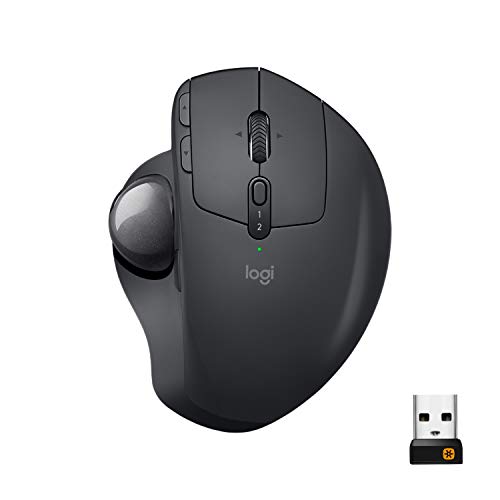
The Logitech MX Ergo Wireless Trackball Mouse stands out for Mac users seeking ergonomic comfort without sacrificing performance. You can adjust the trackball angle from 0–20° to maintain a natural hand position, reducing muscle fatigue by 20% compared to traditional mice. Its precision scroll wheel features horizontal scrolling, and you can easily switch between accuracy and speed modes. With Logitech FLOW technology, you can seamlessly operate across two devices via USB or Bluetooth. Plus, its rechargeable battery lasts up to four months on a full charge, and just one minute of charging gives you three hours of use. Customize your experience with Logi Options+ software.
Best For: The Logitech MX Ergo Wireless Trackball Mouse is best for Mac users who prioritize ergonomic comfort and multi-device functionality.
Pros:
- Reduces muscle fatigue by 20% compared to traditional mice, enhancing comfort during extended use.
- Logitech FLOW technology allows seamless control across two devices, improving productivity.
- Long battery life of up to four months on a full charge, with quick charging capabilities.
Cons:
- The learning curve for users new to trackball mice may take some time.
- Limited customization options compared to other high-end gaming mice.
- The trackball may require regular cleaning to maintain optimal performance.
Nulea M501 Wireless Trackball Mouse (Rechargeable Ergonomic)

With its rechargeable ergonomic design, the Nulea M501 Wireless Trackball Mouse is an excellent choice for Mac users who prioritize comfort and efficiency. You’ll enjoy easy thumb control and smooth tracking, which minimizes wrist and arm movement, making it perfect for all-day use. This mouse connects up to three devices via Bluetooth or a USB receiver, allowing seamless switching. With adjustable DPI for precise cursor movement, it works well on various surfaces and in tight spaces. Plus, the built-in rechargeable battery offers weeks of use on a single charge, ensuring you stay productive without interruption.
Best For: The Nulea M501 Wireless Trackball Mouse is best for Mac users seeking an ergonomic solution that enhances comfort and productivity during extended use.
Pros:
- Rechargeable battery provides weeks of use on a single charge.
- Ergonomic design reduces muscle stress and allows for natural hand positioning.
- Seamless connectivity with up to three devices via Bluetooth or USB receiver.
Cons:
- Some users have reported a squeaking scroll wheel.
- Non-programmable buttons may limit customization options for advanced users.
- Initial full charge is required before first use, which may delay immediate usage.
Factors to Consider When Choosing Wireless Trackballs for Mac
When you’re choosing a wireless trackball for your Mac, several factors come into play. You’ll want to reflect on ergonomic design, connectivity options, and battery life to make certain it fits your needs. Don’t forget to take into account customization features and software compatibility to make the most of your experience.
Ergonomic Design Importance
Choosing a wireless trackball with ergonomic design is crucial for anyone who spends long hours working on a Mac. An ergonomic trackball can reduce muscle strain by up to 25% in your forearm and promote better posture, making your work sessions more comfortable. Look for models with sculpted shapes and adjustable angles that help maintain a natural hand position, alleviating wrist pain. The thumb control mechanism minimizes arm movement, perfect for tight workspaces and reducing the risk of repetitive strain injuries. Features like soft rubber grips and contoured shapes enhance comfort, reducing fatigue during extended use. User-tested ergonomic certifications guarantee these trackballs support a relaxed hand position, ultimately improving your productivity and overall experience.
Connectivity Options Available
As you explore wireless trackballs for your Mac, consider the connectivity options that best fit your workflow. Most wireless trackballs offer dual connectivity—Bluetooth and USB receivers—providing flexibility in how you connect to your devices. You’ll appreciate models that allow seamless switching between multiple devices, making it easy to shift from one computer to another without hassle. Verify compatibility with macOS, as many trackballs are specifically designed for peak performance on Macs. Additionally, take note of the connectivity range, typically up to 33 feet (10 meters), guaranteeing reliable performance without latency. Some advanced models even feature customizable buttons and software to enhance your productivity, making them a worthwhile investment for Mac users.
Battery Life Considerations
Battery life can make or break your experience with a wireless trackball, so it’s essential to weigh your options. Some models boast up to 24 months of use on a single battery, while others feature rechargeable batteries that last weeks or months on a full charge. Consider what type of battery works best for you; standard AA or AAA batteries might require frequent replacements, whereas built-in rechargeable options offer convenience. Fast charging capabilities can also vary—some trackballs fully charge in an hour or less. Look for energy-saving modes like auto-sleep functions to extend battery life during downtime. Ultimately, choosing between rechargeable and disposable batteries can affect both convenience and long-term costs, with rechargeable options often providing better savings.
Customization Features Offered
When looking for the right wireless trackball for your Mac, customization features can play a significant role in enhancing your overall experience. Many models offer customizable buttons, letting you assign specific functions to boost productivity and streamline tasks. Some come with software support like Logi Options+, which allows you to adjust cursor speed, set up Smart Actions, and remap buttons for personalized use. Advanced options provide multi-device support, making it easy to switch between systems. Additionally, precision tracking modes can be toggled for speed or accuracy, catering to both gaming and detailed graphic work. You might also find adjustable tilt angles to improve ergonomics and match your hand positioning preferences, ensuring comfort during extended use.
Compatibility With Software
Choosing the right wireless trackball for your Mac involves several compatibility factors that can greatly impact your user experience. First, verify the trackball is compatible with your macOS version, as some models may only support Windows or specific macOS versions. You’ll also want to check if it requires additional software for full functionality; some advanced features might not work without specific applications. Confirm that it supports Bluetooth or USB connectivity that’s compatible with your Mac. User feedback can provide insights into performance with macOS, helping you avoid potential compatibility issues. Finally, verify if the buttons can be mapped or customized using macOS-compatible software to enhance your productivity and overall experience.
Size and Weight Factors
After ensuring compatibility with your Mac’s software, the next important consideration is the size and weight of the wireless trackball. A larger model may suit you if you have bigger hands, while a smaller one is ideal for limited desk space or smaller hands. Weight also matters; lighter trackballs are easier to maneuver, but heavier models provide a solid feel during use. Look for ergonomically designed options with sculpted shapes that accommodate various hand sizes, enhancing comfort and reducing strain. Make sure the trackball’s dimensions align with your hand size for a natural grip and minimal wrist movement. Finally, consider the design and weight distribution to avoid discomfort and fatigue during extended use.
Tracking Precision Levels
Tracking precision levels play an essential role in your experience with a wireless trackball, especially if you’re working on tasks that require accuracy and control. Look for models with adjustable DPI settings that let you switch between sensitivities, like 400, 800, and 1600 DPI. Higher DPI settings enable faster cursor movement, which is great for high-resolution displays and detailed work such as graphic design or photo editing. Precision tracking modes allow you to toggle between speed and accuracy, adapting to different applications. Additionally, consider the trackball’s design and size; larger balls often provide smoother movements. Finally, optical or laser tracking technologies generally deliver reliable performance across various surfaces, enhancing your overall experience.
Multi-Device Connectivity Support
When working with a wireless trackball, multi-device connectivity can greatly enhance your workflow, especially if you’re using multiple monitors or devices. Many wireless trackballs allow you to connect and switch between several devices seamlessly. Bluetooth connectivity is a common feature, making it easy to pair with your Mac, PC, or tablet without taking up USB ports. Look for models with an Easy-Switch button for quick changes between devices—perfect for balancing work and personal tasks. Some trackballs even connect via a USB receiver, offering reduced latency in crowded environments. Certain models let you connect up to three devices simultaneously, keeping your workflow streamlined and eliminating the hassle of repeated pairing.
