
The best wireless photo booth printers make it easy to turn phone photos and event snapshots into physical keepsakes. The right model can simplify guest sharing, reduce setup time, and deliver colorful prints without a complicated computer-based workflow.
Our roundup includes dedicated event printers, compact wireless photo printers, portable dye-sublimation models, and complete touchscreen photo booth machines. Use the buying guide below to match print quality, connectivity, speed, media cost, and portability to your needs.
Best 10 Wireless Photo Booth Printers Picks for 2026
Best for Events
DNP QW410 Wi-Fi Dye-Sublimation Printer

- 4x6-inch prints in about 19 seconds
- Wi-Fi and USB connectivity
- Glossy or matte finishing options
Best For: High-volume events and professional photo booths
Best Phone-Friendly Option

- Includes 100 sheets and three cartridges
- Built-in hotspot needs no outside network
- Supports up to five connected devices
Best For: Smartphone-based booths and small gatherings
Best for Home Use
Epson PictureMate PM-400 Wireless Printer

- Prints borderless 4x6-inch and 5x7-inch photos
- Wireless printing from phones and tablets
- Compact design with 36-second 4x6-inch prints
Best For: Home printing and smaller personal events
Best for Event Rentals

- 13MP camera and 10.1-inch touchscreen
- Includes 4 x 6-inch dye-sub printer and 60 sheets
- 300+ templates with adjustable fill lighting
Best For: Event planners and rental businesses needing durable 4 x 6-inch prints
Best for Home 4 x 6 Prints
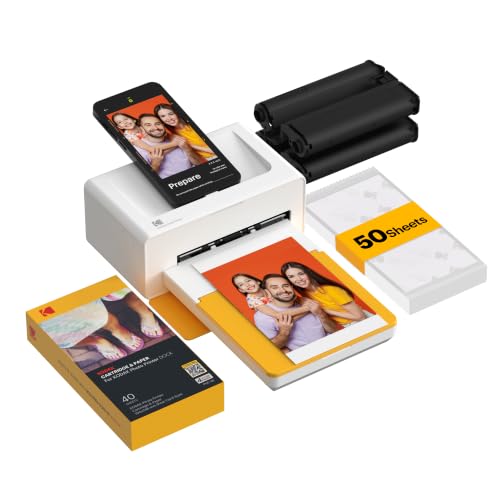
- Bluetooth printing from compatible iOS and Android devices
- Produces laminated 4 x 6-inch 4PASS prints
- Integrated phone dock supports charging while printing
Best For: Home users printing smartphone photos, gifts, and family memories
Best for Portable Digital Sharing

- Lightweight 7.3-pound booth with touchscreen and ring light
- Prints 3 x 4-inch ink-free ZINK photos
- Supports QR-code sharing and cloud photo management
Best For: Mobile events combining sticky-backed prints with digital sharing
Most Versatile
Liene Amber M110 Dual-Format Photo Printer

- Prints 4x6 photos and 3x3 stickers
- Includes 80 sheets and two cartridges
- Bluetooth and Android/iOS app support
Best For: Flexible photo booth setups using standard and sticker prints
Best for Creative Features

- Includes 108 sheets and two ribbons
- Adds collages, ID photos, and AR videos
- Waterproof, scratch-resistant 4x6 prints
Best For: Interactive events and creative smartphone photo printing
Best Complete Bundle
Canon Selphy CP1500 Wireless Photo Printer

- Includes 108 sheets and three color cartridges
- Wireless printing through Wi-Fi
- Compact dye-sub 4x6 photo printing
Best For: Ready-to-use home, event, and scrapbook photo printing
Best for Events – DNP QW410 Wi-Fi Dye-Sublimation Printer
DNP QW410 4.5" Dye Sublimation Printer with WCM Plus Wi-Fi Module and 4x6" Printer Media Kit
Check Price On AmazonFor event operators comparing wireless photo booth printers, the DNP QW410 emphasizes speed, flexible connectivity, and professional-looking 4×6-inch output. Its included WCM Plus Wi-Fi Module supports iOS, Android, Windows, and macOS devices, while dye-sublimation printing produces 4×6-inch glossy photos in about 19 seconds.
Best For: High-volume photo booths, events, and users who need Wi-Fi printing across multiple platforms.
Pros:
- Prints 4×6-inch photos in approximately 19 seconds.
- Includes Wi-Fi connectivity plus USB 2.0.
- Offers glossy or matte finishing options.
- Supports 4×6-inch and 4.5×8-inch media.
Cons:
- At 22.2 pounds, it is less portable than compact home printers.
- The listed maximum media size is 4×6 inches despite support for 4.5×8-inch media.
The QW410 is a practical choice when throughput and dependable wireless compatibility matter more than minimizing equipment weight. Its included media kit and Wi-Fi module make this package particularly convenient for setting up a professional photo booth workflow.
Best Portable Pick – Canon SELPHY CP1500 Wireless Photo Printer
The Canon SELPHY CP1500 is one of the more travel-friendly wireless photo booth printers, with a compact design, smartphone connectivity, and optional battery support. Its dye-sublimation prints are instantly dry, water resistant, and rated to maintain their appearance for up to 100 years.
Best For: Portable photo booths, parties, family gatherings, and on-the-go 4×6-inch printing.
Pros:
- Compact 4×6-inch dye-sublimation printer with optional battery support.
- Connects through Wi-Fi, USB, memory cards, and USB flash drives.
- Prints water-resistant photos that are instantly dry.
- Built-in 3.5-inch display supports viewing and basic editing.
Cons:
- Its listed initial print time is approximately 41 seconds.
- The standard output capacity is listed as 10 sheets.
- Optional battery operation requires an additional battery pack.
The CP1500 balances portability and convenience well, especially for casual photo booth setups where users may want to print from phones, cameras, or storage media. It is better suited to moderate printing demand than the fastest event-focused machines.
Best Phone-Friendly Option – Liene M100 4×6 Photo Printer
The Liene M100 is designed for straightforward smartphone printing, making it a convenient contender among wireless photo booth printers. Its built-in hotspot avoids the need for an outside network, and the included package provides 100 sheets of 4×6-inch paper and three color cartridges.
Best For: Phone-based photo booths, small gatherings, and users who want paper and cartridges included.
Pros:
- Includes 100 sheets of paper and three cartridges.
- Built-in Wi-Fi hotspot works without another network.
- Supports up to five simultaneous device connections.
- App provides filters, borders, brightness, contrast, and printing-status tools.
Cons:
- Uses proprietary Liene cartridges.
- The included paper capacity is listed as 20 sheets per tray.
- Users need to ensure the cartridge clicks securely into place before printing.
The M100 is a strong convenience pick for phone-centered setups because it combines an independent hotspot, multi-device access, and starter supplies. Its included consumables can simplify initial setup, while the proprietary cartridge system should be considered when budgeting for ongoing use.
Best for Home Use – Epson PictureMate PM-400 Wireless Printer
The Epson PictureMate PM-400 is a compact wireless inkjet option for buyers who want more than standard 4×6-inch prints. It supports both 4×6-inch and 5×7-inch borderless photos and can print from iPhones, iPads, tablets, and smartphones, making it suitable for personal events and smaller photo booth setups.
Best For: Home users, personal gatherings, and buyers who want both 4×6-inch and 5×7-inch photo sizes.
Pros:
- Prints borderless 4×6-inch and 5×7-inch photos.
- Supports wireless printing from smartphones and tablets.
- Compact, portable design with a listed 36-second 4×6-inch print time.
- Offers a high listed color resolution of 5760 x 1440 dpi.
Cons:
- Uses Epson Genuine Cartridges exclusively according to the product notes.
- It is an inkjet rather than a dye-sublimation printer.
- At 6 pounds, it is heavier than some compact instant photo printers.
The PM-400 makes sense when print-size flexibility is important and the printer will serve home use, gatherings, or occasional photo booth needs. Its 5×7-inch support is a useful advantage, though buyers should factor in Epson cartridge requirements and the slower inkjet workflow.
Best for Event Rentals – Zylosian Desktop Photo Booth
For event operators comparing wireless photo booth printers, the Zylosian combines a 13MP camera, 10.1-inch touchscreen, adjustable lighting, and an included 4 x 6-inch dye-sublimation printer. Its compact tabletop format is designed for weddings, parties, corporate events, and rental setups.
Best For: Event planners, rental businesses, and hosts who want larger, durable 4 x 6-inch keepsake prints.
Pros:
- Includes a dye-sublimation printer, ribbon, and 60 sheets of photo paper.
- Offers 300+ templates plus effects, props, stickers, and social sharing through the ChackTok software.
- Adjustable 3000K, 4000K, and 6000K fill lighting helps with varied indoor conditions.
- Prints are water-repellent, fingerprint-resistant, and UV-resistant.
Cons:
- At 17 pounds, it is less convenient to transport than smaller photo printers.
- The printer connects to the booth through USB rather than wireless connectivity.
- The included ChackTok VIP access is limited to four months.
This is a full tabletop booth rather than a simple phone printer, so it makes the most sense when you need an integrated capture-and-print station for recurring events.
Best for Home 4 x 6 Prints – KODAK Dock Plus
The KODAK Dock Plus is a straightforward option among wireless photo booth printers for anyone who already takes photos on a smartphone. Bluetooth connectivity, an integrated phone dock, and 4PASS dye-sublimation printing make it suited to home use, parties, albums, and gifts.
Best For: Smartphone users who want simple, polished 4 x 6-inch prints at home or during family events.
Pros:
- Prints 4 x 6-inch photos using three color layers and a protective lamination layer.
- Bluetooth connectivity works with compatible iOS and Android devices through the KODAK app.
- The integrated dock can hold and charge a compatible phone while printing.
- Prints are designed to resist fingerprints, water, and fading.
Cons:
- It is a printer rather than a complete photo booth with a camera, screen, or event controls.
- Each print takes approximately 55 seconds.
- It requires a power outlet for desktop operation.
Choose this model when your photos already come from a phone and you value easy Bluetooth printing over a dedicated booth experience.
Best for Portable Digital Sharing – HP Sprocket Photo Booth
The HP Sprocket Photo Booth stands out among wireless photo booth printers with a built-in 10.1-inch touchscreen, LED ring light, Wi-Fi connectivity, and QR-code sharing. It prints compact 3 x 4-inch ZINK photos, making it a practical fit for interactive parties and mobile event setups.
Best For: Portable events where guests want sticky-backed prints and the option to download digital copies.
Pros:
- Weighs just over 7 pounds, making it easier to transport between events.
- Provides 250+ frames and stickers, customizable event settings, and guest-access controls.
- ZINK paper requires no ink or toner and produces water-, smudge-, and tear-resistant prints.
- Can print duplicate photos or create QR codes for digital sharing when connected to Wi-Fi.
Cons:
- It is compatible only with HP 3 x 4 ZINK paper.
- The 3 x 4-inch print size is smaller than the 4 x 6-inch format used by some alternatives.
- QR-code sharing requires a Wi-Fi connection.
This is a strong choice for hosts who want a lightweight booth with both physical and digital sharing, provided the smaller print format and proprietary paper are acceptable.
Most Versatile – Liene Amber M110 Dual-Format Photo Printer
The Liene Amber M110 stands out among wireless photo booth printers for its ability to handle both standard 4×6-inch photos and 3×3-inch sticker prints. Bluetooth connectivity, a portable design, and included paper and cartridges make it a practical choice for parties, family gatherings, and on-the-go printing.
Best For: Users who want both traditional photo prints and square sticker photos from a compact printer.
Pros:
- Supports both 4×6-inch and 3×3-inch sticker-backed media with two trays.
- Includes 60 4×6-inch sheets, 20 square sticker sheets, and two cartridges.
- Uses dye-sublimation printing with a laminated, water-, scratch-, fingerprint-, and fade-resistant finish.
- Pairs through Bluetooth in about 13 seconds and works with Android and iOS devices.
Cons:
- Compatible only with Liene 4×6 and 3×3 cartridges.
- Its listed output speed is approximately one color page per minute.
The dual-tray design gives this Liene model more format flexibility than a typical 4×6-only printer. It is especially appealing for hosts who want both polished keepsake photos and fun sticker-style prints without carrying multiple devices.
Best for Creative Features – HPRT CP4100 4×6 Photo Printer
The HPRT CP4100 is a useful wireless photo booth printer for anyone who wants straightforward 4×6-inch printing plus app-based creative extras. Its dye-sublimation process produces full-color, layered prints, while the included paper and ribbons let you start printing immediately.
Best For: Families, parties, and gift recipients who want 4×6 prints with collage, ID-photo, and AR-video options.
Pros:
- Includes 108 sheets of photo paper and two dye-sublimation ribbons.
- Produces 300-dpi, full-color 4×6-inch prints with a protective waterproof, scratch-resistant, and fade-resistant layer.
- The HeyPhoto app supports photos, collages, ID photos, templates, and AR video printing.
- Supports Bluetooth and Wi-Fi connectivity with iPhone and smartphone compatibility.
Cons:
- Limited to a maximum media size of 4×6 inches.
- The supplied controller details list iOS, so Android support should be confirmed before purchase.
The CP4100 offers a strong balance of ready-to-use supplies and engaging app features. Its AR-video capability adds an interactive element for events, while the protective finish helps preserve printed memories.
Best Complete Bundle – Canon Selphy CP1500 Wireless Photo Printer
The Canon Selphy CP1500 bundle is a convenient option among wireless photo booth printers when you want a familiar 4×6-inch format and a complete supply kit. It combines the compact SELPHY printer with 108 sheets of paper, three color cartridges, and a cleaning cloth for home printing, events, or travel.
Best For: Buyers seeking a ready-to-use 4×6 photo printer bundle for parties, scrapbooking, gifts, and home use.
Pros:
- Includes the printer, 108 sheets of KP-108 photo paper, three color cartridges, and a microfiber cleaning cloth.
- Uses dye-sublimation printing for vibrant, water-resistant, fingerprint-resistant, long-lasting 4×6 photos.
- Prints wirelessly from smartphones, tablets, and computers via Wi-Fi.
- Compact design suits desks, shelves, travel bags, and event setups.
Cons:
- Supports a maximum media size of 4×6 inches.
- Connectivity is listed as Wi-Fi, without Bluetooth support in the supplied details.
This Canon bundle is a practical pick for buyers who value a matched paper-and-cartridge setup over multiple print formats. The generous included supply pack also makes it convenient for events or anyone building a physical photo collection.
How We Picked the Best Wireless Photo Booth Printers
We compared these Wireless Photo Booth Printers by looking at the features that matter most during real events: wireless connectivity, print size, color quality, print speed, media capacity, portability, ease of setup, and ongoing paper-and-ribbon costs. We also considered whether each product is a standalone printer or a more complete photo booth system with a touchscreen, lighting, templates, and event-focused controls.
Because “best” depends on how you plan to use a printer, this list includes both professional-style dye-sublimation units and consumer models designed for casual parties, weddings, family gatherings, and home printing.
Quick Comparison
| Best For | What to Prioritize | Recommended Type |
|---|---|---|
| Professional events | Fast output, durable construction, consistent color | Dedicated dye-sublimation printer |
| Home parties | Simple wireless setup and affordable media | Compact wireless photo printer |
| Portable printing | Small footprint, battery operation, easy phone pairing | Portable instant photo printer |
| Full photo booth experiences | Touchscreen controls, templates, lighting, and sharing | Complete photo booth machine |
Key Buying Factors for Wireless Photo Booth Printers
Connectivity and Compatibility
Look for Wi-Fi, Bluetooth, or both, and confirm that the printer works with the phones, tablets, or photo booth software you expect to use. Wi-Fi is generally better for multiple guests and event workflows, while Bluetooth can be convenient for direct one-to-one printing.
Print Quality and Technology
Dye-sublimation printers usually produce smooth, detailed 4-by-6-inch prints with protective finishing. Thermal and compact photo printers can be more convenient, but image quality, color consistency, and water resistance may vary. Check sample output and resolution claims rather than judging by printer size alone.
Speed, Capacity, and Running Costs
For a busy event, compare print time, paper capacity, included media, and the cost per finished print. A printer that is inexpensive initially may cost more over time if replacement paper and cartridges are expensive or difficult to find. Higher-capacity media kits can also reduce interruptions during guest-heavy events.
Portability and Setup
Measure the printer and allow room for paper output, cables, and ventilation. Portable models are useful for small gatherings, while larger units may be better for staffed booths. Before buying, check whether the product requires a separate phone, tablet, app, stand, or lighting kit.
Who Should Buy Which Wireless Photo Booth Printers?
Choose a dedicated event printer if you need dependable, repeated 4-by-6-inch output for weddings, corporate events, or a rental business. Choose a compact wireless model for home parties and occasional printing where quick setup matters most. Choose a portable printer if you want to print from a phone at smaller gatherings or while traveling. Choose a complete photo booth machine if you want an integrated touchscreen, lighting, creative frames, and a more self-contained guest experience.
Before placing an order, verify app compatibility, included paper and ribbon quantities, replacement-media pricing, power requirements, and the return policy. Those details often matter as much as the printer’s headline specifications.
