
A good wireless keyboard workstation can make a desk feel cleaner while giving you the comfort and control needed for focused work. The right keyboard-and-mouse setup should match your typing habits, available space, and daily workload.
We selected 10 wireless options ranging from simple full-size combos to ergonomic, rechargeable, backlit, and TV-friendly designs. Use the guide below to narrow down the features that matter most before you buy.
Best 10 Wireless Keyboard Workstations Picks for 2026
Reliable Desk Essential

- Full-size keyboard with number pad and media hotkeys
- Up to 36-month keyboard battery life
- Includes compact ambidextrous mouse
Best For: Office desks needing a dependable full-size combo
Ergonomic Quiet Combo
RECCAZR Curved Wireless Keyboard Set

- Curved layout with double adjustable tilt legs
- Quiet keyboard and mouse for shared spaces
- One receiver connects both devices
Best For: Long office sessions where comfort and low noise matter
TV Workstation Specialist
Logitech K400 Plus Touch Keyboard

- Built-in touchpad eliminates the need for a mouse
- Up to 33 feet of wireless range
- Up to 18 months of battery life
Best For: PC-connected TVs and living-room media setups
Premium Ergonomic Pick
Rechargeable Backlit Keyboard and Mouse Combo

- 4000mAh keyboard battery with auto-sleep
- Wave keys, palm rest, and adjustable stands
- RGB mouse, shortcut keys, and USB-A/USB-C support
Best For: Long typing sessions and feature-rich home or office workstations
Reliable Everyday Pick
Logitech MK345 Full-Size Wireless Combo

- Familiar 104-key layout with palm rest and media keys
- Up to three years of keyboard battery life
- 10-meter wireless range and broad OS compatibility
Best For: Low-maintenance home and office productivity
Multitasking Comfort Pick
Wave-Key Keyboard with Phone Holder

- Memory foam palm rest and ergonomic wave keys
- Built-in 7.28-inch phone or tablet slot
- Quiet wireless operation with USB-C adapter
Best For: Remote work, online classes, and phone-visible home offices
Quiet Comfort Pick
Full-Size Ergonomic Wireless Combo
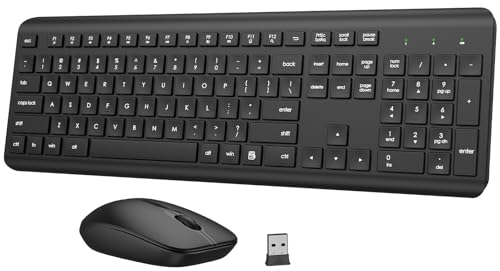
- Quiet membrane keyboard with adjustable tilt legs
- Number pad and 12 multimedia shortcut keys
- One receiver, 33-foot range, and broad OS compatibility
Best For: Quiet home or office workstations needing a full-size layout
Rechargeable Value Pick
Ultra-Slim Keyboard and Mouse Set

- Built-in lithium-ion battery supports recharging
- Quiet low-profile keys with a full number pad
- Single 2.4GHz receiver reaches up to 33 feet
Best For: Sleek Windows workstations prioritizing rechargeable power
Wrist-Support Pick
Palm-Rest Wireless Keyboard Combo

- Palm rest and folding holder support extended typing
- Three adjustable mouse DPI settings
- Shared receiver with 33-foot plug-and-play range
Best For: Extended desk work where wrist support and mouse control matter
Reliable Desk Essential – Logitech MK270 Wireless Combo
For wireless keyboard workstations that need a familiar layout and dependable everyday performance, the Logitech MK270 combines a full-size keyboard with a compact mouse. Its USB receiver, spill-resistant design, multimedia keys, and long battery life make it a practical choice for office or home desks.
Best For: Full-size desktop setups, office productivity, and users who want a keyboard and mouse in one package.
Pros:
- Full-size layout includes F-keys, number pad, arrow keys, and eight multimedia hotkeys.
- Wireless connection reaches up to 33 feet through one USB receiver.
- Keyboard battery life is rated for up to 36 months, while the mouse lasts up to 12 months.
- Spill-resistant construction and adjustable tilt legs support everyday use.
Cons:
- Uses replaceable batteries rather than a rechargeable design.
- Compatibility is centered on Windows systems.
- The included mouse is compact, which may not suit users who prefer a larger shape.
The MK270 is a straightforward workstation pick when a conventional keyboard, number pad, quiet typing, and minimal maintenance matter more than advanced customization.
Space-Saving Pick – Arteck Ultra Slim Wireless Keyboard
The Arteck HW098 suits wireless keyboard workstations where desk space is limited. Its ultra-slim, lightweight body retains full-size keys while offering quiet scissor-switch typing, media shortcuts, and simple USB receiver setup.
Best For: Compact desks, laptop workstations, and users who want a lightweight keyboard without a separate mouse.
Pros:
- Compact 11.12-by-4.7-inch design weighs about 7.65 ounces.
- Scissor-style keys provide quiet, comfortable typing.
- Automatic sleep mode helps provide up to four months between battery changes.
- Works with Windows computers, laptops, and compatible smart TVs using a nano receiver.
Cons:
- Does not include a mouse or numeric keypad.
- Requires two AAA batteries and is not rechargeable.
- Listed compatibility is focused on Windows devices.
Choose the Arteck when portability and a clean desktop footprint are priorities. It delivers essential typing and shortcut controls in a notably slim package.
Ergonomic Quiet Combo – RECCAZR Curved Wireless Keyboard Set
For wireless keyboard workstations built around long office sessions, this RECCAZR combo emphasizes a curved key layout, quiet membrane typing, and an adjustable stance. The shared nano receiver connects both devices while the mouse adds adjustable sensitivity for everyday navigation.
Best For: Home or office users seeking a quieter, more comfort-focused keyboard and mouse combination.
Pros:
- Curved keyboard design and adjustable front and back tilt legs support a more adaptable typing posture.
- Quiet keyboard and mouse operation is suitable for shared spaces.
- One nano receiver connects both devices and reaches up to 33 feet.
- Mouse offers three DPI settings: 800, 1200, and 1600.
Cons:
- Battery requirements are listed as two AA batteries, with no rechargeable option noted.
- The ergonomic curved layout may take adjustment for users accustomed to flat keyboards.
- Only a one-year warranty is specified.
This combo is a practical choice when reduced noise and adjustable positioning are central to your workstation. Its shared receiver also helps preserve USB ports.
TV Workstation Specialist – Logitech K400 Plus Touch Keyboard
The Logitech K400 Plus is designed for wireless keyboard workstations centered on a PC-connected TV or relaxed media setup. Its integrated touchpad replaces a separate mouse, while quiet keys, media-friendly controls, and up to 33 feet of wireless range simplify navigation from a distance.
Best For: Living-room PCs, TV-connected computers, and media control from a couch or reclined position.
Pros:
- Built-in touchpad provides keyboard-and-pointer control without a separate mouse.
- Wireless range reaches up to 33 feet for comfortable distance from a TV.
- Battery life is rated for up to 18 months.
- Spill-resistant design and compatibility with Windows, Android, and Chrome OS support flexible use.
Cons:
- Its compact media-focused layout may not replace a full-size office keyboard.
- Requires two AA batteries rather than offering rechargeable power.
- The integrated touchpad may be less suitable than a dedicated mouse for precision work.
The K400 Plus is best viewed as a media and couch-control keyboard rather than a traditional desk accessory. Its integrated touchpad keeps a TV workstation uncluttered and easy to operate.
Premium Ergonomic Pick – Rechargeable Backlit Keyboard and Mouse Combo
For shoppers comparing wireless keyboard workstations, the SABLUTE combo stands out with rechargeable power, ergonomic wave keys, adjustable stands, and a soft faux lambskin palm rest. Its backlighting, shortcut keys, and USB-A/USB-C receiver support make it suited to a feature-rich home or office setup.
Best For: Long typing sessions, adjustable desk users, and shoppers who want a rechargeable keyboard-and-mouse workstation with backlighting.
Pros:
- 4000mAh keyboard battery is designed to last for weeks with auto-sleep.
- Wave keys, palm rest, and adjustable front/back stands support a more comfortable typing posture.
- Includes a six-button RGB mouse, nine shortcut keys, and USB-A/USB-C connectivity.
- Offers a 33-foot wireless range and compatibility with Windows, Mac, Chrome OS, Linux, and Android.
Cons:
- The backlighting and rechargeable features may be more than needed for a basic workstation.
- The mouse is right-handed and has a maximum sensitivity of 1600 DPI.
Choose this model when comfort, visual customization, and reduced charging interruptions matter more than keeping the setup minimal. Its two-year free replacement warranty adds useful reassurance.
Reliable Everyday Pick – Logitech MK345 Full-Size Wireless Combo
The Logitech MK345 is a straightforward choice for wireless keyboard workstations that prioritize familiar full-size typing and dependable battery life. It pairs a spill-resistant keyboard with an integrated palm rest, media keys, and a comfortable right-handed mouse through one USB-A nano receiver.
Best For: Home and office users who want a dependable full-size keyboard and mouse combo with minimal maintenance.
Pros:
- Full-size 104-key layout includes an integrated palm rest and convenient media keys.
- 2.4GHz wireless connection reaches up to 10 meters.
- Keyboard battery life is rated up to three years, while the mouse can last up to 18 months.
- Plug-and-play compatibility supports Windows, macOS, and ChromeOS.
Cons:
- Uses batteries rather than a rechargeable keyboard design.
- Backlighting support is listed as single-color rather than customizable RGB.
- The included mouse is designed for right-handed use.
This is the practical, low-fuss option in the group. It makes sense for users who prefer a conventional layout, long battery intervals, and reliable everyday productivity over ergonomic extras or decorative lighting.
Multitasking Comfort Pick – Wave-Key Keyboard with Phone Holder
Among wireless keyboard workstations, this EAYBLLY combo is designed around comfort and desktop multitasking. Its memory foam wrist rest, wave-shaped full-size layout, built-in phone or tablet slot, quiet operation, and included USB-C adapter help organize a remote-work or study setup.
Best For: Remote workers, students, and home-office users who want cushioned wrist support and a built-in device holder.
Pros:
- Three-layer memory foam leather palm rest is designed to reduce wrist bending.
- Wave-shaped keys follow a curved layout intended for natural finger placement.
- Built-in 7.28-inch holder accommodates a phone or mini tablet in vertical or horizontal positions.
- Quiet typing, adjustable 800/1200/1600 DPI mouse sensitivity, auto-sleep, and a USB-C adapter add workstation convenience.
Cons:
- The keyboard and mouse use AA batteries rather than rechargeable power.
- Its full-size design and integrated holder may take more desk space.
- Compatibility details emphasize Windows, so users of other systems should verify support.
This model is especially appealing when wrist cushioning and keeping a phone visible during meetings or classes are priorities. It offers a practical multitasking layout, though its larger footprint may not suit compact desks.
Quiet Comfort Pick – Full-Size Ergonomic Wireless Combo
For wireless keyboard workstations in shared offices or home work areas, this full-size keyboard and mouse combo emphasizes quiet operation and everyday comfort. It includes adjustable tilt legs, a numeric keypad, multimedia shortcuts, and a shared 2.4GHz USB receiver with up to 33 feet of range.
Best For: Quiet home or office workstations that need a full-size layout and ergonomic adjustments.
Pros:
- Adjustable tilt legs and soft membrane keys support comfortable, quiet typing.
- Full-size layout includes a number pad and 12 multimedia shortcut keys.
- Keyboard and mouse share one receiver and offer automatic sleep mode.
- Compatible with Windows, macOS, Chrome OS, and Linux.
Cons:
- Uses one AAA battery for the keyboard and one AA battery for the mouse rather than built-in charging.
- The mouse has a fixed 1600 DPI setting.
This is a practical choice when a quiet, traditional keyboard layout matters more than a rechargeable design. Its one-receiver setup also helps keep a workstation’s USB ports available.
Rechargeable Value Pick – Ultra-Slim Keyboard and Mouse Set
This Amazon Basics set suits streamlined wireless keyboard workstations where a slim profile and rechargeable power are priorities. The full-size keyboard has a number pad, quiet low-profile keys, a stainless steel housing, and a single 2.4GHz USB receiver for connections up to 33 feet.
Best For: Sleek Windows workstations where rechargeable devices and a low-profile design are useful.
Pros:
- Rechargeable built-in lithium-ion battery reduces routine battery replacement.
- Full 104-key layout includes a number pad.
- Quiet, low-profile keys and slim styling fit a clean desk setup.
- One USB receiver provides plug-and-play connectivity for both devices.
Cons:
- The supplied compatibility details focus on Windows 7/8/10 or later.
- The keyboard and mouse are designed around a 2.4GHz USB receiver rather than Bluetooth.
Choose this combo if you want a neat, full-size setup with rechargeable power and simple installation. It is less compelling for users who specifically need Bluetooth or broad multi-platform compatibility.
Wrist-Support Pick – Palm-Rest Wireless Keyboard Combo
For wireless keyboard workstations centered on wrist support, this full-size combo adds a palm rest and folding holder to the keyboard. Its shared 2.4GHz receiver offers plug-and-play use up to 33 feet, while the ambidextrous mouse provides selectable 800, 1600, and 2400 DPI settings.
Best For: Users who want a palm rest, adjustable mouse sensitivity, and a full-size keyboard for extended desk work.
Pros:
- Integrated palm rest and folding holder are designed to support the wrists.
- Keyboard and mouse share one receiver and enter sleep mode to save power.
- Mouse offers three DPI settings for different movement preferences.
- Symmetrical mouse design works for both left- and right-handed users.
Cons:
- Requires two AA batteries.
- The listed operating-system support is centered on Windows, Mac OS, and Chrome OS, with older Windows versions specifically noted.
This combo is a strong fit when wrist support and mouse adjustability are more important than rechargeable operation. The shared receiver keeps setup simple while preserving a familiar full-size layout.
How We Picked These Wireless Keyboard Workstations
We focused on complete keyboard-and-mouse combinations that can serve as practical workstation upgrades. Selection criteria included wireless connection reliability, keyboard layout, typing comfort, mouse usability, battery or charging design, noise level, and compatibility with common computers and displays.
We also considered different working styles. Some users need a dependable, affordable full-size setup with a number pad, while others benefit more from ergonomic contours, wrist support, backlighting, rechargeable power, or a compact footprint. Because product specifications and included accessories can vary, confirm the listed operating-system support, receiver requirements, and battery details before ordering.
Quick Comparison
| Best For | Look For |
|---|---|
| Everyday office work | Full-size layout, comfortable keys, and dependable battery life |
| Long typing sessions | Curved or wave-shaped keys, palm support, and an ergonomic mouse |
| Small desks | Compact keyboard dimensions and a low-profile design |
| Quiet environments | Silent or low-noise switches and mouse clicks |
| TV and sofa use | Built-in touchpad, media controls, and a compact wireless design |
| Flexible lighting and charging | Rechargeable battery and adjustable or built-in backlighting |
Key Buying Factors for Wireless Keyboard Workstations
Layout and Desk Space
A full-size keyboard with a number pad is useful for spreadsheets, accounting, and data entry, but it occupies more room. Compact models free up mouse space and travel more easily. Check the keyboard dimensions and make sure the mouse has enough operating area beside it.
Ergonomics and Typing Comfort
Curved or wave-shaped layouts can help keep the hands in a more natural position. A palm rest may reduce pressure during extended use, although comfort is personal. If you already experience wrist or hand discomfort, prioritize a shape that feels natural rather than choosing based on appearance alone.
Connection, Compatibility, and Range
Most bundles use a small 2.4GHz USB receiver, which generally provides simple plug-and-play setup. Confirm that your computer has a compatible USB port; some newer laptops may require an adapter. Bluetooth support, if included, can be useful when you want to avoid a receiver or connect to additional devices.
Power, Noise, and Extra Controls
Compare replaceable-battery models with rechargeable designs by considering how often you want to charge the setup. Backlighting can help in dim rooms but may reduce runtime. Media keys, a touchpad, and quiet operation are valuable extras when the workstation also serves as a home-entertainment or shared-space setup.
Who Should Buy Which Wireless Keyboard Workstations?
Choose a basic full-size combo if you want an affordable, familiar setup for general office tasks. Pick an ergonomic model with a palm rest if comfort is your priority during long sessions. A compact keyboard is better for small desks, occasional travel, or couch-based use, while a touchpad-equipped model makes sense for a PC-connected TV. For a more polished desk and fewer disposable batteries, consider a rechargeable, backlit option.
