
Wireless electronic writing tablets make it easier to draw, annotate, brainstorm, or capture reminders without staying tethered to a computer. This roundup includes graphics tablets, digital notebooks, and simple LCD writing pads for different workflows and budgets.
Use the guide below to compare connectivity, pen performance, writing area, portability, and software compatibility so you can choose a tablet that fits the way you actually work.
Best 10 Wireless Electronic Writing Tablets Picks for 2026
Best Wireless Drawing Tablet for Flexible Setups

- 10 x 6.25-inch working area
- Bluetooth or USB-C connectivity
- Battery-free stylus with 8,192 pressure levels
Best For: Artists and students needing computer and mobile compatibility
Best Smart Notebook for Handwritten Notes
XPPen Note Plus Digital Notebook

- Writes on real A5 paper
- Bluetooth 5.3 phone syncing
- Offline storage and PDF/PNG sharing
Best For: Paper-first note-taking, meetings, and student work
Best Standalone LCD Writing Tablet
12-Inch Rechargeable LCD Writing Tablet

- Spacious 12-inch pressure-sensitive screen
- One-touch erase with lock protection
- Slim rechargeable design with protective cover
Best For: Temporary notes, reminders, and screen-free sketching
Best Wireless Tablet with Shortcut Keys
XPPen Deco MW Bluetooth Drawing Tablet

- Bluetooth 5.0 wireless connection
- Eight customizable shortcut keys
- Battery-free stylus with tilt support
Best For: Digital art, design, teaching, and shortcut-driven workflows
Best Multi-Pack Value
TIQUS 8.5-Inch LCD Writing Tablet 3-Pack

- Three reusable 8.5-inch LCD tablets
- Thin, lightweight design for portable notes
- Useful for lists, reminders, and communication
Best For: Households and shared spaces needing multiple reusable writing tablets
Best Wireless Drawing Controls
GAOMON WH851 Bluetooth Graphics Tablet

- Bluetooth 5.0 and USB-C connectivity
- 16,384 pressure levels with tilt support
- Dial and eight customizable shortcut keys
Best For: Digital artists seeking wireless control and detailed pen input
Best Wired Workflow
HUION Inspiroy 2 Medium Drawing Tablet

- 9-by-5-inch class active drawing area
- Battery-free stylus with 8,192 pressure levels
- Scroll wheel and customizable shortcut keys
Best For: Desk-based artists and designers who prefer wired USB operation
Best Wireless Upgrade
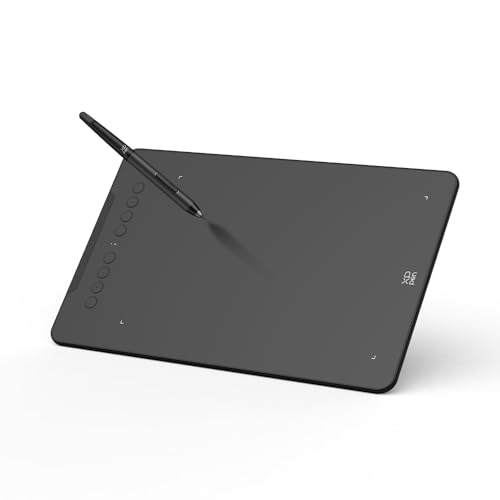
- 16384 pressure levels with 60° tilt support
- Bluetooth 5.0 with up to 13 hours of use
- Eight shortcut keys and broad OS compatibility
Best For: Artists and mobile creators seeking advanced wireless control
Best Beginner Pick

- Battery-free EMR pen with 4096 pressure levels
- Bluetooth and USB-A connectivity
- Includes software access and online training
Best For: Students, teachers, and first-time tablet users
Best Value Wireless Pad
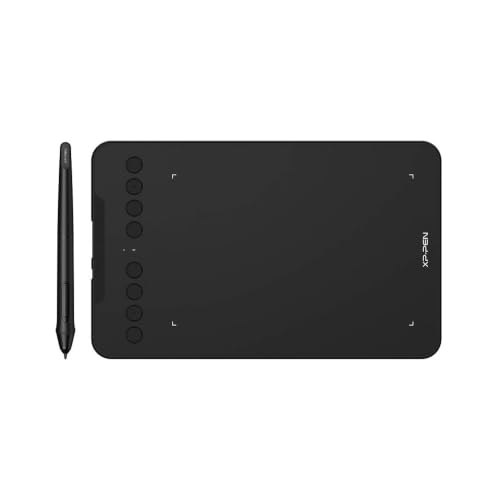
- 16384 pressure levels with 60° tilt response
- Bluetooth 5.0 plus wired connection accessories
- Eight customizable keys and wide compatibility
Best For: Teachers, remote workers, and multi-device users
Best Wireless Drawing Tablet for Flexible Setups – HUION Inspiroy Frego Medium
The HUION Inspiroy Frego is a versatile option for shoppers comparing wireless electronic writing tablets for digital art, sketching, and handwriting-style input. Its 10 x 6.25-inch working area, Bluetooth connectivity, battery-free stylus, and mobile support make it practical for both desk and portable use.
Best For: Students, teachers, and artists who want a wireless drawing tablet with a roomy work area and mobile compatibility.
Pros:
- Connects wirelessly through Bluetooth or by USB-C cable.
- Battery-free PW550S stylus offers 8,192 pressure levels, tilt support, and two programmable buttons.
- Supports Windows, macOS, Linux, Android, and select iPhone or iPad workflows through compatible apps.
- Symmetrical body, wrist rest, and built-in pen holder suit portable and left- or right-handed setups.
Cons:
- It has no physical shortcut keys on the tablet itself.
- Bluetooth compatibility is more limited on some operating systems than wired compatibility.
Choose the Frego if you value a clean surface, comfortable ergonomics, and flexible wired or wireless connections. It is especially appealing when you want one tablet for computer, Android, and compatible iOS workflows.
Best Smart Notebook for Handwritten Notes – XPPen Note Plus Digital Notebook
The XPPen Note Plus takes a different approach to wireless electronic writing tablets: you write on real A5 paper, while Bluetooth 5.3 sends your notes and sketches to a phone. It is designed for people who prefer the feel of paper but want searchable, shareable digital copies.
Best For: Students, professionals, and meeting users who want handwritten notes that sync to Android or iOS devices.
Pros:
- Captures handwriting and sketches from real A5 paper without scanning.
- Bluetooth 5.3 supports wireless syncing, while offline notes can sync after reconnecting.
- Accepts standard A5 notebook cores up to 8mm thick.
- App tools support editing, tagging, searching, cloud backup, and PNG or PDF sharing.
Cons:
- It requires the included compatible ink pen and does not use an electronic display.
- Phone compatibility is limited to Android 10 or later and iOS 14 or later.
The Note Plus is a strong fit if natural paper writing matters more than drawing directly on a tablet surface. Its offline storage, app-based organization, and replaceable A5 paper make it useful for everyday notes and meetings.
Best Standalone LCD Writing Tablet – 12-Inch Rechargeable LCD Writing Tablet
For shoppers seeking simple wireless electronic writing tablets without app or computer setup, this 12-inch LCD model offers a standalone writing surface. Its pressure-sensitive screen, included stylus, rechargeable battery, and protective cover are suited to quick notes, drawings, and reminders.
Best For: Office workers, teachers, students, and families who need a simple paperless writing and drawing pad.
Pros:
- Large 12-inch writing area provides room for notes and sketches.
- One-touch erase clears the screen quickly, while a lock switch helps prevent accidental deletion.
- Rechargeable USB-C design avoids disposable batteries.
- Foldable PU cover helps protect the slim 5.2mm tablet during transport.
Cons:
- It has no connectivity, operating system, or device syncing features.
- The erase function clears the entire screen rather than selected content.
This tablet makes sense when you want an uncomplicated, eye-friendly surface for temporary writing rather than saved digital files. Its large screen and cover make it convenient for desks, classrooms, and travel.
Best Wireless Tablet with Shortcut Keys – XPPen Deco MW Bluetooth Drawing Tablet
The XPPen Deco MW is a practical pick among wireless electronic writing tablets for users who want direct control over drawing software. Bluetooth 5.0, eight customizable shortcut keys, and a battery-free X3 stylus provide a compact workflow for digital art, online teaching, and design.
Best For: Digital artists, designers, students, and teachers who want customizable controls and broad platform support.
Pros:
- Bluetooth 5.0 enables cable-free drawing and a cleaner workspace.
- Eight customizable shortcut keys can speed up common commands.
- Battery-free stylus provides 8,192 pressure levels and 60-degree tilt support.
- Works with Windows, macOS, Android, Chrome OS, Linux, and major creative applications.
Cons:
- The 8 x 5-inch active area is smaller than the HUION Frego’s working area.
- It is a pen tablet rather than a standalone screen, so it requires a compatible connected device.
The Deco MW is a good choice when shortcut access and software compatibility are more important than a large surface. Its wireless connection and compact size also suit organized desks and portable creative setups.
Best Multi-Pack Value – TIQUS 8.5-Inch LCD Writing Tablet 3-Pack
The TIQUS 3-pack is a simple, reusable option for anyone comparing wireless electronic writing tablets for lists, notes, reminders, or communication. Its pressure-sensitive LCD screens are thin, lightweight, and designed to replace disposable paper for everyday writing.
Best For: Households, offices, kitchens, and adults who want multiple reusable memo tablets.
Pros:
- Three 8.5-inch tablets provide convenient sharing or spares.
- Extra-slim, portable design is easy to carry.
- Reusable LCD surface helps reduce paper use and avoids glare and blue light.
Cons:
- Not intended for children under 15, according to the supplied warning.
- The notes do not specify Bluetooth or other wireless connectivity.
- Designed for writing rather than pressure-sensitive digital art.
This is a practical pick when quantity and quick handwritten notes matter more than computer connectivity. Its three-tablet format makes it especially useful for shared spaces and separate to-do lists.
Best Wireless Drawing Controls – GAOMON WH851 Bluetooth Graphics Tablet
The GAOMON WH851 is a strong choice among wireless electronic writing tablets for digital artists who want a larger active area, wireless Bluetooth 5.0, and physical controls. Its battery-free pen provides 16,384 pressure levels and supports tilt detection for detailed drawing and annotation.
Best For: Digital artists, illustrators, students, and users who want wireless drawing with customizable controls.
Pros:
- Bluetooth 5.0 wireless operation or USB Type-C wired use.
- 16,384 pressure levels and 60-degree tilt support enable nuanced strokes.
- Dial and eight customizable keys can speed up common commands.
- Works with Windows, macOS, and Android devices.
Cons:
- It requires a compatible computer or mobile device and has no display.
- Wireless use depends on its battery, rated for up to 18 hours.
The WH851 is more capable than a basic LCD memo pad, offering the controls and pressure response needed for creative software. Choose it when wireless flexibility and shortcut access are priorities.
Best Wired Workflow – HUION Inspiroy 2 Medium Drawing Tablet
The HUION Inspiroy 2 Medium is a wired option for shoppers comparing wireless electronic writing tablets but who prefer a direct USB connection. It combines a 9-by-5-inch class drawing area with a battery-free stylus, scroll wheel, and customizable shortcut keys.
Best For: Artists, designers, and students who want a comfortable wired tablet for drawing, editing, and Android use.
Pros:
- PenTech 3.0 stylus offers 8,192 pressure levels and 60-degree tilt support.
- Scroll wheel, eight press keys, and three group keys support customized workflows.
- Compatible with Windows, macOS, Linux, ChromeOS, and Android devices.
- Ergonomic stylus includes a slimmer body and soft silicone grip.
Cons:
- It is not wireless and must remain connected by cable.
- It has no internal power source and is not a standalone display tablet.
- The supplied notes list a smaller pressure range than the GAOMON WH851.
The Inspiroy 2 makes sense for users who value broad operating-system support and hands-on shortcut control over Bluetooth convenience. Its wired design can be a dependable fit for a fixed desk setup.
Best Wireless Upgrade – XPPen Deco mini7W V2
The XPPen Deco mini7W V2 is a strong choice among wireless electronic writing tablets for creators who want high pressure sensitivity, mobile support, and shortcut keys in a compact format. Bluetooth 5.0 supports cable-free work, while the included USB-C connection provides a wired alternative.
Best For: Digital artists, photo editors, online teachers, and mobile creators who need flexible device compatibility.
Pros:
- 16384 pressure levels and 60° tilt support for detailed line control and shading.
- Bluetooth 5.0 offers wireless use with up to 13 hours of continuous work per charge.
- Eight customizable shortcut keys and compatibility with Windows, macOS, Android, ChromeOS, and Linux.
- Adjustable mobile active area helps maintain accurate screen mapping on Android devices.
Cons:
- iOS support is limited to ibis Paint.
- Requires charging for wireless operation.
Choose this model if wireless flexibility and advanced pen control matter more than having a built-in display. Its compact active area and broad compatibility make it practical for both desktop and mobile workflows.
Best Beginner Pick – Wacom Intuos Small Bluetooth
The Wacom Intuos Small is a dependable option for shoppers comparing wireless electronic writing tablets for drawing, photo editing, writing, and online education. Its battery-free pen uses Wacom EMR technology, and the tablet can connect through Bluetooth or the included USB-A cable.
Best For: Students, teachers, beginners, and creators who want a straightforward compact tablet with included software and training.
Pros:
- Battery-free pressure-sensitive pen provides a pen-on-paper-style experience.
- Bluetooth enables wireless use away from a desk, with USB-A available for direct connection.
- Four ExpressKeys provide convenient shortcut access.
- Works with Mac, Windows, and Chromebook systems, and includes access to creative software and training.
Cons:
- Offers 4096 pressure levels, fewer than the two XPPen models in this roundup.
- Only four shortcut keys are provided.
- Supplied connectivity is USB-A rather than USB-C.
The Intuos Small is a sensible entry point if ease of use, battery-free pen operation, and bundled learning resources are priorities. It is less feature-heavy, but its familiar Wacom workflow suits everyday creative and educational tasks.
Best Value Wireless Pad – XPPen Deco mini7W
The XPPen Deco mini7W is a versatile wireless electronic writing tablet for drawing, writing, e-signatures, teaching, and remote work. Bluetooth 5.0 and the included USB accessories support flexible connections, while the battery-free stylus delivers high pressure sensitivity without requiring pen charging.
Best For: Teachers, remote workers, students, and creators who want a compact tablet with extensive shortcut customization and device support.
Pros:
- 16384 pressure levels and 60° tilt response support smooth, controlled strokes.
- Bluetooth 5.0 provides wireless connectivity, with wired USB-C options included.
- Eight customizable press keys can be tailored to different workflows.
- Compatible with Windows, Mac, Android, ChromeOS, Linux, computers, and mobile devices.
Cons:
- Wireless use relies on the included connection hardware and Bluetooth setup.
- The supplied notes do not specify battery runtime for the tablet.
This model is a practical fit for users who want strong pen specifications and broad compatibility without moving to a larger tablet. Its accessory bundle also makes it easier to connect across different computers and mobile devices.
How We Picked These Wireless Electronic Writing Tablets
We selected models across the main categories shoppers encounter: Bluetooth graphics tablets for computers, digital notebooks that sync handwritten pages to a phone, and rechargeable LCD writing tablets for quick notes. We focused on practical specifications such as wireless connectivity, active area, pressure sensitivity, stylus design, shortcut controls, battery requirements, compatibility, and portability.
Because these products serve different purposes, the most feature-rich drawing tablet is not automatically the best choice for grocery lists or meeting notes. Your ideal model depends on whether you need pressure-sensitive artwork, computer input, handwriting capture, or simple erasable writing.
Quick Comparison
- Best for serious digital art: Choose a larger graphics tablet with high pressure sensitivity, customizable controls, and Bluetooth or wireless computer connectivity.
- Best for portable computer work: A compact wireless tablet is easier to carry and works well for signatures, annotations, online teaching, and occasional drawing.
- Best for handwritten notes: A digital notebook designed to sync with a phone is better suited to preserving and organizing handwritten pages.
- Best for reminders and lists: An LCD writing tablet is simple, lightweight, and generally better for temporary notes than permanent digital storage.
Key Buying Factors for Wireless Electronic Writing Tablets
Wireless Connection and Compatibility
Check whether the tablet uses Bluetooth, a dedicated wireless receiver, or both. Confirm compatibility with your operating system and preferred apps before buying. Some models are designed primarily as computer input devices, while others depend on a mobile app for syncing.
Active Area and Portability
A larger active area gives you more room for broad strokes and detailed artwork, but it takes up more desk and bag space. Smaller tablets are convenient for travel and routine annotations, though they may feel cramped for long drawing sessions.
Stylus and Pressure Sensitivity
Battery-free pens reduce charging interruptions. Higher pressure sensitivity can provide more nuanced line variation, but software support and pen calibration matter just as much. For basic notes, pressure sensitivity is less important than a comfortable tip and responsive writing surface.
Controls, Battery, and Accessories
Shortcut keys, dials, and scroll wheels can speed up creative workflows. Also check battery life, charging method, included cover, replacement nibs, and whether the package includes the required adapter or receiver.
Who Should Buy Which Wireless Electronic Writing Tablets?
Artists and designers should prioritize pressure-sensitive pens, a comfortable active area, programmable controls, and compatibility with their creative software. Students, remote workers, and teachers may prefer a compact Bluetooth model for annotations, presentations, and online instruction. Note-takers should select a digital notebook if saving handwritten pages matters. Families, offices, and kitchens can often save money with an LCD tablet for temporary checklists and reminders.
Before ordering, decide whether you need files saved digitally or simply want a reusable writing surface. That single distinction will narrow the options more effectively than comparing headline specifications alone.
