
In 2025, selecting the right 24-inch wide format printer can greatly impact your projects’ quality and efficiency. With top models like the HP DesignJet T210 and Canon imagePROGRAF TC-21, you’ll find options that cater to various needs, from stunning architectural prints to vibrant creative designs. But what features should you prioritize? Let’s explore the best choices that stand out this year and how they can elevate your printing experience.
HP DesignJet T210 24-inch Plotter Printer (8AG32D)

The HP DesignJet T210 24-inch Plotter Printer is an excellent choice for professionals like architects and engineers who demand precision in their technical line drawings and renders. This printer excels at producing crisp text and detailed maps, ensuring your projects look their best. With media handling for up to 24-inch rolls and an automatic cutter, it streamlines your workflow efficiently. You’ll appreciate the quick print speed of 59 A1/D prints per hour. Plus, its eco-friendly design saves ink and reduces emissions. With versatile connectivity options, managing prints from your devices has never been easier. Experience high-quality printing with the T210.
Best For: The HP DesignJet T210 24-inch Plotter Printer is best for architects, engineers, and construction professionals who require high-quality prints of technical drawings, maps, and posters.
Pros:
- High-speed printing: Capable of producing up to 59 A1/D prints per hour, enhancing productivity.
- Eco-friendly design: Uses 30% recycled plastic and reduces CO2 emissions, making it a sustainable choice.
- Versatile connectivity: Offers multiple connectivity options including Wi-Fi, USB, and Ethernet for convenient printing from various devices.
Cons:
- Limited to 24-inch width: May not be suitable for larger print jobs that require wider media.
- Weight: At 60 pounds, it may be cumbersome to move or install in certain locations.
- Initial ink cartridge limitations: The included introductory ink cartridges may require replacement sooner than expected for high-volume users.
Canon imagePROGRAF TC-21 Large Format Printer

For small businesses and creative professionals looking to produce high-quality posters and prints, the Canon imagePROGRAF TC-21 stands out as a top choice among 24-inch wide format printers. Its 4-color ink system guarantees vibrant images and crisp text, making it ideal for various media types. With easy setup through an intuitive touchscreen, you can start printing within 30 minutes. The printer supports wired and wireless connections, enhancing usability. While the ink costs and driver limitations might concern some users, its overall print quality and performance make it a valuable investment for regular poster printing needs.
Best For: Small businesses and creative professionals seeking to produce high-quality posters and prints efficiently.
Pros:
- Delivers vibrant images and crisp text with a 4-color ink system.
- Intuitive touchscreen setup allows users to start printing within 30 minutes.
- Supports both wired and wireless connections for versatile usability.
Cons:
- Ink costs may be a concern for some users.
- Printer driver limitations restrict custom paper sizes, particularly for common U.S. formats.
- Some users have reported difficulties with loading heavier paper types.
HP DesignJet T650 Large Format Plotter Printer (5HB08T)

Engineers and architects will find the HP DesignJet T650 Large Format Plotter Printer (5HB08T) a perfect fit for their needs, thanks to its ability to produce high-quality, precise prints up to 24 inches wide. This plotter excels in creating technical line drawings, posters, and maps, making it a favorite among construction professionals. With support for various media sizes and automatic switching, handling projects becomes effortless. Additionally, it uses 95% less ink for maintenance, enhancing cost-efficiency. You’ll appreciate the HP Click Software for simplified printing and versatile connectivity options, ensuring a seamless printing experience every time.
Best For: The HP DesignJet T650 Large Format Plotter Printer is best for architects, engineers, and construction professionals seeking high-quality large format prints.
Pros:
- Offers high-quality prints up to 24 inches wide, ideal for technical drawings and posters.
- Supports various media sizes with automatic media switching for effortless project handling.
- Cost-efficient with 95% less ink used for routine maintenance compared to competitors.
Cons:
- May be expensive for casual users or those with infrequent printing needs.
- Limited to a maximum print width of 24 inches, which may not meet the needs of all users.
- Dependence on specific software for optimal performance could be a drawback for some.
HP DesignJet T630 Large Format Plotter Printer (5HB09D)

Designed with professionals in mind, the HP DesignJet T630 Large Format Plotter Printer (5HB09D) excels in producing high-quality technical line drawings, precise renders, and vibrant posters. It supports media sizes up to 24-inch wide rolls and 13-inch by 19-inch sheets, featuring an auto sheet feeder and a convenient media bin. You’ll appreciate the multiple connectivity options, including Gigabit Ethernet and Wi-Fi, that make printing versatile. The included HP Click Software simplifies your tasks by enabling easy drag-and-drop printing and reducing waste. Plus, with the HP Smart app, you can manage printing from your smartphone, enhancing your workflow efficiency.
Best For: Professionals such as architects, engineers, and construction experts who need to produce high-quality technical drawings and large format prints.
Pros:
- Versatile media handling with support for both wide rolls and sheet sizes.
- Multiple connectivity options including Wi-Fi, Ethernet, and USB for easy printing.
- User-friendly printing software that reduces ink and paper waste while streamlining the printing process.
Cons:
- Initial cost may be high for small businesses or individual users.
- Large footprint may require significant workspace.
- Limited to specific media sizes, which may not meet all printing needs.
HP DesignJet T210 Large Format Plotter Printer (8AG32T)
The HP DesignJet T210 Large Format Plotter Printer (8AG32T) stands out as an ideal choice for professionals in architecture and engineering, thanks to its versatile media handling capabilities. You can easily print technical drawings, blueprints, and posters up to 24 inches wide, using both rolls and sheets. Its automatic features save you time and ink, reducing maintenance costs considerably. With HP Click Software, printing is a breeze, allowing you to manage multiple file formats effortlessly. Plus, the HP Smart app lets you print from anywhere, making it perfect for your on-the-go printing needs. Experience efficiency like never before!
Best For: The HP DesignJet T210 Large Format Plotter Printer (8AG32T) is best for architects, engineers, and construction professionals who require high-quality large format prints.
Pros:
- Versatile media handling: Supports a variety of media sizes, including 24-inch rolls and 13×19-inch sheets.
- Cost-efficient: Uses 95% less ink for maintenance compared to competitors, saving on operational costs.
- Convenient printing: Allows for remote printing through the HP Smart app and simplifies file management with HP Click Software.
Cons:
- Limited to 24-inch width: May not meet the needs of users requiring wider format printing.
- Potential learning curve: New users may need time to familiarize themselves with HP Click Software and app functionalities.
- Initial setup complexity: Setting up the printer and configuring software might be challenging for some users.
Epson SureColor T2170 Wireless Poster CAD Plotter Printer
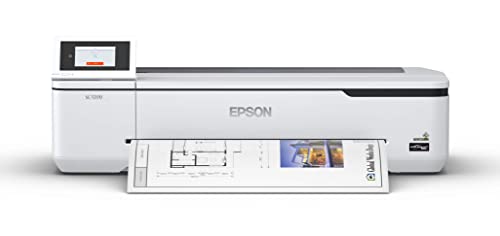
For professionals seeking a reliable and efficient printing solution, the Epson SureColor T2170 Wireless Poster CAD Plotter Printer stands out with its impressive print speed, delivering accurate A1/D-size prints in just 43 seconds. Its PrecisionCore MicroTFP printhead ensures exceptional clarity, while Nozzle Verification Technology assures commercial-grade reliability. You’ll appreciate the durable, instant-dry prints produced with UltraChrome XD2 pigment ink. The large 4.3-inch LCD touchscreen simplifies your print tasks, and with high-capacity cartridges, you’ll enjoy uninterrupted printing. Plus, print wirelessly from your devices and handle various media, accommodating rolls up to 24 inches wide and sheets up to 11 x 17.
Best For: Professionals in need of a reliable and efficient plotter printer for high-quality CAD and poster printing.
Pros:
- Fast print speeds with accurate A1/D-size prints completed in just 43 seconds.
- High-capacity cartridges allow for extended printing without frequent replacements.
- Versatile media handling accommodates various sizes, including rolls up to 24 inches and sheets up to 11 x 17.
Cons:
- Initial setup may require time and technical knowledge for wireless connectivity.
- Larger footprint may not be suitable for small workspaces.
- Cost of ink cartridges can be higher compared to standard printers.
Canon imagePROGRAF TM-240 24 Large Format Printer

If you’re seeking a high-performance wide format printer that excels in both speed and quality, the Canon imagePROGRAF TM-240 is an excellent choice. With its L-COA PRO II processor, it’s about 30% faster than earlier models, achieving speeds up to 3.2 ppm for a 24 x 36 sheet. You’ll enjoy stunning print quality thanks to the high-density 6-channel PF-06 printhead, delivering sharp details at 2400 x 1200 dpi. Plus, its 5-color ink set is UV and water-resistant, perfect for outdoor displays. The intuitive user interface automatically detects media types, making your printing process seamless.
Best For: Professionals and businesses in need of a reliable, high-quality large format printer for outdoor displays and detailed prints.
Pros:
- Fast performance: Approximately 30% faster than previous models, achieving speeds up to 3.2 ppm.
- Exceptional print quality: High-density 6-channel printhead with a resolution of 2400 x 1200 dpi for sharp details.
- User-friendly interface: Automatically detects media type and dimensions for a seamless printing experience.
Cons:
- Initial investment cost: May be higher than entry-level printers, which could be a barrier for small businesses.
- Limited ink colors: The 5-color ink set may not be sufficient for some specialized printing needs.
- Size and weight: Being a large format printer, it requires ample space and may be cumbersome to move.
HP DesignJet T230 Wireless Large Format Plotter Printer
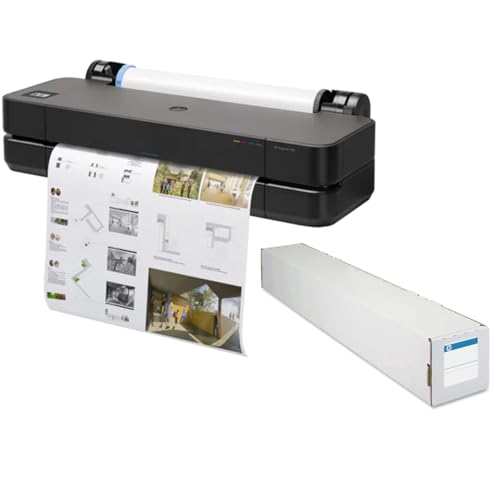
Designed with professionals in mind, the HP DesignJet T230 Wireless Large Format Plotter Printer excels in delivering high-quality prints quickly and efficiently. With a maximum print resolution of 2400 x 1200 dpi, it guarantees precise details on every page. You can print a D-size page in just 35 seconds, boosting your productivity. It supports media sizes ranging from 8.3 x 11 to 24 x 74.7 inches, accommodating diverse projects. Enhanced connectivity options, including Wi-Fi and Gigabit Ethernet, make integration seamless. Plus, its energy-efficient design helps you save on power while reducing environmental impact. Experience exceptional printing with the T230!
Best For: Professionals in architecture, engineering, and design who require high-quality, large format printing for detailed projects.
Pros:
- High print quality with a maximum resolution of 2400 x 1200 dpi for precise details.
- Fast print speed allowing D-size pages to be printed in just 35 seconds, enhancing productivity.
- Versatile media handling supporting various sizes and types of print media without manual switching.
Cons:
- Weight of 68 pounds may require additional effort for relocation or setup.
- Dynamic security measures may prevent the use of third-party cartridges, limiting options for users.
- Initial cost could be higher compared to standard printers, making it a larger investment for some users.
Canon imagePROGRAF TC-21M Multifunction Printer

The Canon imagePROGRAF TC-21M Multifunction Printer stands out as an ideal choice for professionals in fields like architecture and design, thanks to its ability to produce vibrant, high-quality prints up to 24 inches wide. With a maximum print resolution of 2400 x 1200 dpi, it delivers stunning detail and vivid colors. The user-friendly 2.7” touchscreen and cloud printing capabilities enhance usability, making it perfect for busy environments. Although some users report challenges with paper loading, the overall performance and output quality are exceptional. Be mindful of ink costs for larger projects, but this printer truly excels in versatility and precision.
Best For: Professionals in architecture and design who require high-quality, large-format prints.
Pros:
- Exceptional print quality with vibrant colors and detailed images at a maximum resolution of 2400 x 1200 dpi.
- User-friendly interface with a 2.7” touchscreen and cloud printing capabilities for efficient operation.
- Versatile media handling, compatible with various materials, including glossy paper and canvas.
Cons:
- Some users experience challenges with the paper loading process, indicating a need for improved design and instructions.
- High ink costs may be a concern for large-scale projects, prompting users to seek bulk purchasing options.
- Mixed user feedback on reliability, with reports of frequent error messages and potential maintenance issues.
HP DesignJet T230 24-inch Plotter Printer (5HB07T)

For architects, engineers, and construction professionals seeking precision in their large format printing, the HP DesignJet T230 (5HB07T) stands out as an exceptional choice. This versatile plotter supports media sizes up to 24 inches wide and features an automatic sheet feeder for added convenience. With its efficient media handling, including roll feed and an automatic horizontal cutter, you’ll enjoy seamless printing for technical drawings, blueprints, and more. Plus, you’ll save on ink costs, using 95% less for routine maintenance compared to competitors. With a 2-year warranty and fast support, the T230 is a reliable partner for your professional printing needs.
Best For: Professionals in architecture, engineering, and construction requiring high-quality large format prints for technical drawings and designs.
Pros:
- Efficient media handling with support for both roll feed and sheet feed, including an automatic horizontal cutter.
- Cost-effective operation with up to 95% less ink used for routine maintenance compared to competitor models.
- Comprehensive support with a 2-year warranty and next business day service for unresolved issues.
Cons:
- Limited to 24-inch width, which may not accommodate larger print sizes for some projects.
- Initial investment cost may be higher compared to standard printers, impacting budget considerations.
- May require additional accessories like the automatic sheet feeder for optimal functionality.
Factors to Consider When Choosing Wide Format Printers 24 Inch
When choosing a 24-inch wide format printer, you need to take into account several key factors. Print quality standards, media handling options, and connectivity features can greatly impact your workflow. Don’t forget to assess cost efficiency and the usability of the user interface to guarantee it meets your needs.
Print Quality Standards
Choosing a wide format printer that meets your print quality standards is vital, especially if you’re aiming for sharp, vibrant images. Look for printers with high resolutions, like 2400 x 1200 dpi, to guarantee detailed graphics and fine text. The type of ink matters too; pigment inks typically offer better durability and color vibrancy compared to dye-based options. Consistent color accuracy is important, so opt for models that feature calibration tools and advanced printhead technology for precise droplet control. Don’t forget about print speed—some printers can produce A1/D-size prints in just 35 seconds, which is perfect for high-volume projects. Overall, balancing these factors will help you achieve stunning results in your prints.
Media Handling Options
Understanding the media handling options available can greatly impact your printing experience and results. When choosing a 24-inch wide format printer, consider whether it supports both roll feed and sheet feed. This flexibility allows you to print on various sizes and types of media. Look for models that feature automatic media switching for seamless changes between different formats. Evaluate the maximum media size capability, as many printers can handle rolls up to 24 inches wide and sheets as large as 13 x 19 inches. Additionally, check for features like an automatic horizontal cutter and media bin to streamline cutting and organizing. Finally, verify the printer accommodates different media thicknesses for diverse printing needs, including banners and posters.
Connectivity Features Available
While evaluating 24-inch wide format printers, you’ll want to prioritize connectivity features that enhance your printing experience. Look for models with multiple options, like Gigabit Ethernet, Hi-Speed USB, and Wi-Fi, ensuring compatibility with various devices. Printers with Wi-Fi Direct capability allow wireless printing without needing a router, giving you flexibility in different environments. Mobile printing features through dedicated apps can streamline your workflow, letting you print seamlessly from smartphones or tablets. It’s also essential to check for support of various file formats, such as PDF, JPEG, and TIFF, to make printing tasks easier. Finally, assess the printer’s onboard memory capacity; higher memory boosts performance during complex print jobs, ensuring smoother processing of large files.
Cost Efficiency Measures
When selecting a 24-inch wide format printer, consider how cost efficiency can impact your overall printing expenses. Look for models that use up to 95% less ink for routine maintenance, which greatly cuts operational costs. Printers with automatic multi-size project handling save you time and resources by eliminating the need for manual media source switching. High-capacity ink cartridges, offering up to 80 mL for black and 50 mL for color, reduce the frequency of replacements, lowering your cost per print. Energy-efficient designs with auto-scheduling can save up to 65% in energy consumption, further cutting utility bills. Finally, eco-friendly manufacturing practices not only lessen environmental impact but may also resonate with cost-conscious, sustainability-focused businesses.
User Interface Usability
Choosing a 24-inch wide format printer isn’t just about print quality and cost; the user interface plays a crucial role in your overall experience. A user-friendly interface, like an intuitive touchscreen control panel, can streamline setup and simplify daily printing tasks, regardless of your skill level. Look for features like animated installation guides and clear on-screen instructions to cut down on initial setup and troubleshooting time. Printers that support direct printing from USB flash drives or cloud services offer convenient options for submitting documents without needing a computer. Additionally, connectivity options, including wireless and mobile printing, enhance usability, allowing you to manage print jobs easily from your smartphone or tablet, boosting your workflow efficiency.
