
A 17-inch photo printer lets you produce larger prints at home or in the studio, with direct control over paper choice, color, and finishing. The right machine depends on more than image quality: media handling, ink costs, and available space matter too.
These three printers span current professional options and an older model. Here’s what to consider before choosing one for your workflow.
Best 3 Wide Format Photo Printers 17 Inch Picks for 2026
Best for Gallery Prints

- Prints on sheets up to 17 x 22 inches
- 11 colors plus Chroma Optimizer
- Air Feeding System helps prevent skew
Best For: Detailed color and black-and-white photo prints
Best for Flexible Media
- UltraChrome PRO10 ink includes Violet
- Accepts sheets up to 1.5 mm thick
- Touchscreen and wireless connectivity
Best For: Photographers printing on varied sheet media or optional rolls
Best for Black-and-White Work

- Supports sheets up to 17 x 22 inches
- Tri-level black ink system
- Handles posterboard up to 1.5 mm thick
Best For: Black-and-white photos and sheet-based fine-art printing
Best for Gallery Prints – Canon imagePROGRAF PRO-1000
Canon imagePROGRAF PRO-1000 Professional Photographic Inkjet Printer, 17 x 22-Inches, Black
Check Price On AmazonAmong wide format photo printers 17 inch in size, the Canon imagePROGRAF PRO-1000 is a strong choice for photographers producing prints up to 17 x 22 inches. Its 11-color LUCIA PRO ink system and Chroma Optimizer focus on color, gloss, and dark-area detail.
Best For: Photographers and artists making detailed color or black-and-white prints on sheets up to 17 x 22 inches.
Pros:
- 11-color ink system plus Chroma Optimizer supports a broad color gamut and smooth-looking glossy prints.
- Air Feeding System holds paper steady to help prevent skew.
- Anti-clogging ink delivery system is designed to reduce printhead clogs.
Cons:
- At 70.5 pounds, it is a substantial printer to move or place.
- Manual duplex printing is less convenient if two-sided output matters.
The PRO-1000 makes the most sense when print quality and precise sheet feeding outweigh its size and weight.
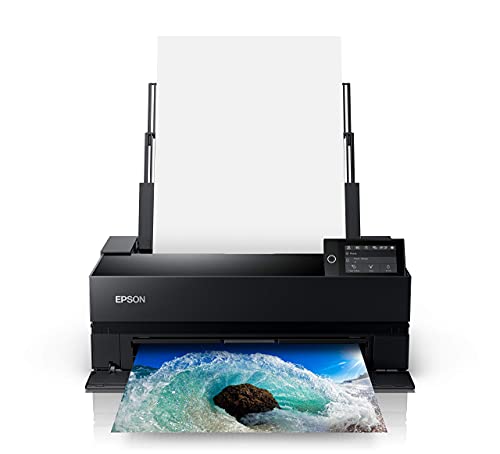
Best for Flexible Media – Epson SureColor P900
The Epson SureColor P900 stands out among wide format photo printers 17 inch in size for its mix of photo-focused inks and media options. Its UltraChrome PRO10 ink set includes Violet, while dedicated Photo Black and Matte Black nozzles eliminate switching between those inks.
Best For: Photographers who want 17-inch printing with wireless controls and the option to use thick sheets or rolls.
Pros:
- Handles sheet media up to 1.5 mm thick and supports rolls with the optional roll-feed accessory.
- Dedicated black-ink nozzles avoid Photo Black and Matte Black switching.
- Offers a 4.3-inch touchscreen, wireless connectivity, and printing from compatible iOS devices.
Cons:
- Roll printing requires an optional accessory.
- Designed for use exclusively with Epson cartridges.
Choose the P900 if varied media and convenient controls matter alongside rich color and deep blacks on glossy paper.
Best for Black-and-White Work – Epson Stylus Pro 3800
For shoppers comparing wide format photo printers 17 inch in size, the Epson Stylus Pro 3800 offers a straightforward option for sheets up to 17 x 22 inches. Its UltraChrome K3 eight-color pigment ink technology and tri-level black ink system are geared toward professional photo output.
Best For: Printmakers who prioritize black-and-white photos and want to work with fine-art sheets or thick posterboard.
Pros:
- Tri-level black ink system supports professional black-and-white prints from grayscale or color files.
- Accepts fine-art paper and posterboard up to 1.5 mm thick.
- Includes a 2.5-inch backlit LCD panel and Ethernet and USB connectivity.
Cons:
- Listed connectivity is Ethernet and USB, with no wireless option specified.
- Manual duplexing is not ideal for frequent two-sided jobs.
The 3800 is worth considering for sheet-based fine-art and monochrome work if wired connectivity suits your workspace.
How We Picked the Best Wide Format Photo Printers 17 Inch
We focused on printers intended for serious photographic output at up to 17 inches wide, then compared the considerations that affect everyday ownership: supported media, print workflow, physical footprint, and likely upkeep. This is a buying comparison, not a claim that the printers have identical features or that the older Epson Stylus Pro 3800 is as easy to source or support as a current model. Always verify the exact printer’s specifications and condition before purchasing.
Quick Comparison
The Canon imagePROGRAF PRO-1000 is a professional desktop choice for photographers who primarily make sheet-fed prints, including prints up to 17 by 22 inches. The Epson SureColor P900 is worth considering if your workflow calls for both sheets and compatible roll-media printing with the appropriate accessory. The Epson Stylus Pro 3800 is an older 17-inch option that may appeal to a budget-conscious buyer comfortable evaluating used equipment. Its age makes condition, consumables, and software compatibility especially important.
Key Buying Factors for Wide Format Photo Printers 17 Inch
Paper Size and Media Handling
A 17-inch width limit does not tell you the maximum print length or which paper paths are available. Decide whether you need standard cut sheets, thick fine-art stock, panoramic prints, or roll paper, then confirm support for your preferred sizes and media. If roll printing matters, check whether the required hardware is included in the listed price.
Color Workflow and Print Quality
Look beyond a printer’s advertised resolution. Your results also depend on suitable paper profiles, calibrated displays, driver settings, and the paper itself. If you switch between glossy and matte finishes, check how your chosen printer handles those media types and whether its workflow fits the way you print.
Ownership Costs and Compatibility
Budget for ink, paper, occasional maintenance, and test prints—not just the purchase price. Frequent printing may make a higher upfront cost easier to justify; occasional users should consider the risk of leaving an inkjet idle for long periods. For a used printer, ask for a recent nozzle check and test print, inspect its history, and confirm that ink, maintenance parts, drivers, and operating-system support are available for your setup.
Space and Output Needs
Measure the printer and leave room for loading and retrieving large sheets. Consider how often you will actually print at 17 inches: if most work is smaller, a large printer’s space and running costs may be harder to justify.
Who Should Buy Which Wide Format Photo Printers 17 Inch?
Choose the PRO-1000 if your priority is a current professional desktop printer for high-quality sheet prints. Consider the P900 if compatible roll-media capability is important to your work. Approach the Stylus Pro 3800 as a used-equipment purchase: it makes the most sense when the price, verified condition, and available supplies outweigh the extra ownership risk. For any of these Wide Format Photo Printers 17 Inch buyers should match the printer to their actual paper, volume, and workspace before ordering.
