
Choosing the right webcam can make your stream look more polished instantly, even before you upgrade lighting or audio. For Twitch creators, the best options balance image quality, autofocus, low-light performance, and a simple setup.
Below, you’ll find 10 strong picks for different budgets and streaming styles, from entry-level Full HD models to premium 4K webcams with tracking and advanced mics.
Best 10 Webcam for Streaming on Twitch Picks for 2026
Editor’s Choice
Insta360 Link 2 4K PTZ for Twitch

- 4K HDR video with a 1/2" sensor
- Physical AI tracking and gesture control
- AI noise-canceling mic plus DeskView modes
Best For: Creators who want premium streaming visuals and automatic framing
Budget-Friendly 4K Pick
EMEET NOVA for Simple Streaming

- 4K/30fps video with PDAF autofocus
- Auto light correction and dual mics
- Privacy cover with plug-and-play USB-A
Best For: Simple streaming setups that prioritize ease of use
Best Auto-Framing Option
Insta360 Link 2C for Clean Twitch Shots

- 4K HDR video with a 1/2" sensor
- Auto Framing and gesture control
- AI noise-canceling mic and PDAF focus
Best For: Creators who want compact premium video with automatic framing
Best for Dynamic Streams
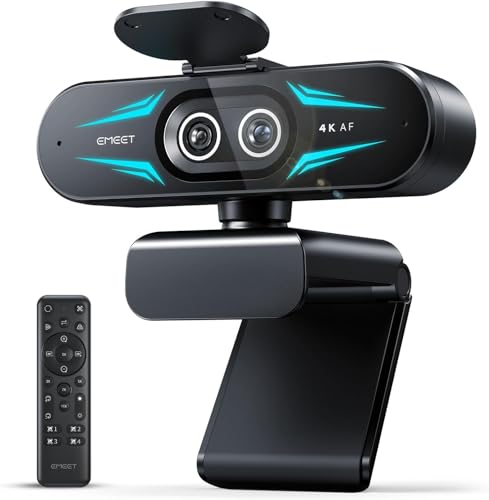
- Dual-camera design for wide and close-up views
- 1X to 11X hybrid zoom with PDAF
- Remote control plus EMEET STUDIO tuning
Best For: Streams that need flexible framing and demo-friendly close-ups
Budget-Friendly Starter Pick
Logitech Brio 101 1080p Webcam

- 1080p Full HD with auto-light correction
- Built-in mic and USB-A plug-and-play
- Privacy shutter for quick coverage
Best For: New streamers who want an easy, affordable setup
Creator-Focused 4K Value Pick
EMEET S600 4K Streaming Webcam

- 4K/30fps or 1080p/60fps output
- PDAF autofocus and light balancing
- Dual noise-reduction mics with privacy cover
Best For: Creators who want sharper video and smooth 1080p streaming
Premium Feature-Rich Pick
Razer Kiyo V2 4K Streaming Webcam

- 4K/30fps with Sony STARVIS sensor
- AI auto-framing with HDR and image enhancement
- Ultrawide lens and pivoting mount
Best For: Streamers who want premium framing and image control
Premium 4K Streaming Pick
Acer A640 4K Webcam with Sony Sensor

- Sony sensor with 4K/30fps and 2K/1080p 60fps
- PDAF autofocus reduces hunting on stream
- AI noise-canceling mic and privacy shutter
Best For: Streamers who want sharper video and dependable autofocus
Best Low-Light Value
NexiGo N960E 1080P Webcam with Ring Light

- Built-in three-level ring light for dim rooms
- 1080p 60fps with fast autofocus
- Privacy cover plus noise-canceling mic
Best For: Streamers who want built-in lighting and simple setup
Best Focused 4K Streamer

- IMX363 4K sensor with light correction
- 1080p 60fps and PDAF autofocus
- 75-degree FOV with tripod and shutter
Best For: Streamers who want a tighter frame and quick focus
Editor’s Choice – Insta360 Link 2 4K PTZ for Twitch
If you want a webcam for streaming on Twitch that feels closer to a studio camera, the Insta360 Link 2 stands out with its 4K image, 1/2″ sensor, HDR, and physical AI tracking. It is built for creators who move around on camera, need reliable focus, and want flexible controls for streaming, calls, and gaming.
Best For: Twitch streamers who want premium image quality, AI tracking, and versatile framing tools.
Pros:
- 4K image quality with HDR and strong low-light performance
- Physical AI tracking keeps you centered as you move
- PDAF autofocus helps maintain crisp, consistent focus
- AI noise-canceling mic helps cut background noise
Cons:
- Does not support ARM-based Windows systems
- Windows Hello Face Recognition is not supported
The Link 2 is the most feature-rich option here, especially if you want more control over framing and a more polished on-stream look. Its DeskView, Whiteboard, gesture control, and smartphone remote features make it especially flexible for creators.
Budget-Friendly 4K Pick – EMEET NOVA for Simple Streaming
The EMEET NOVA is a straightforward webcam for streaming on Twitch if you want 4K resolution, PDAF autofocus, and easy plug-and-play setup without extra complexity. It focuses on clean image capture, basic audio, and privacy features, making it a practical choice for casual streamers and creators who keep their setup simple.
Best For: Streamers who want an affordable 4K webcam with autofocus and simple controls.
Pros:
- 4K/30fps capture with a CMOS sensor
- PDAF autofocus keeps subjects sharp
- Auto light correction helps in changing lighting
- Privacy cover and plug-and-play USB-A connection
Cons:
- Video defaults to 1080p unless changed in software
- No facial tracking or adjustable field of view
- Fixed 73° FOV may feel limiting for some setups
For streamers who mostly sit in one place and want dependable 4K with easy operation, the NOVA covers the essentials well. It is less advanced than the PTZ models, but it offers a solid mix of clarity, autofocus, and privacy.
Best Auto-Framing Option – Insta360 Link 2C for Clean Twitch Shots
The Insta360 Link 2C is a strong webcam for streaming on Twitch if you want 4K detail, HDR, and automatic framing without paying for the full PTZ tracking system. It keeps your image sharp with PDAF autofocus, adds AI noise-canceling audio, and includes gesture control plus software tools for more polished live content.
Best For: Streamers who want automatic framing, strong image quality, and a compact premium webcam.
Pros:
- 4K webcam with a 1/2″ sensor and HDR
- Auto Framing keeps one person or a group in view
- PDAF autofocus delivers crisp, reliable focus
- AI noise-canceling mic and gesture control add convenience
Cons:
- No physical AI tracking like the Link 2
- ARM-based Windows systems are not supported
- Windows Hello Face Recognition is not supported
This model makes sense if you want many of the same image-quality benefits as the Link 2, but you do not need full motorized tracking. It is a well-rounded option for streamers who value clean framing and easy control in a smaller package.
Best for Dynamic Streams – EMEET C60E Dual-Camera 4K
The EMEET C60E is a unique webcam for streaming on Twitch if your content benefits from switching between wide shots and close-ups. Its dual-camera design, hybrid zoom, and PDAF autofocus make it especially useful for demonstrations, teaching, and live streams where the framing needs to change on the fly.
Best For: Streamers who need wide-to-close-up switching for demos, teaching, or product-focused content.
Pros:
- Dual-camera setup with wide-angle and telephoto views
- 1X to 11X hybrid zoom adds flexible framing
- PDAF autofocus helps keep zoomed shots stable
- Remote control and EMEET STUDIO support detailed adjustments
Cons:
- Zoom is not supported in 4K, 60FPS, or YUY2 modes
- More specialized than a standard streaming webcam
- RGB lighting may be unnecessary for minimal setups
If your Twitch stream often alternates between your face, gear, products, or desk area, this model is built for that workflow. The added control options and dual-lens design make it more versatile than a typical fixed-view webcam.
Budget-Friendly Starter Pick – Logitech Brio 101 1080p Webcam
If you want a webcam for streaming on twitch without overcomplicating your setup, the Logitech Brio 101 is a simple 1080p option that focuses on the basics. It includes auto-light correction to brighten your image, a built-in mic, and a privacy shutter, making it a practical pick for entry-level streaming and everyday calls.
Best For: New streamers who want an easy plug-and-play webcam with reliable 1080p video.
Pros:
- 1080p Full HD video with automatic light correction
- Built-in microphone and USB-A plug-and-play connection
- Integrated privacy shutter for quick lens coverage
- Works with major platforms like Zoom, Teams, and Google Meet
Cons:
- Fixed-focus design is less flexible than autofocus models
- Lower-end choice if you want higher-detail 4K streaming
Overall, the Brio 101 is a straightforward webcam that covers the essentials well. It makes sense if you value convenience, solid 1080p quality, and a no-fuss setup more than advanced creator features.
Creator-Focused 4K Value Pick – EMEET S600 4K Streaming Webcam
The EMEET S600 is a strong webcam for streaming on twitch if you want more creator-friendly features than a basic 1080p model. It offers 4K at 30fps or 1080p at 60fps, PDAF autofocus, dual noise-reduction mics, and a built-in privacy cover, so it suits streamers who want sharper video and smoother motion.
Best For: Streamers and content creators who want 4K capability with 1080p60 flexibility.
Pros:
- 4K/30fps or 1080p/60fps video options
- PDAF autofocus for faster, more stable focusing
- Dual noise-reduction microphones for clearer voice pickup
- Built-in privacy cover and plug-and-play USB setup
Cons:
- 4K resolution depends on compatible software or apps like OBS
- Advanced adjustments require the EMEETLINK software
For streamers who want better image quality and more control, the S600 offers a compelling feature set. Its 1080p60 mode is especially useful if you want smoother live video without giving up the option to step up to 4K.
Premium Feature-Rich Pick – Razer Kiyo V2 4K Streaming Webcam
If you’re shopping for a webcam for streaming on twitch and want premium creator features, the Razer Kiyo V2 stands out with 4K at 30fps, AI-powered auto-framing, HDR, and an ultrawide lens. It is built for streamers who want polished framing, strong low-light behavior, and software control through Razer Synapse.
Best For: Streamers who want a premium webcam with framing automation and advanced image control.
Pros:
- Sharp 4K/30fps video with Sony STARVIS sensor support
- AI-powered auto-framing and intelligent pan/tilt/zoom effects
- HDR and one-click image enhancement for low-light and mixed setups
- Ultrawide lens plus pivoting mount for flexible framing
Cons:
- Higher-end feature set may be more than casual streamers need
- 4K is capped at 30fps rather than a higher frame rate
The Kiyo V2 is the most feature-rich option in this group and is best suited to creators who like to fine-tune their image. If you want a more polished on-camera presence for live streams, its mix of AI framing and HDR makes it easy to stand out.
Premium 4K Streaming Pick – Acer A640 4K Webcam with Sony Sensor
If you want a webcam for streaming on Twitch that leans toward sharper detail and cleaner audio, the Acer A640 is built around a Sony 1/2.8-inch sensor, PDAF autofocus, and 4K capture. It supports 4K at 30fps plus 2K/1080p at 60fps, so you can choose between maximum resolution and smoother motion depending on your setup.
Best For: Streamers who want a 4K webcam with fast autofocus, noise-canceling audio, and broad platform support.
Pros:
- 4K at 30fps, with 2K/1080p at 60fps for smoother streaming
- PDAF autofocus helps avoid focus hunting during live movement
- AI noise-canceling mic helps keep voice clear on stream
- Physical privacy shutter and plug-and-play USB setup
Cons:
- 4K output is limited to 30fps rather than 60fps
- Field of view is 77.4 degrees, which may be wider than some prefer
- Best results still depend on your lighting and PC performance
Overall, the Acer A640 is the most feature-rich option here for Twitch creators who care about image clarity and stable autofocus. Its mix of high-resolution video, smoother 60fps modes, and built-in privacy shutter makes it a practical all-around streaming camera.
Best Low-Light Value – NexiGo N960E 1080P Webcam with Ring Light
The NexiGo N960E is a strong webcam for streaming on Twitch if you want an easy way to improve your image in darker rooms. Its built-in three-level ring light, 1080p resolution at up to 60fps, and autofocus give it a straightforward balance of brightness, motion smoothness, and convenience.
Best For: Streamers who need an affordable webcam with built-in lighting for dim rooms.
Pros:
- Built-in ring light with three modes and adjustable brightness
- 1080p at 60fps for smoother motion during live streaming
- Fast autofocus helps keep you sharp on camera
- Privacy cover and noise-canceling microphone included
Cons:
- Only 1080p resolution, not 4K
- 65-degree viewing angle is narrower than some alternatives
- Lighting is useful, but can still be too much if you already have strong studio lights
For Twitch creators who stream in low light or want an all-in-one budget-friendly setup, the N960E stands out. The ring light is the key advantage here, making it easier to look clean and visible without adding separate lighting gear.
Best Focused 4K Streamer – AOC AC410 4K Webcam with PDAF
If you’re choosing a webcam for streaming on Twitch and want a tighter, more controlled frame, the AOC AC410 is designed to keep attention on you. It combines a 4K IMX363 sensor, 1080p at 60fps, PDAF autofocus, and a 75-degree field of view that helps crop out distracting background clutter.
Best For: Streamers who want a sharper, more tightly framed webcam image with quick autofocus.
Pros:
- 4K sensor with automatic light correction and color compensation
- 1080p at 60fps for smooth movement on stream
- PDAF autofocus locks on quickly without hunting
- Includes privacy shutter, noise-canceling mic, tripod, and USB A-C adapter
Cons:
- Fixed focus is listed in the details, so image behavior may depend on how it’s configured
- 75-degree FOV is narrower than many general-purpose webcams
- 4K is great for clarity, but Twitch streams often still rely on lower output resolutions
The AC410 is a smart pick if you want a webcam that frames you cleanly and keeps focus stable during live content. Its narrower view and included accessories make it especially practical for streamers who prefer a polished, no-fuss setup.
How We Picked the Best Webcam for Streaming on Twitch
We focused on features that matter most for live creators: clear image quality, dependable autofocus, frame rates that keep movement smooth, decent built-in microphones, and easy compatibility with Windows and macOS. We also looked for practical extras like privacy covers, software controls, wide fields of view, and low-light correction.
Because a Webcam for Streaming on Twitch should perform well in real-world conditions, we prioritized models that can handle changing lighting, desk movement, and face-cam framing without constant manual adjustment.
Quick Comparison
At a glance, 4K webcams are the best fit for creators who want the sharpest image and more cropping flexibility in post or during a live scene switch. 1080p models remain a smart choice for newer streamers, budget setups, or anyone who streams at standard resolutions and wants to save money for lighting or a microphone.
Look for strong autofocus and image processing before chasing the highest resolution. A well-tuned 1080p camera often looks better on stream than a poorly lit 4K model.
Key Buying Factors for a Webcam for Streaming on Twitch
Resolution and Frame Rate
For most streamers, 1080p at 60fps is a sweet spot for smooth motion and efficient bandwidth use. 4K can be useful if you want extra detail or plan to crop into your frame, but it is not always necessary for live Twitch broadcasts.
Autofocus and Framing
Fast autofocus keeps your image sharp when you lean in, gesture, or adjust your seat. Auto-framing and PTZ-style tracking are especially helpful if you move around while live or want a more hands-free setup.
Low-Light Performance
Many streamers work in mixed or imperfect lighting. A larger sensor, HDR support, and solid auto light correction can help preserve facial detail without making your image look washed out or noisy.
Audio and Setup
Built-in microphones are convenient, but most serious streamers will still prefer a dedicated mic. Even so, a decent webcam mic can be useful for backup audio, calls, or simpler setups. Also check whether you need USB-A, USB-C, or an included adapter for your PC.
Who Should Buy Which Webcam for Streaming on Twitch?
If you want the best overall picture and smarter framing, choose a premium 4K model with tracking and strong sensor performance. If you’re building a budget-conscious streaming rig, a reliable 1080p webcam with autofocus and light correction is often the better value. Creators who stream from compact desks or single-camera setups should also pay attention to field of view and privacy cover design, since both affect everyday usability.
In short, the best Webcam for Streaming on Twitch is the one that matches your lighting, your content style, and how much control you want over framing. Prioritize the features you’ll notice every stream, not just the biggest spec sheet numbers.
