
If you’re looking to elevate your production quality, investing in the right video switcher for multi-camera setups is essential. These devices not only streamline your workflow but also enhance the viewing experience for your audience. With various options available, each offering unique features, it can be tough to choose the best one. Let’s explore the top contenders that can transform your live streaming game and meet your specific needs.
RØDE RØDECaster Video – Professional Video Switcher and Audio Interface

If you’re looking for a professional solution to elevate your multi-camera video productions, the RØDE RØDECaster Video is an ideal choice. This versatile device supports six video inputs, allowing you to switch seamlessly between sources. With customizable scenes and a maximum output of 1080p at 60 frames per second, you can capture stunning visuals. The studio-grade audio capabilities guarantee your sound quality matches your video excellence, thanks to ultra-low-noise preamps. Plus, streaming directly to platforms or recording to USB is a breeze. The RØDECaster Video is your all-inclusive tool for creating broadcast-quality content effortlessly.
Best For: Content creators, video podcasters, and live streamers looking for a professional, all-in-one solution for multi-camera video production.
Pros:
- High-quality 1080p video output at 60 frames per second for stunning visuals.
- Studio-grade audio with ultra-low-noise preamps for exceptional sound quality.
- User-friendly interface with customizable scenes and seamless streaming capabilities.
Cons:
- Limited to six video inputs, which may not suffice for larger productions.
- Requires a corded electric power source, limiting portability.
- Some users may find the learning curve steep when first using the device.
Osee GoStream Deck HDMI Pro Live Streaming Video Mixer Switcher

The Osee GoStream Deck HDMI Pro Live Streaming Video Mixer Switcher is an ideal choice for content creators who demand versatility and efficiency in their multi-camera setups. Weighing only 1.1 pounds, its compact design features four HDMI inputs, enabling seamless shifts between cameras. You can simultaneously stream to three platforms, including YouTube and Facebook, while enjoying professional audio control through adjustable knobs. With its built-in graphics overlay and auto-switching capabilities, your productions will shine. Plus, the intuitive control panel allows you to manage everything without a PC, making it a powerful tool for any live streaming event.
Best For: Content creators and live streamers seeking a compact, feature-rich solution for multi-camera productions.
Pros:
- Versatile connectivity with four HDMI inputs and multiple output options for seamless camera switching.
- Multi-platform streaming capability allows simultaneous broadcasts to YouTube, Facebook, and more.
- Intuitive control panel enables easy management of live productions without the need for a PC.
Cons:
- Limited to four HDMI inputs, which may not suffice for larger setups.
- Requires additional software for advanced streaming features, potentially increasing setup complexity.
- The device’s weight and size may not be ideal for mobile setups or on-the-go streaming.
Osee GoStream Duet Live Stream Video Mixer Switcher

Designed for professionals and enthusiasts alike, the Osee GoStream Duet Live Stream Video Mixer Switcher stands out with its ability to handle multiple inputs, boasting unlimited selections from 4 SDI and 4 HDMI sources, along with USB-type C and NDI HX support. Weighing just 1 kilogram and measuring 4.2D x 10.6W x 1.94H, it’s portable yet powerful. You can stream to three platforms simultaneously, using either Ethernet or a smartphone hotspot. Control it effortlessly with the built-in GUI or via the GoStream software for Mac and Windows. With a 4.7-star rating, it’s a popular choice for seamless live streaming.
Best For: Professionals and enthusiasts looking for a versatile and portable video mixer for live streaming across multiple platforms.
Pros:
- Unlimited input options from 4 SDI and 4 HDMI sources, along with USB-type C and NDI HX support, enhancing flexibility.
- Simultaneous streaming to three platforms allows for broader audience reach and engagement.
- User-friendly control via built-in GUI or GoStream software for Mac and Windows simplifies the streaming process.
Cons:
- Limited to a maximum of 3 streaming platforms at once, which may not meet the needs of larger productions.
- Requires latest firmware download for NDI HX license activation, which can be an additional step for users.
- 1-year warranty may be shorter compared to competitors offering extended warranty options.
Osee GoStream Duet Kit Pro Live Streaming Video Mixer Switcher

For those seeking a versatile solution for live streaming, the Osee GoStream Duet Kit Pro stands out with its all-in-one capabilities, making it ideal for content creators and event producers. With four HDMI/SDI inputs and two HDMI outputs, you can easily connect multiple cameras and monitor your program in real-time. The 14-inch screen guarantees you see every detail clearly, while its lightweight design makes it portable for on-the-go productions. Plus, with USB ports for streaming software and built-in power options, you’re set for any scenario. Trust the Osee GoStream Duet Kit Pro to elevate your live streaming experience.
Best For: Content creators and event producers looking for a portable and versatile live streaming solution.
Pros:
- Compact design for easy portability and durability during mobile live streaming.
- Multiple connectivity options with 4 HDMI/SDI inputs and 2 outputs for flexible camera setups.
- 14-inch high-resolution monitor allows for clear visibility and real-time program monitoring.
Cons:
- Weighs approximately 5kg, which may be heavier than some other portable options.
- Limited to 4 input sources, which might not be sufficient for larger productions.
- Some users may find the learning curve steep for mastering all features and functions.
FoMaKo KC800 4K HDMI Multi-Camera Streaming Video Mixer Switcher
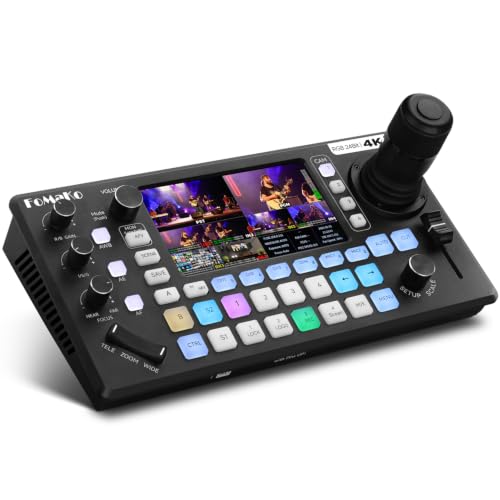
Looking to elevate your live streaming game? The FoMaKo KC800 4K HDMI Multi-Camera Streaming Video Mixer Switcher is your go-to solution. With its integrated 4D joystick PTZ camera controller and 5.5″ LCD screen, you’ll enjoy seamless control. It supports 4K 60FPS input and 1080p 60FPS output, ensuring exceptional quality. The RGB 24-bit true color technology delivers cinema-grade visuals across four HDMI inputs. Plus, you can record directly to USB or SD card, stream on multiple platforms, and benefit from easy operation features. With a year warranty and lifetime support, you’re set for successful productions.
Best For: Professional video producers and live streamers looking for high-quality multi-camera streaming solutions.
Pros:
- Integrated PTZ camera control allows for seamless operation during live events.
- Supports 4K 60FPS input and 1080p 60FPS output for exceptional video quality.
- Multi-platform streaming capability enables simultaneous broadcasting on various platforms.
Cons:
- Limited to 4 HDMI inputs, which may not be sufficient for larger productions.
- Recording format options are restricted to MP4/TS, which may not suit all user preferences.
- Potential learning curve for users unfamiliar with video mixing technology.
Mixer Plus Compact Video Switcher with Built-in Screen

The Mixer Plus Compact Video Switcher with its built-in screen is perfect for content creators who need a portable solution for live streaming. This 4-channel HDMI switcher allows you to connect up to four cameras and switch between them with zero latency. You’ll love the customizable interchange effects and scene presets, making your broadcasts look professional. The advanced tools, like PTZ camera control and chroma keying, elevate your production quality. Plus, the Multi View feature lets you monitor all inputs simultaneously, ensuring precise control over your stream. It’s a flexible, all-in-one solution for on-the-go video production.
Best For: Content creators and live streamers seeking a portable, professional video switching solution for multi-camera productions.
Pros:
- Zero-latency switching for seamless transitions between up to four HDMI inputs.
- Advanced broadcast tools including PTZ camera control and chroma keying enhance production quality.
- Multi View monitoring allows for real-time previews of all inputs, ensuring precise control during live streaming.
Cons:
- Limited to four HDMI inputs, which may not be sufficient for larger productions.
- The built-in screen size (4 inches) may be too small for comfortable monitoring in all situations.
- Customization options for AUX HDMI output may require additional setup time for optimal use.
Osee GoStream Duet 8 Channels Video Switcher

Ideal for content creators and live event producers, the Osee GoStream Duet 8 Channels Video Switcher excels in delivering a seamless multi-camera experience. With 8 channels supporting 4K-HDMI, SDI, and NDI inputs, you can connect various cameras and devices effortlessly. Its PGM and ISO recording capabilities let you capture every moment in high-quality formats. Plus, with 2 XLR inputs, you’ll enjoy professional audio for podcasts or livestreams. The customizable layout and graphics options, including keyers for overlays, enhance your production value. With user-friendly features and multilingual support, you’ll navigate your projects like a pro.
Best For: Content creators and live event producers looking for a versatile and high-quality video switching solution.
Pros:
- Supports multiple input types (4K-HDMI, SDI, NDI) for flexible camera connections.
- PGM and ISO recording capabilities allow for comprehensive capture of events.
- Advanced layout and graphics options enhance production quality with customizable overlays.
Cons:
- Firmware upgrades may be necessary for optimal performance with all input types.
- The complexity of features may require a learning curve for new users.
- Limited to 8 channels, which may not meet the needs of larger productions.
Tenveo 4K60FPS HDMI Video Switcher Mixer

For professionals seeking a robust solution for live streaming, the Tenveo 4K60FPS HDMI Video Switcher Mixer stands out with its ability to support multiple input sources, including 4 SDI and 4 HDMI connections. This 5-channel switcher features a 5.5-inch FHD screen and offers 1080P60FPS output, making it perfect for events like church services or product launches. You can easily manage up to four PTZ cameras and enjoy dual live streaming capabilities. With built-in recording to SD cards or USB drives, you’ll capture every moment while maintaining high-quality audio processing for a seamless production experience.
Best For: Professionals and organizations looking for a versatile and high-quality live streaming solution for events such as church services, studio productions, and product launches.
Pros:
- Supports multiple input sources, including 4 SDI and 4 HDMI, allowing for versatile video configurations.
- Dual live streaming capabilities enable broadcasting to various platforms simultaneously.
- User-friendly interface with a 5.5-inch FHD screen and customizable scenes enhances the overall user experience.
Cons:
- The complexity of features may require a learning curve for new users unfamiliar with live streaming technology.
- Limited to 5 channels for switching, which may not suffice for larger productions needing more inputs.
- Higher price point compared to basic switchers could be a barrier for smaller organizations or individual users.
Blackmagic Design ATEM Mini Pro HDMI Live Stream Switcher (SWATEMMINIBPR)

With its 4-camera multiview capability, the Blackmagic Design ATEM Mini Pro HDMI Live Stream Switcher (SWATEMMINIBPR) is perfect for those who need an efficient solution for multicamera live streaming. You can easily switch between four HDMI sources, making it ideal for education, training, business presentations, and eSports. The device features multiple changes, upstream keys, and a built-in 6-input audio mixer for seamless production. With USB Type-C output for webcam functionality and multiview support, you’ll get everything you need to elevate your live broadcasts. Plus, it comes with an external power supply for added convenience.
Best For: Those seeking a reliable and versatile solution for multicamera live streaming in educational, corporate, or eSports environments.
Pros:
- Versatile multiview capabilities allow seamless switching between four HDMI sources, enhancing live production quality.
- Built-in audio mixer simplifies audio management with 6-input and 2-channel options for clear sound.
- USB Type-C output enables webcam functionality, making it easy to connect to streaming platforms.
Cons:
- Limited to HDMI inputs, which may not be suitable for users with other types of video connections.
- The absence of advanced features like 4K output may limit its appeal for high-end production environments.
- Requires external power supply, which can be less convenient for portable setups.
Pac Intelligent 4 CAM SWTCHR

The PAC VS41 Intelligent 4-Camera Switcher is an excellent choice for drivers looking to enhance their vehicle’s safety and visibility. With four camera inputs and one video output, it seamlessly connects to factory or aftermarket radios. The switcher activates rear backup cameras when in reverse and side cameras with turn signals, ensuring you’re always aware of your surroundings. Compact at 5.5 x 4 x 0.4 inches and lightweight at 3.2 ounces, it’s easy to install. Rated 4.3 out of 5 stars by users, the PAC VS41 is a reliable option for elevating your driving experience.
Best For: Drivers looking to enhance vehicle safety and visibility with multiple camera inputs for better awareness of their surroundings.
Pros:
- Easy Installation: Compact size and lightweight design make it simple to install in various vehicles.
- Multi-Camera Support: Supports four camera inputs, providing comprehensive visibility around the vehicle.
- Automatic Activation: Rear cameras activate in reverse, and side cameras activate with turn signals, improving safety during maneuvers.
Cons:
- Limited Customer Reviews: Although rated 4.3 stars, only 58 reviews may not provide a comprehensive view of performance.
- Specific Compatibility Requirements: May require specific factory or aftermarket radios for optimal use.
- No Warranty Information Provided: Lack of warranty details may concern some potential buyers.
Factors to Consider When Choosing Video Switchers for Multi Camera Setups
When choosing a video switcher for your multi-camera setup, you need to take into account several key factors. Think about the input options and compatibility with your cameras, as well as the streaming capabilities and audio input features. Don’t overlook the importance of control, user interface, portability, and design to guarantee it fits your workflow.
Input Options and Compatibility
Choosing the right video switcher for your multi-camera setup hinges on understanding input options and compatibility. You’ll want to evaluate the number and types of inputs available, such as HDMI, SDI, and USB, to guarantee they align with your cameras and sources. Verify that the switcher supports your desired resolutions, like 4K or 1080p, and the necessary frame rates for ideal video quality. Look for switchers that offer multiple input configurations to enhance flexibility during live productions. Additionally, consider the number of simultaneous input channels the switcher can handle, as this affects your setup’s complexity and scalability. Finally, compatibility with popular streaming software and platforms can simplify your workflow, making it a vital factor in your decision.
Streaming Capabilities and Quality
Streaming capabilities and quality are essential factors that can make or break your multi-camera production. When choosing a video switcher, consider the maximum output resolution and frame rate; many devices support up to 1080p at 60 frames per second or even 4K at the same rate for that crisp, clear image. Look for multi-platform streaming capabilities to broadcast simultaneously on platforms like YouTube, Facebook, and Zoom, expanding your audience reach. Verify the switcher supports various streaming protocols, such as RTMP or NDI, for flexibility. The ability to record directly to external storage while streaming enhances your editing options. Finally, customizable streaming bitrates help maintain quality and stability, guaranteeing a smooth viewing experience, regardless of network conditions.
Audio Input Features
Quality video production hinges not only on visuals but also on audio input features that can elevate your multi-camera setups. When you’re choosing a video switcher, consider the number and type of audio inputs available, like XLR, 1/4″, or 3.5mm jacks, as these impact compatibility with various microphones. Look for switchers with built-in audio mixing capabilities, including EQ and compression, to enhance your audio quality during live productions. Make sure the switcher supports phantom power for condenser microphones, giving you versatile options. Evaluate how many independent audio channels the switcher can handle, as this determines the number of audio sources you can mix simultaneously. Finally, check for headphone outputs for direct audio monitoring, guaranteeing ideal levels during your sessions.
Control and User Interface
When it comes to video switchers for multi-camera setups, the control and user interface play an essential role in your production’s success. A user-friendly interface with dedicated buttons for scene changes can streamline your workflow and make it easier for newcomers to adapt. Look for switchers that offer customizable layouts, allowing you to set up controls for quick access during live events. Features like auto-switching based on audio inputs can enhance your experience by automating changes, reducing manual effort. A built-in graphical user interface (GUI) simplifies navigation and provides real-time feedback on your sources. Additionally, integration with companion software for remote control adds flexibility, letting you manage your streaming setups from a distance. Choose wisely!
Portability and Design
For any multi-camera setup, the design and portability of your video switcher can greatly impact your production experience. A lightweight switcher makes transportation easier, allowing you to set up quickly at different locations. Compact dimensions are essential for efficient storage and placement in tight spaces, whether you’re in a studio or at a live event. Durability is key; a robust design guarantees your switcher can withstand bumps during transport, enhancing its longevity. Built-in screens can simplify your workflow by providing real-time monitoring without needing extra displays. Finally, look for expandable features like cheese plates or attachment points to mount additional gear, giving you the flexibility to optimize your setup for various scenarios.
Recording and Playback Options
Recording and playback options are essential elements to evaluate when selecting a video switcher for your multi-camera setup. You’ll want to check if the switcher supports direct recording to external storage devices like USB drives or SD cards, making playback and post-production easier. Consider switchers with simultaneous recording capabilities, allowing you to capture the program output and individual input streams. Look for various video formats, such as MP4 or TS, as different bitrates can affect both quality and file size. It’s also helpful to choose a switcher with built-in media players for quick access to recorded files during live events. Finally, real-time monitoring features can help you manage your recording process effectively.
Price and Warranty Terms
Evaluating the price and warranty terms of video switchers is vital for making a smart purchase. Prices can vary widely, with options available for under $200 and premium models exceeding $1,000. It’s important to compare features and capabilities to find the best fit for your needs. Warranty terms also play a significant role; many manufacturers offer coverage from 1 to 3 years, reflecting their confidence in the product’s durability. A longer warranty often indicates higher quality, ensuring better long-term value. Don’t forget to take into account additional costs for extended warranties, which can impact your overall investment. Finally, check customer reviews for insights on value for money and the effectiveness of warranty support when issues arise.
