
If you’re looking to enhance your live-streaming game, choosing the right video switcher for your multi-cam setup is essential. These devices can make a significant difference in your production quality, providing seamless shifts and high-quality visuals. With so many options available, it can be overwhelming to find the perfect fit for your needs. Let’s explore some of the top contenders that can elevate your broadcasts and streamline your workflow.
Osee GoStream Deck HDMI Pro Live Streaming Video Mixer Switcher

If you’re looking for a versatile solution for live streaming and multi-camera setups, the Osee GoStream Deck HDMI Pro Live Streaming Video Mixer Switcher is your best bet. With 4 HDMI inputs and 2 outputs, you can connect multiple media sources easily. Its Type-C and Ethernet ports enhance streaming capabilities, while audio control features let you manage sound effectively. You can record directly to an SD card or USB SSD and stream to three platforms simultaneously. Plus, the built-in menu system and hard control panel streamline your production, making it simple to create professional broadcasts with graphics and overlays.
Best For: Those seeking a comprehensive and user-friendly solution for live streaming and multi-camera production.
Pros:
- Versatile connectivity with 4 HDMI inputs and multiple audio options, allowing for diverse media source integration.
- Simultaneous streaming to three platforms offers extensive reach for live broadcasts.
- Built-in controls and graphics overlay features enable professional-quality production without the need for additional software.
Cons:
- May have a learning curve for beginners unfamiliar with live streaming technology.
- Limited to HDMI connections, which may not accommodate all types of media sources.
- The reliance on external storage for recording could be a drawback for users wanting built-in storage solutions.
FEELWORLD LIVEPRO L1 V1 Multi Camera Video Mixer Switcher

The FEELWORLD LIVEPRO L1 V1 Multi Camera Video Mixer Switcher is perfect for content creators who need a compact and efficient solution for live streaming and real-time production. With four HDMI inputs supporting 1080p, you can easily switch between multiple high-quality video sources. Its lightweight design makes it ideal for single-person operation, while the USB 3.0 output connects seamlessly to your computer, functioning like a built-in webcam. Plus, you can apply exciting video effects and monitor all your inputs in real-time. Remote operation via LAN adds flexibility, making this switcher a must-have for enhancing your production quality.
Best For: Content creators and live streamers seeking a compact and efficient video switching solution for high-quality productions.
Pros:
- Lightweight and compact design makes it easy to transport and set up for single-person operations.
- Supports multiple HDMI inputs for seamless switching between different video sources, enhancing live production quality.
- Real-time monitoring and video effects allow for dynamic and engaging live streams.
Cons:
- Limited to 4 HDMI inputs, which may not be sufficient for larger production setups.
- Requires a computer for USB 3.0 output to function as a webcam, which may limit standalone use.
- Remote operation via LAN may require additional setup and knowledge of network configurations.
Movmagic M4E 5CH Multi Camera Video Mixer Switcher
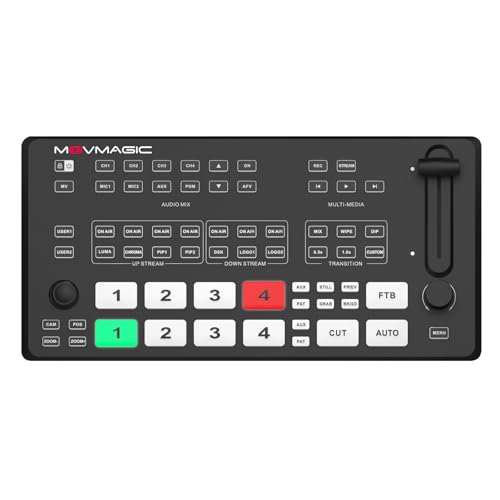
For content creators seeking a versatile solution for live streaming, the Movmagic M4E 5CH Multi Camera Video Mixer Switcher offers remarkable capabilities. With two 4K HDMI inputs and two 1080p inputs, it guarantees high-quality video processing. You can overlay up to 8 layers and utilize 30+ interchange effects, perfect for dynamic productions. The built-in web server allows remote access, while integrated PTZ camera control simplifies single-person operation. Plus, its USB 3.1 output guarantees lossless streaming. Compatible with platforms like YouTube and Twitch, this switcher elevates your content quality and delivers a professional touch to your live broadcasts.
Best For: Content creators and live streamers looking for a professional-grade video mixer with versatile features and high-quality output.
Pros:
- High-quality video processing with two 4K HDMI inputs and two 1080p inputs.
- Supports overlay of up to 8 layers and offers 30+ transition effects for dynamic content.
- Integrated PTZ camera control and built-in web server facilitate easy remote operation.
Cons:
- Limited to 5 channels, which may not be sufficient for larger productions.
- Relatively lightweight design may affect stability during use.
- Customer ratings indicate mixed feedback, suggesting potential areas for improvement.
RGBlink Mini Video Mixer Switcher with 4 x HDMI Inputs

Looking to elevate your live streaming game? The RGBlink Mini Video Mixer Switcher is your go-to solution. With 4 x HDMI inputs and 2K input/output, it lets you stream up to six pictures, making multi-camera setups a breeze. You’ll enjoy 14 built-in effect transitions and nine picture-in-picture layouts. Plus, its USB 3.0 output turns it into a webcam, compatible with all major streaming platforms. Setting it up is simple, thanks to its tripod-ready design and remote control functionality. Weighing just 2.25 pounds, this compact mixer delivers quality and versatility, earning a customer rating of 4.1 stars.
Best For: Content creators and live streamers looking for a versatile, easy-to-use video mixer for multi-camera setups.
Pros:
- Supports 4 x HDMI inputs for seamless multi-camera streaming.
- Features 14 built-in transition effects and 9 picture-in-picture layouts for dynamic presentations.
- Compact and lightweight design with USB 3.0 output for easy connection to computers.
Cons:
- Limited to a maximum of 2K resolution for input and output.
- May require additional setup time for beginners unfamiliar with video mixing equipment.
- Remote control functionality may not be as intuitive for all users.
R2 Pro 4-Channel HDMI Video Switcher

Seamless switching between multiple video sources makes the R2 Pro 4-Channel HDMI Video Switcher an excellent choice for content creators and live event producers. With support for up to four HDMI inputs, you can create dynamic multi-angle productions effortlessly. The 5.5-inch FHD touchscreen interface simplifies scene switching, audio mixing, and graphics overlays, allowing you to focus on your content. Plus, you can stream directly to platforms like YouTube and Twitch using a single HDMI output. Its lightweight and compact design guarantees easy transport and setup, making the R2 Pro a versatile tool for any production environment.
Best For: The R2 Pro 4-Channel HDMI Video Switcher is best for content creators and live event producers seeking an efficient way to manage multiple video sources during broadcasts.
Pros:
- Seamless switching between up to four HDMI video sources for dynamic productions.
- User-friendly 5.5-inch touchscreen interface for easy access to functions like audio mixing and graphics overlays.
- Lightweight and portable design makes it convenient for transport and setup at various locations.
Cons:
- Does not support 4K resolution, limiting high-definition output options.
- Single HDMI output may restrict streaming capabilities compared to more advanced switchers with multiple outputs.
- Limited recording features as it only supports USB recording without advanced options for storage or formats.
FEELWORLD L4 10.1 Inch Touch Screen Video Switcher

The FEELWORLD L4 10.1 Inch Touch Screen Video Switcher stands out as an excellent choice for content creators seeking an efficient way to manage multiple camera feeds. With its intuitive menu interface, you’ll find it easy to operate. The T-bar allows for smooth switching, while the touchscreen gives you full control. It supports five input sources, including 4 HDMI and 1 SDI, ensuring versatility for your setups. Plus, the real-time live streaming capabilities make it perfect for engaging with audiences on social media. Enjoy features like Chroma Key effects and logo overlay for enhancing your brand during broadcasts.
Best For: Content creators and live streamers looking for an efficient and versatile video switching solution.
Pros:
- Intuitive touchscreen interface for easy operation and navigation.
- Supports multiple input sources (4 HDMI and 1 SDI) for versatile setups.
- Real-time live streaming capabilities enhance audience engagement on social media.
Cons:
- Limited to 1080p output for HDMI, which may not meet all high-definition needs.
- The item weight of 4.38 pounds may be cumbersome for portable setups.
- Customer rating of 4.1 out of 5 suggests mixed feedback from users.
Stream1S Multi-Cam Livestreaming Video Mixer Switcher

For those seeking an efficient solution for managing multiple cameras in a livestream, the Stream1S Multi-Cam 4*SDI Livestreaming Video Mixer Switcher stands out with its robust PTZ camera control feature, allowing you to control up to four cameras effortlessly. With its compact size and weight of just 3 pounds, it’s perfect for on-the-go productions. The switcher supports high-bitrate Full HD recording and offers over 30 alteration effects to elevate your show’s quality. Plus, its dual streaming capability lets you broadcast to two destinations simultaneously, making it an ideal choice for professional livestreaming setups.
Best For: The Stream1S Multi-Cam Livestreaming Video Mixer Switcher is best for professional livestreamers who require seamless control over multiple cameras and high-quality broadcasting capabilities.
Pros:
- Efficient PTZ camera control for managing up to four cameras simultaneously.
- High-bitrate Full HD recording offers excellent video quality with instant playback functionality.
- Dual streaming capability allows for broadcasting to two destinations at once, enhancing reach and engagement.
Cons:
- Limited input options with only up to 4 SDI inputs, which may not suffice for larger productions.
- No built-in storage, requiring external devices for saving recorded content.
- Learning curve for users unfamiliar with advanced features like chroma keying and transition effects.
Live Streaming Video Mixer with 4 HDMI Inputs

If you’re a content creator or live streamer looking to elevate your production quality, a live streaming video mixer with 4 HDMI inputs is a game changer. This mixer allows you to switch seamlessly between multiple video sources, ensuring smooth shifts for your audience. With support for HDMI input up to 4K@30Hz and output at 1920×1080@60Hz, you’ll deliver stunning visuals. Plus, it functions as a digital audio mixer, helping you manage sound effectively. With diverse switching modes, like Picture-in-Picture and dual-screen display, you can create engaging presentations that captivate viewers and enhance their overall experience.
Best For: Content creators and live streamers seeking to enhance their production quality with seamless video switching and professional audio management.
Pros:
- Supports multiple HDMI inputs for versatile video source options, allowing for dynamic presentations.
- High-definition output ensures immersive visuals for viewers, enhancing the overall streaming experience.
- Advanced audio management features allow precise control over sound, ensuring synchronization with video for a polished production.
Cons:
- Limited to HDMI input sources, which may not accommodate users with other types of video connections.
- 4K input is capped at 30Hz, potentially limiting high-frame-rate streaming options for some applications.
- Requires a learning curve for optimal use of switching modes and audio features, which may be challenging for beginners.
OREI Quad Multi Viewer HDMI Switcher (HD-401MV)

Looking for a seamless way to switch between multiple HDMI sources? The OREI Quad Multi Viewer HDMI Switcher (HD-401MV) is your solution. It supports four HDMI inputs, allowing you to connect devices like gaming consoles, streaming devices, and Blu-ray players to a single display with real-time, fast switching up to 1080p. You’ll love the five display modes and the convenience of selecting sources via the IR remote or front panel buttons. Plus, it delivers high-quality PCM 2.0 audio through HDMI and 3.5mm connections. With a one-year warranty and OREI support, you can trust its reliability in your setup.
Best For: Anyone looking for an efficient way to connect and switch between multiple HDMI devices on a single display, such as gamers and home entertainment enthusiasts.
Pros:
- Supports up to four HDMI input sources, making it versatile for various devices.
- Features five display modes and easy switching via IR remote or front panel buttons.
- High-quality audio output through HDMI and 3.5mm connections enhances the viewing experience.
Cons:
- Limited to 1080p resolution, which may not satisfy users wanting 4K support.
- May require additional setup for optimal performance with certain devices.
- The remote control may not have the best range or responsiveness in larger rooms.
HDMI Multiviewer Switch 4×1 Seamless Switcher

The HDMI Multiviewer Switch 4×1 Seamless Switcher is perfect for anyone needing to display multiple video sources simultaneously without interruption. With support for resolutions up to 4K@30Hz and 1080p@60Hz, this switcher boasts nine display modes, including Picture-by-Picture (PBP). You can control it easily via an IR remote or a slide switch. Its compact design makes it ideal for various settings like control rooms, home theaters, or offices. Users appreciate its seamless switching and stable performance, although some mention minor issues with 4K output and aspect ratios. Overall, it’s a reliable choice for enhancing your multi-cam setups.
Best For: The HDMI Multiviewer Switch 4×1 Seamless Switcher is best for users who need to monitor multiple video sources simultaneously in settings such as control rooms, home theaters, or offices.
Pros:
- Seamless switching with zero lag or interruption enhances user experience.
- Supports up to 4K@30Hz and 1080p@60Hz resolutions for high-quality visuals.
- Offers nine different display modes, including Picture-by-Picture (PBP) for flexible viewing options.
Cons:
- Some users report issues with true 4K output and latency in certain modes.
- Occasional black screens due to resolution mismatches can occur.
- Limited functionality in some display modes may hinder user experience.
Factors to Consider When Choosing Video Switchers for Multi Cam Setup
When choosing a video switcher for your multi-cam setup, there are several key factors you need to take into account. You’ll want to look at input and output options, streaming capabilities, and how easy the control interface is to use. Also, think about video resolution support and how the switcher handles audio management to guarantee a smooth production.
Input and Output Options
As you engage in selecting a video switcher for your multi-camera setup, input and output options play an essential role in guaranteeing seamless connectivity and flexibility. Start by considering the number of HDMI inputs available; most switchers support 4 to 5 HDMI inputs, allowing multiple camera sources. Look for various output options, like HDMI and USB, to confirm compatibility with different streaming platforms. It’s critical that your switcher handles high-definition resolutions, ideally supporting up to 4K at 30Hz or 1080p at 60Hz for ideal video quality. Additionally, check for other input types like SDI or USB for added versatility. Finally, don’t overlook audio input options, important for managing sound and achieving synchronized audio during your broadcasts.
Streaming Capabilities
Selecting a video switcher with robust streaming capabilities is vital for maximizing your multi-cam setup’s potential. Look for a switcher that allows you to stream simultaneously to multiple platforms like YouTube, Facebook, and Zoom. USB output options are a must, as they enhance compatibility with various streaming software. Confirm it supports at least 1080p high-definition output; some models even offer 4K resolution for exceptional quality. Built-in networking features, such as Ethernet ports and NDI support, simplify your connection process for live broadcasting. Finally, don’t overlook audio management options, which are significant for maintaining quality during streams. Effective audio mixing guarantees that your audience enjoys a professional and polished experience.
Control Interface Usability
Streaming capabilities play a significant role in your multi-cam setup, but the control interface usability can make or break your production experience. A user-friendly control interface enhances operational efficiency, allowing you to switch scenes and make adjustments quickly during live productions. Touchscreen displays in advanced switchers give you intuitive access to functions like graphics overlays and audio mixing. If you prefer tactile controls, look for switchers with buttons and knobs, such as T-bars, which provide a responsive experience for managing shifts. Customizable interfaces that let you set up macros streamline your workflow, especially under pressure. Additionally, remote control capabilities allow you to manage video sources from a distance, increasing your flexibility during live events.
Video Resolution Support
When choosing video switchers for a multi-cam setup, it’s essential to guarantee they support a variety of video resolutions. Look for switchers that can handle inputs up to 4K@30Hz, ensuring high-quality visuals. Remember to take into account the output resolution as well; some switchers only output at 1080p@60Hz, which may limit your final stream’s quality. Compatibility with different video formats matters too, so aim for switchers that support multiple resolutions like 1080p and 720p alongside 4K options. It’s also vital to select switchers that allow seamless changes between resolutions without lag during live events. This will help maintain broadcast quality and provide your audience with a smooth viewing experience.
Audio Management Features
In addition to video resolution support, effective audio management features are essential when choosing video switchers for multi-cam setups. Look for switchers with multiple audio inputs and outputs to seamlessly integrate various audio sources, enhancing your overall sound quality. Many models come equipped with professional audio effects and controls, allowing you to adjust volume levels and apply effects for ideal performance. Dedicated headphone outputs are vital for real-time audio monitoring, ensuring sound synchronization during live streaming. Advanced features like embedding and de-embedding functions provide flexibility in managing audio signals from HDMI sources. Integrated digital audio mixers offer greater control over audio mixing, enabling smooth shifts and a cohesive audio experience throughout your production.
Transition Effects Availability
Choosing the right video switcher involves more than just technical specifications; it’s also about the creative tools at your disposal, particularly shift effects. These effects are essential for enhancing visual storytelling during live productions, allowing seamless changes between different video sources. Many switchers offer a variety of options, including fades, wipes, and cuts—some even provide over 30 different effects for dynamic presentations. Advanced models may feature Picture-in-Picture (PIP) capabilities, adding layered visuals for engaging viewer experiences. Customizable shift effects can greatly elevate your production’s professionalism and viewer engagement. Plus, some switchers let you pre-select and save shifts as presets, streamlining your switching process during live broadcasts. Choose wisely to boost your production quality!
Compatibility With Software
Understanding compatibility with software is essential for maximizing your multi-camera setup’s potential. First, verify the video switcher supports USB output for seamless integration with popular streaming software like OBS and vMix. This feature simplifies your streaming process and enhances flexibility. Next, look for switchers that offer direct streaming capabilities to multiple social media platforms, allowing you to broadcast efficiently without extra software. Check for compatibility with common streaming protocols like RTMPS, guaranteeing secure and reliable live streaming. Additionally, consider switchers that support HDMI input formats up to 4K resolution for peak video quality. Finally, evaluate whether the switcher allows remote control via a LAN connection, which can streamline operations during live productions and improve workflow efficiency.
Portability and Design
When setting up a multi-cam production, considering the portability and design of your video switcher can greatly enhance your workflow. A lightweight and compact switcher makes transport and setup a breeze, especially for on-the-go productions. Smaller dimensions are ideal for single-person operations, allowing for quick setups in tight spaces. Look for models with built-in displays; they let you monitor and control in real-time without extra screens, boosting portability. Durable materials are essential, ensuring your switcher can handle the rigors of travel. Finally, ergonomic features like intuitive button layouts and touch screens improve usability, making operation seamless in fast-paced environments. Prioritizing these aspects will elevate your production quality considerably.
