
If you’re looking to elevate your PC build while saving space, vertical motherboard cases could be the perfect solution. These cases not only showcase your components but also offer efficient cooling and modern GPU configurations. With a variety of styles and features, finding the right fit can transform your setup. Curious about which cases stand out in this category? Let’s explore the top options and what makes them exceptional.
Cooler Master Vertical GPU Card Holder Kit V3 White

If you’re looking to showcase your high-end GPU, the Cooler Master Vertical GPU Card Holder Kit V3 White is an excellent choice. It’s compatible with PCIe 4.0 and 5.0 motherboards, easily accommodating GPUs like the RTX 5090 and RX 9070 XT. This kit fits standard ATX cases and supports modern 3-slot GPUs while allowing for four-slot Micro-ATX configurations. Its PCIe 4.0 riser cable provides fast, reliable performance for gaming and creative tasks. Plus, the toolless, adjustable design lets you make horizontal adjustments up to 65mm, ensuring a perfect fit. Just be aware it might block rear fans in certain setups.
Best For: Gamers and creators looking to showcase their high-end GPUs in a stylish and functional manner.
Pros:
- Versatile Compatibility: Works with PCIe 4.0 and 5.0 motherboards and accommodates modern 3-slot GPUs.
- Toolless Installation: Adjustable design allows for easy fitting without the need for tools.
- Reliable Performance: Equipped with a PCIe 4.0 riser cable for fast and stable performance during gaming and creative tasks.
Cons:
- Potential Fan Blockage: May obstruct rear fans depending on case configuration.
- Limited to ATX Cases: Primarily designed for standard ATX cases, which may not suit all setups.
- Not Suitable for All GPUs: While it supports modern GPUs, older models may not fit properly.
MUSETEX ATX Gaming PC Case with Dual Tempered Glass

The MUSETEX K2 ATX Gaming PC Case with Dual Tempered Glass is an ideal choice for gamers and PC enthusiasts seeking a visually stunning and high-performance build. With its sleek black design and 270° transparent panels, it beautifully showcases your components. Equipped with six pre-installed PWM ARGB fans, it guarantees peak cooling and airflow. You’ll appreciate the ample space for GPUs up to 420mm and CPU coolers up to 178mm. The user-friendly I/O panel features USB 3.0 and Type-C connections for quick access. Overall, it combines elegance and functionality, making it a top contender for your vertical motherboard case needs.
Best For: Gamers and PC enthusiasts looking for a stylish and well-ventilated case to showcase their high-performance components.
Pros:
- Impressive Cooling: Comes with six pre-installed PWM ARGB fans for optimal airflow and cooling performance.
- Spacious Design: Compatible with large GPUs and CPU coolers, offering ample installation space for various components.
- Aesthetic Appeal: Features dual tempered glass panels that provide a stunning view of internal hardware.
Cons:
- Fan Direction Issues: Some users have reported difficulties with fan direction during installation.
- Quality Control Concerns: A few customers noted minor quality control issues, which may affect overall build quality.
- Limited Warranty: Only a 30-day return policy for damaged or dead-on-arrival products, which may not be sufficient for some users.
ASUS TUF Gaming GT501 Mid-Tower Computer Case
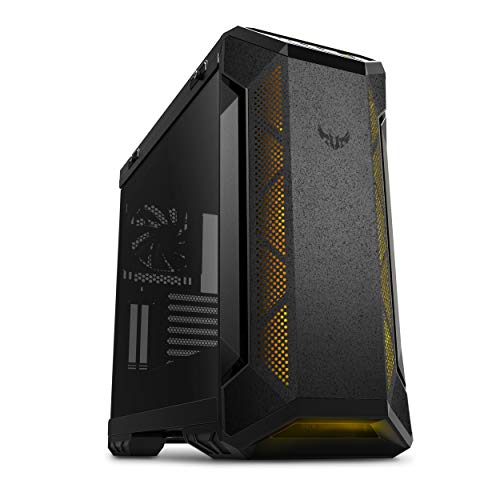
For gamers seeking a robust and stylish solution for their builds, the ASUS TUF Gaming GT501 Mid-Tower Computer Case stands out with its striking metal chassis and custom TUF gaming spatter pattern. This case supports EATX motherboards and features a 4mm-thick smoked tempered-glass side panel for a full view of your components. Equipped with three 120mm Aura Sync RGB fans and an additional 140mm rear PWM fan, it guarantees excellent cooling. Plus, you’ll appreciate the ergonomic carry handles and ample expansion options. With a customer rating of 4.7 stars, it’s a top choice for serious gamers.
Best For: Gamers looking for a stylish and functional mid-tower case with excellent cooling options and ample expansion capabilities.
Pros:
- Features a striking design with a custom TUF gaming spatter pattern and a tempered glass side panel for showcasing components.
- Excellent airflow with three RGB fans and the option to install additional cooling systems, including liquid cooling.
- Ergonomic carry handles make it easy to transport, supporting builds up to 65lbs.
Cons:
- The item weight of 26.2 pounds may be considered heavy for some users.
- Limited USB ports on the front panel with only two USB 2.0 ports alongside one USB 3.0 port.
- The dimensions may not fit in all setups, requiring careful measurement before purchase.
darkFlash Full-Tower ATX Gaming PC Case (DY470)

Designed for gamers and content creators seeking both style and functionality, the darkFlash Full-Tower ATX Gaming PC Case (DY470) stands out with its unique back plug-in motherboard layout and dual-chamber design. With ample space for 410mm GPUs and support for dual 360mm radiators, you’ll enjoy excellent cooling and airflow. The top-angled panoramic glass showcases your components beautifully, while the snap-on design simplifies installation and cable management. Equipped with four PWM ARGB fans and a dust filter, this case guarantees your build remains cool and clean. Plus, it comes with a one-year warranty for peace of mind.
Best For: Gamers and content creators looking for a stylish, spacious, and functional case that supports high-performance components.
Pros:
- Excellent airflow and cooling capabilities with dual-chamber design and support for dual 360mm radiators.
- Stylish panoramic glass and unique top-angled design enhance visibility of internal components.
- Thoughtful cable management features and easy assembly make building a PC hassle-free.
Cons:
- Weighs 22 pounds, which may make it less portable compared to lighter cases.
- Limited color options, as it is only available in black.
- Additional fans may need to be purchased separately for optimal airflow.
CORSAIR 3500X ARGB Mid-Tower ATX PC Case

Looking for a case that combines stunning aesthetics with exceptional cooling capabilities? The CORSAIR 3500X ARGB Mid-Tower ATX PC Case is your perfect match. Its panoramic tempered glass design provides an impressive visual display, while the wraparound glass panels offer easy access for building. With support for Mini-ITX to EATX motherboards, you’ll enjoy versatility. The cooling system is high-quality, featuring mounting points for up to 10x 120mm fans and three pre-installed CORSAIR RS120 ARGB fans. Plus, the +5V ARGB header makes lighting control a breeze. Say goodbye to cable clutter and hello to a sleek, stylish setup!
Best For: Gamers and PC builders seeking a visually stunning case with excellent cooling performance.
Pros:
- High cooling capacity with support for up to 10x 120mm fans, ensuring optimal airflow.
- Panoramic tempered glass design offers a visually appealing display of your components.
- Easy lighting control via a +5V ARGB header simplifies RGB management.
Cons:
- Limited airflow options compared to larger cases, which may affect cooling in high-performance builds.
- Tempered glass panels may be prone to fingerprints and smudges.
- Compatibility with larger motherboards may require careful selection of components to avoid fit issues.
E02 DIY Computer Case PC Frame Desktop Chassis

The E02 DIY Computer Case PC Frame is an exceptional choice for tech enthusiasts who value flexibility and customization in their builds. This stackable open-air chassis supports ATX, MATX, and E-ATX motherboards, fitting up to 330mm x 330mm. Its dimensions of 435mm x 340mm x 195mm allow you to stack up to 10 layers horizontally, offering ample space for 2 HDDs and 4 SSDs. With cooling options for 8x 120mm fans and multiple radiator placements, your components will stay cool. Plus, included accessories like a power switch and motherboard spacer wrench make assembly a breeze.
Best For: Tech enthusiasts looking for a customizable and flexible open-air PC chassis for their builds.
Pros:
- Stackable design allows for up to 10 layers, maximizing space efficiency.
- Versatile cooling options support multiple fan and radiator configurations to keep components cool.
- Compatibility with various motherboard sizes (ATX, MATX, E-ATX) caters to a wide range of builds.
Cons:
- Open-air design may expose components to dust and debris.
- Limited protection compared to traditional closed cases, which can lead to potential damage.
- Assembly may require additional tools for optimal setup beyond included accessories.
PC Creative Assembly Frame Test Bench for Computer Motherboard

For those who prioritize easy access and efficient cooling in their builds, the PC Creative Assembly Frame Test Bench stands out as an ideal choice. This open-air frame case supports various motherboard sizes including EATX, ATX, M-ATX, and ITX, all while weighing only 3.85 pounds. Made from durable aluminum alloy, it features excellent heat dissipation and allows for two water-cooling installations. You can also install independent graphics cards, but keep in mind that vertical installations need extension cables. With a solid customer rating of 4.4 stars, this test bench is a reliable option for your next build.
Best For: Those seeking an open-air case that offers easy access and optimal cooling for their computer builds.
Pros:
- Supports a wide range of motherboard sizes (EATX, ATX, M-ATX, ITX).
- Excellent heat dissipation with the open design and ability to install two water-cooling systems.
- Lightweight aluminum alloy construction makes it easy to move and set up.
Cons:
- Air-cooled CPU installations may be incompatible with ITX and MATX boards due to height restrictions.
- Vertical graphics card installation requires additional extension cables, which may add to the cost.
- May not provide as much protection against dust and debris compared to traditional enclosed cases.
PC Creative Assembly Frame Test Bench (MATX)

If you’re seeking a versatile and sturdy frame for your PC build, the PC Creative Assembly Frame Test Bench (MATX) stands out with its compatibility for various motherboard sizes, including EATX, ATX, and M-ATX. Constructed from aluminum alloy, its stable vertical structure enhances heat dissipation while providing an open design. You can easily install HDDs, SSDs, and both ATX and SFX power supplies. Additionally, it supports long graphics cards, with options for horizontal or vertical installation. You’ll appreciate the adjustable cooling positions too, allowing for efficient water-cooling setups tailored to your preferences, making it a great choice for customization.
Best For: Enthusiasts and builders looking for a customizable and flexible test bench for various motherboard sizes and cooling solutions.
Pros:
- Versatile Compatibility: Supports multiple motherboard sizes (EATX, ATX, M-ATX, ITX) and power supply types (ATX and SFX).
- Efficient Cooling Design: Open design enhances heat dissipation, with options for both air and water cooling.
- Customizable Layout: Adjustable water cooling positions and support for long graphics cards allow for personalized setups.
Cons:
- Height Restrictions: Air-cooled CPUs are limited to certain motherboard sizes (ATX and EATX) due to height restrictions.
- Additional Accessories Required: Vertical installation of graphics cards requires additional extension cables not included.
- Limited Enclosure: The open frame design may not provide the same protection as a closed case, exposing components to dust and damage.
DARKROCK EC2 Black ATX Mid Tower PC Case

Crafted for gamers and PC enthusiasts, the DARKROCK EC2 Black ATX Mid Tower PC Case stands out with its Type-C connectivity, ensuring compatibility with modern devices. It supports up to 50 series graphics cards and boasts a tempered glass side panel, giving your build a sleek look. You can optimize cooling with space for up to eight 120mm fans and a 360mm radiator. The meshed front panel enhances airflow, while magnetic dust filters keep your system clean. With compatibility for ATX, M-ATX, and ITX motherboards, this case is perfect for building your dream setup. Customers rate it 4.5 out of 5 stars.
Best For: Gamers and PC enthusiasts looking for a stylish, efficient case for their high-performance builds.
Pros:
- Spacious design supports up to 50 series graphics cards and multiple cooling options for optimal performance.
- Tempered glass side panels provide a sleek aesthetic to showcase your components.
- Type-C connectivity ensures compatibility with modern devices, enhancing usability.
Cons:
- Weighty construction at 12.27 pounds may make it less portable for frequent movers.
- Limited pre-installed cooling with only one fan included, potentially requiring additional purchases for optimal cooling.
- Maximum PSU length of 200 mm may restrict options for some high-capacity power supplies.
Lian Li ATX PC Case Multi-Directional GPU Kit V3
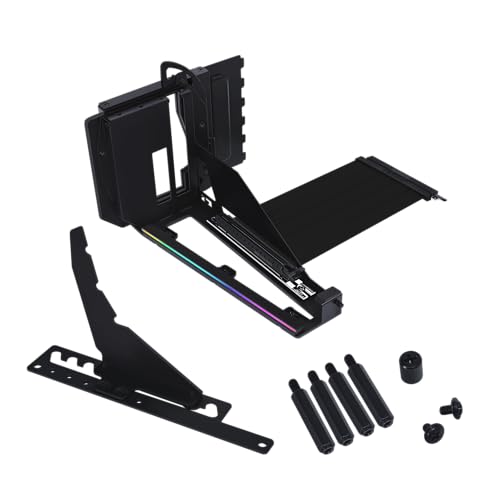
The Lian Li ATX PC Case Multi-Directional GPU Kit V3 shines for gamers and PC builders seeking ideal GPU positioning and airflow management. This versatile kit fits standard ATX chassis, offering triple height adjustments and a dual-angle tilt function to enhance thermal performance. Its high-speed PCIe 5.0 riser cable guarantees excellent signal integrity, while the anti-sag support arm stabilizes your GPU. Integrated RGB lighting adds flair to your setup. With a requirement of six slots for vertical mounting, it’s compatible with various Lian Li models and other brands, making it a stellar choice for your next build.
Best For: Gamers and PC builders looking for optimal GPU positioning and thermal management in their setups.
Pros:
- Triple height adjustments allow for customized GPU positioning to enhance airflow and accommodate larger components.
- High-speed PCIe 5.0 riser cable ensures superior performance and signal integrity for graphics cards.
- Integrated RGB lighting adds aesthetic appeal to any gaming or workstation build.
Cons:
- Requires six to seven slots for installation, which may limit compatibility with some cases.
- Not compatible with NZXT and Fractal Design cases, restricting options for users with those brands.
- The weight of 2.27 pounds may add noticeable bulk to lighter builds.
Factors to Consider When Choosing Vertical Motherboard Cases
When you’re choosing a vertical motherboard case, there are several key factors to keep in mind. You’ll want to take into account case size compatibility, GPU support capacity, and cooling options to guarantee peak performance. Aesthetic design features and build quality also play an essential role in your overall satisfaction with the case.
Case Size Compatibility
Choosing the right vertical motherboard case is essential for ensuring your build runs smoothly and efficiently. First, consider the size compatibility with your motherboard. Vertical cases typically come in ATX, M-ATX, and ITX sizes, with ATX being the most common for larger builds. Standard ATX motherboards measure 305mm x 244mm, while M-ATX measures 244mm x 244mm, so verify that your case accommodates your chosen motherboard dimensions. Additionally, check the internal layout for adequate clearance around components like CPU coolers and power supplies, as this impacts airflow and cooling. Cases designed for vertical mounting often have features that enhance thermal performance, making airflow vital for your system’s longevity and efficiency.
GPU Support Capacity
Considering GPU support capacity is essential for a successful vertical motherboard case setup. You’ll want to know the maximum length and number of slots available for your graphics card. Many vertical cases can accommodate modern GPUs, supporting lengths over 400mm, perfect for high-performance models like the RTX 40 series. Be sure to check the number of expansion slots, as vertical GPU mounts usually require six to seven for proper installation and stability. Additionally, look for GPU sag prevention features, such as support arms or adjustable brackets, to maintain both your build’s integrity and aesthetics, especially with heavier cards. Finally, verify compatibility with PCIe standards (4.0 or 5.0) for peak GPU performance in a vertical orientation.
Cooling Options Available
While selecting a vertical motherboard case, the cooling options available play a crucial role in ensuring your components remain at ideal temperatures. Many vertical cases support multiple fan configurations, allowing for up to 10x 120mm fans to boost airflow and cooling efficiency. You’ll often find pre-installed fans, like ARGB models, that enhance both cooling and the overall look of your build. Open-air designs in these cases promote excellent heat dissipation, making them perfect for high-performance components. Additionally, compatibility with liquid cooling solutions is common, with space for large radiators (up to 360mm) either at the top or front. Don’t forget to check for magnetic dust filters, which help keep your system cool and extend component lifespan.
Aesthetic Design Features
When it comes to vertical motherboard cases, aesthetic design features greatly influence your overall build’s visual impact. Panoramic tempered glass panels are a must-have, allowing you to showcase your internal components and stunning lighting effects. Many cases come with RGB lighting systems, giving you the freedom to customize your setup to match your personal style or theme. Look for unique structural elements like dual-chamber layouts or angled glass, which improve both visibility and airflow. Premium materials, such as aluminum alloy and tempered glass, not only enhance durability but also create a sleek, modern look. Finally, customizable fan and radiator mounting options let you optimize thermal performance while maintaining a visually appealing setup.
Build Quality and Durability
Build quality is an important factor to take into account in vertical motherboard cases, as it directly impacts the longevity and performance of your setup. A sturdy construction guarantees that the case can handle heavy components like graphics cards without bending or warping. Look for materials such as tempered glass, metal, and high-quality plastics to enhance durability and aesthetics. Proper airflow and cooling options are vital, too, since overheating can degrade performance over time. Dust filters and easy access for cleaning help prevent dust build-up, protecting sensitive components. Additionally, cases that support cable management not only improve visual appeal but also reduce strain on cables, lowering the risk of wear and potential short circuits.
Installation Ease and Flexibility
Choosing a vertical motherboard case means considering how easy it is to install and adapt your components. Look for toolless designs that let you adjust horizontally up to 65mm and side panels up to 30mm, making installations a breeze. Many vertical GPU holders support various motherboard types, including ATX, Micro-ATX, and Mini-ITX, adding flexibility to your build. Removable brackets enhance compatibility with both traditional and modern GPUs, accommodating different hardware configurations. Features like pre-drilled mounting points and included screw kits simplify the assembly process. Plus, adjustable GPU sag brackets and anti-sag support arms help maintain GPU stability and alignment, ensuring your installation is not just quick but reliable too.
Cable Management Solutions
Effective cable management is essential for maintaining an organized and efficient setup in vertical motherboard cases. Look for features like velcro straps, cable routing channels, and back covers that conceal cables while enhancing aesthetics. Modular designs allow you to customize cable placement, minimizing clutter and improving airflow. Some cases offer dedicated compartments for power supply units and hard drives, separating power cables from data cables for better organization. Integrated cable management systems with pre-installed cable ties and mounting points make installation and maintenance a breeze. If you opt for a case with tempered glass panels, you’ll appreciate how effective cable management contributes to a clean, visually appealing interior, elevating the overall presentation of your high-end build.
Expansion Slot Configurations
When setting up a vertical motherboard case, expansion slot configurations play a significant role in determining your build’s performance and aesthetics. You’ll typically need six to seven slots for ideal GPU installation, especially if you’re aiming for a vertical mount. Consider using a PCIe riser cable for cases that support this setup to maintain signal integrity. Pay attention to airflow and cooling efficiency, as the placement of expansion slots can impact component interaction, particularly with fans and radiators. Verify your chosen case accommodates your motherboard size—whether ATX, M-ATX, or E-ATX. Some cases also offer adjustable expansion slots, allowing you to customize GPU height and angle, enhancing both cooling and visual appeal.
