
Choosing a vertical GPU mount with PCIe 5 riser cable is about more than looks. The right kit can improve case compatibility, simplify installation, and help your high-end graphics card run at full speed.
In this roundup, we focus on options that balance signal integrity, build quality, and fit for modern ATX, E-ATX, and compact cases.
Best 10 Vertical GPU Mount with Pcie 5 Riser Cable Picks for 2026
Right-Angle Gen 5 Cable
LINKUP PCIe 5.0 Right-Angle Riser Cable 20cm

- PCIe 5.0 x16 shielding and tuned impedance
- Right-angle design for vertical mounts and tight cases
- Backward compatible with PCIe 4.0
Best For: Users who want a standalone right-angle Gen 5 riser cable
White Showcase Vertical Kit
Lian Li VG4v4 White Gen 5 Vertical GPU Kit

- 200mm PCIe 5.0 riser cable included
- Three height settings with dual-angle tilt
- Anti-sag support for up to 4-slot GPUs
Best For: White ATX showcase builds needing an adjustable Gen 5 vertical kit
Short ITX Gen 5 Cable
LINKUP PCIe 5.0 Double Reverse Riser 18cm

- Short 18cm cable for compact ITX layouts
- Double reverse connector layout
- PCIe 5.0 x16 shielding with PCIe 4.0 compatibility
Best For: Mini ITX builds and tight space-constrained cases
Flagship PCIe 5.0 Cable
TRYX String 200mm Vertical GPU Riser

- PCIe 5.0 x16 with 128GB/s bidirectional bandwidth
- Gold-plated connector and EMI shielding
- Flexible 200mm cable with 6-layer PCB base
Best For: High-end vertical GPU builds with latest-gen cards
All-In-One Bracket Kit
Cooler Master Gen5 Vertical GPU Holder

- Includes 165mm PCIe 5.0 x16 riser cable
- Adjustable mount for better clearance and airflow
- Supports E-ATX, ATX, and Micro-ATX cases
Best For: Builders who want bracket and riser cable in one kit
Flexible Fit Option
EZDIY-FAB PCIe 5.0 Vertical GPU Riser
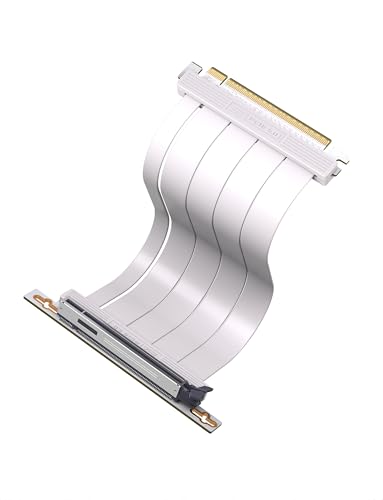
- PCIe 5.0 x16 with full backward compatibility
- 200mm or 300mm lengths plus 90°/180° options
- 6-layer PCB and ultra-flexible TPE cable
Best For: Users who want flexible fit options for different case layouts
Adjustable Vertical Mount Kit
Cooler Master V3 Adjustable Kit

- PCIe 4.0/5.0 compatible riser support
- Toolless adjustment up to 65mm horizontal
- Fits ATX and some Micro-ATX cases
Best For: Mainstream tower builders wanting easy vertical GPU mounting
Right-Angle Gen5 Riser Cable
LINKUP PCIe 5.0 Right-Angle 20cm
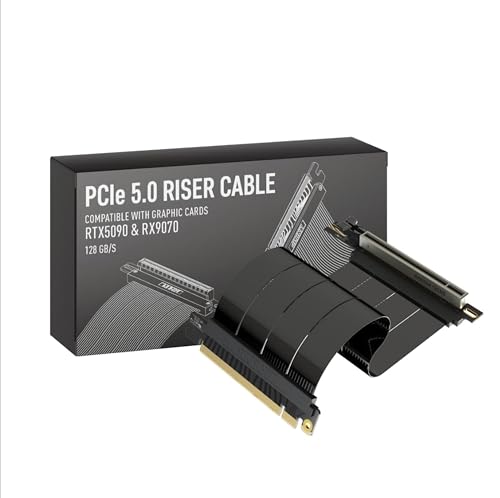
- PCIe 5.0 x16 with 128GB/s bandwidth
- Right-angle layout for vertical GPU mounts
- Backward compatible with PCIe 4.0
Best For: Vertical builds and compact cases needing a right-angle Gen5 riser
Double-Reverse Gen5 Riser Cable
LINKUP PCIe 5.0 Double-Reverse 22cm
- PCIe 5.0 x16 with 128GB/s data rate
- Double-reverse connector layout
- PCIe 4.0 backward compatible
Best For: Tight builds that need a double-reverse riser orientation
Adjustable ATX Vertical Kit – Lian Li VG4v4 Black Gen 5 Vertical GPU Kit
If you want a vertical gpu mount with pcie 5 riser cable that prioritizes fit, airflow, and stability, the Lian Li VG4v4 Black is built around those goals. Its adjustable bracket lets you shift the GPU position for better cooler clearance or a cleaner showcase look, while the included PCIe 5.0 x16 riser cable keeps the connection Gen 5-ready.
Best For: ATX builders who want an adjustable vertical mount with anti-sag support and a premium Gen 5 riser included.
Pros:
- Includes a 200mm PCIe 5.0 riser cable rated for up to 32 Gbps.
- Three height adjustments and dual-angle tilt help with clearance and airflow.
- Anti-sag support arm adds stability and helps prevent GPU droop.
- Fits thick GPUs up to 4 slots and supports ATX cases with 6+ PCIe slots.
Cons:
- Some GPUs with overclocking buttons may interfere with the adjustable bracket.
- Cards with three full-size DisplayPorts can contact the slot at a slight angle.
- Requires a case layout that supports vertical mounting and enough PCIe slot clearance.
This is a strong all-in-one kit if you want the mount and cable in one package. The adjustable design is the main advantage, especially for builders balancing cooler space, cable clearance, and presentation.
Right-Angle Gen 5 Cable – LINKUP PCIe 5.0 Right-Angle Riser Cable 20cm
A vertical gpu mount with pcie 5 riser cable is only as good as the signal quality and fit, and this LINKUP model is aimed squarely at that use case. It is designed for vertical mounts, standard tower layouts, SFF/ITX sandwich cases, open benches, and water-cooled rigs, with PCIe 5.0 x16 performance and backward compatibility for PCIe 4.0.
Best For: Builders who need a Gen 5 riser cable in a right-angle layout for vertical mounts, SFF cases, or tight routing.
Pros:
- PCIe 5.0 x16 design with shielding and tuned impedance for high-speed use.
- Validated on ASUS WS WRX80SE WiFi II and WRX90E Gen5 boards.
- Works with vertical mounts and a wide range of case layouts.
- Right-angle connector helps when routing around compact chassis constraints.
Cons:
- You need to measure carefully to choose the correct cable span.
- Fit may be tight in some cases, so the maker recommends checking compatibility first.
- It is a cable only, so you still need a compatible bracket or mount.
If you already have the mount and just need a dependable Gen 5 cable, this is the most flexible option here. The main selling point is compatibility breadth, but proper measuring matters before you buy.
White Showcase Vertical Kit – Lian Li VG4v4 White Gen 5 Vertical GPU Kit
The white version of this vertical gpu mount with pcie 5 riser cable offers the same practical upgrades as the black model, but in a finish that better suits lighter theme builds. You get a 200mm PCIe 5.0 riser cable, three height settings, and dual-angle tilt, all aimed at improving clearance, airflow, and presentation.
Best For: White-themed ATX builds that want an adjustable vertical mount with Gen 5 connectivity and anti-sag support.
Pros:
- Includes a 200mm PCIe 5.0 riser cable with PCIe 3.0/4.0 compatibility.
- Three height adjustments and tilt options improve clearance and airflow.
- Anti-sag support arm helps stabilize thick graphics cards.
- White finish is a good match for coordinated showcase builds.
Cons:
- Some GPU features, like overclocking buttons, may conflict with the bracket.
- Three full-size DisplayPorts may contact the slot when angled slightly.
- Needs a case with enough PCIe slot clearance for vertical mounting.
This is essentially the same feature set as the black kit, so the choice comes down to case aesthetics. If you want a cleaner white build without giving up the adjustable mount and Gen 5 cable, it fits the brief well.
Short ITX Gen 5 Cable – LINKUP PCIe 5.0 Double Reverse Riser 18cm
If your vertical gpu mount with pcie 5 riser cable needs to work inside a cramped SFF or ITX chassis, this LINKUP double reverse cable is built for that kind of routing. It is designed for vertical mounts, sandwich cases, open benches, and water-cooled systems, with a shorter 18cm length that suits compact layouts.
Best For: Mini ITX and space-constrained builds that need a short Gen 5 riser cable with a double reverse layout.
Pros:
- PCIe 5.0 x16 design with shielding for high-speed transfer.
- 18cm length is well suited to compact ITX routing.
- Double reverse layout expands compatibility with tighter layouts.
- Backward compatible with PCIe 4.0 and validated on Gen5 boards.
Cons:
- Length choice is critical, so measuring is important before buying.
- Designed mainly for compact layouts rather than larger tower builds.
- It is a cable only, so you need a matching mount or bracket separately.
This is the most specialized option in the group, and that is its strength. If you are building a dense ITX system and need a short, properly oriented Gen 5 riser, it is a sensible fit.
Flagship PCIe 5.0 Cable – TRYX String 200mm Vertical GPU Riser
If you want a vertical gpu mount with pcie 5 riser cable that can keep up with today’s fastest cards, the TRYX String focuses on bandwidth, shielding, and clean installation. Its 200mm PCIe 5.0 x16 design is aimed at high-end RTX 50-series and RX 9000-series builds, while the flexible TPE cable and gold-plated connector make it easier to route in compact cases.
Best For: Builders who want a high-bandwidth PCIe 5.0 riser for premium vertical GPU setups and latest-gen graphics cards.
Pros:
- PCIe 5.0 x16 design with up to 128GB/s bidirectional bandwidth
- Validated for stable high-speed transmission with near-zero signal loss
- Gold-plated connector and enhanced EMI shielding for cleaner signal integrity
- Flexible 200mm TPE cable and 6-layer PCB base support easier routing and durability
Cons:
- Built around a 200mm length, so fit depends on your case layout
- Focused on premium modern GPUs, so it may be more than needed for older systems
This is the most performance-focused option in the group, and its strengths are signal stability and build quality rather than bracket hardware. If your priority is a sleek vertical GPU presentation with PCIe 5.0 headroom, it is a strong cable-first choice.
All-In-One Bracket Kit – Cooler Master Gen5 Vertical GPU Holder
For buyers who want a vertical gpu mount with pcie 5 riser cable plus the bracket hardware in one package, the Cooler Master Gen5 holder is the most complete option here. It includes a 165mm PCIe 5.0 x16 riser, supports E-ATX, ATX, and Micro-ATX cases, and adds adjustable positioning to help you fine-tune clearance and airflow.
Best For: Case builders who want a complete vertical GPU mounting kit with an included PCIe 5.0 riser cable and adjustable bracket.
Pros:
- Includes a 165mm PCIe 5.0 x16 riser cable with backward compatibility
- Adjustable mount moves the GPU up to 65mm forward and 30mm sideways
- Supports E-ATX, ATX, and Micro-ATX cases with triple-slot cards
- Heavy-duty steel construction helps reduce sagging and flex
Cons:
- Needs a minimum of four PCI slots for installation
- Compatibility depends on case size and available clearance
This is the most straightforward pick if you want the riser cable and mounting structure handled together. Its adjustable bracket makes it easier to tailor the GPU position, which is especially useful in glass-panel builds where presentation and spacing matter.
Flexible Fit Option – EZDIY-FAB PCIe 5.0 Vertical GPU Riser
If you need a vertical gpu mount with pcie 5 riser cable that still leaves room to match your case layout, the EZDIY-FAB model stands out for its fit options. It offers PCIe 5.0 x16 bandwidth, full backward compatibility, and selectable lengths and connector angles, making it easier to plan a clean build in mid-tower, full-tower, or tight showcase setups.
Best For: Builders who want flexible length and connector choices for a vertical GPU setup with PCIe 5.0 support.
Pros:
- PCIe 5.0 x16 support with up to 128GB/s bidirectional bandwidth
- 6-layer PCB and full-lane shielding to reduce crosstalk and EMI
- Ultra-flexible TPE cable for tight bends and easier routing
- Available in 200mm and 300mm lengths with 90° and 180° connector options
Cons:
- Fit still depends on the case and length you choose
- Some setup planning is needed to match the right angle and base position
This is the best match for shoppers who care about compatibility and cable routing as much as raw spec sheet numbers. The length and connector choices make it easier to adapt the riser to different case formats without forcing awkward bends.
Adjustable Vertical Mount Kit – Cooler Master V3 Adjustable Kit
If you want a vertical gpu mount with pcie 5 riser cable support for a mainstream tower, this Cooler Master kit is built around flexibility. It works with PCIe 4.0 and 5.0 motherboards and GPUs, fits standard 7-slot ATX cases, and can also adapt to many 4-slot Micro-ATX cases with the bracket removed.
Best For: Builders who want a tool-free vertical GPU setup that can adapt to ATX or Micro-ATX cases.
Pros:
- Compatible with PCIe 4.0 and 5.0 motherboards and GPUs
- Toolless adjustment with up to 65mm horizontal and 30mm side-panel movement
- Fits standard ATX cases and can work with Micro-ATX after removing the bracket
- Flexible installation lets you secure the holder before mounting the GPU
Cons:
- May block a rear fan in some cases
- Riser length is fixed at 165mm, so case compatibility still needs checking
Overall, this is a practical choice if you want a vertical GPU mount that prioritizes easy adjustment and broad case support. Its strongest appeal is the combination of tool-free positioning and PCIe 5.0 readiness, which makes it a sensible pick for modern gaming builds.
Right-Angle Gen5 Riser Cable – LINKUP PCIe 5.0 Right-Angle 20cm
This vertical gpu mount with pcie 5 riser cable is aimed at builders who need a reliable Gen5 link and a cleaner GPU layout. The cable is built for vertical mounts and standard tower, SFF/ITX sandwich, open-bench, and water-cooled setups, with backward compatibility for PCIe 4.0 and validation on high-end Gen5 boards.
Best For: Builders who want a right-angle PCIe 5.0 riser for vertical mounts, compact cases, or showcase builds.
Pros:
- PCIe 5.0 x16 design with full 128GB/s bandwidth
- Backward compatible with PCIe 4.0 and ready for RTX 5090 / RX 9070
- Right-angle connector suits vertical GPU mounts and tight layouts
- Multilayer shielding and tuned impedance for reduced crosstalk and EMI
Cons:
- Compatibility depends on your case layout, so measurements are important
- Only one fixed 20cm cable length in this version
For builders focused on airflow, aesthetics, and Gen5 performance, this is a strong riser cable option. The right-angle layout and shielding make it especially practical when you want a tidy vertical GPU install without giving up upgrade headroom.
Double-Reverse Gen5 Riser Cable – LINKUP PCIe 5.0 Double-Reverse 22cm
If your vertical gpu mount with pcie 5 riser cable needs a different connector orientation, this double-reverse LINKUP cable is made for that routing challenge. It offers PCIe 5.0 x16 performance, backward compatibility with PCIe 4.0, and support for vertical layouts in towers, SFF/ITX sandwich cases, open benches, and water-cooled systems.
Best For: Builders who need a double-reverse PCIe 5.0 riser for a specific vertical GPU or tight-cable routing layout.
Pros:
- PCIe 5.0 x16 design with 128GB/s data rate
- Double-reverse connector layout for alternate routing needs
- Backward compatible with PCIe 4.0 and validated on Gen5 boards
- Built for compact PC cases, mini ITX systems, servers, and gaming rigs
Cons:
- Double-reverse layout may be less universal than standard right-angle options
- Case fit still depends on careful measurement before installation
This version makes sense when your case or bracket layout calls for a less common connector orientation. If you need PCIe 5.0 performance and a vertical GPU arrangement, the double-reverse design gives you more flexibility for tricky builds.
How We Picked the Best Vertical GPU Mount with Pcie 5 Riser Cable
We prioritized products that support PCIe 5.0 bandwidth, use durable cable construction, and offer practical mounting hardware for common case layouts. Backward compatibility with PCIe 4.0 and older systems also mattered, since many buyers are upgrading gradually.
We also looked at real-world fit concerns: bracket clearance, cable length, motherboard slot alignment, and whether the kit is easier to install in a standard tower or a compact build.
Quick Comparison
Most buyers will narrow their choice by case size and GPU size first. Full vertical kits are the best fit if you want a clean, all-in-one install. Cable-only options make more sense if you already have a bracket or want to customize the mount.
For the newest flagship cards, choose a Vertical GPU Mount with Pcie 5 Riser Cable that explicitly supports PCIe 5.0 x16 and has enough room for thick coolers and power connectors.
Key Buying Factors for a Vertical GPU Mount with Pcie 5 Riser Cable
Case and Motherboard Compatibility
Check whether the kit supports ATX, Micro-ATX, E-ATX, or ITX layouts, and make sure the riser orientation matches your motherboard slot position. A great mount is useless if the cable path fights your case layout.
Cable Length and Routing
Longer cables offer more flexibility, but excessive slack can make routing messy. Shorter cables often work best in tidy mid-tower builds, while larger cases may need more length to avoid tension.
Bandwidth and Signal Quality
Look for PCIe 5.0 x16 support, gold-plated connectors, and designs marketed for stable signal transmission. If you are running a top-tier GPU, signal quality should be a bigger priority than aesthetics alone.
GPU Clearance and Cooling
Vertical mounting can improve the look of a build, but it can also restrict airflow if the card sits too close to the side panel. Leave enough space for intake and for power cables, especially with bulky adapters.
Who Should Buy Which Vertical GPU Mount with Pcie 5 Riser Cable?
If you want the simplest upgrade, pick a full kit from a case-focused brand that includes both the bracket and matching riser. If you already have a mount, a stand-alone PCIe 5.0 riser cable is the smarter value.
Compact-build owners should favor flexible cable options and tight-fitting hardware, while premium showcase builders should look for rigid, well-finished brackets that keep the GPU level and stable. For gamers and creators using the latest high-end cards, prioritize compatibility, airflow, and verified PCIe 5 performance over flashy extras.
