
Choosing a vertical GPU mount with adjustable bracket can improve case aesthetics while helping you match card height, slot spacing, and riser compatibility more easily.
In this roundup, we focus on models that balance fit, build quality, and installation flexibility for modern GPUs and PC cases.
Best 10 Vertical GPU Mount with Adjustable Bracket Picks for 2026
Premium Adjustable Gen5 Pick
Cooler Master Gen5 Vertical GPU Holder

- PCIe 5.0 x16 riser cable included
- Tool-less two-way bracket adjustment
- Supports up to three-slot GPUs
Best For: High-end showcase builds needing adjustability and Gen5 support
NZXT Case-Matched Bracket
NZXT Vertical GPU Mounting Kit

- Sturdy steel bracket for heavy cards
- Includes 175mm PCIe 4.0 x16 riser cable
- Designed for NZXT H7 Series cases
Best For: NZXT H7 builds needing a straightforward vertical mount
White Gen5 Showcase Option
Cooler Master Gen5 Vertical GPU Holder White

- White version with PCIe 5.0 x16 riser cable
- Two-way modular adjustment for clearance
- Reinforced steel support for large GPUs
Best For: White-themed builds wanting adjustable Gen5 vertical mounting
Budget Universal Support Pick
Universal Vertical GPU Mount Bracket

- Universal fit for 2-slot graphics cards
- Expandable base and magnetic fixed base
- Pairs with PCIe X16 extender
Best For: Budget builds needing a universal 2-slot vertical bracket
Premium Adjustable Vertical GPU Kit
Lian Li VG4v4 White Adjustable Vertical GPU Kit

- Three height settings and dual-angle tilt
- Includes PCIe 5.0 x16 200mm riser cable
- Anti-sag arm helps stabilize heavy GPUs
Best For: ATX builders who want premium adjustability and modern PCIe 5.0 support
Universal Aluminum Mount
Adjustable Vertical GPU Bracket for 2/3-Slot Cards

- Fits standard 2-slot and 3-slot GPUs
- Adjustable support arm helps prevent sag
- Modular base supports 120mm fans and many risers
Best For: Custom builders who want a flexible, airflow-friendly vertical bracket
Toolless Vertical GPU Holder
Cooler Master V3 White Adjustable Vertical GPU Kit

- Toolless position changes for easier setup
- Adjusts 65mm horizontally and 30mm sideways
- Works with PCIe 4.0/5.0 and ATX/Micro ATX cases
Best For: Builders who want an easy-to-adjust vertical mount for common case formats
Budget-Friendly Bracket
ConnBull 3-Slot Vertical GPU Mount
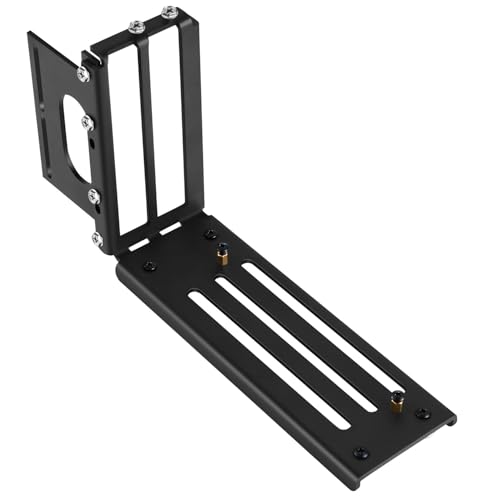
- 3-slot vertical mount for flexible placement
- Universal design for most standard PC cases
- Magnetic base and hardware included
Best For: Users who need a basic vertical GPU bracket and will source the riser cable separately
Most Adjustable Fit
Cooler Master V3 Adjustable GPU Holder

- Toolless movement up to 65mm horizontal and 30mm sideward
- Supports PCIe 4.0 and 5.0 GPUs and motherboards
- Fits many ATX and some Micro ATX cases
Best For: Users who want easy, tool-free adjustment across modern case and motherboard layouts
Premium Adjustable Gen5 Pick – Cooler Master Gen5 Vertical GPU Holder
If you want a vertical gpu mount with adjustable bracket support for a modern high-end build, this Cooler Master kit is built around flexibility and clean presentation. It includes a PCIe 5.0 x16 riser cable and a modular steel bracket that can shift position for better clearance and airflow in compatible E-ATX, ATX, and Micro-ATX cases.
Best For: Builders who want PCIe 5.0 support, tool-less adjustment, and room for large triple-slot cards.
Pros:
- Includes a 165mm PCIe 5.0 x16 riser cable with backward compatibility.
- Tool-less bracket adjustment moves the GPU up to 65mm forward and 30mm sideways.
- Heavy-duty SGCC steel helps support large cards and reduce sagging.
- Works with E-ATX, ATX, and Micro-ATX cases with a minimum of four PCI slots.
Cons:
- Requires a compatible case with at least four PCI slots.
- Designed for cards up to three slots wide, so extra-thick GPUs are not a fit.
This is the most feature-rich option in the group if you need adjustability and newer PCIe 5.0 connectivity. It is a strong choice for showcase builds where spacing, cable support, and stability all matter.
NZXT Case-Matched Bracket – NZXT Vertical GPU Mounting Kit
This vertical gpu mount with adjustable bracket styling is aimed at clean integration inside compatible NZXT H7 cases. The kit uses a sturdy steel bracket and a 175mm PCIe 4.0 x16 riser cable, making it a straightforward way to mount a graphics card vertically while keeping the overall setup tidy.
Best For: NZXT H7 owners who want a sturdy, case-matched vertical GPU install.
Pros:
- Thick steel bracket is designed to hold heavy cards and prevent sagging.
- Includes a 175mm PCIe 4.0 x16 riser cable for high-speed data transfer.
- Fits NZXT H7 Series cases with clearance for air and AIO cooling systems.
- Simple replacement for the standard horizontal mounting bracket.
Cons:
- Compatibility is centered on NZXT H7 Series cases.
- Does not offer the same positioning flexibility as more adjustable kits.
If you are building inside an NZXT H7 case, this kit keeps the installation focused and dependable. It is less universal than other options, but its steel construction and included PCIe 4.0 cable make it a practical fit for the right system.
White Gen5 Showcase Option – Cooler Master Gen5 Vertical GPU Holder White
For builders looking for a vertical gpu mount with adjustable bracket support in a white finish, this Cooler Master version mirrors the Gen5 feature set in a different colorway. It pairs a 165mm PCIe 5.0 x16 riser cable with a reinforced steel bracket and works across E-ATX, ATX, and Micro-ATX cases.
Best For: White-themed PC builds that need Gen5 riser support and adjustable positioning.
Pros:
- Includes a 165mm PCIe 5.0 x16 riser cable with backward compatibility.
- Modular bracket adjusts up to 65mm toward the front panel and 30mm toward the side panel.
- Reinforced SGCC steel helps support large graphics cards and reduce flex.
- Compatible with E-ATX, ATX, and Micro-ATX cases.
Cons:
- Requires a minimum of four PCI slots for installation.
- Designed for cards up to three slots wide.
This white model is a clean fit for themed builds that still need practical adjustment and modern connectivity. If aesthetics matter as much as clearance, it offers the same flexible mounting approach as the black version.
Budget Universal Support Pick – Universal Vertical GPU Mount Bracket
If you need a vertical gpu mount with adjustable bracket-style flexibility without committing to a case-specific kit, this bracket is built around broad compatibility. It is designed for vertical installation of all brand graphics cards with 2-slot support and pairs with a PCIe X16 extender for a cleaner, more showy layout.
Best For: Budget-minded builders who want a universal 2-slot vertical GPU bracket.
Pros:
- Universal fit for all brand graphics cards with 2 slots.
- Expandable base helps extend the link to the graphics card.
- Magnetic suction fixed base aims to make installation faster and firmer.
- Designed to pair with a PCIe X16 extender for vertical mounting.
Cons:
- Built around 2-slot cards only.
- PCIe X16 extender is referenced as a pairing, not an included component.
This is the most flexible universal option here, especially if you are working with a standard 2-slot card. It trades premium cable inclusion and case-specific refinement for broad compatibility and a simpler bracket-based approach.
Premium Adjustable Vertical GPU Kit – Lian Li VG4v4 White Adjustable Vertical GPU Kit
If you want a vertical gpu mount with adjustable bracket support and plenty of fitment flexibility, the Lian Li VG4v4 is built for that job. It offers three height adjustments, forward or backward tilt options, and a revised cutout to reduce cable interference while improving either clearance or presentation.
Best For: ATX builders who want a premium vertical mount with angle adjustment, anti-sag support, and PCIe 5.0 compatibility.
Pros:
- Three height adjustments and dual-angle tilt help fine-tune clearance and airflow.
- Included 200mm PCIe 5.0 riser cable supports modern high-bandwidth builds.
- Anti-sag support arm adds stability and helps prevent GPU droop.
- Updated frame and #6-32 screws improve compatibility and installation.
Cons:
- Requires ATX case support with at least 6 PCIe slots, or 7 for tilted setups.
- Thick GPUs up to 4 slots are supported, but some overclocking buttons may interfere.
- Three full-size DisplayPort cards may contact the mount when angled slightly.
Overall, this is the most feature-rich option here if you care about adjustability and a refined install experience. It suits builders who want both airflow tuning and showpiece aesthetics in a vertical layout.
Universal Aluminum Mount – Adjustable Vertical GPU Bracket for 2/3-Slot Cards
This vertical gpu mount with adjustable bracket design focuses on broad compatibility and straightforward customization. Its aluminum alloy build, multi-angle support arm, and modular base make it a practical choice for clean vertical GPU placement without overcomplicating the install.
Best For: Custom PC builders who want a simple, adjustable vertical bracket that works with 2-slot and 3-slot GPUs.
Pros:
- Supports standard 2-slot and 3-slot GPUs from major brands.
- Fully adjustable support arm helps hold different card sizes and weights securely.
- Modular base works with most PCIe riser cables and supports 120mm bottom fans.
- CNC-machined aluminum alloy construction offers a rigid, premium feel.
Cons:
- Wall mount style may not suit every case-based build.
- Does not include a riser cable in the supplied notes.
- Less specialized than premium case-specific vertical kits.
If you want a flexible bracket for a custom layout, this model keeps the design simple while still covering the basics well. The open-frame approach and fan support also make it appealing for builders who care about airflow.
Toolless Vertical GPU Holder – Cooler Master V3 White Adjustable Vertical GPU Kit
The Cooler Master Vertical GPU Card Holder Kit V3 is a practical pick if you want a vertical gpu mount with adjustable bracket positioning and simple installation. It works with PCIe 4.0 and 5.0 systems, adjusts without tools, and can shift horizontally or toward the side panel to help dial in fit.
Best For: Builders using ATX or Micro ATX cases who want an easy-to-adjust vertical GPU holder with broad platform support.
Pros:
- Toolless adjustment makes repositioning fast and straightforward.
- Moves up to 65mm horizontally and 30mm toward the side panel.
- Compatible with PCIe 4.0 and 5.0 motherboards and GPUs.
- Removable M-ATX bracket adds flexibility across case sizes.
Cons:
- May block a rear fan in some cases.
- Best suited to standard 3-slot GPUs rather than larger cards.
- Micro ATX support depends on the removable bracket configuration.
This is a strong all-around option for builders who value convenience and cross-case compatibility. The toolless design and adjustable placement make it easier to tune the final look and fit without much fuss.
Budget-Friendly Bracket – ConnBull 3-Slot Vertical GPU Mount
If you want a vertical gpu mount with adjustable bracket styling but need a simple, stable hardware-only solution, this 3-slot kit keeps the setup straightforward. It uses a durable black metal frame, includes the mounting hardware, and adds a magnetic suction base to make installation quicker.
Best For: Builders who want a universal vertical GPU mount bracket for a clean display and basic adjustment without buying a riser cable separately.
Pros:
- 3-slot vertical design gives flexible GPU positioning inside the case
- Universal mounting system is designed to work with most standard PC cases and graphics cards
- Metal construction provides stable support for heavy graphics cards
- Magnetic suction base can make installation easier and faster
Cons:
- PCIe riser cable is not included
- Adjustment options are simpler than more advanced tilt-based kits
- Best suited to cases that can accommodate a vertical install
Overall, this is a practical pick if you mainly need a sturdy vertical mounting bracket and already have, or plan to source, the riser cable separately. It focuses on universal fit and basic convenience rather than premium adjustability.
Most Adjustable Fit – Cooler Master V3 Adjustable GPU Holder
The Cooler Master Vertical GPU Card Holder Kit V3 is a strong fit if you want a vertical gpu mount with adjustable bracket movement for a cleaner-looking build. It supports PCIe 4.0 and 5.0 hardware, and the toolless adjustment makes it easy to fine-tune horizontal and side-panel spacing after the holder is installed.
Best For: Builders who want easy adjustment and broad case compatibility in a vertical GPU holder for modern ATX or Micro ATX systems.
Pros:
- Toolless adjustment lets you move the GPU up to 65mm horizontally and 30mm toward the side panel
- Works with PCIe 4.0 and 5.0 motherboards and GPUs
- Fits standard 7-slot ATX cases and includes a removable bracket for some 4-slot Micro ATX cases
- Allows the GPU to be installed after the holder is secured in position
Cons:
- May block a rear fan in some cases
- Compatibility depends on your case layout and slot count
- Does not emphasize tilt-based angle adjustments like some premium kits
This kit stands out for its practical adjustability and wide support across current platforms. If you want a straightforward vertical mount that still gives you room to fine-tune placement, it is one of the most flexible options here.
Premium Adjustable Kit – Lian Li VG4 V4 Dual-Angle GPU Kit
If your goal is a vertical gpu mount with adjustable bracket control plus better cable and cooling clearance, the Lian Li VG4 V4 is the most feature-rich option in this group. It adds three height adjustments, a dual-angle tilt function, a 200mm PCIe 5.0 riser cable, and anti-sag support for larger cards.
Best For: Builders who want maximum adjustability, included riser cable support, and extra GPU stability in an ATX vertical mount kit.
Pros:
- Three height adjustments help improve GPU I/O clearance
- Dual-angle tilt can improve airflow and let you choose a display-forward or cooler-clearance orientation
- Includes a 200mm PCIe 5.0 riser cable for high-speed connectivity
- Anti-sag support arm adds stability for thick GPUs up to 4 slots
Cons:
- Requires ATX-compatible cases with enough PCIe slot space
- Some GPU designs may conflict with the adjustable bracket structure
- Installation can be more complex than simpler fixed-position mounts
This kit is the most advanced of the three, especially if you care about airflow tuning and support for heavier cards. It is best suited to builders who want a premium vertical mount with real positional flexibility rather than a basic showpiece bracket.
How We Picked These Vertical GPU Mount with Adjustable Bracket Options
We prioritized bracket adjustability, riser cable generation, case compatibility, and overall construction quality. For a Vertical GPU Mount with Adjustable Bracket, the most important question is not just whether the card fits, but whether it fits with enough clearance for airflow, side-panel space, and power cable routing.
We also considered support for current PCIe standards, since many builders want a setup that works with newer GPUs without introducing avoidable bottlenecks or instability.
Quick Comparison: What Matters Most
Some kits are designed for maximum case compatibility, while others focus on premium rigidity or a cleaner showroom look. If you want the simplest path, choose a complete kit with a matched riser cable and bracket. If you already own a high-quality riser, a bracket-only option may be enough.
Also pay attention to slot count and GPU thickness. A 2-slot or 3-slot card may fit very differently depending on the mounting system and the case interior layout.
Key Buying Factors for a Vertical GPU Mount with Adjustable Bracket
Riser Cable Version
PCIe 5.0 and PCIe 4.0 support matter most for newer builds. A newer riser can improve future-proofing, but compatibility still depends on your motherboard, GPU, and BIOS settings. If your build is older or you are cost-conscious, PCIe 4.0 is often enough.
Adjustability and Clearance
The best adjustable brackets let you fine-tune height and position so the graphics card does not press against the glass panel, interfere with fans, or block bottom-mounted components. This is especially important in compact ATX and micro-ATX cases.
Structural Support
Look for steel or reinforced alloy brackets when using large, heavy cards. A well-built Vertical GPU Mount with Adjustable Bracket should reduce sag, keep the card aligned, and hold its position during transport or routine maintenance.
Cooling and Cable Routing
Vertical mounting can look great, but it can also restrict airflow if the card sits too close to the side panel. Check fan clearance and the path for 12V-2×6 or PCIe power cables before buying.
Who Should Buy Which Vertical GPU Mount with Adjustable Bracket?
Choose a complete branded kit if you want the easiest install and the best odds of clean alignment. Choose a bracket-focused solution if you already have a riser cable and only need mounting support. Builders with flagship GPUs should favor rigid construction and generous clearance, while budget buyers can focus on basic fit and standard PCIe compatibility.
If your priority is presentation without sacrificing practicality, a well-designed Vertical GPU Mount with Adjustable Bracket is the safest way to get both cleaner visuals and a more controlled installation.
