
If you’re building around an RTX 5090, the right vertical mount can help with clearance, cable routing, and a cleaner showcase look.
We focused on PCIe 5.0-ready options, case compatibility, and mounting flexibility so you can choose a setup that fits your build without sacrificing stability.
Best 10 Vertical GPU Mount for Rtx 5090 Picks for 2026
Heavy-Duty Open-Panel Mount
GLOTRENDS 2-slot RTX5090-ready vertical bracket
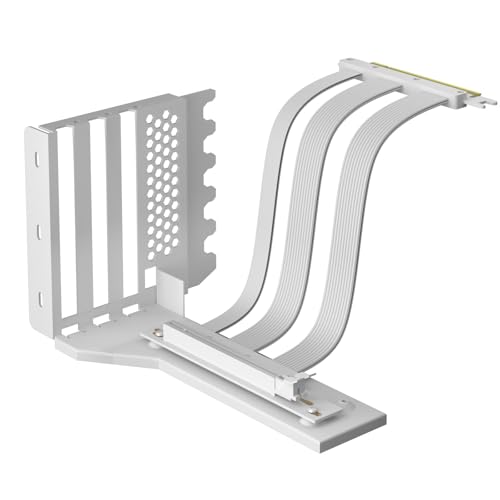
- Made for 2-slot GPUs with PCIe 5.0 riser cable
- Needs a full open 7/8-slot rear PCIe panel
- Iron plate build with foam pads for stability
Best For: Builders with compatible open-slot cases and 2-slot RTX 5090-class cards
Toolless Adjustable Card Holder
Cooler Master Vertical GPU Kit V3 adjustable mount

- Toolless adjustment up to 65mm horizontally
- Works with PCIe 4.0 and 5.0 systems
- Fits ATX and removable M-ATX setups
Best For: Users wanting an easy, flexible vertical mount for mainstream cases
Low-Profile Gen5 Riser Mount
GIGA-MEGA GEN5 vertical mount with 3M cable
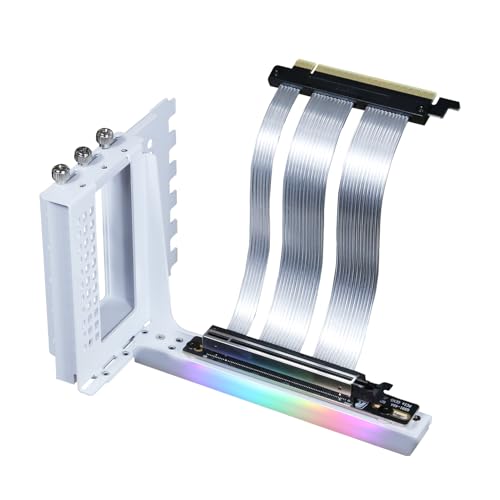
- 3M low-loss Twinax GEN5 riser cable
- Supports RTX 5090-class heavy GPUs
- Low-profile steel bracket for cleaner installs
Best For: ATX builders who need a long GEN5 riser and low-visibility mount
Best Overall Kit
Adjustable vertical mount kit with PCIe 4.0 cable

- Includes 165 mm PCIe 4.0 riser cable
- Thick SGCC steel bracket supports up to 3.5 kg
- Fits E-ATX, ATX, and mATX cases
Best For: Builders who want a durable, adjustable vertical mount kit with broad case compatibility
Performance Cable Pick
Ultra-flexible RTX 5090-ready PCIe 5.0 riser cable

- PCIe 5.0 x16 cable rated up to 128 GB/s
- EMI shielding and gold-plated connector
- Flexible 200 mm TPE design for tight builds
Best For: Builders who already have a mount and want PCIe 5.0 performance for RTX 50 series GPUs
Top RTX 5090 Fit
Open-frame PCIe 5.0 3-slot vertical mount
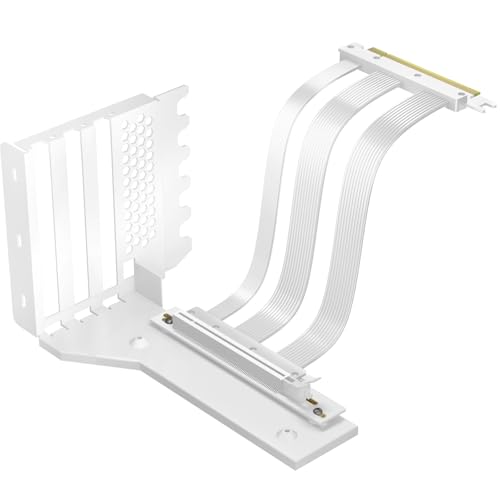
- Includes PCIe 5.0 150 mm riser cable
- Made for 3-slot GPUs including RTX 5090-class cards
- Requires a fully open 7/8-slot PCIe/PCI panel
Best For: Open-frame cases that need a rugged PCIe 5.0 vertical mount for thick next-gen GPUs
High-Bandwidth Riser Pick
RGEEK PCIe 5.0 X16 Riser Cable

- PCIe 5.0 x16 with 128GB/s claimed bandwidth
- Works with RTX 5090 and other pro GPUs
- 20cm right-angle cable for vertical installs
Best For: Gen5 riser-only upgrade for RTX 5090 vertical mounts
Adjustable Bracket Kit
Formulamod PCIe 5.0 Vertical GPU Kit

- Includes bracket plus PCIe 5.0 x16 riser
- Adjustable 13-17cm spacing for fitment
- 5V ARGB sync and heavy-duty steel frame
Best For: All-in-one vertical GPU kit with RGB for RTX 5090 builds
Low-Profile Bracket Choice
GIGA-MEGA GEN5 Vertical Mount Kit

- Gen5 riser cable plus steel vertical bracket
- Made for RTX 5090, RTX 4090, and similar heavy GPUs
- Low-visibility design with shielded twinax cable
Best For: Sturdy low-profile vertical mounting for flagship GPUs
Premium Adjustable Vertical Mount – Lian Li VG4v4 Black adjustable vertical GPU kit
If you want a vertical gpu mount for rtx 5090 builds that prioritizes fit and airflow, this Lian Li kit is built around adjustability. The updated V4 design adds three height positions, a larger GPU I/O cutout, and dual-angle tilt support, making it easier to work around cable clearance and tune the card’s placement inside an ATX case.
Best For: Builders who want a premium vertical mount with adjustable positioning, anti-sag support, and a PCIe 5.0 riser.
Pros:
- Includes a 200mm PCIe 5.0 riser cable for high-bandwidth GPUs.
- Three height adjustments plus forward/back tilt for better clearance and airflow.
- Anti-sag support arm helps stabilize heavier graphics cards.
- Fits thick GPUs up to 4 slots and supports ATX cases with 6 to 7 slots available.
Cons:
- Requires enough case space for standard or tilted vertical mounting.
- Some GPUs with overclocking buttons or three full-size DisplayPorts may conflict.
- Best matched to ATX builds, so smaller cases may be a poor fit.
Overall, this is a strong choice if you want a polished vertical GPU setup with real adjustment range rather than a fixed-position bracket. The added cable clearance and support features make it especially appealing for large modern cards.
Heavy-Duty Open-Panel Mount – GLOTRENDS 2-slot RTX5090-ready vertical bracket
This vertical gpu mount for rtx 5090 is aimed at builders who need a straightforward, heavy-duty bracket for a 2-slot card. The open 7-slot/PCI bracket requirement and one-piece iron plate construction make it a practical pick for cases with the right rear layout and enough room for a full vertical install.
Best For: Users with a compatible full-open PCIe slot panel who want a rugged 2-slot vertical mount with PCIe 5.0 support.
Pros:
- PCIe 5.0 riser cable is included for modern high-speed GPUs.
- Designed specifically for 2-slot thick cards, including RTX 50-series models.
- One-piece iron plate design adds durability for heavy graphics cards.
- Foam pads help with stability and vibration reduction.
Cons:
- Requires a full open 7/8-slot PCIe bracket panel with no railings between slots.
- Only suited to 2-slot GPU thickness, so thicker cards are not the target use case.
- PCIe 5.0 bandwidth depends on platform support from the CPU and GPU.
For the right case, this is a no-nonsense vertical mounting solution that focuses on structural strength and compatibility with new-generation cards. Just make sure your chassis rear panel matches the full-open requirement before buying.
Toolless Adjustable Card Holder – Cooler Master Vertical GPU Kit V3 adjustable mount
If you want a vertical gpu mount for rtx 5090 use without a complicated install, this Cooler Master kit is built around easy adjustment and broad case support. It works with PCIe 4.0 and 5.0 motherboards and GPUs, and its toolless design lets you shift the card horizontally and toward the side panel for a cleaner fit.
Best For: Builders who want a flexible, easy-to-adjust vertical GPU holder for ATX or Micro ATX systems.
Pros:
- Toolless adjustment up to 65mm horizontally and 30mm toward the side panel.
- Compatible with PCIe 4.0 and 5.0 motherboards and GPUs.
- Fits most 7-slot ATX cases and can also work in Micro-ATX builds with the removable bracket.
- Flexible installation lets you position the holder before installing the GPU.
Cons:
- May block a rear fan in some cases.
- Included riser is PCIe 4.0, not a native PCIe 5.0 cable.
- Best suited to modern 3-slot GPUs rather than extremely wide multi-slot designs.
This kit stands out if you value convenience and layout flexibility over more specialized hardware features. It is a sensible option for mainstream vertical mounting in cases that already have the required slot space.
Low-Profile Gen5 Riser Mount – GIGA-MEGA GEN5 vertical mount with 3M cable
For a vertical gpu mount for rtx 5090 builds where signal integrity and cable flexibility matter, this GIGA-MEGA kit is designed around a long 3M Twinax GEN5 cable. It is built for ATX cases, supports a wide range of GPU generations, and uses an L-shape steel bracket for a low-visibility installation.
Best For: Builders who need a long GEN5 riser solution for large GPUs in an ATX case with enough rear-slot clearance.
Pros:
- PCIe GEN5 riser cable supports high-speed installs and works with GEN4 and GEN3 too.
- 3M low-loss Twinax ribbon cable uses aluminum shielding and a double-layer construction.
- Bracket is designed to support large, heavy GPUs like RTX 4090-class and RTX 5090-class cards.
- Low-visibility bracket design keeps the setup looking cleaner.
Cons:
- Needs at least 6 slots of space for installation.
- Rear case ribs can block HDMI/DisplayPort access and may require modification.
- Vertical airflow clearance may be better with water-cooling than with an air cooler.
This is a strong pick when cable length and compatibility are top priorities, especially in larger cases. The tradeoff is that you need to check your chassis carefully for slot spacing and rear-panel obstructions before committing.
Best Overall Kit – Adjustable vertical mount kit with PCIe 4.0 cable
If you want a vertical gpu mount for rtx 5090-style large cards and still need broad case compatibility, this Cooler Master kit is a practical all-in-one option. It combines a sturdy steel bracket with a 165 mm PCIe 4.0 riser cable, and the ventilated design helps keep airflow open around flow-through coolers.
Best For: Builders with E-ATX, ATX, or mATX cases who want a durable vertical mount kit with an included PCIe 4.0 riser.
Pros:
- Fits standard E-ATX, ATX, and mATX cases with at least 4 available PCI slots
- Includes a PCIe 4.0 x16 165 mm riser cable for easy setup
- Thick SGCC steel bracket is rated to support GPUs up to 3.5 kg
- Tool-free adjustments help fine-tune GPU position for layout clearance
Cons:
- PCIe 4.0 cable is not the best match if you specifically want PCIe 5.0 support
- Supports graphic cards up to 3 slots wide, which may limit some oversized designs
- Micro-ATX fitment has a CPU cooler height caveat
This is a solid choice if your priority is a reliable, adjustable vertical mount rather than bleeding-edge interface speed. The included cable, sturdy bracket, and airflow-friendly layout make it well-rounded for high-end builds.
Performance Cable Pick – Ultra-flexible RTX 5090-ready PCIe 5.0 riser cable
For a vertical gpu mount for rtx 5090 systems where PCIe 5.0 performance matters, this TRYX riser cable is the performance-first piece of the build. It is a 200 mm PCIe 5.0 x16 cable rated for up to 128 GB/s bandwidth, with EMI shielding and a flexible TPE construction designed for tight layouts.
Best For: High-end RTX 50 series and RX 9000 series builds that need a PCIe 5.0 riser cable with strong signal integrity.
Pros:
- PCIe 5.0 x16 cable supports up to 128 GB/s bidirectional bandwidth
- Validated for stable high-speed transmission with near-zero signal loss
- Gold-plated connector and EMI shielding help improve reliability
- Ultra-flexible TPE cable is easier to route in compact builds
Cons:
- Riser cable only, so you still need a compatible vertical mount bracket or case hardware
- Best bandwidth claims depend on supported CPU and GPU platform requirements
- Not a full mounting kit, which may make planning harder for first-time builders
This is the strongest pick here if your main concern is keeping a next-gen GPU connected at PCIe 5.0 speeds. It makes the most sense for builders who already have the mounting hardware and want a cable built for demanding hardware.
Top RTX 5090 Fit – Open-frame PCIe 5.0 3-slot vertical mount
If you are shopping for a vertical gpu mount for rtx 5090-class cards, this GLOTRENDS bracket is aimed squarely at big, modern GPUs. It includes a PCIe 5.0 riser cable, a one-piece iron bracket, and a fully open 7-slot PCIe/PCI panel requirement that suits cases with unobstructed slot spacing.
Best For: Builders with a compatible open 7/8-slot case who want a PCIe 5.0 vertical mount for thick, high-end GPUs.
Pros:
- PCIe 5.0 150 mm riser cable is included with the bracket
- Designed for 3-slot thick GPUs, including RTX 5090(Ti) class cards
- One-piece iron plate construction adds rugged durability
- Foam pads are included for extra stability and vibration reduction
Cons:
- Requires a case with a full open 7/8-slot PCIe/PCI bracket panel
- PCIe 5.0 bandwidth depends on platform requirements listed by the seller
- White finish may not match every blacked-out build theme
This is a straightforward choice for builders who need a vertical bracket that matches modern GPU sizing and PCIe 5.0 support. The open-frame requirement is important, but if your case fits, the included riser and sturdy iron construction make it a strong candidate.
High-Bandwidth Riser Pick – RGEEK PCIe 5.0 X16 Riser Cable
If you want a vertical gpu mount for rtx 5090 without giving up PCIe 5.0 headroom, this RGEEK riser cable is built for exactly that use case. It uses a 20cm right-angle design, is backward compatible with PCIe 4.0/3.0, and is aimed at clean vertical installs in ATX and MATX cases.
Best For: Builders who want a Gen5 vertical mount riser with broad GPU support for RTX 5090-class systems and workstation cards.
Pros:
- PCIe 5.0 x16 design with tested 128GB/s bidirectional bandwidth
- Compatible with RTX 5090, RTX 5080, RX 9070, A100/A800/H100/H800 and more
- Right-angle 20cm cable helps vertical GPU layouts in ATX/MATX cases
- Multi-layer shielding and EMI reduction for stable high-speed signal transmission
Cons:
- Only the riser cable is included, not a full bracket kit
- Length and routing still need to match your case layout
Overall, this is a strong choice if you already have a compatible vertical mount and want a Gen5 riser that’s explicitly positioned for RTX 5090 builds. Its broad compatibility also makes it useful for mixed gaming and professional workloads.
Adjustable Bracket Kit – Formulamod PCIe 5.0 Vertical GPU Kit
This vertical gpu mount for rtx 5090 combines an adjustable steel bracket with a PCIe 5.0 x16 riser cable, making it a practical all-in-one option for modern high-end builds. The mount adjusts from 13cm to 17cm, and the kit includes 5V ARGB sync for builders who want both function and presentation.
Best For: Users who want a full vertical GPU bracket kit with Gen5 support, adjustable spacing, and RGB sync.
Pros:
- Includes both a PCIe 5.0 x16 riser cable and vertical GPU bracket
- Adjustable 13-17cm spacing helps with clearance and airflow
- Heavy-duty steel construction is designed to support very heavy graphics cards
- 5V 3-pin ARGB sync supports popular motherboard lighting ecosystems
Cons:
- Requires a case with at least 7 available PCIe expansion slots
- Only works with open-slot cases, not cases with slot crossbars/dividers
- Large CPU air coolers or thick radiators may interfere with fit
For a visible vertical GPU setup, this kit is one of the most complete options here because it covers the bracket, riser, and lighting in one package. Just measure carefully before buying, since the compatibility requirements are clearly specific.
Low-Profile Bracket Choice – GIGA-MEGA GEN5 Vertical Mount Kit
If you need a vertical gpu mount for rtx 5090 and want a lower-visibility bracket setup, this GIGA-MEGA kit is built around a PCIe X16 Gen5 right-angle riser and a steel vertical mount bracket. It is also described as backward compatible with PCIe 4.0 and 3.0, with flexible twinax ribbon cabling for easier routing.
Best For: Builders who want a sturdy, low-profile vertical mount solution for large GPUs like RTX 5090 or RTX 4090.
Pros:
- Includes both a Gen5 riser cable and vertical mount bracket
- Supports RTX 5090, RTX 5090D, RTX 4090, RX 7900 XTX, and RX 9070
- Low-loss twinax ribbon cable with aluminum shielding
- Strong L-shape steel design is intended for heavy GPU support
Cons:
- Needs at least 6 expansion slots of space
- Case ribs behind the PCIe slots can block DP/HDMI access
- Air-cooled radiators may conflict with vertical GPU placement
This is a practical pick if you want a vertical install that stays visually restrained while still being aimed at modern flagship cards. The fit guidance is important, though, so it’s best for cases that already have the right clearance and rear-slot layout.
How We Picked the Best Vertical GPU Mount for Rtx 5090
For this roundup, we prioritized a Vertical GPU Mount for Rtx 5090 builds that balances fit, signal integrity, and installation practicality. That means PCIe 5.0 support where available, solid bracket construction, and layouts that work with common ATX, mATX, and E-ATX cases. We also looked for realistic cable lengths, adjustable hardware, and designs that avoid unnecessary strain on a heavy flagship card.
Quick Comparison
Most options here fall into two categories: full vertical mount kits with a riser cable, and bracket-plus-riser combinations aimed at different case layouts. Full kits are the simplest choice if you want a more complete install. Standalone risers or modular brackets can be better if you already have a compatible mount or need more control over spacing, slot count, or aesthetics.
Key Buying Factors for Vertical GPU Mount for Rtx 5090
PCIe Version and Signal Quality
An RTX 5090 benefits from a high-quality PCIe 5.0 riser cable, especially if you want to preserve bandwidth and reduce troubleshooting. PCIe 4.0 support is fine for some builds, but confirm your motherboard, case layout, and intended performance expectations before choosing.
Case Clearance and Slot Layout
Measure the distance between your motherboard, side panel, and glass before buying. Thick coolers, power connectors, and front-facing 16-pin cables need extra room, and some mounts are better suited to 2-slot or 3-slot spacing than others.
Bracket Strength and Adjustability
A large GPU can stress weaker hardware over time. Look for steel or reinforced brackets, secure fastening points, and adjustable height or offset options. These details matter more than RGB or cosmetic extras when you’re supporting a heavy card.
Cable Length and Routing
Shorter risers can reduce clutter, but only if they reach cleanly without sharp bends. Check the riser length against your case and motherboard position, and make sure the GPU power cable can route without pressing against the side panel.
Who Should Buy Which Vertical GPU Mount for Rtx 5090?
If you want the simplest path, choose a full vertical mount kit with a PCIe 5.0 riser and bracket included. If you already have a compatible bracket or need a custom fit, a standalone riser or modular bracket may be the smarter option. Builders using showcase cases should favor open-frame or adjustable designs, while compact builds should prioritize clearance and cable flexibility over extra features. For most high-end systems, the best Vertical GPU Mount for Rtx 5090 is the one that fits your exact case dimensions first, and your aesthetic preferences second.
