
If you’re looking to boost your MacBook’s storage and performance, USB4 SSDs are a smart choice. With impressive read speeds and ample storage options, these drives cater to a variety of needs. Whether you’re a creative professional or a casual user, there’s something here for you. But how do you know which SSDs are truly worth your investment? Let’s explore the top contenders that can elevate your MacBook experience.
1TB External SSD, USB4 Portable SSD with Cooling Fan
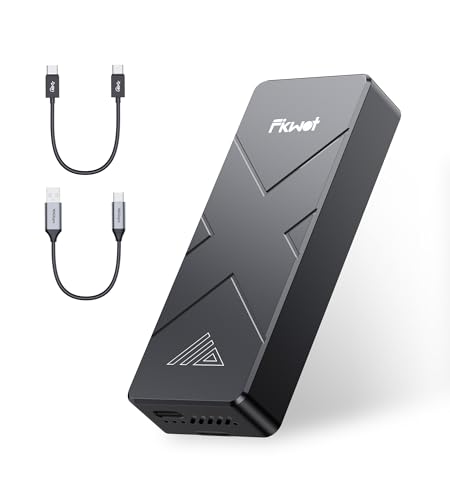
If you’re a creative professional working with high-resolution content, the TB External SSD, USB4 Portable SSD with Cooling Fan is an excellent choice for your MacBook. With blazing read speeds up to 3,700MB/s, it handles 4K and 8K videos effortlessly. The innovative cooling fan and aluminum shell keep your transfers stable and cool, perfect for long sessions. You’ll love its portability; at just 3.4 ounces, it fits easily in your pocket. Plus, it’s plug-and-play compatible with multiple devices, ensuring your data is secure with AES-256 encryption. Upgrade your workflow with this reliable, high-performance SSD.
Best For: Creative professionals handling high-resolution content like 4K and 8K videos who need fast and reliable storage.
Pros:
- Blazing read speeds of up to 3,700MB/s for efficient file transfers and editing.
- Innovative cooling system with a turbo fan and aluminum shell to prevent overheating during prolonged use.
- Lightweight and portable design, making it easy to carry in pockets or briefcases.
Cons:
- Performance may vary depending on the host device and conditions.
- Limited to a maximum capacity of 1TB, which may not be sufficient for some users with larger storage needs.
- Higher price point compared to traditional HDDs.
Corsair EX400U 2TB USB4 Portable External SSD

The Corsair EX400U 2TB USB4 Portable External SSD stands out for its impressive read speeds of up to 4,000MB/s, making it an excellent choice for creative professionals and gamers who demand high-performance storage solutions. With a write speed of up to 3,600MB/s, this compact 2.5-inch drive weighs just 0.2 pounds, making it incredibly portable. It features USB4 connectivity, ensuring compatibility with multiple devices and speeds up to 40Gbps. Plus, the plug-and-play setup means you’re ready to go in no time. Backed by a 3-year warranty, it’s a reliable option for your MacBook or Windows system.
Best For: Creative professionals and gamers seeking high-performance, portable storage solutions.
Pros:
- Impressive read speeds of up to 4,000MB/s and write speeds of up to 3,600MB/s for fast data transfer.
- Compact and lightweight design at just 0.2 pounds, making it easy to carry.
- Wide compatibility with USB4, USB 3.2, and Thunderbolt 4, ensuring versatile connectivity options.
Cons:
- Limited capacity of 2TB may not be sufficient for users with extensive storage needs.
- Price point may be higher compared to traditional external hard drives.
- Dependent on supported operating systems, requiring macOS 13 or later or Windows 10 or later for full functionality.
500GB External SSD, USB4 Portable SSD
For MacBook users seeking high-speed data transfers, the 500GB External SSD, USB4 Portable SSD from Fikwot stands out with its impressive read speeds of up to 3,700MB/s. Weighing just 3.4 ounces, this sleek 2.5-inch drive features a durable aluminum and graphene enclosure, ensuring both style and sturdiness. Its dual heat dissipation design with a cooling fan keeps performance stable during large file transfers. Plus, with AES-256 encryption and TRIM technology, your data remains secure. Compatible with various devices, this SSD is backed by a 5-year warranty, making it a reliable choice for your storage needs.
Best For: Users looking for a high-speed, portable storage solution compatible with a wide range of devices, especially MacBook users.
Pros:
- High read speeds of up to 3,700MB/s for efficient data transfers.
- Durable aluminum and graphene enclosure with a cooling fan for stable performance.
- Equipped with AES-256 encryption and TRIM technology for enhanced data security.
Cons:
- Limited storage capacity of 500GB may not be sufficient for users with large data needs.
- Higher price point compared to traditional HDDs.
- The cooling fan may add slight noise during operation.
SanDisk Extreme PRO Portable SSD (2TB)

With lightning-fast read speeds up to 3800 MB/s, the SanDisk Extreme PRO Portable SSD (2TB) is perfect for creative professionals who need to transfer large files quickly and efficiently. Its impressive write speeds of 3700 MB/s guarantee your workflow remains smooth. Equipped with a USB4 interface, it’s also backward compatible with USB 3.2 and USB 2.0, making it versatile for various devices. The rugged silicone shell and forged aluminum chassis provide durability, while its IP65 rating guarantees protection against water and dust. Plus, with a 5-year limited warranty, you can trust in its professional-grade performance.
Best For: Creative professionals and users needing high-speed data transfer for large files.
Pros:
- Ultra-fast read and write speeds of up to 3800 MB/s and 3700 MB/s enhance productivity.
- Rugged design with a silicone shell and forged aluminum chassis ensures durability in various environments.
- Versatile compatibility with USB4, USB 3.2, and USB 2.0, along with support for Thunderbolt 4.
Cons:
- Higher price point compared to standard external SSDs may not appeal to casual users.
- Limited storage options as it currently only offers a 2TB capacity.
- Potential overheating during prolonged intensive use, common with high-performance SSDs.
OWC 4TB Express 1M2 Portable NVMe SSD

Offering a remarkable read speed of up to 3151 MB/s, the OWC 4TB Express 1M2 Portable NVMe SSD is an excellent choice for creatives and professionals who need fast, reliable storage for their MacBook. This 2.5-inch SSD packs a massive 4TB capacity into a palm-sized design, making it incredibly portable. With speeds over twice as fast as Thunderbolt enclosures and real-world performance reaching 3836 MB/s, it’s perfect for demanding tasks. Its aluminum enclosure guarantees durability, while the included USB-C cable and screwdriver make setup a breeze. Enjoy peace of mind with a solid warranty and rave reviews from users.
Best For: Creatives and professionals who require fast and reliable portable storage for their demanding tasks.
Pros:
- High speed performance: Offers read speeds up to 3151 MB/s and real-world performance of up to 3836 MB/s.
- Portable design: Compact and lightweight aluminum enclosure makes it easy to carry anywhere.
- Versatile compatibility: Works with USB4, Thunderbolt, and USB-C devices, ensuring broad usability.
Cons:
- Limited warranty period: The enclosure has a 2-year warranty, which may be shorter than some competitors.
- Price point: High-performance SSDs can be more expensive compared to traditional hard drives.
- Heat management: While designed for heat dissipation, heavy usage may still lead to increased temperatures.
2TB External USB4 Portable SSD with Cooling Fan
The 2TB External USB4 Portable SSD with Cooling Fan stands out as an ideal choice for creatives and professionals who demand high-speed data transfer. With read speeds up to 3,700MB/s, it’s perfect for handling high-resolution videos, detailed images, and extensive music libraries. Its innovative cooling fan and aluminum alloy design guarantee stable performance during large file transfers. Plus, it’s plug-and-play compatible with various devices, including MacBooks and iPhones. Weighing only 3.4 ounces and featuring AES-256 encryption for security, this SSD combines portability with advanced data protection, making it a must-have for anyone needing reliable, fast storage on the go.
Best For: Creatives and professionals who require high-speed data transfer and portable storage solutions.
Pros:
- High-speed performance with read speeds up to 3,700MB/s, ideal for large files like 4K/8K videos.
- Innovative cooling system with a turbo cooling fan and aluminum alloy shell for stable performance during extensive use.
- Plug-and-play compatibility with a wide range of devices, eliminating the need for software installation.
Cons:
- Higher price point compared to traditional HDDs or lower-capacity SSDs.
- Limited write speeds may be lower than advertised depending on the host device and usage conditions.
- Potential noise from the cooling fan during operation, which might be distracting in quiet environments.
M.2 NVMe SSD Enclosure (40Gbps, Compatible with Thunderbolt 3/4 and USB)

For MacBook users seeking high-speed data transfer, the M.2 NVMe SSD Enclosure stands out with its impressive 40Gbps connectivity that’s compatible with Thunderbolt 3 and 4. This tool-free enclosure supports various SSD sizes and guarantees peak performance with its built-in cooling fan and aluminum alloy shell. You’ll appreciate the ease of installation and portability, thanks to its compact design and included storage bag. It’s universally compatible across different operating systems and comes with a USB4 cable, making it an excellent choice for enhancing your MacBook’s storage capabilities. With a solid warranty and dedicated customer support, you’re well-covered.
Best For: MacBook users looking for a high-speed, portable storage solution with easy installation and universal compatibility.
Pros:
- High-speed data transfer with 40Gbps connectivity, ideal for demanding applications.
- Tool-free installation allows for quick SSD access without the need for additional tools.
- Compact design with a protective storage bag enhances portability and convenience.
Cons:
- Limited to NVMe SSDs, not compatible with SATA SSDs.
- Cooling fan may add noise, which could be a concern in quiet environments.
- Higher price point compared to basic enclosures without high-speed features.
Cable Matters Premium Aluminum USB C Hard Drive Enclosure for 2.5″ SSD/HDD

Designed specifically for 2.5″ SATA SSDs and HDDs, the Cable Matters Premium Aluminum USB C Hard Drive Enclosure is perfect for MacBook users looking to enhance their storage solutions. With a sleek aluminum design, it’s durable and efficient at heat dissipation. You’ll enjoy lightning-fast data transfer rates up to 10Gbps, doubling the speed of USB 3.0. The tool-free installation makes it easy to swap drives, and it supports popular SATA drives like the Samsung 860 EVO. Plus, with a maximum capacity of 5 TB, it’s ideal for both temporary and long-term storage needs.
Best For: Users looking for a durable and high-speed external storage solution for their 2.5″ SATA SSDs and HDDs, especially MacBook owners.
Pros:
- Fast Data Transfer: Offers speeds up to 10Gbps, significantly faster than traditional USB 3.0.
- Tool-Free Design: Easy installation allows for quick swapping of drives without the need for additional tools.
- Durable Aluminum Construction: Provides effective heat dissipation and enhances the longevity of the enclosure.
Cons:
- Limited to 2.5″ Drives: Not compatible with larger 3.5″ hard drives, which may restrict some users’ options.
- Maximum Capacity of 5 TB: May not meet the needs of users requiring larger storage solutions.
- Dependent on SATA Compatibility: Only works with SATA drives, potentially limiting compatibility with other drive types.
ACASIS M.2 NVMe SSD Enclosure with Cooling Fan

If you’re seeking a high-performance solution for demanding tasks like video editing or data backup, the ACASIS M.2 NVMe SSD Enclosure with Cooling Fan stands out as an ideal choice. This compact enclosure supports Thunderbolt 5/4/3, USB4, and various M.2 sizes, making it compatible with your MacBook Air/Pro and other devices. You’ll enjoy impressive read/write speeds of up to 2805/2734 MB/s, ensuring fast data access. Plus, its built-in cooling fan and aluminum alloy design keep your SSD stable during intense workloads. With a 1-year warranty and a 30-day return policy, you can buy with confidence.
Best For: Professionals and content creators seeking a high-speed, portable storage solution for tasks like video editing and data backup.
Pros:
- High Performance: Achieves impressive read/write speeds up to 2805/2734 MB/s, ideal for demanding applications.
- Versatile Compatibility: Supports a wide range of devices and M.2 sizes, making it suitable for various setups.
- Effective Cooling System: Features a built-in cooling fan and aluminum alloy design for optimal heat dissipation during intense workloads.
Cons:
- Price Point: May be more expensive compared to standard SSD enclosures.
- Size Limitations: Only compatible with specific M.2 sizes, limiting options for some users.
- Noise Level: While designed to be silent, the cooling fan may produce noise under heavy usage.
Rosewill M.2 NVMe SSD Enclosure with Cooling Fan
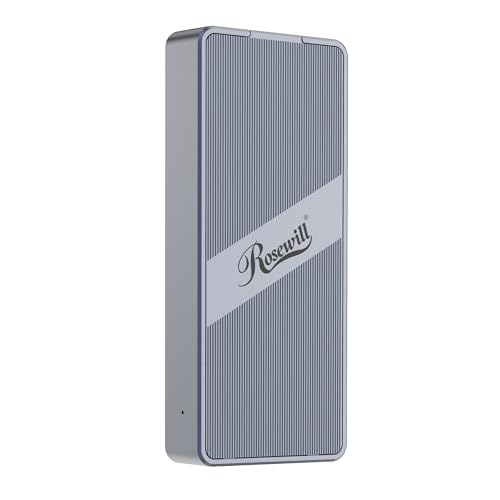
The Rosewill M.2 NVMe SSD Enclosure with Cooling Fan stands out for its impressive 40Gbps transfer speed, making it an ideal choice for creative professionals and tech enthusiasts who demand high performance from their external storage. Supporting M.2 NVMe SSDs up to 8TB, this enclosure is compatible with Thunderbolt 3/4 and USB4, allowing seamless use with your MacBook or PC. Its built-in fan guarantees effective heat dissipation, supporting up to 4 hours of full-speed operation. Compact and lightweight, it’s perfect for on-the-go use. Plus, you get a 1-year warranty and reliable customer support for peace of mind.
Best For: Creative professionals and tech enthusiasts seeking high-performance external storage solutions.
Pros:
- High-speed transfer rates of up to 3187MB/s, ideal for large file transfers and demanding applications.
- Built-in cooling fan ensures effective heat dissipation, allowing for extended periods of use without overheating.
- Compact and lightweight design makes it easy to transport, perfect for mobile use.
Cons:
- Limited to M.2 NVMe SSDs which may not be compatible with other SSD formats.
- Price point may be higher compared to simpler, non-NVMe enclosures.
- Potential compatibility issues with some older devices that do not support USB4 or Thunderbolt.
Factors to Consider When Choosing USB4 SSDs for MacBook
When you’re choosing a USB4 SSD for your MacBook, it’s essential to take into account speed and performance to guarantee smooth operation. You’ll also want to ponder storage capacity options, as well as the significance of cooling features to prevent overheating. Don’t forget to check build quality and compatibility with your devices for a seamless experience.
Speed and Performance
Speed and performance are essential factors to take into account in your quest for the best USB4 SSD for your MacBook. Look for models that deliver impressive read speeds, with some reaching up to 4,000MB/s, perfect for high-resolution content like 4K and 8K videos. Write speeds around 3,600MB/s guarantee quick data transfer and backup. Keep in mind that performance can vary based on your MacBook’s capabilities, so choose an SSD that matches its specifications. Advanced technologies like UASP enhance data transfer speeds and reduce latency, making your workflow smoother. Plus, features like TRIM and S.M.A.R.T technology help maintain peak performance over time by optimizing storage and monitoring drive health. Choose wisely, and you’ll notice the difference.
Storage Capacity Options
Choosing the right storage capacity for your USB4 SSD can greatly impact your MacBook experience. You’ll typically find options ranging from 500GB to 4TB, giving you the flexibility to match your data needs. If you work with large files, such as 4K videos or extensive photo libraries, consider a higher capacity like 2TB or 4TB for improved performance. Higher capacities often deliver better sustained read/write speeds during file transfers. Conversely, compact SSDs in the 500GB to 1TB range are perfect for portability and casual use. It’s essential to select a capacity that not only fits your current needs but also accommodates future growth, as file sizes and storage requirements continue to increase.
Cooling Features Importance
Although you might prioritize storage capacity and speed when selecting a USB4 SSD for your MacBook, it’s equally important to contemplate the cooling features. Effective cooling mechanisms, like built-in fans and heat dissipation designs, are essential for maintaining stable performance during prolonged data transfers, especially with large files or intensive tasks like video editing. Look for SSDs with dual heat dissipation systems to prevent thermal throttling, which can lead to reduced speeds or data loss. Consider models with aluminum alloy shells, as they dissipate heat more effectively than plastic. Additionally, manufacturers often incorporate temperature management technologies, such as silicone thermal pads, to enhance heat dissipation and guarantee efficient operation under load, helping you avoid overheating during demanding tasks.
Build Quality and Durability
When selecting a USB4 SSD for your MacBook, you can’t overlook build quality and durability, as these factors directly impact the longevity and reliability of your device. Look for SSDs with rugged designs, like aluminum chassis or silicone shells, to withstand physical impacts and environmental challenges. IP65 ratings for water and dust resistance can protect your drive during travel or outdoor use. Effective heat dissipation features, such as built-in cooling fans or thermal pads, help prevent overheating during demanding tasks. Additionally, consider the weight and dimensions; lighter, compact designs enhance portability without sacrificing storage capacity. Finally, opt for SSDs with robust warranty periods, as these reflect the manufacturer’s confidence in their product’s durability.
Compatibility With Devices
Durability and build quality are important, but compatibility with your devices is just as essential when selecting a USB4 SSD for your MacBook. Make sure your SSD works seamlessly with your MacBook, iMac, iPad, and iPhone. Most USB4 SSDs support Thunderbolt 3 and 4 interfaces, allowing for blazing-fast data transfer rates of up to 40Gbps when connected to compatible devices. With plug-and-play functionality, you’ll enjoy immediate access without needing software installation. Plus, many USB4 SSDs offer backward compatibility with USB 3.2 and USB 2.0, so you can still use them with older Apple devices. This versatility enhances your overall experience, making it easier to access and store data across your Apple ecosystem.
Portability and Size
Portability and size are essential factors to take into account when choosing a USB4 SSD for your MacBook. Many portable SSDs measure around 4.53 x 2.44 x 0.6 inches, making them easy to slip into pockets or bags. Weighing as little as 3.4 ounces, these lightweight options won’t add bulk to your travel gear. Look for SSDs with rugged enclosures made from aluminum or metal, offering durability without compromising on portability. The slim form factor, typically around 2.5 inches, guarantees that they fit seamlessly into your mobile workflow. Additionally, consider models with built-in cooling systems, like turbo cooling fans, to maintain performance while keeping the SSD lightweight and easy to transport.
Security Features Available
While you’re choosing a USB4 SSD for your MacBook, it’s crucial to take into account the security features that protect your sensitive data. Look for models that incorporate AES-256 encryption; this powerful tool guards against unauthorized access. Additionally, many drives include TRIM and S.M.A.R.T technology, which helps maintain performance and monitor drive health. Some SSDs offer built-in security protocols, enhancing data integrity through garbage collection and bad block management. You’ll also want to think about advanced wear leveling techniques, as these optimize performance and extend the drive’s lifespan. Finally, certain models come with dual heat dissipation designs, ensuring your data stays safe during high-performance sessions. Prioritizing these features can greatly enhance your data security.
