
If you want compact SSD storage that can keep up with modern laptops and workstations, a good enclosure matters as much as the drive inside it. The best USB4 NVMe enclosure with fan cooling helps preserve sustained speeds during large transfers, editing, and backups.
In this roundup, we focus on models that balance speed, thermals, build quality, and compatibility so you can choose a cooler, more reliable setup for everyday use or demanding workflows.
Best 10 Usb4 Nvme Enclosure with Fan Cooling Picks for 2026
Best for Quiet 40Gbps Transfers
40Gbps USB4 NVMe Enclosure with Fan
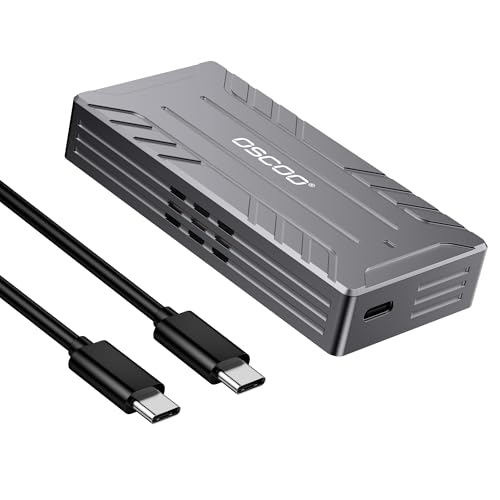
- 40Gbps USB4/Thunderbolt-class transfer support
- Active cooling fan with near-silent operation
- Tool-free NVMe install for 2242/2260/2280 drives
Best For: Creators and power users who want a quiet, cooled enclosure for sustained high-speed NVMe transfers.
Best for Cooling
Tool-Free NVMe Enclosure with Fan

- Silent fan and aluminum body improve heat control
- Tool-free sandwich design for fast SSD swaps
- Fits 2230/2242/2260/2280 NVMe and B+M Key SATA drives
Best For: Users who want an easy-to-install, actively cooled enclosure for steady everyday transfers.
Best for 80Gbps Speed
ACASIS 80Gbps M.2 NVMe Enclosure

- 80Gbps USB4 V2.0 support for next-gen throughput
- Smart fan cooling with auto and manual modes
- Tool-less, plug-and-play design for easy setup
Best For: Power users who want a fast, fan-cooled enclosure for large transfers and future-proof laptops.
Best for Small Spaces
UGREEN 40Gbps M.2 NVMe Enclosure

- Triple cooling setup with aluminum, pad, and fan
- 40Gbps USB4 with Thunderbolt 3/4 compatibility
- Supports 2230/2242/2260/2280 NVMe drives up to 4TB
Best For: Users who want active cooling and high-speed transfers in one enclosure.
Best for Fast Fan-Cooled Transfers
MAIWO 40Gbps USB4 NVMe Enclosure

- 40Gbps USB4 with ASM2464PD chipset
- Built-in fan and aluminum body for cooling
- Tool-free setup, up to 8TB support
Best For: Users who want a fast, actively cooled NVMe enclosure for USB4 and Thunderbolt systems.
Best for Active Cooling
ORICO 40Gbps M.2 NVMe Enclosure

- Built-in fan for better thermal control
- Tool-free setup for 2280 NVMe drives
- USB4 and Thunderbolt 3/4 compatible
Best For: People who want a fast enclosure with active cooling for sustained transfers.
Best for Heavy Workloads
ACASIS 40Gbps M.2 NVMe Enclosure

- Active fan plus aluminum body for better sustained cooling
- 40Gbps USB4/Thunderbolt compatibility across Mac and PC
- Supports 2280/2260/2242/2230 NVMe SSD sizes
Best For: Mac and PC power users who need fast, cooled external storage for long transfers and editing.
Best Heavy-Duty Pick
ORICO 40Gbps NVMe Enclosure with Fan
- 40Gbps USB4 speed with strong Thunderbolt 4 results
- Active fan cooling plus aluminum body and thermal accessories
- Tool-free install with support for up to 2280 NVMe drives
Best For: Users who move large files often and want active cooling to help maintain top-end NVMe performance.
Best Simple Pick
ACASIS TBU405 Pro 40Gbps NVMe Enclosure

- Active fan cooling for better thermal control
- 40Gbps USB4/Thunderbolt 3/4 compatibility
- Supports 2280/2260/2242/2230 M.2 drives
Best For: Power users who need sustained speed and active cooling for large file transfers.
Best for Quiet 40Gbps Transfers – 40Gbps USB4 NVMe Enclosure with Fan
If you want a usb4 nvme enclosure with fan cooling that balances speed and thermals, this model is built for exactly that job. It pairs USB4/Thunderbolt-class bandwidth with an active cooling fan and aluminum body to help keep transfer speeds steady during long copies, editing sessions, and everyday SSD use.
Best For: Creators, Mac users, and power users who need a quiet, high-speed NVMe enclosure for sustained transfers and portable work.
Pros:
- Up to 40Gbps USB4 performance for fast large-file transfers
- Active cooling fan helps reduce throttling under heavy loads
- Aluminum alloy housing improves durability and heat dissipation
- Tool-free setup supports common 2242/2260/2280 NVMe drives
Cons:
- Top speeds require a USB4 or Thunderbolt 4/5 host and a fast SSD
- NVMe-only design does not support SATA or mSATA drives
- Real-world speeds vary by device, cable, and system configuration
For buyers who care more about stable performance than flashy features, this usb4 nvme enclosure with fan cooling is a sensible pick. It is especially appealing if you regularly move large media files and want a compact enclosure that stays cool without getting loud.
Best for Cooling – Tool-Free NVMe Enclosure with Fan
If you want a usb4 nvme enclosure with fan cooling-style setup for keeping drive temps under control, this aluminum SSD case is built for practical everyday use. It pairs a 10Gbps USB 3.2 Gen 2 connection with a silent fan, thermal pad, and tool-free sandwich design, making it a solid choice for fast external storage without a complicated install.
Best For: Users who want an easy-to-install M.2 enclosure with active cooling for sustained transfers, backup drives, and portable storage across Windows, macOS, and Linux.
Pros:
- Built-in silent fan plus aluminum shell helps reduce heat during long transfers
- Tool-free, sandwich-style design makes SSD swaps quick and simple
- Supports M-Key and B+M Key NVMe/SATA M.2 drives in 2230 to 2280 sizes
- Plug-and-play compatibility across major operating systems
Cons:
- Top speed is limited to 10Gbps, not full USB4-class bandwidth
- Does not support M.2 drives with a heatsink attached
- Not compatible with B-Key SATA or AHCI SSDs
This is a strong pick if your priority is cooler, steadier performance rather than chasing maximum interface speed. For anyone specifically shopping a usb4 nvme enclosure with fan cooling, it stands out as a simple, affordable way to keep an SSD running reliably under load.
Best for 80Gbps Speed – ACASIS 80Gbps M.2 NVMe Enclosure
If you want a usb4 nvme enclosure with fan cooling that’s built for top-tier speed and sustained transfers, the ACASIS TB501 Pro is a strong pick. It supports USB4 V2.0 at 80Gbps, works with Thunderbolt 5 and newer USB4 systems, and includes active cooling to help keep performance steady during heavy workloads.
Best For: Power users, creators, and gamers who want an 80Gbps enclosure with active fan cooling for large-file transfers.
Pros:
- 80Gbps support with up to 6000 MB/s speeds on the right SSD and host setup
- Built-in smart fan with automatic and manual cooling modes
- Tool-less design with plug-and-play setup and no drivers needed
- Backwards compatible with USB4 V1.0 and USB 3.2/3.1/3.0
Cons:
- Full speed requires USB4 V2.0 or Thunderbolt 5-class hardware
- Not compatible with Thunderbolt 3 devices
- Best results depend on using a high-end PCIe 4.0 or newer NVMe SSD
For buyers who need a usb4 nvme enclosure with fan cooling and want the newest bandwidth headroom, this ACASIS model stands out for performance and thermal control. It’s a smart choice if you move big files often and want a future-proof enclosure that can scale with newer laptops and SSDs.
Best for Small Spaces – UGREEN 40Gbps M.2 NVMe Enclosure
If you want a usb4 nvme enclosure with fan cooling that puts temperature control front and center, this UGREEN model is built for sustained performance. Its aluminum shell, thermal pad, and PWM fan are designed to keep high-speed transfers steadier over long sessions, while USB4 and Thunderbolt 3/4 support make it easy to plug into modern laptops and desktops.
Best For: Creators, gamers, and MacBook users who need a fast enclosure with active cooling for heavier workloads and long transfer sessions.
Pros:
- Triple heat-dissipation design with aluminum body, thermal pad, and fan
- 40Gbps USB4 support with Thunderbolt 3/4 compatibility
- Fits M.2 NVMe drives in 2230/2242/2260/2280 sizes up to 4TB
- SMART and TRIM support help with drive health and performance
Cons:
- Does not support SSDs with built-in heatsinks
- Thunderbolt 4 top speeds require the right cable and host port
- Active cooling adds a little more complexity than fanless enclosures
As a usb4 nvme enclosure with fan cooling, this UGREEN pick makes the most sense when thermal stability matters as much as raw speed. It is a strong fit for users who move large files regularly and want a cooler-running enclosure for more consistent results.
Best for Fast Fan-Cooled Transfers – MAIWO 40Gbps USB4 NVMe Enclosure
If you want a usb4 nvme enclosure with fan cooling that prioritizes speed and thermal control, the MAIWO is a strong pick. It pairs a USB4/Thunderbolt-friendly 40Gbps connection with an all-aluminum shell, built-in fan, and tool-free access for quick SSD swaps.
Best For: Mac, Windows, and pro users who want a fast external NVMe enclosure with active cooling and broad USB4/Thunderbolt compatibility.
Pros:
- 40Gbps USB4 performance with ASM2464PD chipset and up to 3200+ MB/s speeds
- Built-in fan plus aluminum body, thermal pads, and vented design for better cooling
- Tool-free install, LED indicator, and support for up to 8TB drives
- Works with USB4, Thunderbolt 4/3, and backward-compatible USB ports
Cons:
- Only supports 2280 M.2 NVMe SSDs, so smaller form factors will not fit
- Thunderbolt 3 speeds top out below full 40Gbps depending on system support
- Fan-assisted design adds a bit more size than ultra-compact enclosures
For buyers comparing a usb4 nvme enclosure with fan cooling, this MAIWO stands out for combining high-speed transfer potential with a practical cooling setup. It is especially appealing if you plan to move large files often and want better heat management than a passive enclosure.
Best for Heat Control – 40Gbps M.2 NVMe Enclosure with Fan
If you want a usb4 nvme enclosure with fan cooling for long transfers, this MOKiN enclosure is built around thermal management and speed. The ASM2464PD bridge, 40Gbps class performance, and included USB-C and USB-A cables make it a practical pick for fast external storage across Macs, Windows PCs, and other USB4/Thunderbolt systems.
Best For: Users who need a compact, high-speed enclosure that can stay cooler during sustained file transfers, backups, and daily portable use.
Pros:
- Built-in fan and aluminum shell help reduce heat during extended use
- Supports USB4, Thunderbolt 3/4, and a wide range of USB standards
- Includes both USB-C and USB-A cables for easier compatibility
- Works with M.2 NVMe sizes 2242, 2260, and 2280
Cons:
- Only works with NVMe M.2 SSDs, not SATA drives
- Fan cooling adds a little more bulk than fanless enclosures
- Top speeds depend on host port support and SSD performance
Overall, this is a strong choice if you specifically want a usb4 nvme enclosure with fan cooling to help protect performance under heavy workloads. It combines portable sizing with broad compatibility, making it a sensible option for creators, power users, and anyone moving large files regularly.
Best for Active Cooling – ORICO 40Gbps M.2 NVMe Enclosure
If you want a usb4 nvme enclosure with fan cooling that prioritizes sustained performance over a purely passive design, this ORICO case is a strong fit. It supports 40Gbps-class connections, tool-free installation, and a compact aluminum build, making it a practical choice for fast external SSD use.
Best For: Users who want a cooled, tool-free enclosure for high-speed NVMe drives and long transfer sessions.
Pros:
- Built-in fan helps manage heat during heavier workloads and longer transfers
- Tool-free design makes SSD installation quick and simple
- 40Gbps support with Thunderbolt 3/4 and USB4 compatibility
- Aluminum shell adds durability and helps with heat dissipation
Cons:
- Fan cooling can add some noise compared with fanless enclosures
- Designed for 2280 M.2 NVMe drives only
- Peak speeds still depend on host port and SSD quality
Overall, this usb4 nvme enclosure with fan cooling is a smart pick if you move large files often and want a little extra thermal headroom. It balances speed, convenience, and cooling better than many basic enclosures.
Best for Heavy Workloads – ACASIS 40Gbps M.2 NVMe Enclosure
If you want a usb4 nvme enclosure with fan cooling for sustained performance, the ACASIS 40Gbps model is built for exactly that job. Its active fan, aluminum shell, and thermal pad form a strong cooling setup, while the JHL7440 chip helps it stay compatible with Thunderbolt 5/4/3, USB4, and older USB-C ports.
Best For: Mac and PC users who move large files, edit video, or run a fast external SSD for long sessions without thermal throttling.
Pros:
- Built-in silent fan plus aluminum housing and thermal pad for active cooling
- 40Gbps USB4/Thunderbolt compatibility with broad Mac, Windows, and Linux support
- Supports 2280/2260/2242/2230 NVMe drives for flexible upgrades
- Strong real-world transfer speeds for demanding workflows
Cons:
- Fan cooling adds a little complexity compared with fanless enclosures
- Top speed depends on host port and SSD quality
- Not the smallest option if absolute minimal size is the priority
For buyers who care more about stable throughput than a silent fanless design, this usb4 nvme enclosure with fan cooling is a smart pick. It aims squarely at users who want fast, dependable external storage that can handle longer transfers without losing pace.
Best Heavy-Duty Pick – ORICO 40Gbps NVMe Enclosure with Fan
If you want a usb4 nvme enclosure with fan cooling that prioritizes sustained speed, this ORICO model is built for it. It pairs a 40Gbps USB4/Thunderbolt 3/4 interface with an aluminum body, internal fan, and extra thermal padding to help keep transfers steady during long reads and writes.
Best For: Users who move large files often and want active cooling to help maintain top-end NVMe performance.
Pros:
- 40Gbps USB4 performance with strong real-world Thunderbolt 4 results
- Built-in fan plus aluminum shell, vents, thermal pad, and heatsink support
- Tool-free, push-to-open installation makes SSD swaps quick
- Supports common M-Key NVMe sizes up to 2280 and up to 8TB
Cons:
- Does not support SSDs that already have a heatsink attached
- Full 40Gbps speeds depend on a compatible USB4/TB3/TB4 host
- Some SSD models may not be fully compatible
For buyers who care more about sustained throughput than a minimalist design, this usb4 nvme enclosure with fan cooling hits a strong balance of speed, thermals, and ease of use. It is especially appealing for creators and power users who push large transfers long enough to make passive enclosures throttle.
Best Simple Pick – ACASIS TBU405 Pro 40Gbps NVMe Enclosure
If you need a usb4 nvme enclosure with fan cooling that can keep fast drives stable under sustained transfers, the ACASIS TBU405 Pro is a strong fit. Its aluminum body, built-in fan, and 40Gbps USB4/Thunderbolt support make it a practical pick for editors, developers, and anyone moving large files on a regular basis.
Best For: Power users who want active cooling, broad Thunderbolt/USB4 compatibility, and high-speed NVMe performance for demanding workloads.
Pros:
- Built-in cooling fan helps reduce thermal throttling during long transfers.
- 40Gbps support with Intel JHL7440 chipset for USB4 and Thunderbolt 3/4 systems.
- Works with common M.2 NVMe sizes: 2280, 2260, 2242, and 2230.
- Compact metal enclosure is easy to carry in a laptop bag.
Cons:
- The fan must be switched on manually.
- Top speeds depend on host port support and SSD choice.
- More expensive than basic passive-cooling enclosures.
Overall, this is a well-rounded usb4 nvme enclosure with fan cooling for users who care more about sustained performance than the cheapest possible price. It stands out most when paired with a fast SSD and a modern Mac or PC that can actually take advantage of 40Gbps throughput.
How We Picked the Best Usb4 Nvme Enclosure with Fan Cooling
We focused on enclosures that combine fast modern connectivity with practical thermal management. For a Usb4 Nvme Enclosure with Fan Cooling, that means looking beyond peak headline speeds and prioritizing sustained performance, ease of installation, enclosure materials, and real-world compatibility with Thunderbolt and USB4 systems.
We also considered whether the design makes sense for frequent drive swaps, whether the cooling solution is likely to help under long write sessions, and whether the enclosure supports common NVMe M.2 sizes and keys.
Quick Comparison
At a high level, the choices cluster into three buyer-friendly groups: 40Gbps USB4/TB4-ready models for most users, tool-free or aluminum builds for convenience and heat dissipation, and newer 80Gbps options for users who want headroom on next-generation platforms. Most buyers will be well served by a solid 40Gbps model, while creators and power users may prefer the stronger cooling and interface ceiling of premium picks.
Key Buying Factors for a Usb4 Nvme Enclosure with Fan Cooling
Interface Speed and Host Support
Check whether your laptop or desktop actually supports USB4, Thunderbolt 3/4/5, or only USB 3.x. A fast enclosure is only as fast as the port it connects to, so compatibility matters more than marketing language.
Thermals and Sustained Performance
Fan cooling is most useful when you move large files, edit video directly from the SSD, or run repeated benchmarks. Look for aluminum construction, active airflow, and a design that lets heat leave the drive area efficiently.
Drive Fit and Installation
Confirm support for your M.2 size, usually 2280, and the correct key type. Tool-free designs are convenient if you swap drives often, but a secure fit and good internal contact are more important than speed of installation.
Noise, Portability, and Power
A quieter fan is preferable for desk use, while a compact enclosure may be better for travel. If you plan to use the enclosure on the go, balance cooling with cable quality, enclosure thickness, and overall durability.
Who Should Buy Which Usb4 Nvme Enclosure with Fan Cooling?
If you want the best all-around option, choose a 40Gbps model with active cooling and broad Thunderbolt 4/USB4 support. If you care most about easy setup and frequent drive changes, a tool-free aluminum enclosure is the safer bet. If you work on newer high-bandwidth systems and want more future-proofing, consider an 80Gbps enclosure, especially for sustained creative workloads.
For Mac users, pay close attention to compatibility notes and physical fit, since some enclosures are better optimized for specific laptop layouts. For everyday backups and portable projects, a reliable midrange USB4 enclosure with fan cooling is usually the best value.
