
USB power meters make it easier to understand what your chargers, cables, power banks, and devices are actually delivering. The best models for beginners show essential readings clearly without requiring advanced electrical knowledge.
This roundup compares 10 USB-A and USB-C testers with different display types, measurement ranges, capacity functions, and fast-charging support. Use the guide below to choose a meter that matches your devices and testing goals.
Best 10 USB Power Meters for Beginners Picks for 2026
Top Versatile Pick
Klein Tools ET920 USB Power Meter

- USB-A and USB-C testing
- Monitors capacity, energy, and resistance
- Stores readings and detects overloads
Best For: Beginners needing comprehensive USB testing
Feature-Rich Pick

- Color display with nine interfaces
- Tests fast-charging standards
- Measures capacity, temperature, and timing
Best For: Beginners exploring chargers, cables, and power banks
Simple Everyday Pick

- Shows voltage and current together
- Includes capacity and time memory
- Measures 3–9V and up to 3A
Best For: Basic charger, phone, and power-bank checks
Best Value Two-Pack
- Includes two USB meters
- Shows voltage and current together
- Supports 4–30V and up to 3A
Best For: Basic testing at multiple chargers or work areas
Best High-Current Pick

- Measures up to 30V and 12A
- Supports multiple fast-charge protocols
- Color display with curve monitoring
Best For: USB-C charger and power-bank testing
Best Beginner-Friendly USB-A Option

- Simple one-button operation
- Seven modes for voltage, current, power, and capacity
- USB-A input with dual outputs
Best For: Basic USB-A charger and cable checks
Best for Detailed USB 3.0 Checks

- Measures voltage, current, power, and temperature
- Supports USB 3.0 and USB 2.0
- Stores capacity and power data after shutdown
Best For: Detailed USB accessory and charger testing
Most Versatile
YOJOCK USB-C Tester Power Meter

- Measures voltage, current, capacity, power, and more
- Supports USB-A, USB-C, PD, QC, and BC1.2
- Color display with built-in safety protections
Best For: Beginners wanting a feature-rich USB-A and USB-C tester
Best for USB-A Simplicity

- Clear IPS color display for real-time readings
- Tests up to 30V and 5.1A
- Stores power-bank capacity data across multiple sessions
Best For: Beginners checking USB-A chargers, cables, and power banks
Best Complete Kit

- Measures 3.6–32V and up to 8.0A
- Supports PD, QC, and BC1.2 charging protocols
- Includes adapter, manual, and storage case
Best For: Beginners testing USB-A, USB-C, chargers, and power banks
Top Versatile Pick – Klein Tools ET920 USB Power Meter
For beginners comparing USB power meters, the Klein Tools ET920 is a practical choice when you want one meter for both USB-A and USB-C testing. It measures voltage, current, capacity, energy, and calculated resistance, with overload detection and a clear high-resolution display.
Best For: Beginners who want broad USB-A and USB-C monitoring in a rugged, pocket-sized meter.
Pros:
- Supports 3–20V DC and up to 3A on USB-A or 5A on USB-C.
- Tracks voltage, current, charge, energy, and resistance for up to 1,000 hours.
- Stores up to 10 readings and includes overload detection.
- Rugged design has stated 6.6-foot drop protection.
Cons:
- Its broader feature set may be more than needed for basic voltage and current checks.
- Resistance is calculated rather than presented as a direct standalone measurement.
The ET920 stands out as a well-rounded beginner meter, especially if you use both connector types or want readings you can save for later comparison.
Feature-Rich Pick – KJ-KayJI USB-C Tester
Among USB power meters for beginners, the KJ-KayJI tester offers an unusually wide range of information through its IPS color display. It monitors voltage, current, power, resistance, capacity, temperature, timing, and fast-charging indicators across supported USB connections.
Best For: Beginners who want to explore chargers, cables, power banks, and fast-charging standards.
Pros:
- Provides nine color-screen display interfaces for different measurements.
- Supports PD2.0/3.0, QC2.0/3.0, and BC1.2 detection.
- Can help test power-bank and phone capacity using the stated procedures.
- Includes a USB clip cable and OTG adapter for broader compatibility.
Cons:
- The many functions and testing procedures may feel complicated for first-time users.
- Some applications require the included OTG adapter or an external load.
This is the most expansive option in the group, but its extra protocols and display pages make it better suited to beginners willing to learn beyond simple voltage and current checks.
Simple Everyday Pick – HiLetgo LCD USB Tester
HiLetgo LCD USB Current Voltage Doctor Charger Capacity Tester Meter Power Bank
Check Price On AmazonThe HiLetgo LCD USB tester keeps USB power testing straightforward by showing voltage and current together in real time. Its memory function also retains working time and capacity after power-off, making it a friendly starting point for basic device and charger checks.
Best For: Beginners who mainly need simple voltage, current, and capacity readings.
Pros:
- Simultaneously displays amperage and voltage.
- Measures 3–9V and 0–3A with stated ±1% accuracy.
- Memory function retains working time and capacity when powered off.
- Suitable for phones, power banks, solar chargers, and car chargers.
Cons:
- Its 3–9V range is narrower than some multifunction meters.
- The notes do not mention USB-C-specific support or fast-charging protocol detection.
Choose the HiLetgo when you value a simple display and basic capacity tracking over advanced protocol analysis or wider measurement features.
Best Value Two-Pack – USB Tester Power Meter 2-Pack
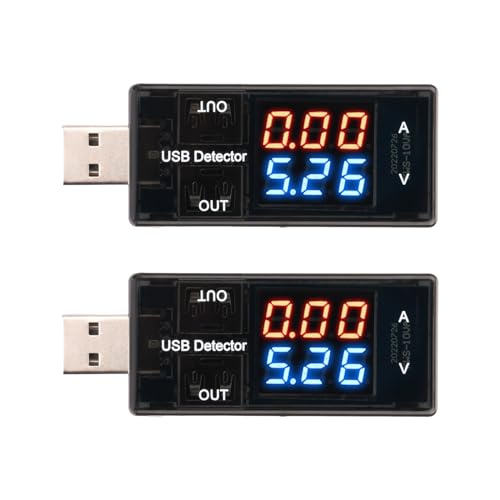
For beginners who want a no-frills way to check USB output, this two-pack provides separate voltage and current meters for basic readings. The blue and red displays show both values at once, while the meters support 4–30V and up to 3A.
Best For: Beginners who want two basic meters for checking chargers, USB ports, and connected devices.
Pros:
- Includes two USB power meters.
- Displays voltage and current simultaneously.
- Offers a 4–30V range with 0.01V resolution.
- Measures up to 3A with 0.01A current resolution.
Cons:
- Measurement features are limited to voltage and current.
- The supplied notes do not specify capacity, energy, or fast-charging analysis.
- The stated minimum operating voltage is 4V, so it does not cover lower-voltage testing.
This two-pack is a practical entry point when you need quick voltage and current checks in more than one location, but it lacks the deeper diagnostics of the multifunction models.
Best High-Current Pick – KWS-2303C USB-C Power Meter
For beginners comparing USB power meters, the KWS-2303C is a practical choice when you need USB-C testing with a broad voltage and current range. It measures 4–30V and up to 12A, displays key charging data, and supports several fast-charging protocols.
Best For: Beginners testing USB-C chargers, power banks, cables, and fast-charging devices.
Pros:
- Measures 4–30V and 0–12A with stated accuracy of ±(1%+5).
- Supports PD, QC, FCP, SCP, AFC, DASH, VOOC, and Super VOOC protocols.
- Color display shows voltage, current, power, capacity, energy, time, and temperature.
- Curve mode records voltage and current over selectable time periods.
Cons:
- Designed around USB-C connections rather than USB-A setups.
- The wide range of readings and functions may take beginners some time to learn.
Its high-current capability and protocol support make this the most versatile option in the group for USB-C-focused testing. The included storage case and user manual are useful extras for keeping the tester organized.
Best Beginner-Friendly USB-A Option – DROK USB Tester
Among USB power meters for beginners, the DROK USB Tester stands out for its simple one-button operation and straightforward display modes. It measures 3.2–30V and up to 5A, while also offering capacity, power, and basic protection-related monitoring.
Best For: Beginners testing USB-A chargers, power banks, cables, solar panels, and battery chargers.
Pros:
- One button switches among seven display modes.
- Shows voltage, current, power, and capacity in easy-to-select combinations.
- Includes USB-A input and dual USB 2.0 output ports.
- Supports PD and QC 3.0 output charging, with voltage and current ranges up to 12V and 3A for output.
Cons:
- Uses USB-A connections, so it is less suitable for USB-C-only equipment.
- Its measurement range tops out at 5A, lower than the KWS-2303C.
The simple controls make this a sensible starting point for basic charging checks. Its seven display modes provide useful information without requiring complicated navigation, though its USB-A design limits compatibility with newer USB-C systems.
Best for Detailed USB 3.0 Checks – MakerHawk AT34 Tester
The MakerHawk AT34 is a strong option for beginners who want more than basic voltage and current readings. This USB power meter measures 3.7–30V and up to 4A, and adds capacity, power, temperature, impedance, and fast-charge identification.
Best For: Beginners checking USB 3.0 devices, chargers, power banks, and charging performance in greater detail.
Pros:
- Displays voltage, current, capacity, power, impedance, and temperature.
- Supports USB 3.0 while remaining compatible with USB 2.0.
- Identifies QC 2.0, QC 3.0, and several device charging modes.
- Stores capacity and power data after power is disconnected.
Cons:
- Its 0–4A current range is lower than the KWS-2303C and DROK meter.
- Advanced readings may be more information than a beginner needs for simple checks.
The AT34 is especially useful when you want to compare charger performance under load or inspect USB 3.0 accessories. Its power-off storage and temperature function add useful detail, while the IPS display keeps the readings visible from a wide viewing angle.
Most Versatile – YOJOCK USB-C Tester Power Meter
For beginners comparing USB power meters, the YOJOCK stands out as a versatile USB-C and USB-A tester with a broad measurement range. It displays voltage, current, power, capacity, temperature, resistance, and charging time, making it useful for checking chargers, cables, and power banks.
Best For: Beginners who want broad measurements, fast-charging support, and USB-C compatibility in one compact tester.
Pros:
- Measures 3.6–32V and 0–8.0A, along with capacity, power, temperature, resistance, and charging time.
- Eight IPS color-screen interfaces include a larger-font viewing mode.
- Supports PD 2.0/3.0, QC 2.0/3.0, BC1.2, and USB-A or USB-C connections.
- Includes over-voltage, over-current, under-voltage, and low-energy protection.
Cons:
- The power-bank capacity procedure requires a full charge and continuous discharge or careful calculation.
- Its many readings and display modes may be more than a beginner needs for simple voltage checks.
Choose the YOJOCK if you want a feature-rich meter that can grow with your testing needs. Its color display, wide range, adapters, and safety features make it a practical all-around option.
Best for USB-A Simplicity – Eversame USB 3.0 Power Tester
Among USB power meters for beginners, the Eversame offers straightforward real-time monitoring for USB-A equipment. Its color IPS screen shows voltage, current, capacity, power, and time, while the compact design suits checking phone chargers, cables, power banks, and other USB-A devices.
Best For: Beginners who primarily use USB-A chargers and want clear readings with simple operation.
Pros:
- Displays voltage, current, capacity, power, and elapsed time in real time.
- Supports a 3.6–30V input/output range and current up to 5.1A.
- Automatically detects several charging protocols, including Apple, Android DCP/AFC, Huawei, Samsung, and Qualcomm QC.
- Power-off memory can accumulate power-bank capacity tests across up to nine sets of data.
Cons:
- The supplied notes emphasize USB-A devices rather than USB-C compatibility.
- Power-bank capacity testing requires completing a full discharge process, which can take considerable time.
The Eversame is a sensible entry point for USB-A users who value readable information and uncomplicated operation. Its memory feature is particularly useful when a capacity test cannot be completed in one session.
Best Complete Kit – YEREAD USB-C Power Meter
The YEREAD USB-C tester is a practical choice for beginners who want to monitor charging performance across USB-A and USB-C devices. It combines voltage and current testing with capacity and power readings, supports common fast-charging protocols, and includes adapters, a manual, and a storage case.
Best For: Beginners who want a broad USB-C testing range and included accessories for power-bank and charger checks.
Pros:
- Measures 3.6–32V and 0–8.0A for testing a wide range of charging equipment.
- Supports PD 2.0/3.0, QC 2.0/3.0, and BC1.2 protocols.
- Eight IPS display interfaces show voltage, current, capacity, power, and load impedance.
- Includes a Micro USB adapter, user manual, and storage case.
Cons:
- The range of measurements and display interfaces may require some familiarization for first-time users.
- Accurate power-bank capacity testing still requires a full charge and a suitable load or calculation.
Pick the YEREAD if you want a capable starter kit rather than a basic voltage monitor. Its wide range, fast-charge support, and included storage case make it well suited to beginners testing multiple device types.
How We Picked the Best USB Power Meters for Beginners
We focused on meters that present core measurements in a reasonably accessible format, including voltage, current, power, and—where supported—accumulated capacity or energy. We also considered connector compatibility, display readability, measurement range, charging-protocol support, and practical features such as data retention, temperature readings, and dual-port testing.
Because USB standards and product specifications vary, buyers should confirm the meter’s supported port type and maximum ratings before connecting high-power equipment. A tester is a diagnostic tool, not a replacement for a certified electrical multimeter.
Quick Comparison
| Best For | Look For | Useful Features |
|---|---|---|
| Basic charging checks | Clear voltage and current display | USB-A compatibility, simple operation |
| USB-C devices | Type-C input and output support | Power-delivery visibility, reversible connector |
| Power-bank testing | Capacity and energy tracking | mAh or Wh accumulation, reset function |
| Frequent troubleshooting | Broad voltage and current range | Color screen, multiple readouts, memory |
Key Buying Factors for USB Power Meters for Beginners
Connector and Protocol Compatibility
Start with the ports you use most. USB-A testers are useful for older chargers, cables, and power banks, while USB-C models are better suited to newer phones, laptops, hubs, and fast chargers. If you use USB Power Delivery or Quick Charge equipment, choose a model that explicitly lists support for the relevant protocol. A meter that only measures basic power may not negotiate every fast-charge mode correctly.
Measurement Range and Accuracy
Voltage and current ranges should cover your intended devices with room to spare. Basic 5V testing needs less range than USB-C laptop charging, which can use substantially higher voltage and current. For beginners, a stable, readable display is often more valuable than an unusually wide range. Treat inexpensive meters as useful indicators rather than laboratory-grade instruments.
Readability and Useful Measurements
A color LCD or IPS display can make several readings easier to view at once, especially when checking power, resistance, temperature, or charging time. Capacity tracking is helpful for comparing power banks, but it depends on a complete test cycle and should not be confused with the battery’s advertised nominal capacity.
Who Should Buy Which USB Power Meters for Beginners?
Choose a simple USB-A meter if you mainly troubleshoot standard chargers and cables. Select a USB-C tester if most of your equipment uses modern Type-C connections or fast charging. A model with capacity and energy tracking makes the most sense for power-bank testing, while a broader-range, multi-function tester suits hobbyists who want more detailed diagnostics. If you need to test several ports regularly, prioritize clear displays, durable construction, and a range that matches your highest-power devices.
