
A reliable desk fan can make a home office more comfortable without taking up much space or creating distracting noise. USB models are especially convenient because they work with laptops, power banks, adapters, and other common devices.
We compared 10 compact fans across airflow control, portability, noise-conscious design, power options, adjustability, and workspace-friendly features to help you find the right fit for your desk.
Best 10 USB Desk Fans for Home Offices Picks for 2026
Best Compact Plug-In Pick
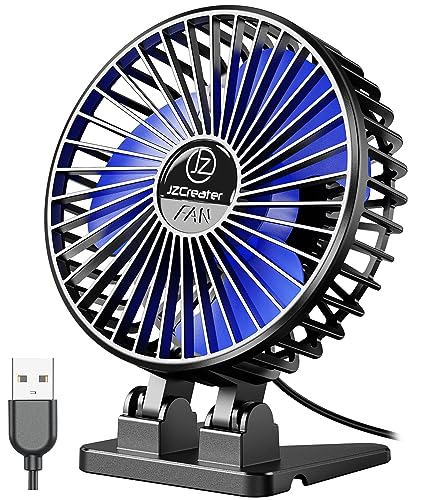
- Compact 4.1-inch design weighs about 4.8 ounces.
- Three speeds and a brushless motor support personal cooling.
- Removable front cover simplifies cleaning.
Best For: Small desks and USB-powered personal cooling
Best Cordless Flexibility
100-Speed Rechargeable Desk Fan
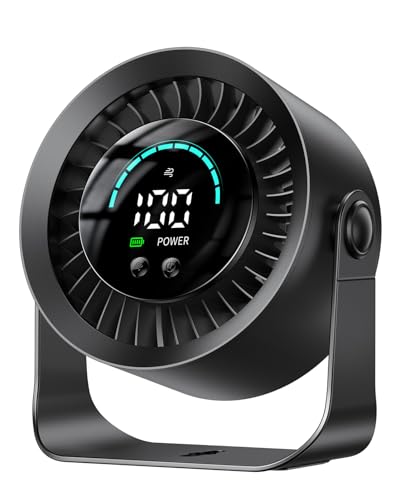
- 3000mAh battery offers up to 17 hours on low.
- 100 stepless speeds provide precise control.
- 360-degree rotation and tabletop or wall mounting add flexibility.
Best For: Cordless office use and highly adjustable airflow
Best Air Circulation
Amazon Basics 3-Speed Desk Fan

- Three 7-inch blades support broader airflow.
- 90-degree tilt directs air toward a desk or room.
- Corded 35-watt design uses a standard 120-volt outlet.
Best For: Larger home offices needing broad air circulation
Best Lightweight Personal Fan

- Very lightweight design weighs about 4 ounces.
- Three speeds support simple personal cooling.
- 30-degree vertical adjustment helps aim airflow.
Best For: Portable close-range cooling at home or on the go
Best Space Saver

- Compact 4.5-inch, 6.3-ounce design
- Three speeds with 360° vertical rotation
- USB-A powered with a stable silicone-padded base
Best For: Small desks, travel, and direct personal airflow
Best Compact Rechargeable

- 100 speed levels with turbo airflow
- Up to 8.5 hours of battery runtime
- Digital display in a compact 0.92-pound design
Best For: Cordless, precisely adjustable cooling at a desk
Best Compact Metal Pick
Zuvas 4-Inch Quiet USB Desk Fan
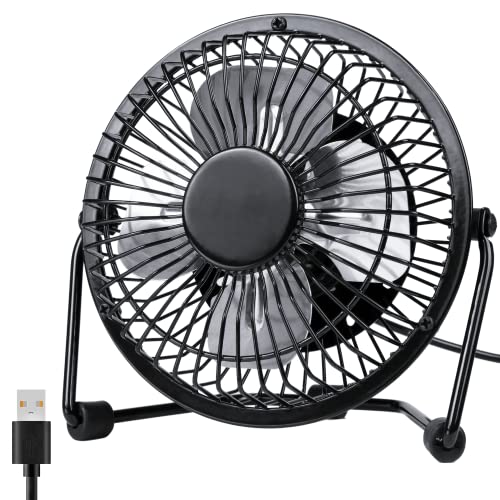
- Compact 6-inch metal frame for small desks
- Two speeds with 360-degree rotation
- USB-powered and rated below 40 dB
Best For: Small workspaces and personal airflow
Best Quiet Three-Speed Pick

- Three speeds with a 360-degree adjustable tilt
- Removable front cover simplifies cleaning
- Quiet operation and a 4.7-foot USB cable
Best For: Quiet home-office cooling with flexible airflow control
Best Cordless Option
Otlonpe Rechargeable Portable Desk Fan
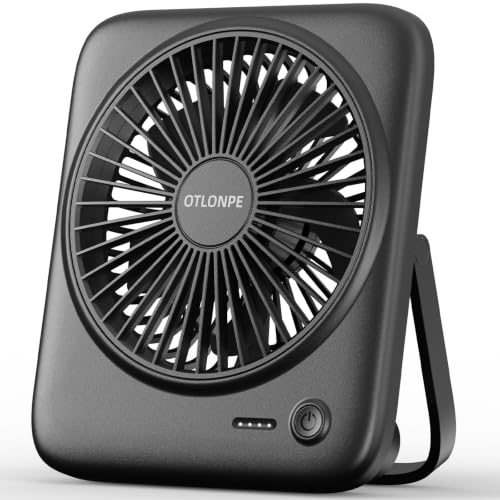
- 4000mAh battery with up to 23 hours of cooling
- Four speeds and quiet operation under 35 dB
- Foldable, USB-C rechargeable, and emergency-charging capable
Best For: Portable workspaces and cordless personal cooling
Best Compact Plug-In Pick – Mini 3-Speed USB Desk Fan
For shoppers seeking USB desk fans for home offices, this JZCreater model is a compact plug-in option with three speeds and a brushless motor. Its small footprint suits crowded desks, while the included 3.7-foot cable makes it easy to connect to a computer or USB wall charger.
Best For: Small home-office desks, travel, and users who prefer a lightweight fan without a built-in battery.
Pros:
- Compact 4.1-inch design weighs about 4.8 ounces.
- Three speed settings provide basic airflow adjustment.
- Removable front cover makes cleaning easier.
- Brushless motor is listed at under 50 dB on high speed.
Cons:
- USB-powered only; it does not include a battery.
- Its small size may provide more personal cooling than broad room circulation.
This is a practical choice when desk space and portability matter most. Choose it for simple, quiet personal airflow near a USB port rather than cordless operation.
Best Cordless Flexibility – 100-Speed Rechargeable Desk Fan
This DIGIX model stands out among USB desk fans for home offices with a rechargeable 3000mAh battery, 100 stepless speeds, and a 360-degree rotating head. It can sit on a tabletop or mount to a wall, giving you more placement options when desk space is limited.
Best For: Cordless home-office use, precise airflow control, travel, and spaces where wall mounting is useful.
Pros:
- Battery provides up to 17 hours of use on low speed.
- 100 speed levels allow fine airflow adjustments.
- 360-degree rotation helps direct air in different directions.
- Built-in LED display shows speed and remaining battery power.
Cons:
- Its 0.43-kilogram weight is higher than the smallest plug-in fans.
- Battery runtime varies by speed and is specified as up to 17 hours on low.
With cordless operation, wall-mounting capability, and detailed controls, this is the most flexible option in the group. It is especially appealing if you move between workspaces or want to avoid keeping a fan beside a USB port.
Best Air Circulation – Amazon Basics 3-Speed Desk Fan
Although it is not USB-powered, this Amazon Basics fan is worth considering alongside USB desk fans for home offices when stronger room airflow is the priority. Its three 7-inch blades, 35-watt motor, and 90-degree tilt head make it better suited to circulating air across a larger desk or room than a mini personal fan.
Best For: Home offices that need broader air circulation and have access to a standard 120-volt outlet.
Pros:
- Three 7-inch blades support stronger, broader airflow.
- 90-degree variable tilt helps aim air where needed.
- Three speed settings provide straightforward control.
- Three-pound design can be moved between rooms.
Cons:
- Uses corded 120-volt power rather than USB.
- At 60 dB, it is listed as louder than the smaller USB models here.
- Larger dimensions require more desk or floor space.
This is the practical pick for users who value airflow coverage over USB convenience. Its larger blades and adjustable tilt give it a clear advantage for general room circulation, but its size and standard outlet requirement make it less portable.
Best Lightweight Personal Fan – Compact 3-Speed USB Fan
The Gaiatop is a straightforward choice for USB desk fans for home offices, combining a very small footprint with three speed settings and USB compatibility. Its 30-degree vertical adjustment lets you aim the breeze toward your workspace without taking up much room.
Best For: Lightweight personal cooling at a desk, in a car, or while traveling.
Pros:
- Weighs about 4 ounces and measures 4.6 inches wide.
- Three speed settings offer low, medium, and high airflow.
- 30-degree vertical adjustment helps direct the breeze.
- Works with computers, laptops, power banks, adapters, and car chargers that support USB.
Cons:
- It requires a USB power source and has no stated battery.
- The highest speed requires a 5V/1A power source.
- Its 30-degree adjustment is more limited than a fully rotating fan head.
For a simple, highly portable desk fan, the Gaiatop keeps things uncomplicated. It is a good fit for close-range cooling and travel, provided your USB power source meets the requirement for the top speed.
Most Versatile – 100-Speed Rechargeable Air Circulator Fan
For USB desk fans for home offices, this model stands out when you want broad airflow coverage and fine control. It offers 100 speed settings, vertical and horizontal oscillation, a digital display, remote control, and a large rechargeable battery for cordless use.
Best For: Home-office users who want customizable, room-circulating airflow and extended battery operation.
Pros:
- 90° vertical and 120° horizontal auto-oscillation helps distribute air widely.
- 100 speed levels provide precise airflow adjustment.
- 10,000mAh battery offers approximately 10 to 18 hours of runtime.
- Includes a remote, digital display, and USB charging support.
Cons:
- At 2.7 pounds, it is less lightweight than a basic mini desk fan.
- Its larger feature set may be more than needed for simple, close-range cooling.
This is a strong pick if your workspace needs more than a direct personal breeze. The oscillation, remote, battery, and wide speed range make it especially flexible for changing work conditions.
Best Space Saver – TriPole Mini USB Desk Fan
If you need USB desk fans for home offices that take up very little room, the TriPole mini fan is a straightforward option. Its 4.5-inch design, USB-A power, three speeds, and adjustable 360° tilt make it easy to position beside a monitor or on a small desk.
Best For: Compact workstations, travel, and users who prefer simple plug-in USB cooling.
Pros:
- Compact 4.5-inch design weighs only 6.3 ounces.
- 360° vertical rotation makes it easy to direct airflow.
- USB-A power works with chargers, computers, and power banks.
- Detachable cover supports regular cleaning.
Cons:
- Only three speed settings are available.
- It requires a USB power source and is not rechargeable.
- The third speed may require a charger that supports 5V/1A output.
This fan favors portability and simplicity over advanced controls. Its stable base, quiet operation rating, and adjustable angle make it a practical choice for personal cooling without crowding your workspace.
Best Compact Rechargeable – KIMMOO 100-Speed Desk Fan
Among USB desk fans for home offices, the KIMMOO is a convenient middle ground between a basic mini fan and a larger air circulator. It combines 100 speed levels, turbo airflow, a digital display, adjustable positioning, and rechargeable battery power in a compact tabletop design.
Best For: Users who want precise speed control and cordless flexibility in a small office fan.
Pros:
- 100 speed levels allow precise adjustment from a gentle breeze to stronger airflow.
- Rechargeable battery provides up to 8.5 hours of cooling and recharges in about 2.5 hours.
- Digital display shows battery status and current wind speed.
- Compact 0.92-pound design is convenient for office or travel use.
Cons:
- Its 35dB lowest-setting noise rating is higher than the quietest model in this roundup.
- It does not offer the broad automatic oscillation range of the larger air circulator.
The KIMMOO is well suited to desk users who want detailed airflow control without relying on a nearby outlet. Its rechargeable design and display add everyday convenience, while the compact size keeps it easy to move.
Best Compact Metal Pick – Zuvas 4-Inch Quiet USB Desk Fan
For shoppers comparing USB desk fans for home offices, the Zuvas is a compact choice with a metal frame, two speed settings, and a 360-degree adjustable head. Its USB-A cable works with common desk power sources such as a laptop, hub, adapter, or power bank.
Best For: Small desks, focused personal airflow, and buyers who prefer a sturdy metal finish.
Pros:
- Compact 6-inch frame fits easily on a desk, table, or bedside surface.
- Two speeds and a 360-degree rotating head provide straightforward airflow adjustment.
- Quiet operation is rated below 40 dB, with anti-slip rings for added stability.
- Includes a 3.6-foot USB cable and uses a low 2.25-watt design.
Cons:
- Only two speed settings are available.
- The compact airflow area may be better suited to personal cooling than broad room circulation.
- It requires a USB power source and does not include a built-in battery.
The Zuvas stands out when desk space and a refined metal appearance matter most. It is a practical, portable option for keeping air moving near a home-office workstation without adding a large appliance.
Best Quiet Three-Speed Pick – SWEETFULL Small USB Desk Fan
The SWEETFULL is a practical option for anyone comparing USB desk fans for home offices and wanting more airflow control. It offers three speeds, a broad 5.8-inch airflow area, a long USB cable, and quiet operation rated below 25 dB in the product highlights.
Best For: Office users who want quiet operation, three speed choices, and easy everyday cleaning.
Pros:
- Three speed settings allow more precise comfort adjustment than a two-speed fan.
- 360-degree tilt helps direct airflow where it is needed.
- Removable front cover makes the blades and grille easier to clean.
- Includes a 4.7-foot USB cable and works with laptops, adapters, power banks, and car chargers.
Cons:
- It is USB-powered only and has no included battery.
- The plastic construction may appeal less to shoppers seeking a metal fan.
- Its tabletop design still requires a nearby compatible power source.
Choose the SWEETFULL if adjustable cooling and maintenance convenience are higher priorities than cordless use. Its quiet profile and flexible USB compatibility make it well suited to a daily desk setup.
Best Cordless Option – Otlonpe Rechargeable Portable Desk Fan
For home-office shoppers who do not want to stay tethered to a cable, the Otlonpe combines USB power with a rechargeable 4000mAh battery. This portable fan adds four speed settings, a foldable bracket, USB-C charging, and up to 23 hours of cooling in battery mode according to the supplied product details.
Best For: Users who move between rooms, work away from outlets, or want a desk fan that can also provide emergency charging.
Pros:
- 4000mAh rechargeable battery supports up to 23 hours of cooling in battery mode.
- Four speed settings offer the widest airflow adjustment among these picks.
- Foldable bracket and 9.3-ounce weight make it easy to carry.
- Detachable fan frame supports cleaning, and the fan includes an emergency-charging function.
Cons:
- Battery operation means it must be recharged periodically.
- Its smaller personal-fan format is intended for nearby airflow rather than whole-room cooling.
- The rechargeable design is more feature-heavy than a basic USB-only fan.
The Otlonpe is the most versatile choice here for cordless home-office cooling. Its battery, four speeds, and foldable design are especially useful when you work in different locations or want airflow during short power interruptions.
How We Picked the Best USB Desk Fans for Home Offices
We focused on features that matter during real workdays: adjustable airflow, compact footprints, practical power options, quiet operation, and flexible positioning. The selection includes simple plug-in fans for basic cooling as well as rechargeable models with digital controls, timers, oscillation, or wider speed ranges.
Because product specifications vary, treat advertised noise levels, battery runtimes, and airflow claims as useful guidelines rather than direct laboratory comparisons. A fan’s actual performance also depends on room size, distance, desk placement, and whether it is connected to a strong USB power source.
Quick Comparison
| Best For | Look For |
|---|---|
| Simple everyday cooling | Three speeds, tilt adjustment, and USB plug-in power |
| Precise airflow control | Wide speed ranges or digital controls |
| Flexible positioning | 360-degree rotation, tilt, or oscillation |
| Portable use | Rechargeable battery and compact construction |
| Shared rooms | Quiet operation, timer controls, and moderate airflow |
Key Buying Factors for USB Desk Fans for Home Offices
Power and Battery Life
Plug-in USB fans are usually the simplest choice for a permanent desk. Rechargeable models are more convenient if you move between rooms, work away from an outlet, or want backup operation during a power interruption. Check whether the fan includes a charging cable and whether it can run while charging.
Airflow Control and Coverage
Multiple speeds help you balance cooling against noise. A broad speed range is useful when you need very low airflow during calls or stronger circulation during warm afternoons. Oscillation and adjustable tilt can spread air across a workspace, while fixed-direction fans are often easier to aim precisely.
Noise, Size, and Placement
Look for a stable base, compact dimensions, and controls that are easy to reach. A small fan should fit beside your monitor without blocking paperwork or camera views. “Quiet” performance is subjective, so prioritize models with multiple low-speed settings if you record audio or attend frequent video meetings.
Convenience Features
Timers, remote controls, displays, and memory settings can improve daily usability, but they are not essential for everyone. Choose them when you value automation or precise adjustments; otherwise, a straightforward fan may offer better simplicity and value.
Who Should Buy Which USB Desk Fans for Home Offices?
Choose a basic three-speed USB fan if you want affordable, uncomplicated cooling at a fixed workstation. Select a rechargeable model if portability is important or your desk is not near an outlet. Fans with oscillation or wide-angle adjustment suit larger desks and shared spaces, while highly adjustable models are best for users who want fine control over airflow. For calls, recording, or quiet concentration, prioritize low-speed performance and a stable, vibration-resistant base over maximum power.
