
Long recording sessions, bright studio lights, and powerful computers can make a desk surprisingly uncomfortable. The right USB fan adds targeted airflow without taking up much space or overwhelming your microphone.
These 10 options cover quiet office fans, rechargeable models, adjustable airflow, compact travel designs, and simple plug-in choices for creators building a cooler, more comfortable workstation.
Best 10 USB Desk Fans for Content Creators Picks for 2026
Quiet Compact Pick

- 5.8-inch airflow area and three speeds
- 360° adjustable positioning
- USB powered and easy to clean
Best For: Small desks and quiet creator workspaces
Most Adjustable
DIGIX 100-Speed Rechargeable Desk Fan
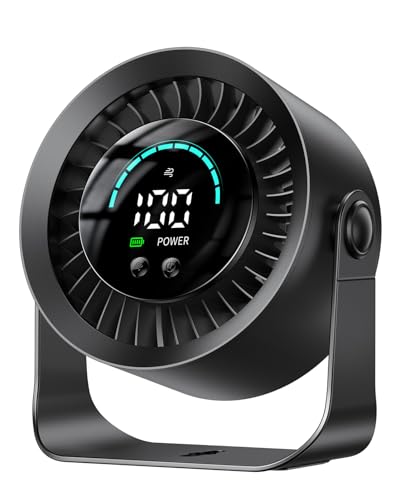
- 100 stepless speed settings
- Up to 17 hours on low
- 360° rotation and wall-mount option
Best For: Cordless, flexible creator setups
Continuous USB Cooling
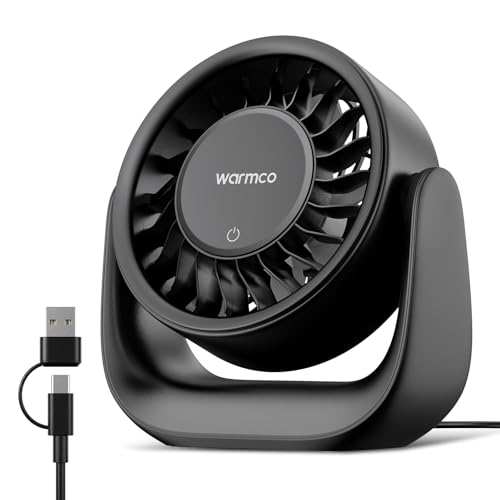
- USB-C and USB-A power cable
- Seven blades and up to 6 m/s airflow
- 120° tilt with three touch-controlled speeds
Best For: Stationary desks needing steady plug-in airflow
Portable Value Pick

- Lightweight 5.5-inch portable design
- Three speeds with up to 5.3 m/s wind speed
- Detachable cover and stable anti-slip base
Best For: Traveling creators and compact workspaces
Best for Easy Setup
- 25 dB low-noise operation
- Four speeds with 5.2 m/s maximum airflow
- 360° adjustable and easy to clean
Best For: Quiet personal cooling beside a content-creation desk
Simple Budget Pick

- Lightweight 6.3-ounce design
- Three speeds with adjustable tilt
- Non-slip base and 4.9-foot USB cable
Best For: Basic plug-in cooling for compact creative workspaces
Best for Comfort
KIMMOO Rechargeable USB Desk Fan

- 100 speed levels with digital display
- Up to 8.5 hours of battery-powered cooling
- Turbo airflow and portable tabletop design
Best For: Cordless creative setups needing precise airflow control
Compact Quiet Pick

- Three-blade focused airflow
- Approximately 45 dB operation
- USB-A powered with 39.3-inch cable
Best For: Stationary creator desks needing simple personal cooling
Best Heavy-Duty Pick
100-Speed Rechargeable Desk Fan

- 100 speed levels with digital display
- 120-degree oscillation
- 3000 mAh battery with USB-C charging
Best For: Creators wanting precise, cordless airflow control
Best Two-Pack Value

- Two compact fans in one pack
- Three speeds with 360-degree angle adjustment
- Stable bases with silicone vibration pads
Best For: Multi-area desks and budget-conscious creator setups
Quiet Compact Pick – SWEETFULL Small USB Desk Fan
For content creators seeking USB desk fans for content creators, the SWEETFULL is a compact, straightforward option for keeping air moving around a filming or editing workspace. Its 5.8-inch airflow area, three speeds, adjustable positioning, and USB power make it easy to place beside a laptop, monitor, or camera setup.
Best For: Small desks, quiet office work, and creators who want simple USB-powered cooling.
Pros:
- Operates below 25 dB according to the product bullet points, supporting focused work and recording environments.
- Offers three speed settings with one-button control.
- Tilts through 360° for flexible airflow direction.
- Removable front cover simplifies cleaning.
Cons:
- No built-in battery; it must remain connected to a USB power source.
- No wall adapter is listed as included.
The SWEETFULL stands out as a lightweight, low-profile fan for creators who prioritize easy positioning and uncomplicated controls. It is best suited to personal cooling rather than covering a large room.
Most Adjustable – DIGIX 100-Speed Rechargeable Desk Fan
The DIGIX gives content creators unusually fine control over personal airflow. With 100 stepless settings, 360° rotation, a rechargeable battery, and tabletop or wall-mount use, it can adapt to desk work, mobile filming areas, and spaces where cable-free placement is useful.
Best For: Creators who want cordless flexibility, precise speed control, and multiple placement options.
Pros:
- Provides 100 speed levels for detailed airflow adjustment.
- Its 3000mAh battery offers up to 17 hours on low speed.
- Supports 360° rotation and tabletop or wall-mounted use.
- Built-in LED display shows speed and remaining battery power.
Cons:
- Battery-powered operation requires charging for cordless use.
- Its feature-rich design may be more than needed for basic desk cooling.
For creators who move between editing stations, filming locations, or shared workspaces, the DIGIX is the most versatile choice here. Its 23 dB noise specification and battery indicator also suit focused work and portable setups.
Continuous USB Cooling – Warmco DS1 6.4-Inch Desk Fan
The Warmco DS1 is a practical plug-in choice for content creators who prefer continuous USB cooling without recharging a battery. Its seven-blade design, three speeds, 120° vertical tilt, and USB-C/USB-A cable make it suitable for office desks, editing stations, and bedside workspaces.
Best For: Stationary workspaces where steady USB-powered airflow matters more than cordless portability.
Pros:
- Includes a 2-in-1 USB-C and USB-A power cable for flexible connections.
- Seven-blade design provides airflow up to 6 m/s according to the supplied notes.
- Offers three speeds with touch control and 120° vertical adjustment.
- Compact 6.4-inch body fits smaller desks and shelves.
Cons:
- No battery, so it needs a suitable 5V/2A USB power source.
- Low-speed noise is listed at about 50 dB, with higher speeds producing more operating noise.
The DS1 is a sensible pick for creators who work in one place and want dependable plug-in airflow. Its dual-connector cable is especially convenient when switching between a laptop, monitor, USB adapter, or desktop computer.
Portable Value Pick – Gaiatop 5.5-Inch USB Desk Fan
The Gaiatop is a compact option for content creators who need a lightweight fan that can move between a desk, nightstand, car, or travel setup. It uses USB power, offers three speed modes, and includes a detachable cover and stable base for practical everyday use.
Best For: Travel-friendly creator setups, small desks, and users who want simple three-speed cooling.
Pros:
- Compact 5.5-inch design weighs about 0.6 lb for easy portability.
- Three speed modes cover gentle personal airflow through stronger cooling.
- USB power works with laptops, power banks, car chargers, and USB adapters.
- Detachable cover and silicone base pads support cleaning and stability.
Cons:
- No wall charger is included.
- Noise is listed at 30–50 dB, depending on speed.
- It requires a 5V/2A power supply.
The Gaiatop offers a useful balance of portability, basic controls, and flexible USB compatibility. It is a good fit when a creator needs personal cooling on location but does not require battery operation or advanced speed adjustment.
Best for Easy Setup – SWEETFULL 5-Inch USB Desk Fan
For content creators seeking USB desk fans for content creators, the SWEETFULL S36 is a compact option for cooling a workstation without adding much noise or taking up valuable desk space. Its four speeds, 360° adjustable head, and USB power make it easy to position near a camera, monitor, or editing setup.
Best For: Quiet desk cooling during recording, editing, studying, or streaming.
Pros:
- Quiet operation rated as low as 25 dB.
- Four speed settings, including a maximum airflow of 5.2 m/s.
- Compact 0.61-pound design with a 360° adjustable head.
- Detachable rear cover makes blade and interior cleaning easier.
Cons:
- No built-in battery; it must remain connected to a USB power source.
- Its small size is intended for personal airflow rather than broad room circulation.
The S36 is a practical choice when quiet operation and a small footprint matter most. The included 4.9-foot cable allows flexible placement, but creators who need cordless operation should consider a rechargeable model.
Simple Budget Pick – TriPole 5.1-Inch USB Desk Fan
The TriPole TF01 is a straightforward choice among USB desk fans for content creators who want plug-in cooling for a compact workstation. Its three speeds, adjustable tilt, non-slip base, and 4.9-foot cable provide basic positioning flexibility for desks, home offices, and portable setups.
Best For: Small desks and creators who already have a USB charger, laptop, or power bank available.
Pros:
- Lightweight 6.3-ounce design that is easy to carry.
- Three adjustable speeds controlled by a rear button.
- 360° up-and-down rotation helps direct airflow.
- Non-slip base helps keep the fan stable and reduce operating noise.
Cons:
- Requires continuous USB connection and has no built-in battery.
- A wall charger is not included.
- Three speeds offer less fine control than models with more settings.
The TF01 focuses on portability and uncomplicated operation. It suits creators who need inexpensive personal airflow near a laptop or recording area, provided a compatible USB power source is within reach.
Best for Comfort – KIMMOO Rechargeable USB Desk Fan
For creators who want cordless flexibility, the KIMMOO rechargeable fan stands out among USB desk fans for content creators with 100 speed levels, a digital display, and up to 8.5 hours of stated battery life. Its compact tabletop design can support recording, editing, or travel without requiring a constant cable connection.
Best For: Creators who need precise airflow control and portable, rechargeable cooling.
Pros:
- 100 speed levels allow highly precise airflow adjustment.
- Rechargeable battery provides up to 8.5 hours of continuous cooling.
- LED display shows battery status and selected wind speed.
- Turbo airflow mode and flexible positioning support faster cooling.
Cons:
- At 35 dB on its lowest setting, it is not the quietest option listed.
- Charging requires a 5V/2A adapter, which is not specified as included.
- Its 0.92-pound weight is higher than the smallest plug-in models.
The KIMMOO is the most versatile option here for creators who move between rooms or locations. Its rechargeable design and granular controls add convenience, while the digital display makes monitoring speed and remaining power straightforward.
Compact Quiet Pick – 5.5-Inch USB Desk Fan
For content creators who need close-range cooling without taking much desk space, this USB desk fan for content creators uses three broad blades and a compact 5.5-inch housing. Its attached USB-A cable works with a laptop, power bank, wall adapter, car USB port, or another compatible 5V source.
Best For: Creators who want a simple, lightweight fan beside a camera, microphone, laptop, or editing setup.
Pros:
- Three large blades provide focused personal airflow.
- Approximately 45 dB operation is suited to calls and focused work.
- Lightweight 6.35-ounce design includes a carry or hang loop.
- The 39.3-inch attached cable offers useful reach to a nearby USB source.
Cons:
- It has a fixed-leg design with no tilt, folding, or telescoping adjustment.
- There is no internal battery, so it must stay connected while running.
- The power adapter and power bank are not included.
This is a straightforward choice for a stationary creator desk where quiet, personal airflow matters more than oscillation, wireless use, or broad room circulation.
Best Heavy-Duty Pick – 100-Speed Rechargeable Desk Fan
This USB desk fan for content creators is designed for precise comfort during recording, editing, or streaming. It offers 100 speed levels, a digital display, 120-degree oscillation, USB-C charging, and a built-in 3000 mAh battery for cordless use.
Best For: Creators who want fine airflow control, quiet operation, and the flexibility to move a fan around a home office or studio.
Pros:
- One hundred speed levels make it easy to fine-tune airflow.
- The digital display shows the selected speed clearly, including in the dark.
- 120-degree oscillation helps distribute airflow across a wider area.
- The rechargeable battery supports approximately 3 to 10 hours of operation and USB-C use.
Cons:
- Its 14.4-ounce weight is heavier than the smallest wired mini fans.
- Battery runtime varies from approximately 3 to 10 hours depending on use.
- The supplied information describes wall mounting but does not specify a mounting installation process.
Among these USB desk fans, this is the most feature-rich option for creators who alternate between plugged-in desk sessions and cordless use, especially when precise speed control is useful.
Best Two-Pack Value – TriPole Mini USB Fans, 2-Pack
For multi-device workspaces, this two-pack gives content creators two compact USB desk fans for separate areas such as a desk and shooting space. Each fan has three speeds, a 360-degree up-and-down angle adjustment, a wide stable base, and a 4.9-foot USB-A cable.
Best For: Creators who need affordable personal airflow in more than one location, such as a desk, nightstand, or travel setup.
Pros:
- Two fans provide flexible coverage for separate work areas.
- Three speed modes offer simple airflow adjustment.
- 360-degree vertical angle adjustment helps direct air where needed.
- Wide bases and silicone pads help reduce movement and vibration.
Cons:
- These are wired USB-A fans with no rechargeable battery.
- Only three speed settings are available, rather than fine-grained control.
- The compact design is intended for personal airflow, not whole-room circulation.
This pair is a practical pick when a creator wants two inexpensive, space-saving fans and does not need wireless operation or advanced controls.
How We Picked the Best USB Desk Fans for Content Creators
We focused on features that matter at a content-creation desk: noise control, airflow adjustment, positioning flexibility, power options, footprint, and practical controls. A fan may be used beside a microphone, camera, monitor, or laptop, so quiet operation and stable placement received particular attention.
We also included both USB-powered and rechargeable designs. Plug-in models are convenient for permanent workstations, while battery-powered fans are more useful for mobile filming, outdoor shoots, or desks where cable clutter is a concern. Product claims such as speed count, rotation range, and noise level should still be checked against the manufacturer’s specifications before purchase.
Quick Comparison
| Best For | Look For | Why It Matters |
|---|---|---|
| Streaming and voice recording | Quiet motor and low-speed control | Helps limit unwanted background noise |
| Hot editing workstations | Wide speed range or turbo airflow | Makes it easier to balance comfort and noise |
| Mobile creators | Rechargeable battery and carry loop | Provides cooling away from a wall outlet |
| Small desks | Compact base and adjustable tilt | Preserves room for lights, cameras, and accessories |
| Multi-person setups | 360-degree or broad-angle rotation | Directs airflow across more than one position |
Key Buying Factors for USB Desk Fans for Content Creators
Noise and Microphone Placement
Choose a fan with a genuinely usable low setting, not merely a high maximum speed. Place it to the side or behind the microphone when possible, and test it with your usual recording gain. A brushless motor or published noise rating can be helpful, but real-world sound depends on distance and airflow turbulence.
Speed Control and Airflow
Three speeds are simple and reliable, while 100-speed controls offer finer adjustment for balancing cooling against recording noise. Turbo modes can be useful during hot editing sessions, but they are rarely ideal while speaking on camera.
Power, Battery, and Controls
USB-powered fans work well at a desk, laptop, hub, or power bank. Rechargeable models add flexibility but require charging and may become less convenient if the battery wears out. Digital displays can make settings easier to repeat, while physical buttons are often faster to operate without looking away from a project.
Positioning and Stability
Adjustable tilt, rotating heads, and sturdy legs help aim airflow without blowing directly across a microphone or loose papers. Check the base dimensions and cable direction, especially if your workspace already includes a monitor arm or compact keyboard tray.
Who Should Buy Which USB Desk Fans for Content Creators?
Choose a quiet three-speed mini fan if you record voiceovers, stream near a sensitive microphone, or want straightforward controls. Select a rechargeable model with a wide speed range if you move between rooms or film in changing locations. A rotating fan is a better fit for shared desks or setups where airflow must reach more than one area. For a permanent workstation, a compact USB-powered model is usually the simplest and most dependable choice.
Whichever style you choose, prioritize low-speed noise, secure placement, and convenient power over impressive maximum airflow alone. Those details have the greatest effect on comfort and recording quality.
