
If Wi-Fi feels inconsistent or your internet plan has outgrown gigabit Ethernet, a USB-C adapter can deliver a fast, stable wired connection with minimal setup.
This roundup of the best USB-C to 2.5GbE adapters for 2026 focuses on compatibility, build quality, and real-world value so you can choose confidently.
Best 9 USB C to 2 5gbe Adapters Picks for 2026
Best for Stable 2.5GbE Performance
Cable Matters USB C to 2.5Gb Ethernet Adapter
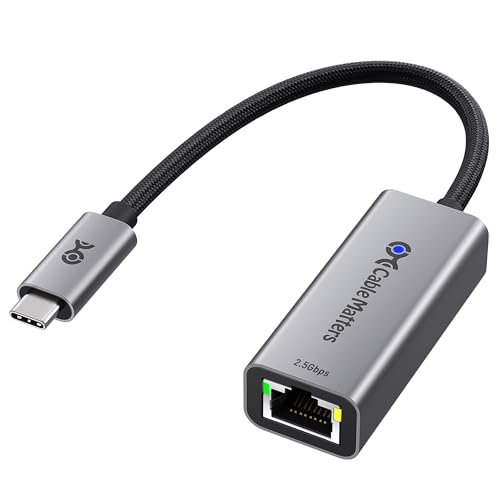
- Up to 2.5Gbps wired networking
- Durable aluminum body with braided cable
- Wide compatibility across USB-C and Thunderbolt devices
Best For: Users who want a tough, dependable 2.5GbE adapter for laptops and USB-C devices.
Best for Dell Systems
Dell USB-C to 2.5Gbps Ethernet Adapter

- 2.5Gbps wired networking in a compact USB-C adapter
- Built-in driver supports easy plug-and-play setup
- OEM-grade Dell build aimed at reliable compatibility
Best For: Dell users who want a compact, dependable 2.5GbE Ethernet adapter.
Best for Easy Setup
TP-Link UE302C 2.5GbE USB-C Adapter

- 2.5Gbps wired speeds for fast transfers and streaming
- Plug-and-play setup with broad OS support
- Compact aluminum build for portability and durability
Best For: Anyone who wants a simple, portable USB-C adapter for faster wired networking.
Best for Charging Laptops
Cable Matters 5GbE Adapter with 140W PD

- 5GbE networking for faster wired transfers
- Up to 140W USB-C pass-through charging
- Durable aluminum body with braided cable
Best For: MacBook and USB-C laptop users who want fast Ethernet and charging from one adapter.
Best for True 5GbE Speeds
SABRENT USB-C to 5G Ethernet Adapter

- Up to 5GbE with automatic fallback to slower speeds
- Plug-and-play on Windows 10/11 and macOS
- Durable aluminum build with good heat handling
Best For: People who want a USB-C Ethernet adapter that can go beyond 2.5GbE on a capable network.
Best for Dual-Port Compatibility
Plugable 2.5Gbps USB-C/USB-A Ethernet Adapter

- Works with both USB-C and USB-A ports
- 2.5Gbps speed for faster wired networking
- Aluminum housing and braided cable for durability
Best For: People who need a versatile 2.5GbE adapter that works across mixed-device setups.
Best for Easy Cross-Platform Setup
StarTech 2.5GbE USB-C Ethernet Adapter

- 2.5GbE speeds over existing Cat5e cabling
- Works across Windows, macOS, Linux, ChromeOS, and iOS
- Compact, bus-powered USB-C design with attached cable
Best For: Users who need a broadly compatible USB-C to 2.5GbE adapter for mixed-device environments.
Best for 2.5Gb Upgrades
UGREEN USB C to 2.5G Ethernet Adapter

- Up to 2.5Gb wired speeds
- Realtek chip for stable, cooler operation
- Aluminum build with broad USB-C compatibility
Best For: People upgrading to 2.5Gb networking who want a compact, dependable USB-C Ethernet adapter.
Best 5Gb Upgrade
UGREEN USB C to Ethernet Adapter 5Gb

- 5Gb performance for faster wired transfers
- Aluminum thermal design helps manage heat
- Windows 11, macOS 15+, and Linux 5.17 support
Best For: Users who want a fast 5Gb USB-C Ethernet adapter for supported devices and networks.
Best for Stable 2.5GbE Performance – Cable Matters USB C to 2.5Gb Ethernet Adapter
If you want one of the more reliable usb c to 2 5gbe adapters for everyday use, this Cable Matters option is built for fast wired networking with broad device support. It’s a practical pick for MacBooks, laptops, tablets, and other USB-C systems when you want 2.5GbE speeds without a complicated setup.
Best For: Buyers who want a durable, plug-and-play USB-C Ethernet adapter for faster wired internet on modern laptops and USB-C devices.
Pros:
- Supports up to 2.5Gbps for faster downloads, streaming, gaming, and file transfers
- Aluminum housing and braided cable improve durability and heat dissipation
- Works with USB4, Thunderbolt 4/5, macOS, Windows, Linux, Chrome OS, and iOS
- Plug-and-play on most systems, with driver support available for best performance
Cons:
- May need a Realtek driver update on some older systems or Linux kernels
- Not compatible with Android devices
- Speed gains depend on having a 2.5GbE-capable network
Among usb c to 2 5gbe adapters, this one stands out for its sturdy build and wide compatibility rather than flashy extras. If you care most about dependable wired speed and long-term reliability, it’s an easy model to shortlist.
Best for Dell Systems – Dell USB-C to 2.5Gbps Ethernet Adapter
If you want a simple wired upgrade among usb c to 2 5gbe adapters, Dell’s USB-C to 2.5Gbps Ethernet Adapter is built for straightforward speed and dependable compatibility. It offers up to 2.5Gbps performance in a compact form factor, making it a practical choice for workstations, cloud workflows, and anyone who prefers a plug-and-play connection over wireless instability.
Best For: Dell laptop and desktop users who want a compact, brand-matched 2.5GbE adapter with easy setup.
Pros:
- Up to 2.5Gbps transfer speeds for faster wired networking
- Built-in driver and plug-and-play setup for quick use
- Compact, lightweight design for travel and desk setups
- Genuine Dell parts with OEM-grade components
Cons:
- Best fit is clearly for Dell users, not broad universal buyers
- Single-purpose Ethernet adapter with no extra ports
- May be more expensive than generic alternatives
For buyers comparing usb c to 2 5gbe adapters, this Dell model stands out for its clean setup, compact build, and reliability-focused approach. It is less about feature-packed versatility and more about getting stable 2.5GbE performance with minimal hassle.
Best for Easy Setup – TP-Link UE302C 2.5GbE USB-C Adapter
If you want one of the simplest usb c to 2 5gbe adapters for a faster wired connection, the TP-Link UE302C is a strong plug-and-play option. It delivers up to 2.5Gbps speeds, works across major operating systems, and is easy to carry between a laptop, tablet, or compatible phone.
Best For: Users who want a fast, no-driver USB-C Ethernet adapter for laptops, tablets, and other portable devices.
Pros:
- Up to 2.5Gbps speeds for faster downloads, transfers, and streaming
- Plug-and-play setup with broad support across Windows, macOS, iPadOS, Chrome OS, Linux, and iOS
- Aluminum alloy housing with a compact, travel-friendly design
- Compatible with USB-C and Thunderbolt 3/4 devices
Cons:
- Requires a 2.5Gb-capable router, switch, or network to reach full speed
- Wired-only design means no added USB ports or other expansion features
For shoppers comparing usb c to 2 5gbe adapters, this model stands out for its easy setup, wide compatibility, and solid everyday performance. It is a practical pick if you want faster wired networking without dealing with drivers or bulky hardware.
Best for Charging Laptops – Cable Matters 5GbE Adapter with 140W PD
If you want one of the more capable usb c to 2 5gbe adapters for a desk or travel setup, this Cable Matters model stands out because it combines 5GbE networking with up to 140W USB-C charging. It is a practical pick for fast wired internet, especially if you move large files, stream in high resolution, or want a steadier connection than Wi‑Fi.
Best For: MacBook and USB-C laptop users who want fast Ethernet and pass-through charging from a single adapter.
Pros:
- 5GbE speeds can outperform typical 2.5GbE adapters when your network supports it
- Up to 140W USB-C Power Delivery helps keep laptops charged while connected
- Compatible with USB4, Thunderbolt 5/4/3, Mac, Windows, and many USB-C devices
- Aluminum housing and braided cable add durability and better heat handling
Cons:
- Needs compatible high-speed USB-C and 5GbE network gear to reach top performance
- Windows and some Linux setups may need the latest Realtek driver
- Not intended for Android devices
For buyers comparing usb c to 2 5gbe adapters, this one makes sense if you would rather step up to 5GbE and get charging in the same compact device. It is less about lowest cost and more about speed, power, and convenience in a single adapter.
Best for True 5GbE Speeds – SABRENT USB-C to 5G Ethernet Adapter
If you’re comparing usb c to 2 5gbe adapters and want a model that can actually move past 2.5GbE when your network is ready, the SABRENT NT-C5GA is built for that job. It’s a practical pick for faster wired networking on USB-C laptops and tablets, as long as your port, cable, and switch/router all support the needed speed.
Best For: Users who want a plug-and-play USB-C adapter for 5GbE networks, with automatic fallback to 2.5GbE and lower speeds when needed.
Pros:
- Can negotiate all the way up to 5GbE, with backward support for 2.5GbE, 1GbE, and slower links.
- No-driver setup on Windows 10/11 and macOS makes it easy to get running quickly.
- Aluminum shell helps with durability and heat dissipation during extended use.
- Works with data-capable USB-C ports, not just newer devices with power-only USB-C.
Cons:
- Requires the right setup to reach full 5Gbps performance.
- Some Linux and other systems may need manual driver installation.
- Not a fit for USB-C ports that only provide charging.
For buyers weighing usb c to 2 5gbe adapters, this one stands out if you want a future-ready option that can exceed 2.5GbE and still stay compatible with slower networks. Just be sure your cable and upstream hardware match the speed you expect.
Best for Dual-Port Compatibility – Plugable 2.5Gbps USB-C/USB-A Ethernet Adapter
If you want one of the most flexible usb c to 2 5gbe adapters, this Plugable model is a smart pick for laptops, tablets, and desktops that may need either USB-C or USB-A connectivity. It delivers 2.5Gbps networking for faster file transfers, smoother streaming, and more reliable wired access than Wi-Fi.
Best For: Buyers who want a single adapter that works across both USB-C and USB-A devices while upgrading to 2.5GbE.
Pros:
- Dual USB-C and USB-A input support adds broad compatibility
- 2.5Gbps speeds help reduce bottlenecks on faster networks
- Aluminum shell and braided cable improve durability
- Uses a Realtek chipset for straightforward high-speed Ethernet upgrades
Cons:
- Full 2.5Gbps performance depends on compatible network hardware
- Needs a USB 3.0 or higher port and Cat6 or better cable
For shoppers comparing usb c to 2 5gbe adapters, this one stands out for its practical dual-input design and dependable build, making it a strong everyday upgrade rather than a niche accessory.
Best for Easy Cross-Platform Setup – StarTech 2.5GbE USB-C Ethernet Adapter
If you want one of the more straightforward usb c to 2 5gbe adapters for upgrading a laptop, tablet, or phone, this StarTech model is built for broad compatibility and simple plug-in use. It delivers 2.5GbE over USB-C, works with existing Cat5e cabling, and is a practical pick for faster file transfers, smoother calls, and more reliable wired networking.
Best For: Buyers who want a cross-platform USB-C to 2.5GbE adapter that works across Windows, macOS, Linux, ChromeOS, iOS, and Thunderbolt-equipped devices.
Pros:
- Supports 2.5Gbps networking over existing Cat5e cable
- Broad OS support, including Windows, macOS, Linux, ChromeOS, and iOS
- Compact, bus-powered design with attached USB-C cable
- Thunderbolt compatible and auto-negotiates multiple speeds
Cons:
- Not a full 5GbE or 10GbE upgrade
- Jumbo frames are not supported in macOS
For shoppers comparing usb c to 2 5gbe adapters, this one stands out for compatibility and convenience rather than flashy extras. It is a solid fit if you want a dependable wired speed boost without replacing your existing network cabling.
Best for 2.5Gb Upgrades – UGREEN USB C to 2.5G Ethernet Adapter
If you’re comparing usb c to 2 5gbe adapters for a faster wired connection, this UGREEN model is a straightforward way to add 2.5Gb Ethernet to a USB-C laptop, tablet, or phone. It’s a practical pick for NAS transfers, smoother 4K/8K streaming, and any setup where Wi-Fi or 1Gb Ethernet is starting to feel limiting.
Best For: Users upgrading from 1Gb to 2.5Gb networking who want a compact, durable adapter for laptops and mobile devices.
Pros:
- Supports up to 2.5Gb speeds for faster downloads and file transfers
- Realtek RTL8156BG chip is designed for stable performance and lower heat
- Aluminum housing adds durability for frequent plug-and-unplug use
- Works with a wide range of USB-C devices, including MacBook, XPS, iPad, and iPhone models
Cons:
- Needs 2.5Gb-capable networking gear to reach its full speed potential
- More adapter than casual users need if 1Gb Ethernet is already sufficient
For buyers focused on usb c to 2 5gbe adapters, this is a solid middle-ground option: fast, widely compatible, and built for everyday wired reliability rather than flashy extras.
Best 5Gb Upgrade – UGREEN USB C to Ethernet Adapter 5Gb
If you’re comparing usb c to 2 5gbe adapters and want more headroom than basic gigabit, this UGREEN model is built for faster wired transfers, NAS work, and other bandwidth-heavy tasks. It supports 5Gb speeds, uses an aluminum body for better cooling, and is meant to plug directly into a compatible USB 3.2 Gen2 or higher port for best results.
Best For: Users who want a fast 5Gb USB-C Ethernet adapter for a supported laptop, desktop, or MacBook with minimal fuss.
Pros:
- 5Gb Ethernet can deliver a big jump over standard gigabit for downloads and file transfers
- Aluminum housing and thermal design help keep heat under control during sustained use
- Broad support for Windows 11, macOS 15+, and Linux Kernel 5.17 with proper setup
- Supports useful network features like Wake-on-LAN and Auto MDI/MDIX
Cons:
- Apple compatibility is limited to M3 and newer chips
- Windows and Linux require driver installation
- Needs the right cable, router, and host port to reach full 5Gb speeds
Overall, this is a strong pick for usb c to 2 5gbe adapters if you care more about top-end wired speed and cooling than universal plug-and-play compatibility. Just make sure your device and network gear can actually take advantage of the 5Gb bandwidth.
How We Picked the Best USB C to 2 5gbe Adapters
We focused on adapters that are easy to deploy, broadly compatible, and relevant for everyday buyers. Priority went to models with solid chipset support, dependable driver behavior, and clear compatibility with modern laptops, tablets, and docks. We also weighed enclosure quality, thermal design, and whether the adapter can sustain 2.5GbE speeds without instability.
Quick Comparison
Most buyers only need a straightforward USB-C to RJ45 adapter that supports 2.5GbE and plugs in cleanly on USB4 or Thunderbolt systems. If you want a simpler setup for home or office use, a compact 2.5GbE model is usually the best value. If you need more headroom for local transfers, multi-gig networking, or future-proofing, the 5GbE options in this list may be worth the premium.
Key Buying Factors for USB-C to 2.5GbE Adapters
Host Port Support
Check whether your device has USB-C, USB4, or Thunderbolt. Most USB C to 2 5gbe Adapters will work over USB-C, but actual performance and compatibility can vary based on the host controller and operating system.
Speed and Network Standard
2.5GbE is a practical upgrade over 1GbE and works well with compatible switches, routers, and NAS devices. If your network hardware is still gigabit-only, you will not see the full benefit.
Thermals and Build Quality
Multi-gig adapters can run warm, especially under sustained transfers. Aluminum housings and better ventilation often help maintain stable performance during backups, media editing, or file syncs.
Power Delivery and Extras
Some users may prefer pass-through charging or a 2-in-1 design with USB-A and USB-C support. These conveniences matter most for travel, dock replacement, and minimalist desk setups.
Who Should Buy Which USB C to 2 5gbe Adapters?
Choose a basic 2.5GbE adapter if you want the best value for home internet, office networking, or light NAS access. Pick a premium model if you need broader compatibility, a tougher enclosure, or a cleaner fit with Thunderbolt laptops and modern ultrabooks.
If your workflow includes large local transfers, frequent backups, or multiple high-speed devices on the same network, consider one of the faster 5GbE-capable options. For most people, though, USB C to 2 5gbe Adapters offer the ideal balance of speed, simplicity, and price.
