
If you need faster wired networking for a laptop, workstation, or NAS, the right adapter can make a big difference. USB-C to 10GbE adapters are a simple way to unlock multi-gig speeds without replacing your device.
Below, we focus on real-world compatibility, thermal design, and connection standards so you can choose a model that fits your setup and your network gear.
Best 10 USB C to 10gbe Adapters Picks for 2026
Best for 10GbE Speed

- True 10GbE on USB4 and Thunderbolt 3/4/5
- Auto-negotiates to slower multi-gig and gigabit speeds
- Bus-powered aluminum build with WOL and PXE support
Best For: Power users who want full 10GbE performance from a USB4 or Thunderbolt system.
Best for Fast Charging and OTG Use
BOMIE USB C to USB Adapter 2-Pack

- 10Gbps data transfer for quick file moves
- Up to 120W charging support on compatible devices
- OTG-friendly for flash drives, keyboards, and more
Best For: People who need a compact USB-C adapter for charging and everyday accessory connections.
Best for Low-Heat Operation
Cable Matters USB-C 10Gb Ethernet Adapter

- Cool-running Realtek RTL8159 chipset
- Supports USB-C, USB4, and Thunderbolt 3/4/5
- Strong option for NAS, backups, and large transfers
Best For: People who want a quiet, low-heat 10GbE adapter for Macs or Windows PCs.
Best for 5GbE Upgrades

- True 5GbE speeds with compatible USB 3.1 Gen 1+ hardware
- Clear USB-C data-port compatibility guidance
- Plug-and-play on Windows 10/11 and macOS
Best For: Users who want a simple USB-C-to-ethernet upgrade for 5GbE networks.
Best for 95W Charging
WAVLINK USB-C to Ethernet Adapter

- 5Gbps Ethernet for faster-than-gigabit wired networking
- 95W USB-C Power Delivery for pass-through charging
- Driver-free setup on major desktop and mobile platforms
Best For: Users who want fast wired internet and charging from one USB-C adapter.
Best for Speed and OS Flexibility
USB-C 10GbE Adapter with Realtek 8159

- Realtek 8159 chipset for broad compatibility
- Bus-powered aluminum build with no external adapter
- Auto-senses 10G through 100M links
Best For: Portable 10GbE networking across Windows, macOS, Linux, and NAS devices.
Best for 5GbE + Charging
Cable Matters USB C 5GbE Adapter

- 5GbE wired networking up to 5000 Mbps
- Up to 140W USB-C pass-through charging
- USB4 and Thunderbolt 5/4/3 compatibility
Best For: Users who want faster Ethernet and laptop charging in one compact USB-C adapter.
Best for Portable Gigabit Ethernet
Anker USB-C to Gigabit Ethernet Adapter

- Up to 1 Gbps wired speeds
- Ultra-compact and travel-friendly
- Premium aluminum and braided cable
Best For: People who want a simple, portable USB-C Ethernet adapter for stable everyday networking.
Best for Low-Heat 10GbE
USB C to 10GbE Adapter with RTL8159
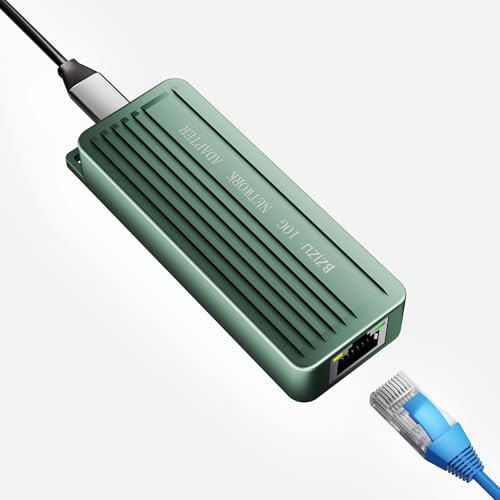
- Runs cool thanks to the RTL8159 chip and aluminum body
- Supports 10G, 5G, 2.5G, 1G, and 100Mbps auto-negotiation
- Compatible with Thunderbolt 3/4, MacBook Pro, and Windows 11
Best For: People who want a stable, low-heat 10GbE adapter for laptops and NAS setups.
Best 2.5Gb Upgrade
UGREEN USB C to Ethernet Adapter 2.5G

- Up to 2.5Gb wired networking
- Realtek RTL8156BG for stable performance
- Aluminum build with broad USB-C compatibility
Best For: People who want a durable, easy 2.5Gb Ethernet upgrade for USB-C devices.
Best for 10GbE Speed – SABRENT USB4 to 10GbE Adapter
If you want one of the fastest usb c to 10gbe adapters for a USB4 or Thunderbolt setup, this Sabrent model is built for true 10GbE networking. It’s a strong fit for users with a 10GbE NAS, multi-gig switch, or fast router who want wired performance beyond standard gigabit.
Best For: Power users and IT-minded buyers who need full 10GbE performance on USB4 or Thunderbolt 3/4/5 systems.
Pros:
- Supports true 10GbE on USB4 and Thunderbolt 3/4/5 ports
- Auto-negotiates down to 5GbE, 2.5GbE, 1GbE, and Fast Ethernet
- Bus-powered aluminum design helps with portability and heat management
- Includes USB4 cable and supports WOL plus PXE boot
Cons:
- Not compatible with standard USB 3.x ports
- Windows and Linux require a manual driver install
- Ethernet cable is not included
For buyers comparing usb c to 10gbe adapters, this is a performance-first option with the right mix of speed, backward compatibility, and pro features. Just make sure your computer has USB4 or Thunderbolt and your network is ready for 10GbE.
Best for Fast Charging and OTG Use – BOMIE USB C to USB Adapter 2-Pack
If you want a compact accessory that does more than just basic connectivity, this 2-pack BOMIE adapter is a practical pick for usb c to 10gbe adapters-style shopping, especially if you care about speed, charging, and everyday OTG support. It pairs 10Gbps data transfer with up to 120W charging support, making it useful for laptops, tablets, and phones that need a simple USB-C to USB-A bridge.
Best For: Users who want a small, durable USB-C adapter for fast charging, flash drives, keyboards, and other USB accessories.
Pros:
- 10Gbps transfer speed is solid for moving large files quickly
- Supports up to 6A/120W charging for compatible devices
- OTG support expands what you can connect to a USB-C phone or tablet
- Metal build and tested connectors add confidence for daily use
Cons:
- Not an actual 10GbE network adapter, despite the keyword overlap
- OTG functionality depends on your device supporting it
- USB-A female design means it won’t connect peripherals that require USB-C
For buyers comparing usb c to 10gbe adapters, this is really a high-speed USB-C to USB-A adapter rather than a network accessory. Still, it stands out if your priority is fast charging plus reliable data and peripheral connectivity in a tiny, travel-friendly form factor.
Best for Low-Heat Operation – Cable Matters USB-C 10Gb Ethernet Adapter
If you want one of the more practical usb c to 10gbe adapters for everyday high-speed networking, this Cable Matters model stands out for its cooler-running design and broad USB-C, USB4, and Thunderbolt compatibility. It’s a strong fit for NAS transfers, large backups, and other workloads where stable wired speed matters more than flashy specs.
Best For: Users who want a low-heat, silent 10GbE adapter for Mac or Windows workflows, especially with NAS use and large file transfers.
Pros:
- 10GbE support with auto-negotiation down to 100M for flexible network compatibility
- Realtek RTL8159 chipset is designed for efficient power use and minimal heat
- Works with USB-C, USB4, and Thunderbolt 5/4/3 devices on Mac and Windows
- Rugged aluminum housing and braided pigtail cable help with durability
Cons:
- Real-world speeds are below the theoretical 10GbE maximum
- Windows may need the latest Realtek driver for best performance in some setups
- Not compatible with Android or Xbox One S
For buyers comparing usb c to 10gbe adapters, this is a balanced pick if you care about heat, noise, and cross-platform support more than peak benchmark numbers. It’s especially appealing for docked desktop setups and mobile workstations that need dependable wired throughput.
Best for 5GbE Upgrades – SABRENT USB-C to 5GbE Adapter
If you’re comparing usb c to 10gbe adapters but your network only needs 5GbE, this Sabrent adapter is a straightforward way to get faster wired speeds without moving up to a pricier 10GbE setup. It’s designed for data-capable USB-C ports, supports auto-negotiation down to 100Mbps, and uses an aluminum body for better durability and heat management.
Best For: Users who want a simple USB-C-to-ethernet upgrade for 5GbE networks, especially on Windows or macOS laptops with compatible data ports.
Pros:
- Delivers true 5GbE speeds with the right USB 3.1 Gen 1+ host, cable, and switch/router
- USB-C compatibility is clearly defined, helping avoid power-only port confusion
- Plug-and-play on Windows 10/11 and macOS with no drivers needed
- Rugged aluminum build is compact and travel-friendly
Cons:
- Not a 10GbE adapter, so it won’t suit users who need full 10Gbps networking
- Performance depends heavily on the rest of the network chain, including CAT 6a+ cabling
- Some Linux and other operating systems may require manual driver setup
As a practical middle ground, this Sabrent model makes sense when you’re shopping usb c to 10gbe adapters but realize 5GbE is the better fit for your hardware and budget. It’s a solid pick if you want clear compatibility, easy setup, and reliable everyday wired networking.
Best for 95W Charging – WAVLINK USB-C to Ethernet Adapter
If you want a wired networking upgrade that also keeps your laptop powered, this WAVLINK pick stands out among usb c to 10gbe adapters alternatives for its 5Gbps Ethernet and 95W pass-through charging. It is a practical choice for people who need faster-than-gigabit speeds, a simple plug-and-play setup, and a single USB-C connection for both internet and power.
Best For: MacBook, iPad Pro, and USB-C laptop users who want fast wired networking plus charging in one compact adapter.
Pros:
- 5Gbps Ethernet can outpace standard gigabit adapters when paired with the right cable and host port.
- 95W USB-C Power Delivery helps keep compatible devices charged during long work sessions.
- Driver-free setup makes it easy to use on modern Windows, macOS, iPadOS, Linux, and Chrome OS systems.
- Thunderbolt 3/4/5 compatibility broadens support for many newer USB-C laptops.
Cons:
- To reach top speeds, you need a USB 3.2 Gen 2 or faster port, plus CAT6A or better cabling.
- The USB-C PD port is charging-only, with no data or video support.
- It is not a true 10GbE adapter, so buyers seeking maximum wired throughput should look elsewhere.
For shoppers comparing usb c to 10gbe adapters, this model makes more sense if you value convenience, charging, and reliable 5Gbps networking over raw top-end speed. It is a strong everyday dock-style adapter for mobile work setups.
Best for Speed and OS Flexibility – USB-C 10GbE Adapter with Realtek 8159
If you want one of the more practical usb c to 10gbe adapters for a laptop, workstation, or NAS setup, this model stands out for its Realtek 8159 chipset, bus-powered design, and wide OS support. It delivers up to 10GbE over USB-C while also auto-negotiating down to 5G, 2.5G, 1G, and 100M links for easier compatibility.
Best For: Users who need a portable USB-C 10GbE adapter with strong compatibility across Windows, macOS, Linux, and NAS devices.
Pros:
- Realtek 8159 chipset for broad compatibility and reliable performance
- Bus-powered, fanless aluminum design with no external adapter required
- Supports 10G, 5G, 2.5G, 1G, and 100M Base-T auto-sensing
- Good fit for high-bandwidth workflows and fast network storage access
Cons:
- macOS requires a driver
- Top speeds depend on having a USB 3.2 Gen 2 or faster port
- Bulkier than basic 1GbE dongles due to the metal housing
Overall, this is a strong pick if you care more about dependable 10GbE performance and device compatibility than the absolute smallest form factor. Among usb c to 10gbe adapters, it’s a sensible choice for people moving large files, editing from shared storage, or upgrading a mobile workstation.
Best for 5GbE + Charging – Cable Matters USB C 5GbE Adapter
If you want a wired networking upgrade that still keeps your laptop powered, this Cable Matters adapter is a strong fit for shoppers comparing usb c to 10gbe adapters. It tops out at 5GbE rather than 10GbE, but it offers a very practical mix of fast Ethernet, USB-C charging, and broad compatibility for modern USB4 and Thunderbolt systems.
Best For: MacBook and USB-C laptop users who want faster-than-gigabit Ethernet plus up to 140W pass-through charging in one compact adapter.
Pros:
- 5GbE speeds can handle large transfers, streaming, and low-latency work well above standard gigabit
- 140W USB-C Power Delivery helps reduce cable clutter at desk setups and travel stations
- Aluminum housing and braided cable add durability and better heat handling
- Works with USB-C, USB4, and Thunderbolt devices across Mac, Windows, and more
Cons:
- It is 5GbE, so it is not a true 10GbE adapter
- Full performance depends on compatible USB 3.2 Gen 2 or faster ports and 5GbE networking gear
- Windows or Linux may need a current Realtek driver for best results
For buyers browsing usb c to 10gbe adapters, this model makes more sense if you care about charging convenience and stable 5GbE speed more than hitting the absolute highest throughput tier. It is a sensible middle ground for everyday workstations and portable setups.
Best for Portable Gigabit Ethernet – Anker USB-C to Gigabit Ethernet Adapter
If you need a simple, reliable network upgrade rather than a full docking station, this Anker adapter is a practical choice for usb c to 10gbe adapters roundup readers who mainly want stable wired internet. It tops out at 1 Gbps, so it is not a true 10GbE adapter, but it is a solid pick for everyday Ethernet on laptops, tablets, and other USB-C devices.
Best For: Users who want a compact, dependable USB-C Ethernet adapter for fast everyday wired networking on the go.
Pros:
- Delivers up to 1 Gbps for stable wired internet
- Compact, lightweight design is easy to carry
- Aluminum housing and braided cable feel more premium than basic adapters
- Works with a wide range of USB-C laptops and tablets
Cons:
- Not a true 10GbE adapter, despite being relevant to the keyword category
- Only includes Ethernet, with no extra ports or charging passthrough
This is a strong everyday Ethernet pick if your priority is portability and reliability, but shoppers comparing usb c to 10gbe adapters should note the 1Gbps limit before buying. For most users, it is an easy, low-fuss way to get a more stable connection than Wi‑Fi.
Best for Low-Heat 10GbE – USB C to 10GbE Adapter with RTL8159
If you want one of the more reliable usb c to 10gbe adapters for high-speed file transfers, this model stands out for its Realtek RTL8159 chip, aluminum housing, and support for true 10GbE over the right port. It is a practical choice for laptop and NAS users who need stable throughput for large backups, editing, or gaming.
Best For: Users who need a cool-running 10GbE adapter for Thunderbolt 3/4 or USB 3.2 Gen 2×2 systems.
Pros:
- RTL8159 chipset is designed for lower heat and steady performance
- Supports 10G, 5G, 2.5G, 1G, and 100Mbps auto-negotiation
- Aluminum shell helps dissipate heat during long transfers
- Works with Thunderbolt 3/4, MacBook Pro, and Windows 11
Cons:
- Windows requires a driver before full 10GbE speeds are available
- Needs USB 3.2 Gen 2×2 or Thunderbolt for true 10Gbps performance
- Cat6a or Cat7 cabling is recommended for best results
For buyers comparing usb c to 10gbe adapters, the main appeal here is stability: it is built to run cool and maintain speed instead of relying on a basic plastic shell and an older, hotter chip.
Best 2.5Gb Upgrade – UGREEN USB C to Ethernet Adapter 2.5G
If you need a simple way to add fast wired networking to a USB-C laptop or tablet, this UGREEN adapter is a practical pick. It’s a strong fit for buyers comparing usb c to 10gbe adapters but who really want reliable 2.5Gb performance for NAS access, large file transfers, and smoother streaming without overpaying for speed they may not use.
Best For: Users who want a dependable 2.5Gb Ethernet adapter for laptops, Macs, tablets, and select phones.
Pros:
- Up to 2.5Gb speeds for noticeably faster wired networking than standard Gigabit.
- Realtek RTL8156BG chip helps keep performance stable and power use low.
- Aluminum housing feels sturdy and is built for frequent plugging and unplugging.
- Works with a wide range of USB-C devices, including MacBook, XPS, iPad Pro, and newer iPhone models.
Cons:
- It is not a true 10Gb adapter, so it won’t suit full 10G network setups.
- Requires compatible 2.5Gb networking gear to reach its top speed.
Overall, this is a sensible upgrade if you want better-than-Gigabit wired speed in a compact, durable package. For many shoppers browsing usb c to 10gbe adapters, it may be the more affordable and more practical step up before moving to a full 10Gb setup.
How We Picked the Best USB C to 10gbe Adapters
We prioritized adapters with broad host support, stable 10GbE performance, sensible heat management, and clear compatibility with USB4 and Thunderbolt systems. We also looked for bus-powered designs, aluminum housings, and chipset choices that help reduce dropouts under sustained transfers.
Quick Comparison of USB-C to 10GbE Adapters
The biggest differences are speed tier, power delivery, and portability. Full 10GbE models are best for NAS backups, large media files, and shared storage. Lower-speed alternatives like 5GbE and 2.5GbE are useful when your device, cable, or network switch does not fully support 10GbE yet.
Key Buying Factors for USB-C to 10GbE Adapters
Host Port Compatibility
Make sure your laptop or desktop has enough upstream bandwidth. For the best results, use USB 3.2 Gen 2×2, USB4, or Thunderbolt 3/4/5 when supported. Some USB C to 10gbe Adapters will work on older ports, but performance may be limited if the host interface cannot supply enough bandwidth.
Thermal Design
10GbE networking generates heat. Aluminum bodies, vented enclosures, and efficient chipsets help maintain speed during long transfers. If you move large files often, heat control matters more than compact size alone.
Chipset and Driver Support
Look for adapters with proven chipset support for macOS, Windows, and Linux if you switch between platforms. Driver-free operation is convenient, but confirm your exact OS version and any firmware requirements before buying.
Power Delivery and Pass-Through
Some adapters add USB-C charging pass-through, which is useful on ultraportable laptops with limited ports. If you only need networking, a simpler bus-powered model can be cleaner and more portable.
Who Should Buy Which USB C to 10gbe Adapters?
Choose a true 10GbE adapter if you back up to a NAS, edit video from network storage, or routinely transfer large project folders. Choose 5GbE or 2.5GbE if your router, switch, or computer cannot yet support 10GbE and you want a lower-cost step up from gigabit. If you mainly want basic wired internet for travel or office use, a 1GbE adapter may be enough.
For most buyers comparing USB C to 10gbe Adapters, the safest choice is the model that matches both your host port and your network hardware. When those two pieces line up, performance is usually consistent and noticeably faster than standard gigabit Ethernet.
