
Need one setup that powers a laptop, shares peripherals, and switches displays without cable chaos? The best USB C KVM switches with 100W charging can simplify a home office, creative workstation, or dual-computer desk.
Below, we focus on practical choices for monitor count, video resolution, USB data speed, and charging headroom so you can match the switch to your actual workflow.
Best 10 USB C Kvm Switches with 100w Charging Picks for 2026
Best for High-Refresh Sharing
TobenONE USB C KVM Switch 4K@120Hz
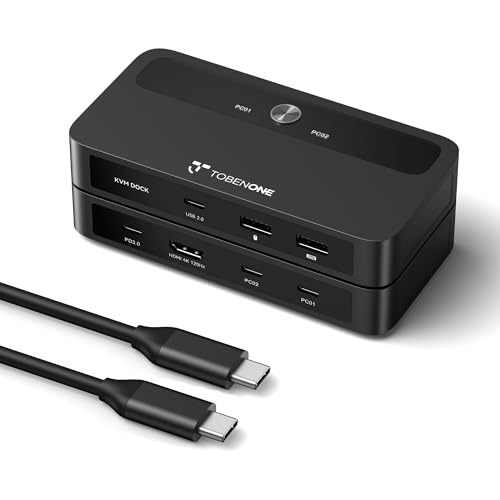
- Up to 4K@120Hz for sharp, smooth visuals
- Supports up to 100W PD charging for the active laptop
- Three USB 2.0 ports for shared peripherals
Best For: Users who want a dual-laptop USB-C KVM with high-refresh video and laptop charging.
Best for Dual-Monitor Sharing
USB C HDMI Dual Monitor KVM Switch

- Shares 2 monitors between 2 computers
- 4 USB 3.0 ports for peripherals
- USB-C laptop input with 80W charging
Best For: Laptop and desktop users who want dual-monitor KVM switching with USB expansion and charging.
Best for Dual-Display Workstations
Cable Matters 14-in-1 USB-C KVM Dock

- Dual 4K 60Hz switching with up to 8K on DisplayPort
- Up to 100W charging for two laptops in one desk setup
- 14-in-1 hub with 6 USB-A ports, USB-C, SD/microSD, and audio
Best For: Two-laptop desks that need dual-monitor switching, charging, and shared peripherals.
Best for Triple-Monitor Switching
HDMI KVM Switch 3 Monitors for 2 PCs

- Runs 2 PCs on 3 shared monitors
- Up to 8K@60Hz / 4K@120Hz support
- USB 3.0 ports plus USB-C peripheral sharing
Best For: Dual-PC workstations that need triple-monitor switching and high-resolution HDMI output.
Best for Triple-Monitor Power Users
2 Laptops 3 Monitors USB-C KVM Dock
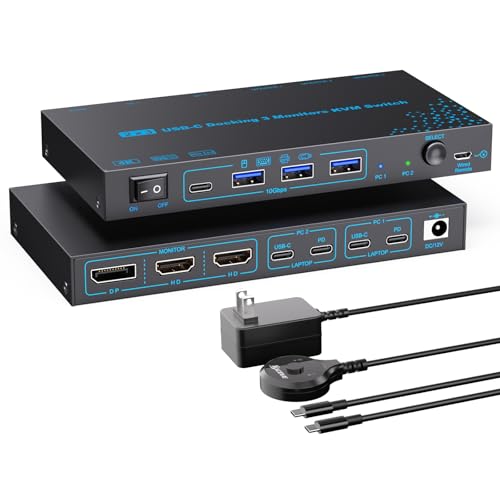
- Triple-monitor MST support with dual 4K@60Hz output
- 100W PD passthrough for compatible USB-C laptops
- 4 USB 3.1 Gen2 ports with up to 10Gbps transfer
Best For: People building a high-productivity dual-laptop workstation with shared displays and charging.
Best for High-Refresh Sharing – TobenONE USB C KVM Switch 4K@120Hz
If you want one of the more capable usb c kvm switches with 100w charging, this TobenONE model is built for fast laptop swapping without sacrificing display quality. It lets two USB-C laptops share one monitor and a small set of peripherals, while also supporting up to 100W PD charging through your own USB-C power adapter.
Best For: Office or home users who need a plug-and-play USB-C KVM for two laptops, a single monitor, and high-refresh 4K output.
Pros:
- Supports up to 4K@120Hz for crisp, high-refresh display setups
- Delivers up to 100W USB-C charging to the active laptop
- Includes three USB 2.0 ports for keyboard, mouse, storage, and more
- Plug-and-play switching with broad support for Windows, Chrome OS, Mac, and Linux
Cons:
- Works with laptops only, not desktop PCs
- Uses USB 2.0 for peripherals, so it’s not ideal for high-speed data devices
- Needs compatible USB-C/Thunderbolt ports and the right cables to reach 4K@120Hz
Overall, this is a strong pick if you care about smoother visuals and dependable laptop power in one compact switch. Among usb c kvm switches with 100w charging, it stands out for pairing 4K@120Hz support with simple button-based control and easy dual-laptop sharing.
Best for 8K Video & Charging – 8K USB C Switch with 100W PD
If you want one of the more capable usb c kvm switches with 100w charging, this bi-directional model is built around high-resolution video, fast USB-C power delivery, and simple one-button switching. It works well when you need to share a USB-C monitor and peripherals between two computers, or use one USB-C source to toggle between displays, without constantly unplugging cables.
Best For: Power users who need 8K-class video, 100W USB-C charging, and a straightforward switch for two computers or one source with dual displays.
Pros:
- Supports up to 8K@60Hz and 4K@120Hz for high-end monitors
- Provides 100W PD reverse charging plus 10Gbps data transfer
- Bi-directional design works as either a KVM-style switch or splitter
- Plug-and-play operation with no drivers or software required
Cons:
- Requires USB-C devices that support DisplayPort Alt Mode
- High-resolution and 10Gbps performance depend on quality cables
- Does not mirror one source to two monitors with different content at the same time
This is a strong pick if you care about performance first: it combines serious video support, useful charging, and practical switching in one compact box. Among usb c kvm switches with 100w charging, it stands out for buyers who want premium specs without adding software complexity.
Best for Triple-Monitor Macs – Thunderbolt 4 KVM Switch for 2 Laptops
If you’re comparing usb c kvm switches with 100w charging for a dual-laptop setup, this Thunderbolt 4 DisplayLink dock stands out for its rare 3-monitor switching support. It’s built for users who need extended displays on both Mac and Windows systems, plus integrated USB, Ethernet, and card-reader convenience in one desktop hub.
Best For: Mac or Windows users who want to switch three external monitors and shared peripherals between two laptops, especially where extended display support on M1-M5 Macs matters.
Pros:
- Supports switching up to 3 monitors at 4K@60Hz with DisplayLink
- Works with M1-M5 Macs for extended display, not just mirroring
- Includes USB 3.0/USB-C, SD/TF, and 1G Ethernet for a full dock setup
- Easy front-button or wired-remote switching
Cons:
- Requires DisplayLink driver installation to work properly
- Power delivery is 50W, not full 100W charging
- Not ideal for users who want hotkey switching
This is a strong pick if your priority is multi-monitor flexibility over pure charging power. Among usb c kvm switches with 100w charging, it is better viewed as a feature-rich docking KVM alternative with excellent display support rather than a true 100W charging solution.
Best for Dual-Monitor Sharing – USB C HDMI Dual Monitor KVM Switch
If you need usb c kvm switches with 100w charging for a laptop-and-desktop setup, this model stands out for its dual-monitor support and built-in USB-C laptop input. It’s a practical choice for people who want to share two displays, several USB peripherals, and a single switching workflow between work and personal machines.
Best For: Users who want one KVM for a laptop and desktop with dual 4K display support, USB 3.0 peripherals, and laptop charging in one compact desk setup.
Pros:
- Supports 2 computers sharing 2 monitors at up to 4K@60Hz
- Includes 4 USB 3.0 ports for keyboards, mice, printers, and other devices
- USB-C laptop input with up to 80W charging support
- Wired remote and front-panel switching make desk use simple
Cons:
- Charging is 80W, not full 100W
- Mac M1/M2 users won’t get true dual extended displays over MST
- Best suited to a dual-monitor workflow, not a simple single-screen setup
Overall, this is a strong fit if you’re comparing usb c kvm switches with 100w charging but can live with 80W output, since it delivers the bigger win here: clean dual-monitor sharing, useful USB expansion, and easy switching for a laptop/desktop hybrid workspace.
Best for 8K Desktop Setups – MLEEDA USB-C Switcher with 100W Charging
If you want one of the more feature-rich usb c kvm switches with 100w charging, this MLEEDA model is built for high-resolution monitors, fast data transfer, and simple two-computer sharing. It is aimed at users who need a single USB-C switch for a cleaner desk without giving up charging power or display quality.
Best For: Power users with two USB-C laptops who want a switch that can handle 8K video, 10Gbps data, and up to 100W charging.
Pros:
- Supports up to 8K@60Hz and 4K@120Hz for demanding displays
- Offers 100W charging plus 10Gbps data transfer
- Works with Windows, macOS, Linux, and many Thunderbolt devices
- Includes button and wired-remote switching for easy use
Cons:
- Requires USB-C DP Alt Mode compatibility
- MacBook Pro compatibility is limited per the product notes
- May need a docking station for some HDMI/DP and dual-monitor setups
This is a strong pick if your shortlist of usb c kvm switches with 100w charging needs to prioritize display performance as much as power delivery. It is especially appealing for workstation-style setups where you want high-res video, quick peripheral switching, and enough charging headroom to keep a laptop topped off.
Best for Thunderbolt Laptops – 4K60 USB-C KVM Switch with 100W Charging
If you need one of the more capable usb c kvm switches with 100w charging, this model is built for a laptop-and-desktop setup that shares one monitor, keyboard, mouse, and USB peripherals. It stands out for Thunderbolt 3/4/5 compatibility, 4K@60Hz output, and enough power passthrough to keep a work laptop charged while switching between systems.
Best For: Users with a Thunderbolt-equipped laptop who want a tidy dual-computer desk setup with single-monitor switching and USB-C charging support.
Pros:
- Supports 4K@60Hz for sharp everyday and productivity use
- USB-C power input supports up to 100W charging for compatible laptops
- Works with common peripherals like keyboard, mouse, printer, and drives
- Two switching methods make it easy to move between laptop and desktop
Cons:
- Requires a Thunderbolt 3/4/5 USB-C laptop for compatibility
- Hotkey switching is not supported
- Must be connected to power to operate
This is a strong pick if you want usb c kvm switches with 100w charging and care more about stability, monitor quality, and clean desk management than ultra-simple universal compatibility.
Best for Dual-Display Workstations – Cable Matters 14-in-1 USB-C KVM Dock
If you need one of the more capable usb c kvm switches with 100w charging, this Cable Matters dock is built for two-laptop desks that run multiple peripherals and dual monitors. It combines KVM switching, up to 100W charging, and a wide port selection, making it a practical hub for office setups that want fewer cables and more screen space.
Best For: Two-laptop workstations that need dual-monitor switching, device charging, and lots of shared USB accessories in one dock.
Pros:
- Supports dual 4K 60Hz displays, plus up to 8K on the DisplayPort output
- Up to 100W charging helps power two connected laptops through a single setup
- 14-in-1 design includes 6 USB-A ports, 1 USB-C port, SD/microSD, and audio
- RF remote makes switching between two computers quick and easy
Cons:
- Requires USB-C hosts with DP Alt Mode, so it will not work with every USB-C port
- Not compatible with desktop PCs
- Mac users are limited to one external display at 4K 60Hz
Overall, this is a strong pick for buyers who want usb c kvm switches with 100w charging and lots of I/O in a compact desktop dock. It is especially appealing if your workflow is centered on two laptops and shared peripherals rather than mixed desktop use.
Best for Triple-Monitor Switching – HDMI KVM Switch 3 Monitors for 2 PCs
If you need to run two computers across three displays, this HDMI KVM is built for a more demanding desk setup than most usb c kvm switches with 100w charging. It supports extended or mirrored modes, handles up to 8K@60Hz or 4K@120Hz, and includes USB 3.0 peripherals support for keyboard, mouse, and storage devices.
Best For: Users who want a dual-PC, triple-monitor KVM with high-resolution HDMI output and simple button or wired-remote switching.
Pros:
- Supports 2 computers on 3 monitors with extended and mirrored display modes.
- High-resolution output up to 8K@60Hz / 4K@120Hz for capable systems and displays.
- Includes 3 USB 3.0-A ports plus 1 USB-C port for shared peripherals.
- Comes with wired remote switching and USB cables in the box.
Cons:
- Not a USB-C docking KVM, so it does not emphasize laptop charging.
- Final display performance depends on your GPU, monitors, cables, and adapters.
- Only USB inputs connected properly to the PC will be recognized.
For buyers comparing usb c kvm switches with 100w charging, this model is better suited to a stationary multi-monitor workstation than a laptop-dock-style setup. It’s a strong pick when triple-screen support matters more than power delivery.
Best for Triple-Monitor Power Users – 2 Laptops 3 Monitors USB-C KVM Dock
If you need usb c kvm switches with 100w charging that can also drive a true multi-monitor workstation, this model stands out. It combines a KVM switch and USB-C docking station in one box, giving you shared control of two laptops, support for three displays, and enough USB bandwidth for everyday peripherals.
Best For: Users who want a desktop-style dual-laptop setup with triple-monitor support, 100W charging, and fast peripheral sharing.
Pros:
- Supports 2 laptops and 3 monitors with MST docking functionality
- Dual 4K@60Hz plus one 1080P@60Hz output for flexible screen layouts
- Includes 4 USB 3.1 Gen2 ports with up to 10Gbps transfer speeds
- 100W PD passthrough helps keep a compatible laptop charged while working
Cons:
- Triple-monitor output depends on laptop DP Alt Mode and MST support
- Mac M1/M2 systems have mirror or limited extended-display support
- Needs proper cable lengths and the included power adapter for stable performance
This is a strong fit if your priority is a feature-packed workstation hub rather than a basic switch. Among usb c kvm switches with 100w charging, it’s especially appealing for users who need both charging convenience and serious multi-display expansion.
Best for Dual USB-C Setups – SUIDEK USB-C KVM Switch
If you’re shopping for usb c kvm switches with 100w charging and need to share one HDMI monitor between two USB-C computers, this SUIDEK model covers the basics well. It combines one-button switching, three USB 3.0 sharing ports, and up to 100W PD support, making it a practical fit for a tidy desk or a light workstation.
Best For: People with two USB-C laptops or devices who want a simple KVM for one monitor, shared peripherals, and charging from a single hub.
Pros:
- Supports two USB-C inputs with one HDMI display for straightforward dual-device switching.
- Includes 3 USB 3.0 ports for a keyboard, mouse, printer, or storage device sharing.
- Offers up to 100W PD charging, with 85W available to the active computer.
- Button or desktop controller switching keeps operation simple and fast.
Cons:
- Requires a fully functional USB-C port and an HDMI monitor.
- Hotkeys are not supported, so switching is manual only.
- Power adapter and HDMI cables are not included.
This is a solid pick for buyers comparing usb c kvm switches with 100w charging who care more about simple dual-USB-C sharing than advanced extras. It’s especially appealing if you want plug-and-play convenience without a steep setup learning curve.
How We Picked the Best USB C Kvm Switches with 100w Charging
For USB C Kvm Switches with 100w Charging, we prioritized real-world usefulness over flashy specs. That means strong charging support, reliable monitor output, enough USB ports for everyday peripherals, and clear compatibility with common laptop and desktop setups.
We also looked for models that make sense for different desk layouts: single-monitor users, dual-monitor productivity rigs, and multi-display power users. Features like 4K or 8K video support, 10Gbps data transfer, and DisplayLink or MST support mattered when they improved compatibility or flexibility.
Quick Comparison
If you want the simplest path, a single-monitor KVM is usually easiest to set up and most affordable. Dual-monitor USB C Kvm Switches with 100w Charging are the sweet spot for most productivity users, especially if you switch between a laptop and desktop or two laptops. Triple-monitor and Thunderbolt-based options are for advanced workstations and are only worth it if your displays and devices support those modes.
Key Buying Factors for USB C Kvm Switches with 100w Charging
Charging output: 100W PD is the headline, but usable power depends on cable quality and whether the switch reserves some wattage for its own operation. If you use a power-hungry laptop, confirm the switch can still deliver enough charge under load.
Display support: Match the switch to your monitor count and refresh needs. Some units handle 4K@60Hz, while others support 4K@120Hz or even 8K for users with newer displays. Make sure your laptop and monitor ports can actually use those modes.
USB performance: If you connect webcams, storage drives, audio interfaces, or dongles, look for 10Gbps USB support and enough downstream ports. Basic keyboard-and-mouse sharing needs are simpler than fast file transfers or creator workflows.
Compatibility: Not every laptop handles every docking or multi-display method the same way. USB-C, Thunderbolt, MST, and DisplayLink support can affect whether you get mirrored or extended desktops, especially on Mac and mixed-platform setups.
Desk setup: Consider the number of computers, monitors, and peripherals you need to share. A great KVM is the one that fits your cables, ports, and daily routine without extra adapters.
Who Should Buy What
Choose a single-monitor KVM if you mainly want one clean workstation and charge a laptop at the same time. Go dual-monitor if you work in spreadsheets, code, design, or multitasking and want a balanced mix of price and capability.
Pick a triple-monitor or Thunderbolt/DisplayLink model if you already run an advanced desk and need broader expansion or more flexible laptop compatibility. For most buyers, the best USB C Kvm Switches with 100w Charging are the ones that cover your present setup cleanly and leave a little room to grow.
