
In 2025, staying connected is more essential than ever, especially with the rise of USB-C hubs that include VGA ports. These hubs offer you the flexibility to connect to a variety of devices, enhancing your work or entertainment setup. With options that support multiple displays and fast data transfer, you might wonder which models stand out in this crowded market. Let’s explore the top contenders that could redefine your connectivity experience.
Acer USB C Hub with 4K HDMI and 9-in-1 Adapter

If you’re looking for a versatile solution to expand your connectivity options, the Acer USB C Hub with 4K HDMI and 9-in-1 Adapter is an excellent choice for professionals and students alike. This compact hub lets you connect multiple devices effortlessly, offering high-quality 4K@30Hz HDMI output and dual-display functionality via HDMI and VGA. With 5Gbps USB 3.0 ports and 1Gbps Ethernet connectivity, your data transfers remain swift and stable. Plus, the PD 100W rapid charging guarantees your devices stay powered. Compatible with a wide range of devices, this hub simplifies your workspace while enhancing productivity.
Best For: Professionals and students seeking a versatile and efficient hub to expand their device connectivity options.
Pros:
- High-quality 4K@30Hz HDMI output for seamless streaming to larger displays.
- Dual-display functionality allows for both mirror and extend modes for enhanced productivity.
- Fast data transfer speeds of up to 5Gbps via USB 3.0 and stable 1Gbps Ethernet connection.
Cons:
- Some users report issues with USB port performance affecting peripheral connectivity.
- Customer support responsiveness has received mixed reviews from users.
- Driver installation may be required for certain Windows systems, which could complicate setup for some users.
BENFEI USB C HUB 4-in-1 Adapter

The BENFEI USB C HUB 4-in-1 Adapter stands out as an ideal choice for professionals and students who need versatile connectivity options for their devices. With one HDMI port, one VGA port, a USB-C charging port, and a USB-A port, you can easily connect multiple displays, all while enjoying data transfer speeds up to 5Gbps. Its compact design and lightweight build make it portable, perfect for on-the-go use. Plus, it supports 4K HDMI resolution and 1080p VGA, ensuring crisp visuals. With an 18-month warranty and positive user feedback, it’s a reliable choice for enhancing your connectivity.
Best For: The BENFEI USB C HUB 4-in-1 Adapter is best for professionals and students seeking versatile connectivity options for their devices.
Pros:
- Compact and lightweight design for easy portability.
- Supports simultaneous HDMI and VGA output, allowing for multiple displays.
- High data transfer speeds of up to 5Gbps and compatibility with various devices.
Cons:
- Not compatible with iPad Pro 2021 M1 11 and 12.9 models.
- Some users may find the maximum power delivery of 60W limiting for certain devices.
- Limited to HDMI resolution of 3840×2160@30Hz, which may not satisfy users needing higher frame rates.
IKERY 11 in 1 USB C Hub

With its impressive 11-in-1 functionality, the IKERY USB C Hub is perfect for professionals who need versatile connectivity on the go. You’ll enjoy seamless data transfer with multiple USB ports, and the 100W PD Type-C charging keeps your devices powered. Dual video output via HDMI and VGA allows you to connect to multiple displays effortlessly, making presentations a breeze. Plus, the RJ45 LAN guarantees a stable internet connection for gaming or streaming. Its aluminum alloy build offers durability and effective heat dissipation, while the compact design makes it travel-friendly. Experience ultimate connectivity without the hassle of extra adapters.
Best For: Professionals and everyday users seeking versatile connectivity and high-speed performance in a portable USB C hub.
Pros:
- Multiple Connectivity Options: Offers 11 different ports, including USB, HDMI, VGA, and RJ45 for extensive connectivity.
- Fast Charging: The 100W PD Type-C port ensures devices remain powered during use, preventing battery drain.
- Durable and Portable Design: Made from aluminum alloy for durability, while its compact size makes it easy to carry.
Cons:
- Limited USB 3.0 Speed: Only one USB 3.0 port with a maximum speed of 480MB/s, which may be insufficient for some users’ needs.
- No 4K at Higher Refresh Rate: HDMI supports 4K at only 30Hz, which may not be ideal for all video applications.
- Potential Overheating: While designed for heat dissipation, heavy use may still lead to overheating in some situations.
USB C Docking Station Dual DisplayPort (8 in 1 Hub)

For professionals and students who need versatility in connecting multiple displays, the USB C Docking Station Dual DisplayPort (8 in 1 Hub) stands out as an ideal choice. It offers two DisplayPorts, HDMI, and VGA options, all supporting high resolutions up to 4K@60Hz and 1080P@60Hz. With a powerful 100W PD charging port, you can quickly power your device while transferring data at speeds up to 480Mbps. Compatible with various Dell, HP, and Lenovo laptops, this hub simplifies your workspace. Plus, it comes with an 18-month warranty for peace of mind, ensuring a reliable connection for all your needs.
Best For: Professionals and students seeking a versatile docking solution for connecting multiple displays and peripherals.
Pros:
- Supports dual 4K@60Hz displays with multiple output options (DisplayPort, HDMI, VGA).
- Quick charging capability with a 100W PD charging port while maintaining data transfer speeds of up to 480Mbps.
- Compact design and lightweight, making it easy to transport and set up in various environments.
Cons:
- Limited to mirror mode for MacBook users, restricting extended display functionality.
- Compatibility primarily focused on specific Dell, HP, and Lenovo laptop models, which may exclude other brands.
- Data transfer speeds are capped at 480Mbps, which may be slower compared to newer USB standards.
USB C 11 in 1 Hub Adapter with HDMI and Ethernet
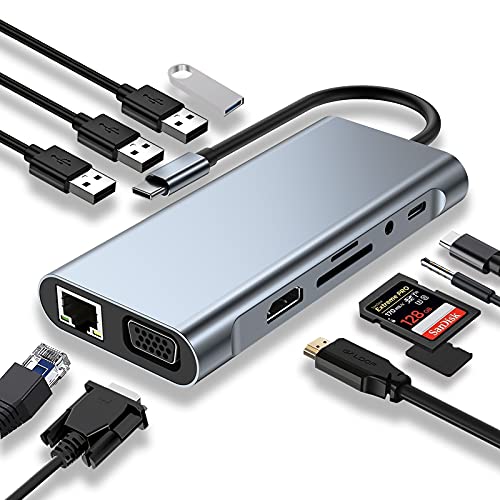
If you’re looking for a versatile solution to expand your laptop’s connectivity, the USB C 11 in 1 Hub Adapter stands out as an excellent choice. Compatible with MacBook Pro/Air and other Type-C laptops, it features 11 ports, including a 4K HDMI, VGA, and RJ45 Ethernet. Experience lightning-fast data transfer with USB 3.0 speeds up to 5Gbps and stable internet connectivity up to 100M. Plus, you can charge your devices quickly with the PD port supporting up to 100W. Weighing only 3 ounces, it’s compact and user-friendly, ensuring you stay connected without hassle.
Best For: Users who need to expand their laptop’s connectivity with multiple ports and fast data transfer capabilities.
Pros:
- Supports high-speed data transfer with USB 3.0 ports up to 5Gbps.
- Includes a variety of ports for versatile connectivity options, including HDMI, VGA, and Ethernet.
- Compact design makes it easy to carry and use on-the-go.
Cons:
- Limited to Type-C laptops, which may not suit all users.
- The 4K HDMI output is capped at 30 Hz, which may not be ideal for high-refresh-rate displays.
- Some users may find the price point higher compared to simpler hubs.
Anker 10-in-1 USB C Hub and Docking Station

The Anker 10-in-1 USB C Hub and Docking Station stands out as an excellent choice for professionals who need versatile connectivity options on the go. With a 4K HDMI port and a 1080p VGA port, you can easily connect dual displays, enhancing your productivity. It offers five data ports, including USB-C and USB-A, all delivering high-speed transfers up to 5 Gbps. Plus, the 85W pass-through charging guarantees your laptop stays powered while you work. Weighing just 4 ounces, it’s portable and compatible with popular laptops like the Dell XPS. Enjoy the 18-month warranty and strong customer support for peace of mind.
Best For: Professionals and commuters seeking a versatile and portable docking solution for enhanced connectivity and productivity.
Pros:
- Supports dual displays with 4K HDMI and 1080p VGA ports, ideal for multitasking.
- High-speed data transfer capabilities of up to 5 Gbps via USB-C and USB-A ports.
- Lightweight design at just 4 ounces, making it easy to carry while traveling.
Cons:
- Limited to 100W Power Delivery, which may not be sufficient for high-performance laptops.
- May require additional drivers or software updates for full functionality on some devices.
- The compact size might limit the number of simultaneously connected devices due to spacing.
Selore USB C Docking Station Dual Monitor (14 in 1)

Offering seamless connectivity for multitaskers, the Selore USB C Docking Station Dual Monitor (14 in 1) stands out as an ideal choice for professionals and creatives who need to expand their workspace. With dual HDMI and VGA outputs, you can easily manage up to three displays. It features 14 ports, including 2 4K HDMI, USB A/C, SD card readers, and a 3.5mm audio port, all supporting plug-and-play functionality. Plus, you’ll enjoy high-speed data transfers up to 10Gbps and 100W power delivery for quick charging. Compatible with various Thunderbolt 3 and USB C devices, it’s perfect for enhancing productivity.
Best For: Professionals and creatives seeking to enhance their workspace with seamless connectivity and multitasking capabilities.
Pros:
- High-Speed Data Transfer: Supports data transfer rates up to 10Gbps for fast and efficient file management.
- Multiple Display Support: Enables triple display functionality with dual HDMI and VGA outputs, ideal for multitasking.
- Wide Compatibility: Universally compatible with various Thunderbolt 3 and USB C devices, ensuring versatility across different laptops.
Cons:
- Limited to Specific Devices: Compatibility relies on having devices with Thunderbolt or DisplayPort Alternate Mode for video output.
- Power Supply Requirement: Requires a charger that meets 100W for optimal performance, which may not be included.
- No Video Output from USB Ports: USB ports are solely for data transfer and charging, lacking video output functionality.
USB C HUB 11 in 1 Adapter for MacBook Pro/Air and Other Type C Laptops

Designed for professionals and students alike, the USB C HUB 11 in 1 Adapter seamlessly connects your MacBook Pro, MacBook Air, or any Type C laptop to a variety of peripherals. With 11 ports, it includes 4K HDMI, 1080P VGA, and fast PD charging up to 100W. You’ll enjoy lightning-fast data transfer rates, with USB 3.0 offering up to 5 Gbps. The hub’s compact design makes it easy to carry, while its plug-and-play functionality guarantees hassle-free use across multiple operating systems. Users appreciate its build quality and performance, making it a top choice for enhancing your connectivity experience.
Best For: Professionals and students seeking a versatile and efficient way to connect multiple devices to their MacBook Pro, MacBook Air, or other Type C laptops.
Pros:
- 11-in-1 functionality providing a wide range of connectivity options.
- Supports 4K HDMI and fast PD charging up to 100W for enhanced performance.
- Compact and lightweight design, making it portable and easy to use.
Cons:
- Some users have noted the cord length as a minor issue.
- Limited simultaneous usage of SD and TF card readers.
- Occasional price fluctuations during delivery may be inconvenient.
4-in-1 USB C Hub with 4K HDMI and Multiport Adapter

For those who frequently present or teach, the 4-in-1 USB C Hub with 4K HDMI and Multiport Adapter is an indispensable tool. It combines HDMI, VGA, USB-A, and Power Delivery ports, making it perfect for various settings, from home theaters to classrooms. Weighing just 2.29 ounces, its compact design guarantees portability. Enjoy stunning 4K video output at 30Hz, and don’t worry about compatibility; it works seamlessly with popular devices like MacBook Pro and Dell XPS. With 100W power delivery and quick USB 3.0 transfers, this hub simplifies your tech setup while enhancing your connectivity wherever you go.
Best For: Individuals who frequently present or teach, and require a versatile and portable connectivity solution.
Pros:
- Supports stunning 4K video output at 30Hz for high-quality presentations.
- Compact and lightweight design makes it easy to transport for meetings or travel.
- Fast USB 3.0 data transfer speeds enable quick uploads and compatibility with various devices.
Cons:
- Limited capability in driving multiple external monitors simultaneously.
- Requires a USB-C compatible device for full functionality.
- Some users may find the built-in cable length restrictive in certain setups.
Anker Laptop Docking Station, 14 in 1 USB C Hub

If you’re looking to enhance your workspace with multiple display options, the Anker Laptop Docking Station, a 14-in-1 USB-C hub, is a fantastic choice. With two 4K HDMI ports and a 1080p VGA port, you can easily set up a triple display. It features five USB-A ports and a 5 Gbps USB-C port for fast data transfer, while the 80W power delivery keeps your devices charged. Compatible with various systems, including macOS and Windows, this hub guarantees seamless connectivity. Just be mindful of potential monitor detection issues with certain setups. Overall, it’s a reliable option for extensive connectivity.
Best For: Users seeking a versatile docking station that offers multiple display outputs and extensive connectivity options for enhanced productivity.
Pros:
- Supports triple display with two 4K HDMI ports and one VGA port, making it ideal for multitasking.
- Fast data transfer speeds of up to 5 Gbps through USB-A and USB-C ports, ensuring quick file access.
- Responsive customer service with options for refunds or replacements, enhancing user support experience.
Cons:
- Potential monitor connectivity issues reported with certain laptop models, affecting usability.
- Insufficient power delivery for some laptops, which may lead to inadequate charging during use.
- Limited compatibility with Linux, which may hinder users in that environment despite some successful adjustments.
Factors to Consider When Choosing USB C Hubs With VGA Port
When choosing a USB-C hub with a VGA port, consider how well it works with your devices. You’ll want to look at data transfer speeds, video output quality, and whether it supports power delivery. Don’t forget to check the variety of ports available to guarantee it meets your needs.
Compatibility With Devices
Choosing a USB-C hub with a VGA port requires careful consideration of your device’s compatibility. Not all USB-C ports support video output, so it’s essential to verify that the hub is compatible with your specific device model. Look for hubs that clearly state compatibility with popular operating systems like Windows, macOS, and Chrome OS to avoid potential driver installation issues. Make sure the hub supports the necessary resolutions for VGA output, typically up to 1080p at 60Hz, to guarantee peak display quality. Additionally, consider whether it can function with both HDMI and VGA outputs simultaneously, as this feature impacts your ability to connect multiple displays. Finally, review customer feedback to gauge performance reliability across various laptops and tablets.
Data Transfer Speeds
Understanding data transfer speeds is vital as you explore USB-C hubs with VGA ports. These hubs typically offer speeds ranging from 480Mbps to 5Gbps, depending on the USB ports included. If you want quick file transfers, look for hubs with USB 3.0 ports, which can achieve up to 5Gbps. However, remember that USB 2.0 ports limit you to 480Mbps. Additionally, using multiple ports at once can affect overall speed, as some hubs may prioritize video output over data transfer. If high-definition video output is essential, be aware that VGA supports resolutions up to 1080p at 60Hz, which might impact your data transfer experience when multitasking. Choose wisely for best performance.
Video Output Quality
While evaluating USB-C hubs with VGA ports, you should consider the video output quality, as it greatly impacts your overall experience. VGA typically supports resolutions up to 1080p at 60Hz, which might not be enough for high-definition displays compared to HDMI. Additionally, be aware that video quality can degrade over longer cable runs, affecting clarity and color fidelity, especially in professional settings. Many USB-C hubs with VGA ports also support HDMI output, allowing you to mirror or extend displays for enhanced productivity. Check the hub’s compatibility with the latest video standards to guarantee it supports dual-display setups and higher refresh rates. Look for clear specifications on video resolution to avoid performance issues or lag.
Power Delivery Support
When you’re selecting a USB-C hub with a VGA port, power delivery support is a critical factor to evaluate, as it directly affects your device’s charging efficiency. Look for hubs that provide up to 100W of power, especially if you’re using high-performance laptops. If a hub only offers 60W, it might not keep your device charged during intensive tasks. Additionally, hubs with PD functionality allow simultaneous charging and data transfer, ensuring a smooth user experience. Remember, to maximize performance, you’ll need compatible charging cables and wall adapters. A hub’s PD capabilities can greatly impact how well it operates, particularly when connected to external displays or during demanding tasks. Choose wisely to avoid interruptions.
Port Variety Offered
Choosing the right USB-C hub with a VGA port hinges on the variety of ports it offers. You’ll want to evaluate the number and types of additional ports, like HDMI, USB-A, USB-C, and Ethernet, to meet all your connectivity needs. Look for hubs that support dual or multiple video outputs so you can connect both HDMI and VGA simultaneously, giving you versatile display options. Pay attention to the data transfer speeds of USB ports; hubs with USB 3.0 capabilities can transfer files up to 5 Gbps. Confirm the HDMI output supports at least 4K resolution at 30Hz and that the VGA port can deliver 1080p at 60Hz for peak performance.
Build Quality and Design
Selecting a USB-C hub with a VGA port requires careful consideration of its build quality and design, as these factors greatly influence durability and usability. Look for hubs made from durable materials like aluminum alloy, which enhance heat dissipation and longevity. A compact design is essential for portability; ideally, choose hubs measuring around 4 to 5 inches and weighing between 2 to 5 ounces for easy transport. Ergonomic features, such as reinforced ends and lightweight structures, make traveling or presenting more convenient. Snug-fitting ports guarantee stable connections, reducing accidental disconnections. Finally, opt for aesthetically pleasing designs in neutral colors to complement your modern laptop and elevate your overall user experience.
