
In 2025, seamless connectivity is more vital than ever, especially for professionals and travelers. If you need reliable internet access and versatile port options, USB-C hubs with Gigabit Ethernet are essential. These hubs not only support high-speed data transfer but also enhance charging capabilities. You might be surprised by how well models like the Anker 6-in-1 and UGREEN Revodok series can cater to your needs. Let’s explore the top options available for you.
Anker 6-in-1 USB C Hub with 65W Power Delivery

If you’re a tech-savvy professional on the go, the Anker 6-in-1 USB C Hub with 65W Power Delivery is the perfect companion for your devices. This compact hub packs an HDMI port for 4K@30Hz displays, a 1Gbps Ethernet port for stable internet, and multiple USB ports for fast data transfer. Weighing just 2.89 ounces and measuring 5.2 inches, it easily fits in your bag. Plus, the 65W Power Delivery guarantees your laptop stays charged even when connected to multiple devices. With a stellar 4.6-star rating from over 3,200 users, it’s a reliable choice that enhances your productivity effortlessly.
Best For: Tech-savvy professionals who need a versatile and portable solution for connecting multiple devices while on the go.
Pros:
- Compact and lightweight design makes it easy to carry in bags or pockets.
- 65W Power Delivery ensures your laptop stays charged while using multiple peripherals.
- 4K HDMI support and a 1Gbps Ethernet port provide excellent performance for displays and internet connectivity.
Cons:
- Some users may experience slower charging speeds when connecting multiple devices simultaneously.
- Limited to USB-C compatible devices, which may not suit all users.
- Careful handling is recommended to maintain connection quality and avoid wear over time.
UGREEN Revodok 6 in 1 USB C Hub with Gigabit Ethernet and HDMI

The UGREEN Revodok 6 in 1 USB C Hub is perfect for professionals and gamers who need a reliable and versatile connection. This hub transforms a single USB-C port into six, featuring a 4K@30Hz HDMI output, gigabit ethernet for lightning-fast internet, and three USB-A 3.0 ports for quick data transfers up to 5Gbps. You’ll appreciate the gigabit RJ45 port, ensuring stable connections for gaming or video calls. Plus, with 85W USB-C pass-through charging, you can power your devices effortlessly. It’s compatible with a range of devices, including Mac M1, M2, M3, and the Steam Deck, making it an essential accessory.
Best For: Professionals and gamers seeking a reliable and versatile connection for their devices.
Pros:
- Supports 4K@30Hz HDMI output for high-definition visuals in movies and presentations.
- Gigabit ethernet port ensures stable and fast internet connections for online gaming and video calls.
- Fast data transfer speeds of up to 5Gbps with three USB-A 3.0 ports for efficient peripheral connectivity.
Cons:
- USB-C port is for charging only, lacking data transmission or video output capabilities.
- Does not support HDR/3D for HDMI output, limiting visual enhancements for some users.
- May not be compatible with all devices, requiring verification for specific models outside the listed compatibility.
UGREEN Revodok Pro 6 in 1 USB C Hub with Gigabit Ethernet and HDMI

For those who need a versatile and high-performance solution, the UGREEN Revodok Pro 6 in 1 USB C Hub is an excellent choice. This hub transforms a single USB-C port into six, featuring a 4K@60Hz HDMI port, Gigabit Ethernet, and multiple USB-A and USB-C connections. You’ll enjoy lightning-fast data transfers up to 10Gbps and stable internet with its Gigabit RJ45 port. Plus, with 85W USB-C power delivery, charging your devices is a breeze. Built from solid aluminum, it’s durable yet lightweight. Users love its performance consistency, making it perfect for your Mac, iPad, or Steam Deck setup.
Best For: Users seeking a versatile and high-performance USB-C hub for multiple devices, including Mac, iPad, and Steam Deck.
Pros:
- Supports 4K@60Hz HDMI output, ideal for high-definition visuals in presentations and entertainment.
- Gigabit Ethernet port ensures stable and fast internet connections, perfect for gaming and remote work.
- Fast data transfer speeds of up to 10Gbps via USB-C and USB-A ports enhance productivity with peripherals.
Cons:
- Some users reported difficulties with tech support, particularly regarding warranty and compatibility issues.
- The USB-C port is limited to charging only, without support for data transmission or video output.
- Device may become warm during operation, which could be a concern for prolonged use, though it remains cool to the touch.
USB C to Ethernet Adapter with 4-Port USB Hub

Packed with a 5 in 2 design, the Denlane USB C to Ethernet Adapter with 4-Port USB Hub is perfect for users who need both high-speed internet and multiple USB connections. With a Gigabit Ethernet hub, you’ll enjoy speeds up to 1000Mbps via RJ45 LAN, making it ideal for online gaming and HD streaming. The plug-and-play functionality means you won’t need any drivers or power supply. Its durable aluminum design and flexible cable guarantee longevity, while the four USB-A 3.0 ports and one USB-C port keep your devices connected. Rated 4.5 stars, this adapter delivers seamless performance across various platforms.
Best For: Users seeking a high-speed internet connection along with multiple USB ports for their devices.
Pros:
- Plug and Play: No drivers or power supply required for easy setup.
- High-Speed Connectivity: Offers Gigabit Ethernet speeds up to 1000Mbps for seamless online activities.
- Durable Build: Made from high-durability aluminum alloy with a flexible cable designed for longevity.
Cons:
- Speed Drops: Some users have reported speed reduction when daisy-chaining with other hubs.
- Limited USB-C Ports: Only one USB-C port available, which may limit connectivity for some users.
- Ranked Lower in Category: Currently ranked #127 in USB Computer Network Adapters, indicating competition in the market.
UGREEN Revodok Pro 9 in 1 USB C Hub

Transforming a single USB-C port into nine versatile connections, the UGREEN Revodok Pro 9 in 1 USB-C Hub is perfect for professionals and gamers alike. With a 4K@60Hz HDMI port, Gigabit Ethernet, and PD 100W charging, it guarantees seamless performance. You’ll appreciate the fast data transfer rates of up to 10Gbps across multiple USB ports, making it easy to connect your peripherals. Its durable aluminum casing and integrated 1-foot USB-C cable enhance portability. Users rave about its functionality across devices, though some suggest longer cable length. Overall, it’s a reliable choice for anyone needing efficient connectivity.
Best For: Professionals and gamers looking for a multifunctional hub to expand their device connectivity.
Pros:
- Versatile connectivity with 9 ports, including HDMI, Ethernet, and multiple USB ports.
- High-speed data transfer rates of up to 10Gbps for efficient peripheral connections.
- Durable aluminum construction and integrated cable make it portable and heat-dissipating.
Cons:
- Integrated cable length of 1 foot may be inconvenient for some setups.
- Limited to 85W charging capacity, which may not be sufficient for all laptops.
- Some users may find the hub’s size slightly bulky for ultra-portable use.
UGREEN USB C to Ethernet Adapter, 6-in-1 Hub

The UGREEN USB C to Ethernet Adapter stands out as an ideal choice for professionals and tech enthusiasts seeking seamless connectivity. With its 6-in-1 design, you get two USB-C 3.2 ports, one USB-A 3.2 port, one USB-A 2.0 port, a gigabit Ethernet port, and a power port. Experience lightning-fast data transfer speeds of up to 10Gbps, perfect for large files. It’s compatible with MacBook Pro/Air, Dell XPS, and iPhone 15 models, and offers plug-and-play functionality on most systems. The durable aluminum alloy design guarantees portability, fitting easily into your travel bag for on-the-go productivity.
Best For: Professionals and tech enthusiasts seeking seamless connectivity and high-speed data transfer.
Pros:
- Supports data transfer speeds of up to 10Gbps, making it ideal for large file transfers.
- Compact and portable design allows for easy transport in travel bags.
- Compatible with a wide range of Type C devices, ensuring versatility in use.
Cons:
- Driver installation required for older Windows versions (XP/7/Vista) and Linux, which may complicate setup.
- Cannot charge host devices like laptops, limiting power supply functionality.
- Limited to Type C devices, which may exclude users with older USB standards.
Anker USB C to Ethernet Adapter, 1-Gigabit Network Hub

For anyone seeking a reliable and portable solution to enhance their internet connectivity, the Anker USB C to Ethernet Adapter is a top choice. This compact hub supports speeds up to 1 Gbps and works seamlessly with various devices like the MacBook Pro and Galaxy S9. Weighing just 0.8 ounces and measuring only 0.55 inches thick, it’s perfect for on-the-go use. Users rave about its plug-and-play functionality, achieving stable connections with download speeds reaching 400 Mbps. Plus, with an 18-month warranty, you can trust its durability and performance for all your networking needs.
Best For: Individuals looking for a lightweight and efficient USB-C to Ethernet adapter for stable internet connectivity on the go.
Pros:
- Plug-and-play functionality for easy setup with no drivers required.
- Achieves stable connection speeds, with some users reporting up to 400 Mbps download.
- Durable design with premium aluminum exterior and braided-nylon cable to prevent overheating.
Cons:
- Some users have reported connectivity issues, such as a wobbly connection.
- Comparison with competitors like Amazon Basics indicates mixed experiences with fit and reliability.
- Limited compatibility may exclude certain devices not mentioned in the specifications.
Hiearcool USB C Hub Ethernet 8-in-1 Multi-Port Adapter

Need a reliable and versatile solution for your connectivity needs? The Hiearcool USB C Hub Ethernet 8-in-1 Multi-Port Adapter is perfect for you. This compact hub supports 4K visuals at 60Hz and features a Gigabit Ethernet port, ensuring seamless internet access. With three USB 3.0 ports, a 100W PD port, and TF/SD card slots, you can connect multiple devices effortlessly. It’s compatible with various devices like MacBook Pro, iPad Pro, and more. Weighing only 3.04 ounces, it’s ideal for on-the-go use. Customer feedback praises its functionality, but some users have noted concerns about build quality.
Best For: Users seeking a compact and versatile connectivity solution for devices like MacBook Pro, iPad Pro, and Windows laptops.
Pros:
- Multi-functional: Offers HDMI, Gigabit Ethernet, USB 3.0 ports, and card slots for diverse connectivity options.
- High performance: Supports 4K visuals at 60Hz, ideal for gaming and online meetings.
- Portable design: Lightweight and compact, making it perfect for on-the-go use.
Cons:
- Build quality concerns: Some users have reported issues with the durability of the casing and USB-C cable.
- Initial setup challenges: A few customers experienced difficulties during setup, requiring adjustments.
- Compatibility issues: Users advised to check compatibility with newer devices, particularly with M4 MacBook Pro.
BENFEI USB-C to Gigabit Ethernet Adapter with 3-Port USB 3.0 Hub

Looking to enhance your connectivity options? The BENFEI USB-C to Gigabit Ethernet Adapter with a 3-Port USB 3.0 Hub is your answer. This adapter provides a seamless gigabit Ethernet connection for your USB-C devices, ensuring stable network speeds up to 1 Gbps. Plus, it expands your laptop’s capabilities with three additional USB 3.0 ports, offering data transfer speeds up to 5Gbps. Its durable design features a braided nylon cable and an aluminum alloy casing, ensuring longevity. Compatible with a range of devices like MacBook Pro and Dell XPS, it’s perfect for anyone needing reliable wired connections.
Best For: Users seeking a reliable wired internet connection and extra USB ports for their USB-C devices.
Pros:
- Plug-and-play functionality allows for easy setup without the need for additional drivers.
- Durable design featuring a braided nylon cable and aluminum alloy casing ensures long-lasting use.
- High data transfer speeds of up to 5Gbps make it 10x faster than USB 2.0, enhancing productivity.
Cons:
- Some users have reported driver configuration issues that may require troubleshooting.
- Customer support experiences can vary, with some users noting inconsistent assistance.
- Limited to USB-C devices, which may exclude users with older or different connector types.
UGREEN USB to Ethernet Adapter with 5 in 1 USB Hub
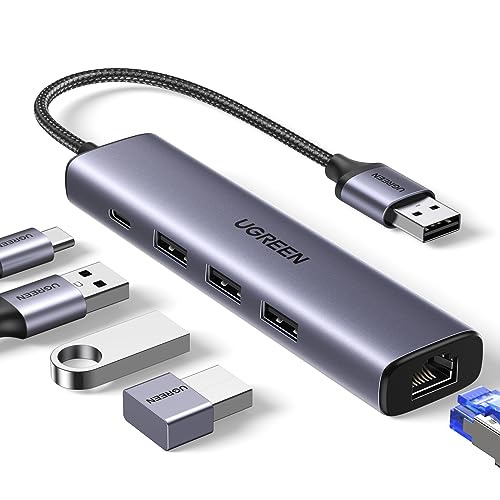
The UGREEN USB to Ethernet Adapter with 5-in-1 USB Hub is perfect for those who require reliable connectivity on the go, especially if your laptop lacks built-in ports. It features a gigabit Ethernet port and three USB 3.0 ports, giving you a significant boost in connectivity. With speeds up to 1000Mbps, you can enjoy seamless uploads, downloads, and HD streaming. Installation is a breeze—just plug it in, and you’re ready to go with Windows 11, macOS, and Chrome OS. Weighing only 2.46 ounces, it’s an excellent travel companion for enhancing your productivity wherever you are.
Best For: Individuals who need reliable wired and USB connectivity for their laptops while traveling or working remotely.
Pros:
- 5-in-1 functionality provides a gigabit Ethernet port and three USB 3.0 ports, enhancing connectivity options.
- High-speed performance with up to 1000Mbps for Ethernet and 5Gbps data transfer rates on USB 3.0 ports, ideal for streaming and gaming.
- Plug and play installation for compatibility with modern operating systems, making it user-friendly and convenient.
Cons:
- Some users experience unstable connections on certain hardware configurations, particularly with Windows 10 and Linux.
- Insufficient documentation can lead to confusion regarding setup and features, as some users misunderstand the product’s capabilities.
- The USB-C power port is often misinterpreted as a charging option for devices rather than a power source for peripherals.
Factors to Consider When Choosing Usb C Hubs With Gigabit Ethernet
When you’re choosing a USB-C hub with Gigabit Ethernet, consider a few key factors that can impact your experience. Look at the variety of ports available, the data transfer speeds, and whether it supports power delivery. Also, think about the build quality, design, and compatibility with your devices to guarantee you get the best fit for your needs.
Port Selection Variety
Choosing a USB-C hub with Gigabit Ethernet goes beyond just picking a random model; you’ll want to think about the variety of ports it offers. Look for hubs with 5 to 9 ports, including both USB-A and USB-C options, to connect multiple devices effortlessly. Make sure it features a Gigabit Ethernet port for a reliable internet connection at speeds up to 1000Mbps. Consider USB data ports supporting high transfer speeds, like USB 3.0 and 3.2, which enable efficient data transfers. Additionally, evaluate the hub’s charging capabilities—some offer Power Delivery (PD) charging from 65W to 100W for simultaneous charging. Don’t forget HDMI output for video display, supporting up to 4K@60Hz, perfect for presentations or media streaming.
Data Transfer Speed
Finding a USB-C hub with Gigabit Ethernet means you should pay close attention to data transfer speeds. These hubs typically support speeds up to 1000 Mbps, perfect for high-bandwidth activities like online gaming or HD video streaming. Look for hubs that offer USB 3.0 or 3.2 ports, which can deliver data transfer rates of 5Gbps or even 10Gbps, enhancing your productivity when connecting various peripherals. Ethernet integration reduces latency and improves reliability compared to wireless connections, ensuring consistent network performance. Remember, actual speeds can vary based on the devices you connect, the quality of your cables, and the hub’s specifications. Choose wisely to optimize your connectivity experience!
Power Delivery Support
Power Delivery support is a critical factor to take into account if you want to guarantee your devices stay charged while using a USB-C hub with Gigabit Ethernet. Look for hubs that offer up to 100W of power, as this guarantees your laptop and connected peripherals maintain battery life during use. It’s crucial to check the wattage of PD support since it directly affects charging capabilities, especially for high-power devices. Some hubs may charge faster than others, so consider user reviews on battery longevity and performance when multiple devices are connected. Also, be aware that not all USB-C ports support data transmission and charging simultaneously, so understanding each port’s functionality can optimize your hub’s performance.
Build Quality and Design
When it comes to USB-C hubs with Gigabit Ethernet, build quality and design play a significant role in your overall experience. Opt for hubs made from materials like aluminum alloy, which provide durability and heat resistance while adding a premium touch. A compact design enhances portability, making it easy for you to carry the hub in your bag or pocket. Look for features like braided cables and integrated cords; these guarantee longevity, with some hubs tested for over 10,000 bends. Weighing between 2 to 6 ounces, lighter models are perfect for travel. Finally, consider ergonomic designs with non-slip surfaces and user-friendly layouts, making it easier for you to plug and unplug your devices without hassle.
Compatibility With Devices
To guarantee you get the most out of your USB-C hub with Gigabit Ethernet, compatibility with your devices is essential. First, confirm the hub works seamlessly with your devices, like MacBook Air/Pro, Dell XPS, and various iPad models. Some hubs may only support specific brands or models, so double-check before purchasing. Next, consider operating system compatibility; many hubs offer plug-and-play functionality with Windows and macOS but may require driver installation for older systems like Windows XP or Linux. Look for hubs that support the latest USB standards, such as USB 3.2, for ideal data transfer speeds. Finally, verify power delivery capabilities and check that the hub has the right number and type of ports for your connectivity needs.
Size and Portability
Choosing the right USB-C hub with Gigabit Ethernet means considering its size and portability. A compact design, like hubs measuring around 5.2 x 0.9 x 0.72 inches and weighing about 2.89 ounces, enhances your ability to travel and use it daily. Lightweight hubs easily fit into bags or pockets, making them perfect for on-the-go professionals. The construction material matters too; durable aluminum casings offer sturdiness without adding weight. Look for hubs with cable management features to reduce clutter and keep your workspace organized. Finally, verify it has plug-and-play functionality, allowing for quick setups without needing extra drivers—ideal for using in various environments without hassle.
Price and Warranty Options
Determining the right USB-C hub with Gigabit Ethernet also involves weighing price and warranty options. Prices can vary greatly, typically ranging from around $30 to over $100, depending on the number of ports and features. When you shop, look for hubs that offer long warranties—18 months or more from reputable brands—ensuring reliability and support if you encounter issues. Don’t forget to check the return policy; a flexible one can give you peace of mind if the hub doesn’t meet your expectations. Research customer reviews to assess value for money, as higher ratings often indicate better performance. Finally, consider whether the price includes extra functionalities like data transfer speeds and charging capabilities, which can enhance overall value.
