
If you’re looking to enhance your Chromebook or Mac’s connectivity, investing in a quality USB-C hub is key. These hubs can expand your device’s capabilities considerably, offering features like multiple USB ports and 4K HDMI output. With options from brands like Anker and Lention, you’ll find hubs that suit your needs. But before you make a choice, it’s essential to understand what factors to take into account for peak performance.
Lention USB-C Multi-Port Hub with 4K HDMI Output

If you’re looking for a versatile and powerful solution to expand your connectivity options, the Lention USB-C Multi-Port Hub with 4K HDMI Output is an excellent choice for MacBook and Chromebook users. This hub features four USB 3.0 ports, allowing fast data transfer speeds of up to 5Gbps. With HDMI support for stunning 4K@30Hz resolution, you can easily connect to monitors or TVs. Plus, it delivers up to 100W of power, ensuring your devices stay charged. Compact and durable, it’s perfect for travel, making it a reliable addition to your tech arsenal. Enjoy seamless connectivity wherever you go!
Best For: Users seeking a reliable and versatile USB-C hub to enhance connectivity for MacBook, Chromebook, and other USB-C devices.
Pros:
- Multiple Ports: Four USB 3.0 ports allow simultaneous connections for various devices, enhancing productivity.
- High-Quality Video Output: Supports stunning 4K resolution at 30Hz, perfect for presentations or entertainment.
- Power Delivery: Offers up to 100W power delivery, ensuring your devices remain charged while in use.
Cons:
- Incompatibility Issues: Not compatible with Apple SuperDrive and may have issues with certain peripherals.
- Potential HDMI Quality Problems: Some users reported picture noise or quality issues when using HDMI output.
- Warm Operation: While it runs warm, it may not be suitable for prolonged heavy usage without concerns about overheating.
Lention USB C Hub with 100W Charging and 4K HDMI
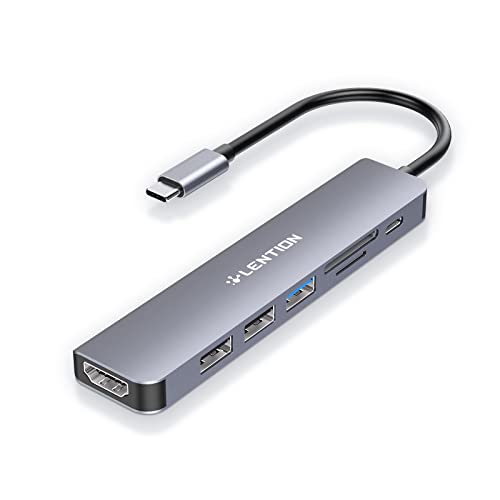
The Lention USB C Hub stands out as an ideal choice for those who need versatile connectivity and powerful charging capabilities. This 7-in-1 hub features a 100W Type C charging port, 4K HDMI output, USB 3.0, and dual USB 2.0 ports, along with SD and Micro SD card readers. It’s compatible with various devices, including MacBook Pro, Chromebook, and Surface devices. With stable driver certification, it guarantees reliable performance without overheating. Users appreciate its portability and multiple connection options, though some have noted HDMI issues after extended use. Overall, it’s a solid choice for enhancing your device’s connectivity options.
Best For: Those seeking a versatile and high-performance USB-C hub for enhanced connectivity and charging capabilities.
Pros:
- 7-in-1 functionality allows for multiple connections, including USB ports and card readers.
- 100W power delivery supports fast charging for host devices without sacrificing performance.
- Compact and portable design makes it easy to carry, ideal for on-the-go professionals.
Cons:
- Some users have reported HDMI connection issues after prolonged use, affecting reliability.
- Not compatible with Superdrive, limiting its use with certain devices.
- May experience overheating if multiple high-demand devices are connected simultaneously.
Anker USB C Hub, 5-in-1 USBC to HDMI Splitter

Looking for a reliable and versatile USB-C hub? The Anker USB C Hub, 5-in-1 USBC to HDMI Splitter has you covered. With a 4K HDMI port and three high-speed USB ports, it supports seamless connectivity for your devices. You can transfer files at speeds up to 5 Gbps, while the 100W pass-through charging keeps your laptop powered. Despite its compact design, users appreciate its solid build quality and easy plug-and-play setup. Just keep in mind some may encounter occasional HDMI connection issues. Overall, this hub is a top choice for enhancing your Chromebook or Mac’s functionality.
Best For: Users seeking a reliable and compact USB-C hub for enhancing connectivity on their laptops or Chromebooks.
Pros:
- High-speed data transfer: File transfer speeds of up to 5 Gbps via USB-C and USB-A ports.
- 4K HDMI support: Connects to external monitors with resolutions up to 4K@30Hz for clear video output.
- Compact design: Lightweight and portable, making it easy to carry for on-the-go use.
Cons:
- Occasional HDMI issues: Some users report needing to reboot or update for stable HDMI connections.
- Limited Thunderbolt compatibility: Not compatible with Thunderbolt devices, which may affect performance.
- Warmth during heavy use: Some users experience warmth from the device under heavy load, though it’s not excessive.
UGREEN USB C Hub with 4 USB 3.0 Ports

For anyone needing extra connectivity options, the UGREEN USB C Hub with 4 USB 3.0 ports offers a practical solution. This compact, lightweight hub easily expands your device’s capabilities, letting you connect peripherals like a mouse or keyboard with ease. With data transfer speeds up to 5Gbps, it’s ten times faster than USB 2.0, ensuring quick file transfers. You’ll appreciate its plug-and-play functionality, which makes setup a breeze. While it’s made from plastic and might not feel as premium as aluminum hubs, its performance and portability make it a reliable choice for your Chromebook or Mac.
Best For: The UGREEN USB C Hub with 4 USB 3.0 ports is best for users who need additional USB connectivity on devices like MacBooks, Chromebooks, and other USB-C compatible gadgets.
Pros:
- Fast Data Transfer: Offers data transfer speeds of up to 5Gbps, significantly faster than USB 2.0.
- Compact Design: Lightweight and portable, making it easy to carry in a backpack or computer bag.
- Plug and Play: Simple setup with no additional drivers required, ensuring user-friendly operation.
Cons:
- Build Quality: Made from plastic, which may feel less premium compared to aluminum alternatives.
- Audio Device Limitations: Some users reported issues with audio devices when sharing ports.
- Durability Concerns: There are concerns about long-term durability based on user feedback.
BENFEI 5-in-1 USB C Hub with 4K HDMI

If you’re searching for a versatile solution to connect your MacBook Pro or Chromebook with additional peripherals, the BENFEI 5-in-1 USB C Hub delivers impressive functionality. With a 4K HDMI port, you can easily connect to an external display for stunning visuals. Plus, it features a USB-C port for 100W power delivery and three USB-A ports for fast data transfers up to 10 Gbps. Weighing only 2.82 ounces, this compact hub is perfect for on-the-go use. Built with an aluminum case and silicone woven cable, it’s durable and reliable. Plus, you’ll enjoy an 18-month warranty for peace of mind.
Best For: The BENFEI 5-in-1 USB C Hub is best for professionals and students who need a compact and efficient solution for connecting multiple devices and peripherals while on the go.
Pros:
- Supports 4K HDMI output for high-quality video display.
- Compact and lightweight design makes it ideal for travel.
- Fast data transfer speeds of up to 10 Gbps via USB A 3.2 port.
Cons:
- Limited to 30Hz refresh rate for 4K output, which may not be suitable for all users.
- The USB-C charging port provides only 90W for laptop charging, which might not be sufficient for some high-powered laptops.
- The silicone woven cable, while durable, may not be as flexible as traditional cables.
LENTION USB C Hub with 4 Ports and 100W PD Charging

The LENTION USB C Hub stands out with its impressive 100W Power Delivery, making it an excellent choice for content creators and tech enthusiasts alike. With four USB C 3.2 Gen 2 ports, you’ll enjoy data transfer speeds up to 10Gbps—perfect for moving large files quickly. The 2-foot cable guarantees a tidy workspace while preventing wear on your device’s ports. Compatible with a range of devices from MacBooks to iPhones, it’s designed for power users who demand reliability. Weighing just 3.2 ounces, it’s portable and efficient, helping you boost your connectivity options effortlessly.
Best For: Content creators, gamers, IT professionals, and tech enthusiasts seeking a reliable and efficient USB C hub for fast data transfer and device charging.
Pros:
- High-speed data transfer of up to 10Gbps, enabling quick file movement.
- 100W Power Delivery allows for charging of connected devices while in use.
- Compact design with a 2-foot cable, ensuring a clean workspace and reducing wear on device ports.
Cons:
- Limited to data transfer only; no display or charging capabilities through the USB C ports.
- Not compatible with Apple Superdrive, which may limit usage for some users.
- Weighs 3.2 ounces, which may be slightly heavier compared to some other hubs on the market.
Acer USB C Hub, 7 in 1 Multi-Port Adapter for Laptop

Acer’s USB C Hub, a 7 in 1 multi-port adapter, is perfect for those who need to maximize their connectivity on laptops like the MacBook Pro or Air. It expands your USB-C port to seven versatile options, including a 4K HDMI output, two USB 3.1 ports, a USB-C port, and slots for MicroSD and SD cards. With power delivery up to 100W, it keeps your devices charged while supporting data transfer speeds of up to 5Gbps. Lightweight and durable, this hub is easy to carry and use, making it a fantastic addition to your tech setup.
Best For: Users needing an efficient and versatile connectivity solution for USB-C laptops, particularly MacBook Pro and Air owners.
Pros:
- Versatile Connectivity: Expands USB-C to seven ports, including 4K HDMI and multiple USB ports for a variety of devices.
- High-Speed Data Transfer: Supports data transfer speeds up to 5Gbps, ensuring quick and efficient file transfers.
- Durable and Portable Design: Lightweight aluminum housing provides durability and heat dissipation, making it easy to carry on the go.
Cons:
- Device Compatibility Limitations: Requires USB-C port to support PD protocol for optimal functionality; not all devices may be compatible.
- Occasional Connection Issues: Users report minor connection problems with external monitors after power cycles, needing reconnection.
- Heat Generation: The hub can get warm during extended use, which may concern some users, although it remains within safe limits.
UGREEN Revodok 105 USB C Hub 5 in 1 Multiport Adapter

For users seeking a reliable solution to expand their Chromebook or Mac’s connectivity, the UGREEN Revodok 105 USB C Hub 5 in 1 Multiport Adapter stands out with its 4K HDMI output. You can enjoy stunning media displays up to 4K at 30Hz while connecting multiple devices. With three USB-A ports, you’ll transfer files at speeds up to 5 Gbps, making it perfect for your peripherals. Weighing just 3.21 ounces, its sleek aluminum design is both durable and portable. Plus, with 95W Power Delivery, it guarantees your laptop stays charged while you work. Enjoy seamless compatibility across various devices!
Best For: Users seeking a compact and versatile multiport adapter to enhance connectivity for their laptops, particularly Chromebook and Mac users.
Pros:
- 4K HDMI Output: Supports high-resolution media displays up to 4K at 30Hz.
- Fast Data Transfer: Offers a USB A 3.0 port for quick file transfers up to 5 Gbps.
- Portable Design: Lightweight and sleek aluminum construction makes it ideal for travel.
Cons:
- HDMI Limitations: The HDMI port only supports 30Hz, which may not be suitable for dual monitor setups.
- Device Compatibility: Some devices may not allow simultaneous charging and peripheral connections.
- Limited Customer Support: While generally positive, customer support experiences can vary.
Hiearcool USB C Multi-Port Adapter Hub (7IN1)

If you’re looking to expand your connectivity options for devices like the MacBook Pro, Dell, or even an iPad Pro, the Hiearcool USB C Multi-Port Adapter Hub (7-in-1) is an excellent choice. This compact hub features 1x HDMI for stunning 4K displays, 2x USB-A 3.0 ports for fast data transfer, and SD/microSD card slots. Weighing just 1.8 ounces, it’s easy to carry, making it perfect for travel. Plus, with USB-C Power Delivery of up to 100W, you can keep your device charged while using it. Enjoy plug-and-play functionality and a sleek design that enhances your workspace.
Best For: The Hiearcool USB C Multi-Port Adapter Hub is best for professionals and students who need versatile connectivity options for their USB-C devices while on the go.
Pros:
- Versatile Connectivity: Expands a single USB-C port into multiple ports, including HDMI and USB-A, catering to various needs.
- High-Speed Data Transfer: USB 3.0 ports enable fast transfer rates of up to 5Gbps, perfect for quick file handling.
- Compact and Portable Design: Lightweight and slim, making it easy to carry in bags for travel.
Cons:
- Limited HDMI Resolution: HDMI output is capped at 4K@30Hz, which may not satisfy users needing higher refresh rates.
- Dependence on USB-C Compatibility: Requires devices to support DisplayPort Alt Mode for full functionality.
- No Additional Power Ports: Only one USB-C Power Delivery port limits charging options for multiple devices simultaneously.
MOKiN 7 in 1 USB C Hub HDMI Adapter for MacBook Pro/Air

The MOKiN 7-in-1 USB C Hub HDMI Adapter is ideal for MacBook Pro and Air users who need versatile connectivity options without sacrificing performance. It features a 4K@60Hz HDMI port for stunning visuals and two USB 3.0 ports, allowing you to connect peripherals at speeds up to 5Gbps. Plus, the USB C Data port guarantees seamless file transfers. With a 100W Power Delivery port, you can charge your devices safely. The built-in micro SD/TF card reader offers quick access to files, making it perfect for creatives. Enjoy enhanced connectivity and efficiency with this powerful hub.
Best For: MacBook Pro and Air users looking for a multifunctional hub to enhance connectivity and performance.
Pros:
- Versatile Connectivity: Offers 7 ports including HDMI, USB 3.0, USB C Data, and a card reader.
- High-Speed Data Transfer: Supports data transmission speeds up to 5Gbps for efficient file management.
- 4K Video Output: Delivers stunning visuals at 4K@60Hz, perfect for media editing and presentations.
Cons:
- Limited HDD/SSD Connection: Only one external hard drive can be connected at a time.
- Charging Limitation: Power delivery is capped at 87W while using the adapter for safety.
- Incompatibility with Apple USB Super Drive: Does not support connection with Apple’s USB super drive.
Factors to Consider When Choosing Usb C Hubs for Chromebooks and Mac
When you’re choosing a USB-C hub for your Chromebook or Mac, consider several key factors. You’ll want to look at the variety and number of ports, power delivery capability, and data transfer speeds. Don’t forget to assess video output resolution and the hub’s build quality to guarantee it meets your needs.
Port Variety and Count
Choosing the right USB-C hub for your Chromebook or Mac involves considering the variety and count of ports it offers. You’ll find options ranging from basic hubs with 2 or 3 ports to advanced models featuring up to 7 or 8 ports for enhanced versatility. Look for a mix of USB-A and USB-C ports, along with additional features like HDMI output and SD card slots, to accommodate different devices. High-speed data transfer is key, so opt for hubs with USB 3.0 or 3.1 ports that support speeds of up to 5 Gbps or 10 Gbps. If you plan to use external displays, make sure the HDMI ports support 4K resolutions for ideal video output.
Power Delivery Capability
Considering how many devices you might connect to your USB-C hub, power delivery capability becomes a significant factor in your decision. Look for hubs that support up to 100W, guaranteeing your laptop and peripherals receive enough power while you use other ports. This capability prevents your host device’s battery from draining during heavy use. It’s essential to check the maximum wattage supported, as this impacts charging speed and compatibility. Be aware that some hubs reserve power for their operation, which can limit effective charging for connected devices. Finally, verify you have a compatible power source to maximize efficiency, allowing for charging, data transfer, and video output simultaneously.
Data Transfer Speed
Data transfer speed is essential for maximizing the performance of your USB-C hub, especially when connecting multiple devices to your Chromebook or Mac. USB hubs vary considerably in speed; USB 3.0 ports offer up to 5Gbps, while USB 3.2 ports can reach 10Gbps. Make certain to check the USB version supported by your device, as older versions like USB 2.0 only provide speeds up to 480Mbps. When choosing a hub, consider one with multiple USB ports for simultaneous connections, enhancing data transfer efficiency. Also, verify compatibility with high-speed devices; using lower-speed ports can bottleneck your transfers. For peak performance, look for hubs supporting USB Power Delivery, allowing for high-speed data transfer and charging simultaneously.
Video Output Resolution
When connecting your Chromebook or Mac to an external display, video output resolution plays a significant role in your overall experience. Many USB-C hubs support up to 4K at 30Hz, offering stunning high-definition visuals. If you’re into gaming or watching fast-paced videos, you might prefer options that deliver 1080p at 60Hz for smoother motion. Make sure the hub you choose supports HDMI output with the correct version, as older versions can limit both resolution and refresh rates. Compatibility with DisplayPort Alt Mode is also essential for ideal video performance. Remember, not all USB-C hubs perform equally; some may struggle with HDMI connections or multi-monitor setups at higher resolutions, so choose wisely to avoid frustration.
Build Quality and Design
Build quality and design are essential factors to take into account in USB-C hubs for Chromebooks and Macs. Look for hubs made from durable materials like aluminum, which not only enhance longevity but also improve heat dissipation. A compact and lightweight design makes it easy to carry your hub in a bag or backpack, perfect for users on the move. Solid construction with securely mounted ports helps prevent damage from frequent plugging and unplugging, ensuring reliable connections over time. Many hubs boast a sleek, modern design that complements your Chromebook or MacBook’s aesthetic, making for a more enjoyable user experience. Remember, smaller dimensions can enhance portability while still providing essential connectivity options.
Compatibility With Devices
Choosing the right USB-C hub for your Chromebook or Mac requires careful consideration of compatibility to guarantee seamless functionality. First, verify the hub matches your specific device model, as some are tailored for MacBook Pro or Air. Look for power delivery capabilities; hubs that support up to 100W charging are essential to keep your laptop powered. Next, check the ports available—features like HDMI for 4K displays or multiple USB-A and USB-C ports can enhance your experience. Data transfer speeds matter, too; opt for USB 3.0 or 3.2 ports for faster rates. Finally, confirm compatibility with functionalities like DisplayPort Alt Mode for video output and SD card reading, as some hubs may have limitations.
